Uno: PointerReleased event does not work for Android
Current behavior
PointerReleased event is not invoked on Android
Expected behavior
PointerReleased should be invoked.
How to reproduce it (as minimally and precisely as possible)
https://github.com/zipswich/AppDebugUno
Environment
Nuget Package:
Package Version(s):
Affected platform(s):
- [ ] iOS
- [x] Android
- [ ] WebAssembly
- [ ] WebAssembly renderers for Xamarin.Forms
- [ ] Windows
- [ ] Build tasks
- [ ] Solution Templates
Visual Studio:
- [ ] 2017 (version: )
- [x] 2019 (version: )
- [ ] for Mac (version: )
Relevant plugins:
- [ ] Resharper (version: )
Anything else we need to know?
 zipswich
All 15 comments
It would be great to know if the fix will be a quick so that I can decide whether to find a workaround.
zipswich
on 10 Oct 2019
@zipswich It may be fixed with @dr1rrb 's feature branch addressing pointer events, he can give you more details
 davidjohnoliver
on 10 Oct 2019
davidjohnoliver
on 10 Oct 2019
Hi @zipswich , this should be fixed by https://github.com/unoplatform/uno/pull/1256. There is still few limitations, but with this PR all pointers events should be raised properly.
You can test it with the package _2.1.0-feature.iosTouches.3213_ which is published on a nuget feed dedicated to feature branches : https://dev.azure.com/uno-platform/Uno%20Platform/_packaging?_a=feed&feed=Features ... or you can wait up to tomorrow as I plan to merge this PR today 🎉. (BTW: No matter the name of the feature branch, it's addressing pointer events on all platforms)
 dr1rrb
on 10 Oct 2019
dr1rrb
on 10 Oct 2019
Thanks a lot. I look forward to getting it tomorrow.
zipswich
on 10 Oct 2019
Just tried 2.0.324-dev.3171, but the event still does not work.
zipswich
on 11 Oct 2019
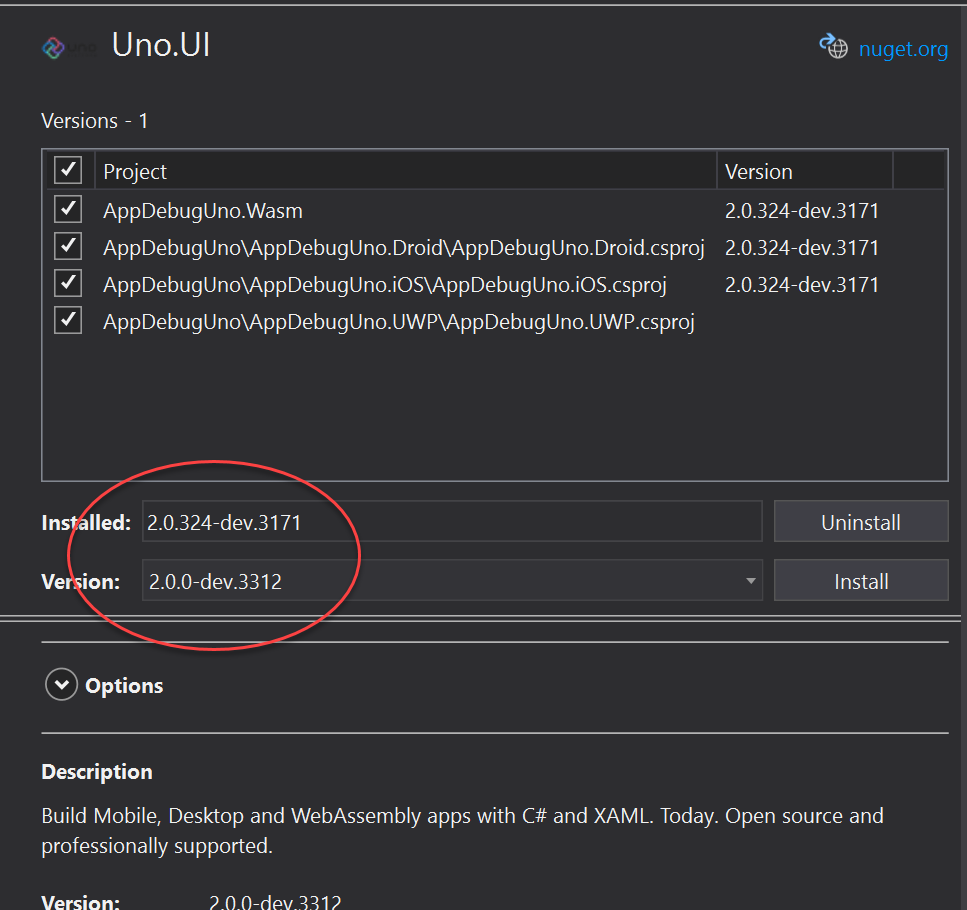
Unfortunately there is a versioning issue 😔(@benventive ) Moving forward we will disable the "patch" auto increment, but it was wrongly applied to this build.
The published version is 2.0.0.dev-3312 : https://www.nuget.org/packages/Uno.UI/2.0.0-dev.3312
Build Mobile, Desktop and WebAssembly apps with C# and XAML. Today. Open source and professionally supported.
dr1rrb
on 11 Oct 2019
Thank you for the clarification. How can I get the version with NuGet Manager?
Do you mean "downgrade" it to 2.0.0?
zipswich
on 11 Oct 2019
Yes. Even if the version number is lower, this version is actually newer/upper. We are fixing it https://github.com/unoplatform/uno/pull/1812#event-270585673, a new version with the right version will be available soon.
dr1rrb
on 11 Oct 2019
"Downgrading" works. 👏
zipswich
on 11 Oct 2019
I cannot believe this minor glitch killed me a few hours.
        <Border
            Grid.Row="1"
            BorderThickness="2"
            BorderBrush="Red"
            PointerReleased="border_PointerReleased"
            Background="Transparent"
            >
            <!--Background="Transparent" is needed for PointerReleased to work on Android -->
            <Image Source="Assets\StoreLogo.png"
            />
        </Border>
Background="Transparent" is needed for PointerReleased to work on Android.
I suspected it earlier, but somehow disputed it because it failed even with Background="Transparent" under some circumstances, so I started chasing the culprit in wrong directions.
The UWP head works fine without Background="Transparent" . The color does not have to be Transparent. It just needs to be something.
Should I open another issue? I do not know the scope affected by this (just Border with Image or more).
zipswich
on 11 Oct 2019
Usually you need to have a non null background to get a control "hitable" on UWP ... but I just tested it on UWP and indeed a Border can get a PointerPressed even if the background is null ... weird:
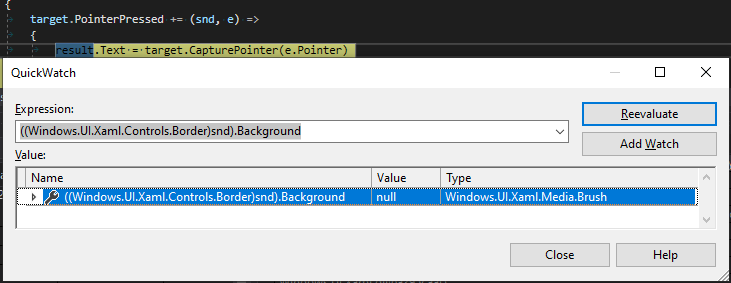
So yes please if you can open a new issue for that, we definitively have to look deeper to the UWP logic for the "hit testability" (I've not updated it too much in my pointers work, but it's something that needs a bit of love)
dr1rrb
on 11 Oct 2019
Hummm no ... actually my test was wrong : it's because I had a TextBlock in my Border and in fact I clicked on it, so here I only get the event which is bubbling from the TextBlock. But if I click in my Border but outside of the TextBlock I won't get the PointerPressed.
So the actual issue is that the Image should be "hit testable" but it's not on Android.
dr1rrb
on 11 Oct 2019
I am sorry but I should have stated the importance of Image. I also tested TexbBlock, it worked while Imaged did dot so I started to examine the image and I was using, and compare it to others. Anyway, there are many components involved, I spent a lot of time chasing wrong ones.
zipswich
on 11 Oct 2019
zipswich
on 11 Oct 2019
This is certainly not a show stopper. Adding background to Border is effortless as long as I keep this requirement in mind.
zipswich
on 11 Oct 2019
Related issues
 Ali-YousefiTelori
·
4Comments
Ali-YousefiTelori
·
4Comments
 MartinZikmund
·
4Comments
MartinZikmund
·
4Comments
 JanabiSoft
·
3Comments
JanabiSoft
·
3Comments
 SuperJMN
·
3Comments
SuperJMN
·
3Comments
 MelbourneDeveloper
·
3Comments
MelbourneDeveloper
·
3Comments