Summary
I've created a control that is similar to the PropertyGrid control by Xceed (https://github.com/xceedsoftware/wpftoolkit/wiki/PropertyGrid). The control itself uses Reflection internally, but the look&feel is pretty simple. However, the WebAssembly head doesn't render it properly.
UWP on the left <=> WebAssembly head on the side.
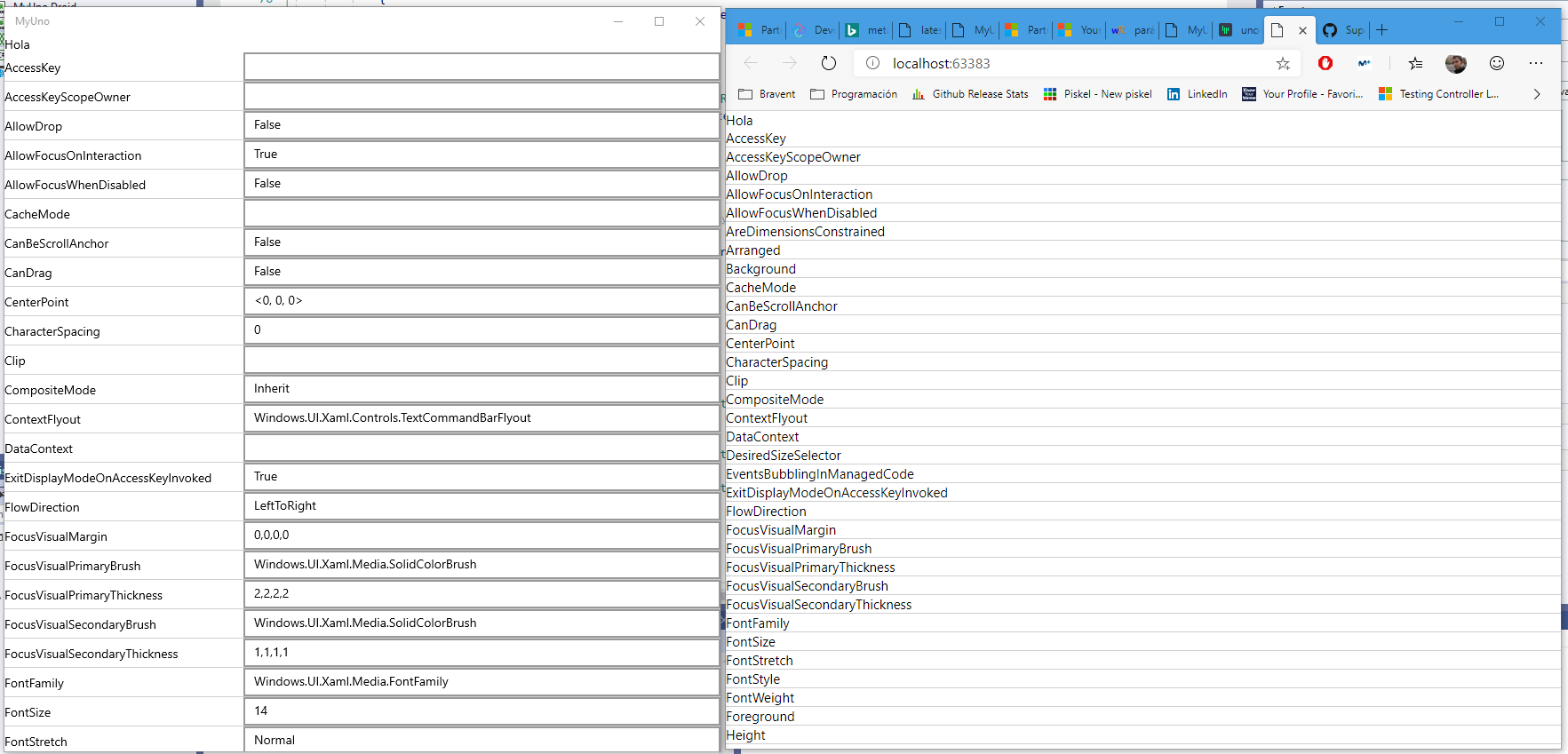
As you can see, the items aren't rendered as they should be. It seem that the are no controls inside the Grid at all.
Repro
The minimal reproduction project is located here: https://github.com/SuperJMN/SuppaDesigner.Uno.Reloaded
Can somebody, please, take a look?
Additional notes
The Android head looks broken, too. It shows a blank view in the emulator. Please, check.
Big thanks!
 SuperJMN
All 9 comments
@SuperJMN to troubleshoot, one good strategy is to determine what's being displayed. What's visible and what's not, what's present and what's not.
Since you're a browser, you can determine if the controls are present or not in the HTML DOM:
- If they are, maybe they're not visible for some reason, like incorrect measuring.
- If they're not, maybe it's a binding issue, or maybe it's a templating issue, like subclassing a control that does not have a default style (because of #119).
 jeromelaban
on 28 Sep 2019
jeromelaban
on 28 Sep 2019
@jeromelaban Thanks for the guidance! I've been researching a bit and the problem seems to lie down to this style:
    <Style TargetType="propertyEditor:PropertyItem">
        <Setter Property="Background" Value="White" />
        <Setter Property="Template">
            <Setter.Value>
                <ControlTemplate TargetType="propertyEditor:PropertyItem">
                    <Border
                        Margin="0,0,0,1"
                        Background="{TemplateBinding Background}"
                        BorderBrush="{TemplateBinding BorderBrush}"
                        BorderThickness="{TemplateBinding BorderThickness}">
                        <Grid DataContext="{Binding RelativeSource={RelativeSource TemplatedParent}}">
                            <Grid.ColumnDefinitions>
                                <ColumnDefinition Width="1*" />
                                <ColumnDefinition Width="2*" />
                            </Grid.ColumnDefinitions>
                            <TextBlock Text="{Binding PropName}" VerticalAlignment="Center" />
                            <ContentControl Background="Red" HorizontalContentAlignment="Stretch" VerticalAlignment="Stretch" Grid.Column="1"  />
                        </Grid>
                    </Border>
                </ControlTemplate>
            </Setter.Value>
        </Setter>
    </Style>
The problem isn't the style itself, that is applied correctly, but the line that uses the ContentControl
<ContentControl Background="Red" HorizontalContentAlignment="Stretch" VerticalAlignment="Stretch" Grid.Column="1" />
The ContentControl is not rendered at all. Is there a known problem with it?
SuperJMN
on 29 Sep 2019
I've found a workaround doing this:
  <Style TargetType="propertyEditor:PropertyItem">
        <Setter Property="Background" Value="White" />
        <Setter Property="Template">
            <Setter.Value>
                <ControlTemplate TargetType="propertyEditor:PropertyItem">
                    <Border
                        Margin="0,0,0,1"
                        Background="{TemplateBinding Background}"
                        BorderBrush="{TemplateBinding BorderBrush}"
                        BorderThickness="{TemplateBinding BorderThickness}">
                        <Grid DataContext="{Binding RelativeSource={RelativeSource TemplatedParent}}">
                            <Grid.ColumnDefinitions>
                                <ColumnDefinition Width="1*" />
                                <ColumnDefinition Width="2*" />
                            </Grid.ColumnDefinitions>
                            <TextBlock Text="{Binding PropName}" VerticalAlignment="Center" />
                            <ContentControl Style="{StaticResource ContentControlStyle}" HorizontalContentAlignment="Stretch" VerticalAlignment="Stretch" Grid.Column="1"  Content="{Binding Editor}" />
                        </Grid>
                    </Border>
                </ControlTemplate>
            </Setter.Value>
        </Setter>
    </Style>


    <Style TargetType="ContentControl" x:Key="ContentControlStyle">
        <Setter Property="Template">
            <Setter.Value>
                <ControlTemplate TargetType="ContentControl">
                    <ContentPresenter Content="{TemplateBinding Content}" Background="{TemplateBinding Background}" />
                </ControlTemplate>
            </Setter.Value>
        </Setter>
    </Style>
Anyways, the ContentControl Binding doesn't work:
Content="{Binding Editor}"
SuperJMN
on 29 Sep 2019
Good troubleshooting! Indeed, there's an issue with the ContentControl.Content behavior. We're working on it (#1405) but there are still some issues with the behavior (#857).
For now, you need to explicitly specify the Content template binding.
jeromelaban
on 30 Sep 2019
Thanks! So, how would be the XAML after the workaround? I don't know what you mean by "explicitly specifying the content template binding".
SuperJMN
on 30 Sep 2019
You found the proper modification:
    <Style TargetType="propertyEditor:PropertyItem">
        <Setter Property="Background" Value="White" />
        <Setter Property="Template">
            <Setter.Value>
                <ControlTemplate TargetType="propertyEditor:PropertyItem">
                    <Border
                        Margin="0,0,0,1"
                        Background="{TemplateBinding Background}"
                        BorderBrush="{TemplateBinding BorderBrush}"
                        BorderThickness="{TemplateBinding BorderThickness}">
                        <Grid DataContext="{Binding RelativeSource={RelativeSource TemplatedParent}}">
                            <Grid.ColumnDefinitions>
                                <ColumnDefinition Width="1*" />
                                <ColumnDefinition Width="2*" />
                            </Grid.ColumnDefinitions>
                            <TextBlock Text="{Binding PropName}" VerticalAlignment="Center" />
                            <ContentControl Background="Red" xamarin:Content="{TemplateBinding Content}" HorizontalContentAlignment="Stretch" VerticalAlignment="Stretch" Grid.Column="1"  />
                        </Grid>
                    </Border>
                </ControlTemplate>
            </Setter.Value>
        </Setter>
    </Style>
The xamarin: namespace is required if you share this XAML with windows (the behavior is incorrect on windows).
jeromelaban
on 30 Sep 2019
Nice! Thank you! but how's the xamarin namespace prefix declared?
SuperJMN
on 30 Sep 2019
@SuperJMN https://github.com/unoplatform/workshops/tree/master/uno-bootcamp/modules/04-Create-rich-responsive-UIs#-xaml-with-uno or specifically https://platform.uno/docs/articles/platform-specific-xaml.html
GitHub
workshops, study guides and learning materials for the Uno Platform - unoplatform/workshops

 ghuntley
on 9 Oct 2019
ghuntley
on 9 Oct 2019
Should be fixed by this PR
 francoistanguay
on 29 Aug 2020
francoistanguay
on 29 Aug 2020
Related issues
 chrisevans9629
·
4Comments
chrisevans9629
·
4Comments
 MartinZikmund
·
3Comments
MartinZikmund
·
3Comments
 TonyHenrique
·
3Comments
MartinZikmund
·
4Comments
jeromelaban
·
3Comments
TonyHenrique
·
3Comments
MartinZikmund
·
4Comments
jeromelaban
·
3Comments