Universalmediaserver: Unable to start 7.0.1 with Java 10.0.1 on macOS High Sierra 10.13.4
Installed Java using: brew cask install java
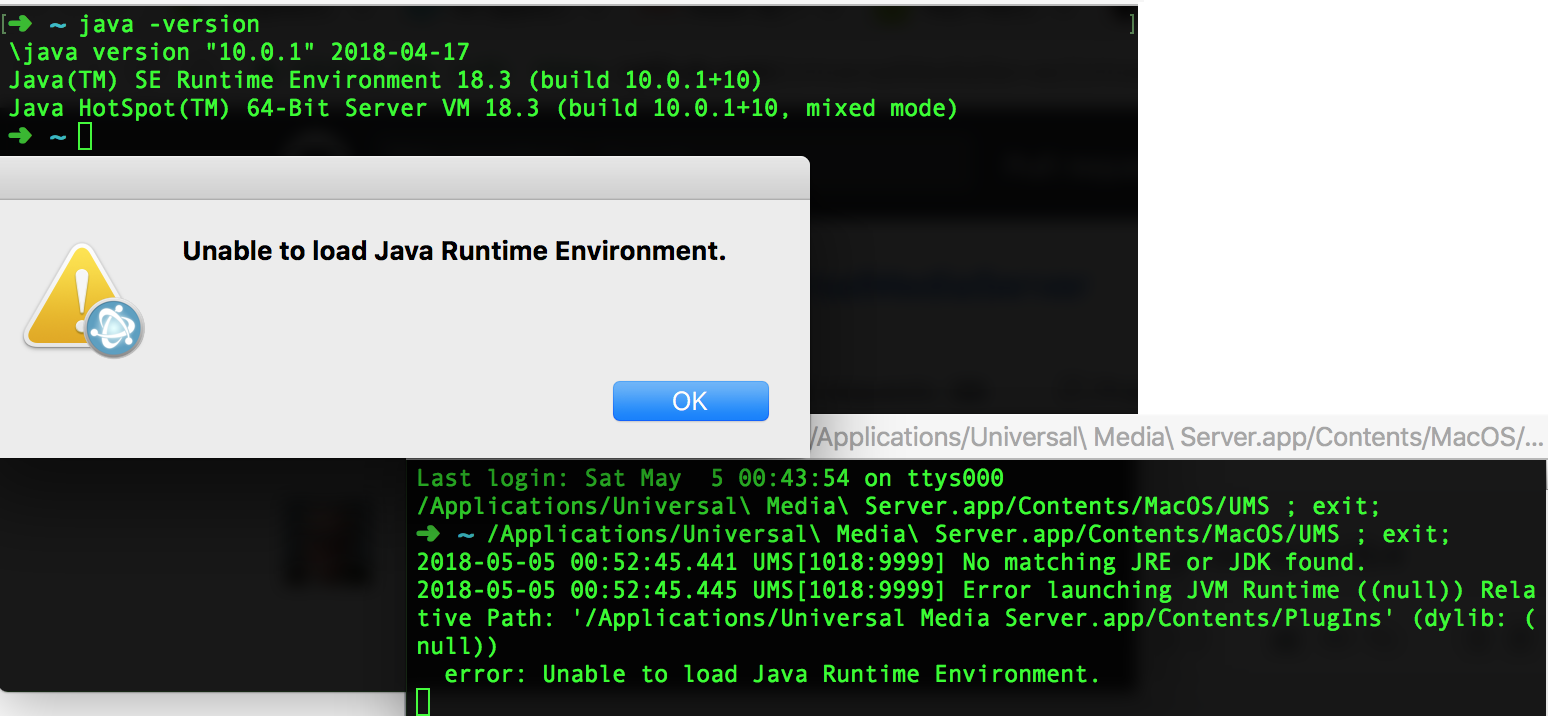
java -version returns
java version "10.0.1" 2018-04-17
Java(TM) SE Runtime Environment 18.3 (build 10.0.1+10)
Java HotSpot(TM) 64-Bit Server VM 18.3 (build 10.0.1+10, mixed mode)
When trying to run Universal Media Server 7.0.1 a dialog is displayed: "Unable to load Java Runtime Environment".
When trying to execute the script: Universal Media Server.app\Contents\MacOS\UMS the following error is displayed:
2018-05-05 00:52:45.441 UMS[1018:9999] No matching JRE or JDK found.
2018-05-05 00:52:45.445 UMS[1018:9999] Error launching JVM Runtime ((null)) Relative Path: '/Applications/Universal Media Server.app/Contents/PlugIns' (dylib: (null))
  error: Unable to load Java Runtime Environment.
Is this version of the JRE not detected / supported?
When running directly, a class not found exception is displayed:
java -jar /Applications/Universal\ Media\ Server.app/Contents/Java/ums-7.0.1-jar-with-dependencies.jar
Exception in thread "main" java.lang.NoClassDefFoundError: com/sun/java/swing/plaf/windows/WindowsLookAndFeel
    at java.base/java.lang.ClassLoader.defineClass1(Native Method)
    at java.base/java.lang.ClassLoader.defineClass(ClassLoader.java:1009)
    at java.base/java.security.SecureClassLoader.defineClass(SecureClassLoader.java:174)
    at java.base/jdk.internal.loader.BuiltinClassLoader.defineClass(BuiltinClassLoader.java:801)
    at java.base/jdk.internal.loader.BuiltinClassLoader.findClassOnClassPathOrNull(BuiltinClassLoader.java:699)
    at java.base/jdk.internal.loader.BuiltinClassLoader.loadClassOrNull(BuiltinClassLoader.java:622)
    at java.base/jdk.internal.loader.BuiltinClassLoader.loadClass(BuiltinClassLoader.java:580)
    at java.base/jdk.internal.loader.ClassLoaders$AppClassLoader.loadClass(ClassLoaders.java:190)
    at java.base/java.lang.ClassLoader.loadClass(ClassLoader.java:499)
    at net.pms.PMS.main(PMS.java:1145)
Caused by: java.lang.ClassNotFoundException: com.sun.java.swing.plaf.windows.WindowsLookAndFeel
    at java.base/jdk.internal.loader.BuiltinClassLoader.loadClass(BuiltinClassLoader.java:582)
    at java.base/jdk.internal.loader.ClassLoaders$AppClassLoader.loadClass(ClassLoaders.java:190)
    at java.base/java.lang.ClassLoader.loadClass(ClassLoader.java:499)
    ... 10 more
Found this, might be useful:
https://github.com/jidesoft/jide-oss/commit/bce89cec677169503b820cb67ca5709f7c72e6ec
 holtkamp
All 14 comments
The link seems like it could be useful, but I'm afraid there are more issues running UMS under Java 9 or 10. Oracle has severely broken Java since Java 9, so until all everything is sorted out Java 8 is the way to go.
 Nadahar
on 5 May 2018
Nadahar
on 5 May 2018
Ok, thanks for the swift response. Maybe an idea to include such a requirement in README.md ? Or did I miss it... 🤓
holtkamp
on 5 May 2018
@holtkamp No, Java 10 was just released and Java 9 has been a headache for 6 months. I don't think anyony planned for it to stay this way, so documenting it probably has't been on anyone's mind.
Nadahar
on 5 May 2018
Thanks for the link to that code fix, I've started to implement it at https://github.com/UniversalMediaServer/UniversalMediaServer/pull/1497/
Maybe we can also combine this with removing our dependence on JGoodies, then we will be even more compatible on other operating systems and Java versions.
 SubJunk
on 5 May 2018
SubJunk
on 5 May 2018
@SubJunk The whole GUI is built on JGoodies, so that's no small task. AFAIK not all JGoodies dependencies are a problem though, only JGoodies looks (net.java.dev.jgoodies:looks). Replacing that might be more doable.
I don't remember which right now, but I think we have more Java 9/10 incompatible dependencies though. When compiling with Java 9/10 there should be warnings for all incompatible classes.
Nadahar
on 5 May 2018
Nice to see the pro-active attitude in this project! Thanks, I got little Java experience, but will monitor this project and try to contribute in case possible!
holtkamp
on 5 May 2018
I just wanted to record this here even though I know we are talking about a macOS specific problem: I just tested UMS master branch on Windows with JRE 10.0.1 and it works fine. I will test the fixed branch on macOS to confirm it works
SubJunk
on 6 May 2018
@SubJunk I'm confused about what is Oracle's real policy here. They have decided that some things that have been allowed to do in Java earlier should be forbidden from now on. Some things have alternative replacements that only work in Java 9 and later, which means there must exist two sets of code, other things have no replacement.
Since this has caused so much software to stop working, they have been releasing JRE's that allow these now "forbidden" things. That's not the case for all versions though (some OpenJDK versions does NOT allow it), and they maintain that this is just temporary and can change at any time.
Since we have no control over which JRE versions allow these now illegal things, we can't rely on that as a "solution". Merely testing UMS with one of these thus isn't worth much. You have to use Java 9/10 to compile and then solve the warnings to make sure it will run also for the versions that blocks these "illegal" things.
Nadahar
on 6 May 2018
Yeah it is a frustrating situation
SubJunk
on 7 May 2018
I still can't get Java 9+ on macOS (or Windows) if I go through their official website so it doesn't seem like they are pushing it. It still just offers Java 8, and they are still releasing updates for it too, so I suggest just using the version that Oracle offers to download rather than via a package manager like brew
SubJunk
on 29 Jun 2018
Java 9 & 10 has caused so much havoc that I think Oracle has reversed the "default" to Java 8. That doesn't mean Java 10 isn't available: http://www.oracle.com/technetwork/java/javase/downloads/jre10-downloads-4417026.html.
Since Java 9 is already EOL, they have removed the download and you need to log in to download it: http://www.oracle.com/technetwork/java/javase/downloads/java-archive-javase9-3934878.html
You can also use OpenJDK : 10 http://jdk.java.net/10/
..or OpenJDK 9: http://jdk.java.net/archive/
As I guess you have already noticed, Java 11 won't be available from Oracle for free. All this bullshit with Java 9 and 10 (which are primary versions that remove stuff that will no longer be free) is just a preparation for making Java payware. As such, I'm perfectly happy with just ignoring Java 9 and 10 until a new version that is actually useful is available. I don't know if OpenJDK 11 will be it, but one can always hope.
Nadahar
on 29 Jun 2018
This probably makes https://github.com/UniversalMediaServer/UniversalMediaServer/issues/1460 quite a high priority
SubJunk
on 30 Jun 2018
@SubJunk In the future yes, but for now I think we just got some extra time since Oracle has stopped automatically upgrading to newer versions than Java 8.
Nadahar
on 30 Jun 2018
This was fixed in https://github.com/UniversalMediaServer/UniversalMediaServer/pull/1497
SubJunk
on 11 Nov 2018
Related issues
 yohonet
·
4Comments
yohonet
·
4Comments
 SsJVasto
·
4Comments
SubJunk
·
3Comments
SubJunk
·
5Comments
SubJunk
·
9Comments
SsJVasto
·
4Comments
SubJunk
·
3Comments
SubJunk
·
5Comments
SubJunk
·
9Comments
Most helpful comment
Nice to see the pro-active attitude in this project! Thanks, I got little Java experience, but will monitor this project and try to contribute in case possible!