Universal: styles.css not included inline in server render
I'm submitting a ...
- [ ] bug report <!-- Please search GitHub for a similar issue or PR before submitting -->
- [ x] feature request
- [ ] Support request => Please do not submit support request here, instead see https://github.com/angular/universal/blob/master/CONTRIBUTING.md#question
What modules are related to this Issue?
- [ ] aspnetcore-engine
- [ ] common
- [ x] express-engine
- [ ] hapi-engine
- [ ] module-map-ngfactory-loader
Current behavior?
The CSS declared in styles.css is included in the client bundle, but it is not inlined into the server bundle the way component styles are.
Expected behavior?
Any CSS in the styles.css should be (optionally?) inlined in the server rendered html and transitioned out when the client loads, the way other component CSS does.
Minimal reproduction with instructions
- Clone this repo
- Add any CSS to styles.css that should apply anywhere. Eg. body { color: pink; }
- Open any server rendered route and view the html that is generated
- Note that the CSS rule you added does not appear inlined in the HTML, it only appears once the client bundle is loaded.
Environment:
@nguniversal versions
- aspnetcore-engine:
- common:
- express-engine:
- hapi-engine:
- module-map-ngfactory-loader:
<!--
Output from: `ng --version`.
If nothing, output from: `node --version` and `npm --version`.
  Windows (7/8/10). Linux (incl. distribution). macOS (El Capitan? Sierra?)
-->
Other information (optional)
My application has a lot of base styles defined in styles.css and it looks really bad before the transition to the client application when these styles are not available in the server view.
 arutnik
All 29 comments
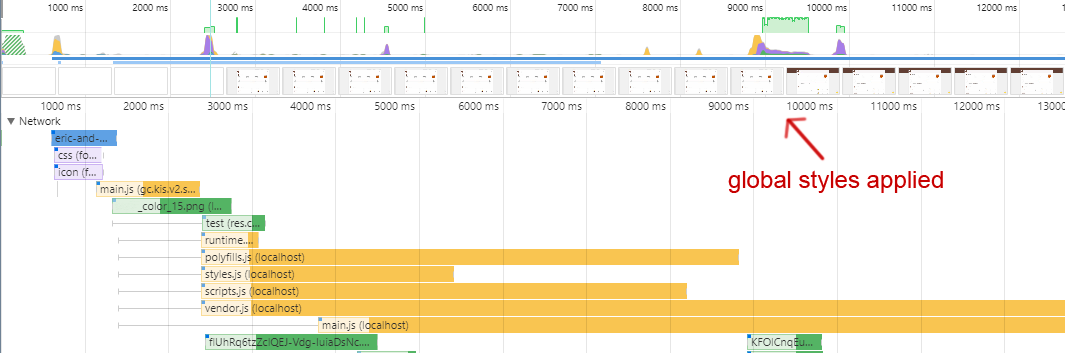
The same issue. My global style.scss and Material theme.scss included in the angular.json in build.styles section. And this styles are not applied while polyfills.js is loading
 twoheaded
on 13 Jun 2018
twoheaded
on 13 Jun 2018
Hey,
i had the same problem. Im actually using the following workaround to include the "main" styles. Its not a perfect solution but until there is a fix / extension in angular cli it does the job.
1) i created a new component which i added to the server.module
@Component({
  selector: 'app-ssr',
  template: '',
  //we need to use an extra scss where the style.scss is imported, otherwise there is a webpack(replace) webpack error
  styleUrls: ['app.server.component.scss'], //this scss only imports the "main" style.scss
  encapsulation: ViewEncapsulation.None
})
export class AppServerComponent {}
The ServerModule, (im bootstrap.. this component in the server module (only in the server module, dont use this new component in the client module, bec. the styles will be included in the generated file which would increase the bundle size. But for the server bundle its ok bec its never transfered to the client)
@NgModule({
  imports: [
    ... <your imports>...
  ],
  declarations: [
    AppServerComponent
  ],
  bootstrap: [AppComponent, AppServerComponent],
})
export class AppServerModule {}
add the component 'tag' (app-ssr) into the index.html -> so it can be bootstrapped
The only downside of this approach is you always have the
In my case im fine with this tag for the workaround.
Hope it helped someone else.
But im looking forward for a real / supported solution, to remove this workaround. So let me know if someone found a better solution.
 Priemar
on 15 Jul 2018
Priemar
on 15 Jul 2018
@Priemar is it right workaround ?
 Gorniv
on 21 Sep 2018
Gorniv
on 21 Sep 2018
@Gorniv yes it is, I'm currently using this without major issues
 marcinkunert
on 21 Sep 2018
marcinkunert
on 21 Sep 2018
@Gorniv yes it is, i'm also using my workaround in different applications without any issues, maybe there is already a fix/other solution available ?!?!
I didn't do any research since i posted the workaround.
Priemar
on 21 Sep 2018
I use InlineStyleComponent at app.browser.module.ts and app.server.module.ts because it is work better.
If I only remove CSS from angular.json(browser+server) and use the only app.server.module I have a good view from the server and when angular loaded CSS not working.
this solution load style.css adn ignore inline style from server.
Gorniv
on 26 Sep 2018
I ran into the same issue but found a different workaround.
Forcing Angular to extract the global styles into their own files and loading them using <link rel="stylesheet"> correctly loads them in both cases, with and without SSR.
Set extractCss to true in build/options in angular.json.
Is there any documentation for extractCss?
 fluidsonic
on 13 Oct 2018
fluidsonic
on 13 Oct 2018
@fluidsonic Exactly how to you "Force Angular to extract the global styles into their own files"?
 peturh
on 10 Jan 2019
peturh
on 10 Jan 2019
@peturh nothing more than setting extractCss to true. Doesn't that work for you?
fluidsonic
on 10 Jan 2019
A better approach, solving that you have to have an all-time call to the app-ssr component. One downside is still in: The app-ssr component still get's bundled. But anyhow, it's not called at anytime in browser:
Create two classes BrowserAppComponent and ServerAppComponent, both deriving from AppComponent. Copy the Component annotation from AppComponent and paste it as the Component annotation for BrowserAppComponent AND ServerComponent.
import { ViewEncapsulation, Component } from '@angular/core';
import { AppComponent } from './app.component';

@Component({
  selector: 'app-root',
  templateUrl: './app.component.html',
  styleUrls: ['./app.component.scss'],
  encapsulation: ViewEncapsulation.None
})
export class BrowserAppComponent extends AppComponent { // Derive from AppComponent
}
import { ViewEncapsulation, Component } from '@angular/core';
import { AppComponent } from './app.component';

@Component({
  selector: 'app-root',
  templateUrl: './app.component.html',
  styleUrls: ['./app.component.scss'],
  encapsulation: ViewEncapsulation.None
})
export class ServerAppComponent extends AppComponent { // Derive from AppComponent
}
Remove the Component annotation from AppComponent Mark it as abstract for architectural reason.
export abstract class AppComponent {
  // .... APP LOGIC HERE ...
}
Now, last but not least, add server-app.component.scss to the styleUrls array of ServerAppComponent, like @Priemar did.
import { ViewEncapsulation, Component } from '@angular/core';
import { AppComponent } from './app.component';

@Component({
  selector: 'app-root',
  templateUrl: './app.component.html',
  styleUrls: ['./app.component.scss', './server-app.component.scss'],
  encapsulation: ViewEncapsulation.None
})
export class ServerAppComponent extends AppComponent { // Derive from AppComponent
}
And define the SCSS:
@import "../../../styles.scss";
Cheers 🍻 Hint: For sure, the app module needs to export components and directives originally used in AppComponent's template.
Hey,
i had the same problem. Im actually using the following workaround to include the "main" styles. Its not a perfect solution but until there is a fix / extension in angular cli it does the job.
- i created a new component which i added to the server.module
@Component({ selector: 'app-ssr', template: '', //we need to use an extra scss where the style.scss is imported, otherwise there is a webpack(replace) webpack error styleUrls: ['app.server.component.scss'], //this scss only imports the "main" style.scss encapsulation: ViewEncapsulation.None }) export class AppServerComponent {}The ServerModule, (im bootstrap.. this component in the server module (only in the server module, dont use this new component in the client module, bec. the styles will be included in the generated file which would increase the bundle size. But for the server bundle its ok bec its never transfered to the client)
@NgModule({ imports: [ ... <your imports>... ], declarations: [ AppServerComponent ], bootstrap: [AppComponent, AppServerComponent], }) export class AppServerModule {}add the component 'tag' (app-ssr) into the index.html -> so it can be bootstrapped
The only downside of this approach is you always have the item in your html. no matter if its SSR or not. In my case this tag doesnt matter, and you can remove it when app component is loaded and not SSR.
In my case im fine with this tag for the workaround.
Hope it helped someone else.
But im looking forward for a real / supported solution, to remove this workaround. So let me know if someone found a better solution.
 Hobart2967
on 29 May 2019
Hobart2967
on 29 May 2019
I don't understand the original report that syles.css is loaded only when the client bundle loads. In production builds styles.css should just be present as a link tag in index.html?
This should block any rendering before the server rendered HTML is displayed? Only in development build the CSS is loaded as part of the dev build by webpack so that it can be refreshed when the CSS changes.
 vikerman
on 30 Jul 2019
vikerman
on 30 Jul 2019
Seems that external stylesheets don't block rendering in Firefox. There's definitely a FOUC in this browser when extractCss is true. Found an open issue about it (I think): https://bugzilla.mozilla.org/show_bug.cgi?id=1459305. In SSR, Angular outputs script tags at the end of the body without async, which is one of the cases mentioned in the issue.
 axelboc
on 30 Jul 2019
axelboc
on 30 Jul 2019
CSS should be render blocking -
https://developer.mozilla.org/en-US/docs/Learn/Performance/CSS_performance
The other point is whether one wants to inline the CSS for better performance. But I'm still trying to understand the original problem where CSS is downloaded as part of client bundle and causing FOUC.
vikerman
on 30 Jul 2019
@vikerman
We have the exact same problem as the 'original problem'.
The problem is that the styles are not 'loaded' by the SSR application
In our case:
            "styles": [
              "node_modules/typeface-montserrat/index.css",
              "node_modules/typeface-open-sans/index.css",
              "node_modules/typeface-roboto-mono/index.css",
              "node_modules/ngx-toastr/toastr.css",
              "shared/styles.scss",
              "projects/public/src/styles.scss"
            ],
And in FF this sometimes results in a flash.
I never noticed this (I don't really use FF) and I always thought this was a limitation by Angular Universal. But when digging deeper I found out that it's indeed the global styles that aren't loaded.
I can share our production url:
https://www.intigriti.com/companies´
where you clearly see this when checking the raw html returned by SSR.
(Lot of Times New Roman, non styles navbar, ... -> All defined in our global styles)
Is there a recommend workaround?
EDIT: The workaround above works ;)
A played a bit around and now have a balanced 'index.html' (not all styling but most of it that's important on that page)
Sincerely, Brecht
And thanks in advance!
 ErazerBrecht
on 20 Nov 2019
ErazerBrecht
on 20 Nov 2019
Hi guys, is there any update on this?
 BruneXX
on 6 Mar 2020
BruneXX
on 6 Mar 2020
@BruneXX, is your global css extracted into a css file? Otherwise css will not be render blocking which will cause flickering.
 alan-agius4
on 6 Mar 2020
alan-agius4
on 6 Mar 2020
I've disabled extractCss and the render blocker warning disapear, but I'm not totally convinced about that, I think should be extracted, isn't?
BruneXX
on 6 Mar 2020
@BruneXX, when not extracting css, it’s most likely that you will have flickering.
For production, css should indeed be extracted.
alan-agius4
on 6 Mar 2020
mmmm I understand but how to fix the render blocker isse reported by google lighthouse? that's affecting the performance (according to google)
BruneXX
on 6 Mar 2020
If I activate the extractCss I've a newly big problem with performance delaying the page load.
BruneXX
on 6 Mar 2020
If I activate the extractCss I've a newly big problem with performance delaying the page load.
That means you have a lot of global css, you’d probably need to cut that down. Out of curiosity what’s the size of your global css minified?
alan-agius4
on 6 Mar 2020
Yes probably unused css, but what if there's needed css and the generated file is large? what's the workaround for that if there's no way to cut that down?
BruneXX
on 6 Mar 2020
@alan-agius4 Size is 372k any suggestion for this?
BruneXX
on 9 Mar 2020
Someone above suggested to use extractCss: true and then use link rel="stylesheet" (I think will be better to use rel=preload) to load the CSS. How that can be done if the css file is generated dinamically?
The only thing we got after the build is a style.{hash}.css
BruneXX
on 9 Mar 2020
@alan-agius4 even at 1KB lighthouse still complains about global styles being extracted.
https://developers.google.com/speed/pagespeed/insights/?url=https%3A%2F%2Fhostwriter.app
 that70schris
on 14 Mar 2020
that70schris
on 14 Mar 2020
To answer my own inquiry, to change the link “rel” we need to créate a post build script, also regarding the comment of @that70schris I think its complaing regarding expirarion time and not for the size, can you confirm?
BruneXX
on 15 Mar 2020
@Gorniv
I use
InlineStyleComponentatapp.browser.module.tsandapp.server.module.tsbecause it is work better.
If I only remove CSS from angular.json(browser+server) and use the onlyapp.server.moduleI have a good view from the server and when angular loaded CSS not working.
this solution load style.css adn ignore inline style from server.
@Gorniv It not working.Here i used this case in angular 7.
 Bizotics-Dev
on 1 Jul 2020
Bizotics-Dev
on 1 Jul 2020
@CaerusKaru any update
 akshata456
on 3 Jul 2020
akshata456
on 3 Jul 2020
I had the same issue with server side rendering not including the global base styles, but that came from the fact that I used a custom document, .e.g.:
 await renderModule(AppServerModule, {
    url: req.url, document: '<app-root></app-root>', extraProviders: []
});
this does obviously not include the <style> tags for the global styles. So the "fix" is to actually use the built index.html in your dist folder, which contains the correct style tag.
import {AppServerModule, renderModule} from "../../../dist/server/main";

await renderModule(AppServerModule, {
    url: req.url, document: readFileSync(__dirname + '/../../../dist/browser/index.html').toString(),
    extraProviders: []
});
If you use @ nguniversal/express-engine this should be loading the correct index by using res.render('../dist/index', ... already.
This is using Angular 11 with enabled (default) extractCss.
 marcj
on 30 Nov 2020
marcj
on 30 Nov 2020
Related issues
 flexchintoo
·
5Comments
flexchintoo
·
5Comments
 benrondeau
·
5Comments
benrondeau
·
5Comments
 atlmtw
·
4Comments
atlmtw
·
4Comments
 jeffwhelpley
·
4Comments
jeffwhelpley
·
6Comments
jeffwhelpley
·
4Comments
jeffwhelpley
·
6Comments
Most helpful comment
I ran into the same issue but found a different workaround.
Forcing Angular to extract the global styles into their own files and loading them using
<link rel="stylesheet">correctly loads them in both cases, with and without SSR.Set
extractCsstotrueinbuild/optionsinangular.json.Is there any documentation for
extractCss?