Unigram: [feature request] Move "call settings" to other settings menu.
Sorry, but I never found where it is
 m-alice
All 6 comments
Any suggestions about the place? I think other settings is fine, also it's the same settings you can manage with the wheel icon during calls
 MarcAnt01
on 2 Oct 2020
MarcAnt01
on 2 Oct 2020
Something like:
≡
⚙ Settings
✆ Call & Device Settings
...or just in Advanced.
m-alice
on 2 Oct 2020
They are in Advanced right now, and you can also reach them during calls pressing on ⚙
 FrayxRulez
on 6 Oct 2020
FrayxRulez
on 6 Oct 2020
❤1
🎉1
👍1
Very-very thx!
m-alice
on 8 Oct 2020
The item disappeared again, but since it just duplicated w10 "App volume and device preferences" — I don't think I will miss it very much.
m-alice
on 3 Feb 2021
All settings are now available in call.
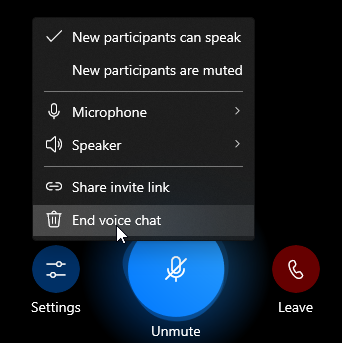
Also webcam can be changed during video call.
Sadly, this prevents pre-call setting all up.
 makisukurisu
on 3 Feb 2021
makisukurisu
on 3 Feb 2021
Was this page helpful?
0 / 5 - 0 ratings
Related issues
 Daksh777
·
6Comments
Daksh777
·
6Comments
 MarcelBrusius
·
5Comments
MarcelBrusius
·
5Comments
 metya
·
6Comments
metya
·
6Comments
 JaggerJo
·
3Comments
JaggerJo
·
3Comments
 smfilipe
·
6Comments
smfilipe
·
6Comments
Most helpful comment
They are in Advanced right now, and you can also reach them during calls pressing on ⚙