Unigram ignores system spell check options
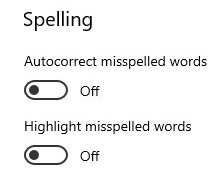
I have "Autocorrect misspelled words" and "Highlight misspelled words" disabled in the Windows settings... and Unigram seems to completely ignore them.
It still corrects some words and highlights everything (I chat in Spanish and English).
I'm using Unigram 3.11.2588
 Wanny
Wanny
All 11 comments
You must close and reopen any UWP app to apply system spell check settings
 FrayxRulez
on 29 Oct 2019
FrayxRulez
on 29 Oct 2019
I've done it lots of times and the problem persists.
I changed those settings MONTHS ago and Unigram recognized the change back then.
But now after updating the app, it just ignores them.
Wanny
on 30 Oct 2019
I'm not able to reproduce the issue to be honest, might something on your side, or might be related to the recent update to Microsoft.UI.Xaml 2.2...
FrayxRulez
on 30 Oct 2019
Most possibly. I'm using Windows 10 1903 (build 18362.418)
EDIT: none of the changes make any reference to the Spell Check system ( github.com/Microsoft/microsoft-ui-xaml/releases )
Wanny
on 1 Nov 2019
Because there's no API to control the Spell Check system, but they might have broken something in the text boxes style.
Still I'm not able to reproduce the issue (I keep spell checking turned off)
FrayxRulez
on 12 Nov 2019
Hi,
I've been having this issue as well. I think I must have been using Unigram for 4-5 months already, so it's been there for quite a while.
Could I provide any info to help you reproduce the issue?
 unpollito
on 7 Jan 2020
unpollito
on 7 Jan 2020
I just replied to another ticket that this should be handled by default by Windows: https://docs.microsoft.com/en-us/windows/uwp/design/controls-and-patterns/text-controls#guidelines-for-spell-checking
I'm not even sure there's a way to override this behavior and I'm pretty sure there's no way to check if the spell checker is disabled.
FrayxRulez
on 25 Feb 2020
With this combo Unigram starts to auto-correct words
 MarcAnt01
on 30 Apr 2020
MarcAnt01
on 30 Apr 2020
Misspelled words highlighting appears both if it the setting is on and off
MarcAnt01
on 30 Apr 2020
I will implement an option in the app to actually disable spell check.
FrayxRulez
on 30 Apr 2020
🕺
FrayxRulez
on 17 May 2020
Related issues
 ipuneetsingh
·
3Comments
ipuneetsingh
·
3Comments
 Vas0sky
·
4Comments
MarcAnt01
·
5Comments
Vas0sky
·
4Comments
MarcAnt01
·
5Comments
 Marocco2
·
4Comments
MarcAnt01
·
4Comments
Marocco2
·
4Comments
MarcAnt01
·
4Comments
Most helpful comment
I will implement an option in the app to actually disable spell check.