Unigram: Tray icon does not appear in tray
Tray icon doesn't appear in tray, even though the corresponding setting is "on".
Steps to reproduce:
- Launch Unigram
- Login if not logged in
- Go to Settings > Advanced and turn on "Show tray icon"
- Check the windows tray
Expected behavior:
Unigram icon is in the tray
Actual behavior:
Unigram icon is NOT in the tray
This was introduced by 3.11.2563, still reproducible in 3.11.2579
Windows 1903 Build 18362
 electronic-dk
All 30 comments
Can confirm
 alex-fgsfds
on 13 Oct 2019
alex-fgsfds
on 13 Oct 2019
👋 will restore the tray icon asap!
 FrayxRulez
on 16 Oct 2019
FrayxRulez
on 16 Oct 2019
Microsoft broken their tooling and it isn’t possible anymore to have the tray icon it seems (to have the tray icon I was using a separate win32 app bundled and hidden within Unigram setup).
I’m lazy to open a ticket on their side to ask for a fix to be honest.
FrayxRulez
on 30 Oct 2019
@FrayxRulez thanks for the update. Is it broken in a particular version of the SDK (read Windows version) or is it some say .NET thing which can be fixed without having to wait for a new Windows version?
electronic-dk
on 30 Oct 2019
It's actually broken starting from VS 16.3
FrayxRulez
on 30 Oct 2019
The official Windows store Telegram app does have a tray icon, so I am using that since then. Too bad, it doesn't support multiple accounts, so my secondary Telegram account is now in Unigram and I use my main one with the tray icon in the official.
 szedjani
on 30 Oct 2019
szedjani
on 30 Oct 2019
You should provide this feedback to Microsoft and not to me, I can do really little to solve the issue.
FrayxRulez
on 30 Oct 2019
@szedjani the official Telegram app is a win32 app unlike Unigram which is a UWP app. AFAIK UWP apps don't have an API for tray, so usually they use "hacks" such as a companion win32 app which doesn't do much except maintains a tray icon which has been apparently broken "from VS 16.3".
electronic-dk
on 30 Oct 2019
I am very unfamiliar with Windows app development (I am a data scientist / enterprise software developer). I installed the official app from Windows Store, I didn't download it from the website. Is it still the same win32 software?
szedjani
on 30 Oct 2019
@szedjani yeah, if you're talking about this app: https://www.microsoft.com/en-us/p/telegram-desktop/9nztwsqntd0s?activetab=pivot:overviewtab then it's the same app that can be downloaded from the telegram website, just packaged for distribution through the windows store.
It's pretty ok, I personally have two issues with it:
- Terrible custom window header which doesn't respect high DPI scaling and looks out of place
- Worse notifications support (no in-line reply for example)
That's what comes to my mind right away (I haven't used the official app in a while)
And I just think that Unigram is more visually pleasing than the official app, but that's subjective.
electronic-dk
on 30 Oct 2019
Microsoft broken their tooling and it isn’t possible anymore to have the tray icon it seems (to have the tray icon I was using a separate win32 app bundled and hidden within Unigram setup).
Can't you share that win32 app separately? We could run that manually (or automatically at startup) instead of having it bundled with the Windows store app?
 rfgamaral
on 31 Oct 2019
rfgamaral
on 31 Oct 2019
Anyway, I'm using this AutoHotKey script as a workaround for now:
#NoEnv
#Persistent
#SingleInstance force

global AHK_NOTIFYICON = 0x404
global WM_LBUTTONDBLCLK = 0x203

SendMode Input

OnMessage(AHK_NOTIFYICON, "NotifyIconHandler")

Menu, Tray, NoStandard
Menu, Tray, Icon, %A_ScriptDir%\Default.ico
Menu, Tray, Tip, Unigram

Menu, Tray, Add, Unigram, UnigramHandler
Menu, Tray, Default, Unigram

Menu, Tray, Add

Menu, Tray, Add, Exit, ExitHandler

Return

NotifyIconHandler(wParam, lParam) {
    if (lParam = WM_LBUTTONDBLCLK) {
        Gosub, UnigramHandler
        Return
    }
}

UnigramHandler:
    Run shell:AppsFolder\38833FF26BA1D.UnigramPreview_g9c9v27vpyspw!App
Return

ExitHandler:
    ExitApp
Return
You can download the icon from the this repository here.
rfgamaral
on 31 Oct 2019
Reported the issue in feedback hub: https://aka.ms/AA6wooo
 soumyamahunt
on 27 Dec 2019
soumyamahunt
on 27 Dec 2019
I think that opening a ticket to Visual Studio team would be more effective :/
FrayxRulez
on 27 Dec 2019
@FrayxRulez appreciate your work on the app and a quick response to this issue back in October. Could you, please, explain briefly what Microsoft broke that the previous workaround with a win32 companion app isn't working anymore? Is it something in the Windows SDK?
electronic-dk
on 27 Dec 2019
@FrayxRulez is the tray icon related to the delivery of notifications? Because I have sporadic notification issues (sometimes it comes, sometimes I have to open the app for all notifications to come)
 sprite-1
on 20 Jan 2020
sprite-1
on 20 Jan 2020
Yes, it would allow in-app notifications when the window is closed
 MarcAnt01
on 20 Jan 2020
MarcAnt01
on 20 Jan 2020
I thought the whole point of UWP apps is that it doesn't need to rely on an omnipresent tray icon already because it's tied to Windows' backend with receiving push notifs
sprite-1
on 20 Jan 2020
I thought the whole point of UWP apps is that it doesn't need to rely on an omnipresent tray icon already because it's tied to Windows' backend with receiving push notifs
I don't know if it's Microsoft's or Telegram's fault, but I don't enjoy the experience with push notifications.
MarcAnt01
on 20 Jan 2020
I don't know if it's Microsoft's or Telegram's fault, but I don't enjoy the experience with push notifications.
I think I just fixed it actually. On the _Settings app > System > Battery > See which apps are affecting your battery life > Show: All apps > Unigram_
Uncheck the _Let Windows decide when this app can run in the background_ and check _Allow the app to run background tasks_
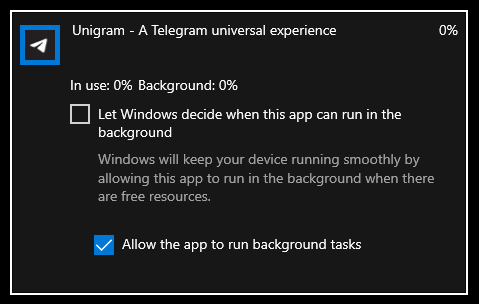
After I did that, notifications seem to be coming in properly afterwards now. It doesn't seem to matter if your device has a battery or not, as long as you do the steps above
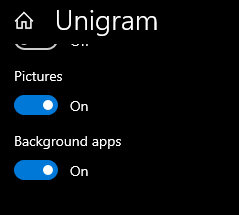
Of course, don't forget to make sure Unigram itself has background permission
sprite-1
on 20 Jan 2020
This ticket is not about that notifications are not coming properly, but about not having a tray icon.
szedjani
on 20 Jan 2020
I know, I was resolving my own comment/question that I stated here. As well as responding to @MarcAnt01
sprite-1
on 20 Jan 2020
Suddenly it just started working today.
szedjani
on 27 Feb 2020
🕺
FrayxRulez
on 27 Feb 2020
Since the last update, it broke again. The tray icon disappeared.
When I click on the Advanced settings I get an unhandled exception.
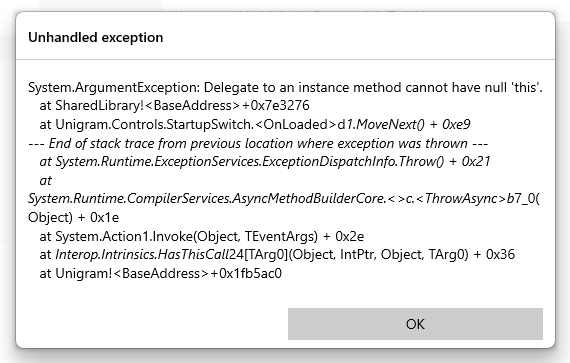
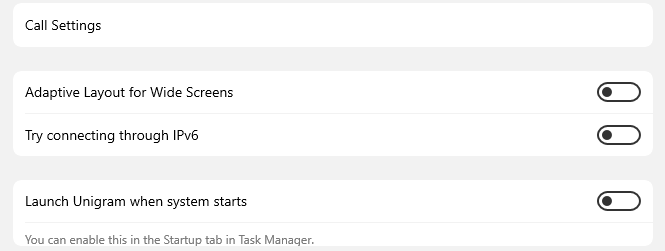
Then when I acknowledge it, I cannot see the relevant setting.
szedjani
on 4 May 2020
Tray icon has been removed and there's already an issue about the exception
MarcAnt01
on 4 May 2020
I haven't seen the removal of the tray icon in the release notes. Do you know the reason by any chance? Is it permanent or just temporary?
szedjani
on 4 May 2020
Hi @szedjani I have explained the reasons here: https://github.com/UnigramDev/Unigram/issues/1493
I will make sure you can download the tray icon as a external software in the future.
FrayxRulez
on 4 May 2020
Furthermore we don't use release section to mention the changes in minor updates
MarcAnt01
on 4 May 2020
Thanks for the explanation. Yes please, send me as well the tray icon exe please :)
szedjani
on 4 May 2020
Related issues
 ChungZH
·
4Comments
ChungZH
·
4Comments
 TheGuardianWolf
·
4Comments
TheGuardianWolf
·
4Comments
 HimbeersaftLP
·
3Comments
HimbeersaftLP
·
3Comments
 framctr
·
5Comments
framctr
·
5Comments
 Daksh777
·
6Comments
Daksh777
·
6Comments
Most helpful comment
👋 will restore the tray icon asap!