Uniforms: `validate="onSubmit"` disables the submit button after initial click
const PersonSchema = new SimpleSchema({
  firstName: String,
  lastName: String,
});

<AutoForm schema={PersonSchema} validate="onSubmit" onSubmit={model => console.log({model})} />

Anyone else come across this? It would be best if the submit button stay enabled at all times when validate="onSubmit".
 purplecones
All 22 comments
Hey, @purplecones!
It should stay disabled as long as the form is not valid, but as I see, the form is not recovering from the invalid state... Which version are you using? I'll try to investigate it. And by the way - onSubmit is the default value.
 radekmie
on 2 Jun 2017
radekmie
on 2 Jun 2017
Thanks @radekgronski. I'm using version ^1.18.1. If I omit validate="onSubmit" it behaves differently and successfully recovers the submit button.
<AutoForm schema={PersonSchema} onSubmit={model => console.log({model})} />
I think it uses "onChangeAfterSubmit" if I don't specify.

purplecones
on 2 Jun 2017
Oh, my fault. Yeah, it's a dead lock. I'm not sure on how to handle it... How about simply removing error on first change? What do you think?
radekmie
on 2 Jun 2017
Hmm. I haven't dug into the code yet but what if the submit button just stays enabled? This way user can trigger a validation at any point instead of on every change.
My use case is that I want to catch most of the validations on the client but during submit I can potentially have the server return additional errors. For this reason I would not want to call the server on every form change, just on submit.
purplecones
on 2 Jun 2017
It makes sense. I don't really remember, why we are disabling this button but it is like this since... Ever I think. As a workaround, use disabled={false} on the SubmitField.
It's already on the roadmap, that rejected promise from onSubmit should be treated as a validation error. It would greatly simplify this case.
radekmie
on 2 Jun 2017
I'm using onSubmitFailure and it works great! If only I can get submit button to work. It seems like it doesn't matter if disabled={false} is passed.
Doing it this way:
<AutoForm schema={PersonSchema} validate="onSubmit" onSubmit={model => console.log({model})}>
      <TextField name="firstName" />
      <TextField name="lastName" />
      <ErrorsField />
      <SubmitField disabled={false} />
</AutoForm>
doesn't resolve the issue. I'll try and figure out how the forms work.
purplecones
on 2 Jun 2017
It depends on your theme, but it should work in all of them - I'll fix it later.
radekmie
on 2 Jun 2017
Thanks @radekgronski. How soon until this is published? It seems that the npm package is still on 1.18.1
purplecones
on 5 Jun 2017
It will be probably this Wednesday - I always wait a little until publish to make less granular versioning.
And by the way - actually, @purplecones, it's @radekmie.
radekmie
on 5 Jun 2017
oh sorry!
purplecones
on 5 Jun 2017
@radekmie this fix introduced a UX issue where all the errors are cleared after the first onChange event.
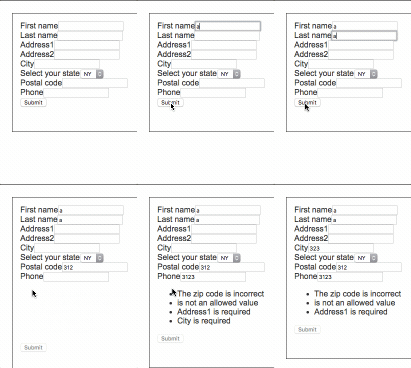
In case where there are a lot of errors, the user will not have them memorized. As soon as the user starts fixing one error, the remaining errors disappear.
purplecones
on 7 Jun 2017
@purplecones: indeed. In this case, I'd rather suggest using disabled={false} - this change is really useful, because current version achieves a dead lock. On the other hand, SubmitField can't access validation mode of the form _(it's not in the context)_. Suggestions?
_(release is delayed due to this issue)_
radekmie
on 7 Jun 2017
I've decided to revert this and leave setting disabled={false} as an only option for now.
radekmie
on 9 Jun 2017
@radekmie I tried that and it didn't work. See above.
<AutoForm schema={PersonSchema} validate="onSubmit" onSubmit={model => console.log({model})}>
      <TextField name="firstName" />
      <TextField name="lastName" />
      <ErrorsField />
      <SubmitField disabled={false} />
</AutoForm>
I'm using the unstyled flavor.
purplecones
on 9 Jun 2017
@purplecones: I've tried a minute ago and it's working. Try this, and let me know how it's working:
<AutoForm schema={PersonSchema} validate="onSubmit" onSubmit={model => console.log({model})}>
    <AutoFields />
    <ErrorsField />
    <SubmitField />
    <SubmitField disabled />
    <SubmitField disabled={false} />
</AutoForm>
validate="onSubmit" didn't work ...i want to disable submit button after initial click but it remains enabled.
schema={schema}
onSubmit={(docs)=>this.onSubmit(docs)}
placeholder={true}
label={false}
submitField={MySubmitField}
>
 waheed25
on 26 Jul 2017
waheed25
on 26 Jul 2017
@waheed25: How your MySubmitButton differ from the default one? The default one is disabled only when the validation failed.
radekmie
on 26 Jul 2017
yeah its default behaviour is disable only in failed validation but i want to implement the behaviour like that site http://app.mevris.io
if we enter the wrong input that button will enable after some duration
waheed25
on 26 Jul 2017
Then use disabled prop as shown few comments up.
radekmie
on 26 Jul 2017
but how to set duration???
waheed25
on 26 Jul 2017
There's no built in option to do so: implement a timer yourself and pass it's state.
radekmie
on 26 Jul 2017
thank u .
i will try
waheed25
on 26 Jul 2017
Related issues
 cesarve77
·
4Comments
cesarve77
·
4Comments
 simplecommerce
·
6Comments
simplecommerce
·
6Comments
 dacioromero
·
5Comments
dacioromero
·
5Comments
 rereradu
·
7Comments
rereradu
·
7Comments
 wtrocki
·
7Comments
wtrocki
·
7Comments