Ungoogled-chromium: Resolving host takes too long compared to other browsers or original chromium
Describe the bug
Accessing a website that has not been opened yet in the current session always takes 1-2 seconds before it starts loading making the browsing experince terrible. The status bar at the bottom of the browser says "Resolving host" during this wait, so my assumption is that there're something slowing DNS queries down.
What I've tried:
- --set-ipv6-probe-false
- removing ~/.config/chromium dir for a fresh install
- other browsers work just fine
- even original Chromium works ok
- different networks
- changing DNS servers
To Reproduce
As I couldn't find any open issue that would describe my problem, I assume it is for some reason specific to my machine. I'm not aware of anything special on my computer however. I'm not even using a system-wide DNS cache. No IPv6.
Environment (please complete the following information):
- OS/Platform and version: Linux version 5.8.5-arch1-1, Arch Linux, i3
- ungoogled-chromium version: Version 84.0.4147.125 (Official Build) Arch Linux (64-bit)
--
Could anyone push me in the right direction so that I can figure out what's the problem, please?
 JurajMlich
All 34 comments
Does it show "waiting for a cache" upon first opening a website? I remember experiencing a similar issue and it was due to a slow HDD (cached files happend to be saved on a very-very slow sectors).
 PF4Public
on 6 Sep 2020
PF4Public
on 6 Sep 2020
@PF4Public It does not. I've got a very fast SSD so I find it unlikely it's a storage issue. It gets stuck at the "Resolving host" message (for 1-2 seconds) which means translating the domain name into an ip address using DNS. Thanks for the guess though. Any chance you've got any other idea? Or at least some general tools/ways to find out more that could help me?
JurajMlich
on 6 Sep 2020
I've got a very fast SSD so I find it unlikely it's a storage issue.
Indeed it is.
The issue might be with your network: router/switch. This assumption does not however explain, why other browsers have no such issues. Have you tried nslookup'ing random domains for the first time? Try nslookup any.random.domain.you.havent.accessed.yet.
I would also suggest opening Developer tools in a new tab and navigating to a new website. There might be an explanation for a long wait in Developer tools.
PF4Public
on 6 Sep 2020
@PF4Public
Nslookup for various domains works instantly. I also tried different DNS servers as well as completely different networks (even a 4G mobile network). That was of no help whatsoever too.
I tried the developer tools and that was indeed of value. It confirms that the problem truly lies in DNS lookups.
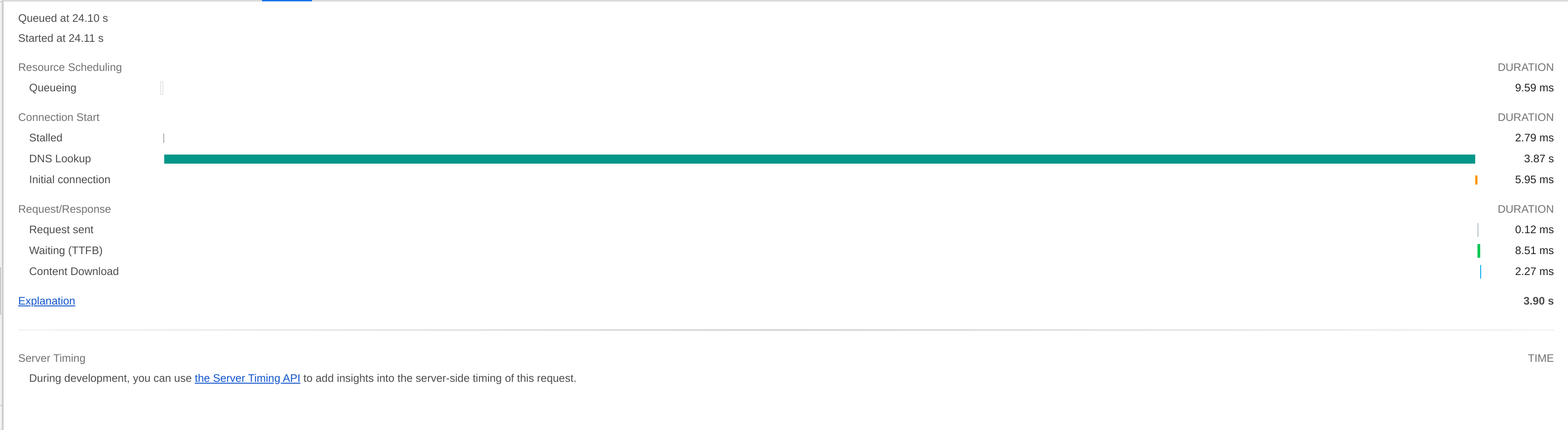
Any idea where to go from here? I was thinking I could try disabling patches one by one, recompiling and seeing if it fixes the problem. That way I could identify which patch is causing the difference in behavior between original chromium and ungoogled-chromium. That's going to be really time demanding however as compiling it from source takes a lot of time. I would like to avoid that at all costs so any other ideas are welcome.
JurajMlich
on 6 Sep 2020
Does this happen for you on any of the previous versions, or 85+?
 Ahrotahn
on 8 Sep 2020
Ahrotahn
on 8 Sep 2020
@Ahrotahn I've just tried installing a few of them and unfortunately yes, it happens on all of them.
JurajMlich
on 8 Sep 2020
Can be because of disable-intranet-redirect-detector.patch or 0009-disable-google-ipv6-probes.patch. Someone try compiling a version without the two patches?
 wchen342
on 11 Sep 2020
wchen342
on 11 Sep 2020
I could make a test build for you try out since I'm on the same distro and have a ccache already populated.
But before I do that, try going to chrome://net-internals/#dns and clearing the DNS cache. Maybe it's possible there is a mangled entry causing the problem.
Ahrotahn
on 11 Sep 2020
@wchen342 Thanks for the suggestion.
@Ahrotahn Clearing the cache doesn't help. I've run out of options, I'm going to test disabling the patches, so could I kindly ask you to build it, please? Not having my computer run at 100% CPU values for 2 hours would certainly make my day a bit better, I would be very grateful :)
JurajMlich
on 11 Sep 2020
Ok, they are available here.
The first one has disable-intranet-redirect-detector.patch removed.
The second one has add-ipv6-probing-option.patch removed. The 0009-disable-google-ipv6-probes.patch only sets the address used and is completely invalidated by the other patch (so this might be a good candidate for a cleanup PR in the future).
Ahrotahn
on 11 Sep 2020
The second fixes the problem! Thank you very much for the help everyone, especially @wchen342 for pointing us in the right direction and you, @Ahrotahn, for taking the time and doing the compiling for me!
What do we do now? As I seem the only one to be affected so far, shall we just close this thread and let me recompile without the patch everytime there's an update?
JurajMlich
on 11 Sep 2020
So it is probably the delay of the browser waiting for results of ipv6 detections that will not come. I wonder whether this is related to if you have an ipv6 address on one of your network interfaces?
In long term the patch itself should be fixed.
wchen342
on 11 Sep 2020
I don't have ipv6 support in kernel, so this is probably the reason I'm not affected by this.
PF4Public
on 11 Sep 2020
lo: flags=73<UP,LOOPBACK,RUNNING>  mtu 65536
        inet 127.0.0.1  netmask 255.0.0.0
        inet6 ::1  prefixlen 128  scopeid 0x10<host>
        loop  txqueuelen 1000  (Local Loopback)
        RX packets 137  bytes 10650 (10.4 KiB)
        RX errors 0  dropped 0  overruns 0  frame 0
        TX packets 137  bytes 10650 (10.4 KiB)
        TX errors 0  dropped 0 overruns 0  carrier 0  collisions 0

wlp59s0: flags=4163<UP,BROADCAST,RUNNING,MULTICAST>  mtu 1500
        inet 192.168.1.34  netmask 255.255.255.0  broadcast 192.168.1.255
        inet6 fe80::aaf0:1a69:f1e1:c569  prefixlen 64  scopeid 0x20<link>
        ether a8:6d:aa:1d:f4:1b  txqueuelen 1000  (Ethernet)
        RX packets 2596  bytes 2535372 (2.4 MiB)
        RX errors 0  dropped 0  overruns 0  frame 0
        TX packets 1575  bytes 336043 (328.1 KiB)
        TX errors 0  dropped 0 overruns 0  carrier 0  collisions 0
https://test-ipv6.com says that I don't have a IPv6 address and IPv6 requests are failing. It says Your DNS server (possibly run by your ISP) appears to have IPv6 Internet access. however. But if that was the problem, wouldn't changing the DNS servers my computer is using fix that? (I remeber trying 1.1.1.1 or 8.8.8.8, definitely not any IPv6 ones)
JurajMlich
on 11 Sep 2020
There seems to be two aspects to this working in conjunction:
The first being that you have a somewhat unique setup compared to most.
Is it possible you blocked ipv6 traffic rather than disabling it?
Do you recall how you went about disabling ipv6 in your setup?
The second part is with add-ipv6-probing-option.patch:
Due to the way the patch is implemented there should have been a difference between when you have the --set-ipv6-probe-false flag set or not.
I did some debugging and it turns out that the flag check always returns false!
I'll try to poke around some more this weekend when I get some time to see why that is the case.
Ahrotahn
on 11 Sep 2020
I'm afraid I didn't do anything special in regards to IPv6. I played with some configurations only after the issue started happening (i.e. after I installed ungoogled-chromium and noticed the issue), but not before it.
JurajMlich
on 12 Sep 2020
I too am seeing "Resolving host" for few seconds (sometimes what feels like 5+ seconds) on Ubuntu MATE Focal 20.04. Ungoogled Chromium version: 84.0.4147.135
Here's a developer tools screen:
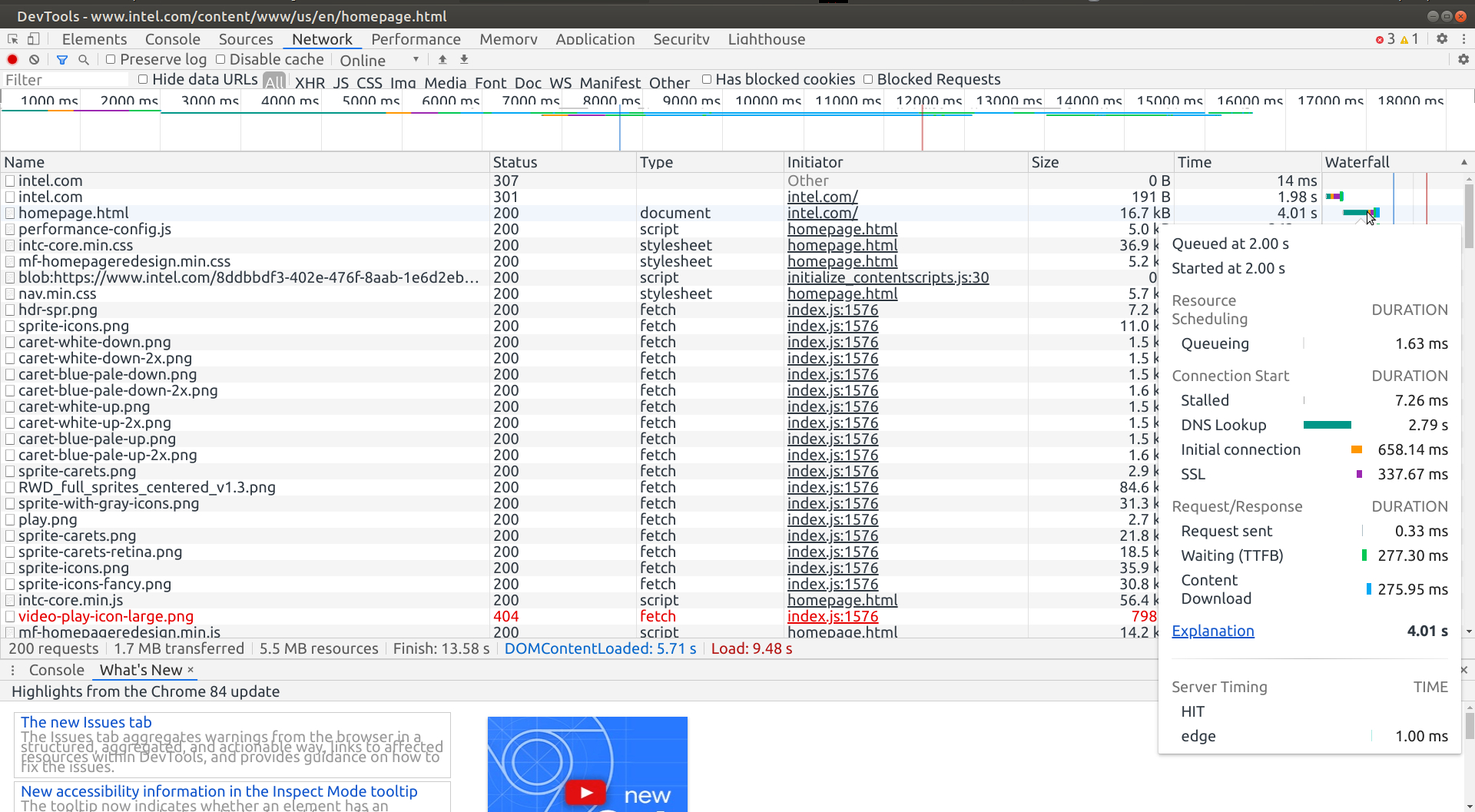
I find it very strange seeing "Resolving host" for 3 to 5 seconds for the sites that I visit frequently, because in my case,
(1) I'm running Unbound DNS Resolver, and
(2) I'm caching (dig -f /home/user/sitelist) few thousands frequently visited domains with an expiry of 24 hours at the system startup. (usually I would shut down the PC in under 12 hours or so technically they never reach 24 hours).
When I run dig let's say 5 minutes after the system startup, I would get Query time: 0 msec
````
user@um:~$ dig bing.com +dnssec
; <<>> DiG 9.16.1-Ubuntu <<>> bing.com +dnssec
;; global options: +cmd
;; Got answer:
;; ->>HEADER<<- opcode: QUERY, status: NOERROR, id: 38169
;; flags: qr rd ra; QUERY: 1, ANSWER: 2, AUTHORITY: 0, ADDITIONAL: 1
;; OPT PSEUDOSECTION:
; EDNS: version: 0, flags: do; udp: 1472
;; QUESTION SECTION:
;bing.com. IN A
;; ANSWER SECTION:
bing.com. 257815 IN A 13.107.21.200
bing.com. 257815 IN A 204.79.197.200
;; Query time: 0 msec
;; SERVER: 127.0.0.1#53(127.0.0.1)
;; WHEN: Sat Sep 12 22:09:09 IST 2020
;; MSG SIZE rcvd: 69
user@um:~$
````
The questions I have:
Does this high dns lookup time mean Ungoogled chromium not using the system / Unbound DNS?
How do I test this, and what would I change to make UC use system / Unbound DNS please.
Thank you.
 TheJags
on 12 Sep 2020
TheJags
on 12 Sep 2020
@TheJags You might want to check previous comments. If you're sufferring from the same problem I was, which as it seems you do, then they'll answer your questions.
JurajMlich
on 13 Sep 2020
@JurajMlich thanks for the reply. By reading previous comments, did you mean disabling IPv6?
Well, I disabled IPv6 system wide on Ubuntu MATE Focal 20.04, but DNS lookup still took 2.09 s even though I cached the site by running dig first.
Disabled IPv6 by:
````
sudo -i
nano /etc/sysctl.conf
net.ipv6.conf.all.disable_ipv6 = 1
net.ipv6.conf.default.disable_ipv6 = 1
net.ipv6.conf.lo.disable_ipv6 = 1
net.ipv6.conf.eth0.disable_ipv6 = 1
net.ipv6.conf.wlxd0374547816a.disable_ipv6 = 1
sysctl -p
cat /proc/sys/net/ipv6/conf/all/disable_ipv6
Output:
1
Then I ran:
dig nbcnews.com +dnssec
dig www.nbcnews.com +dnssec
````
And here's the result when I opened nbcnews.com in Ungoogled Chromium afterwards:
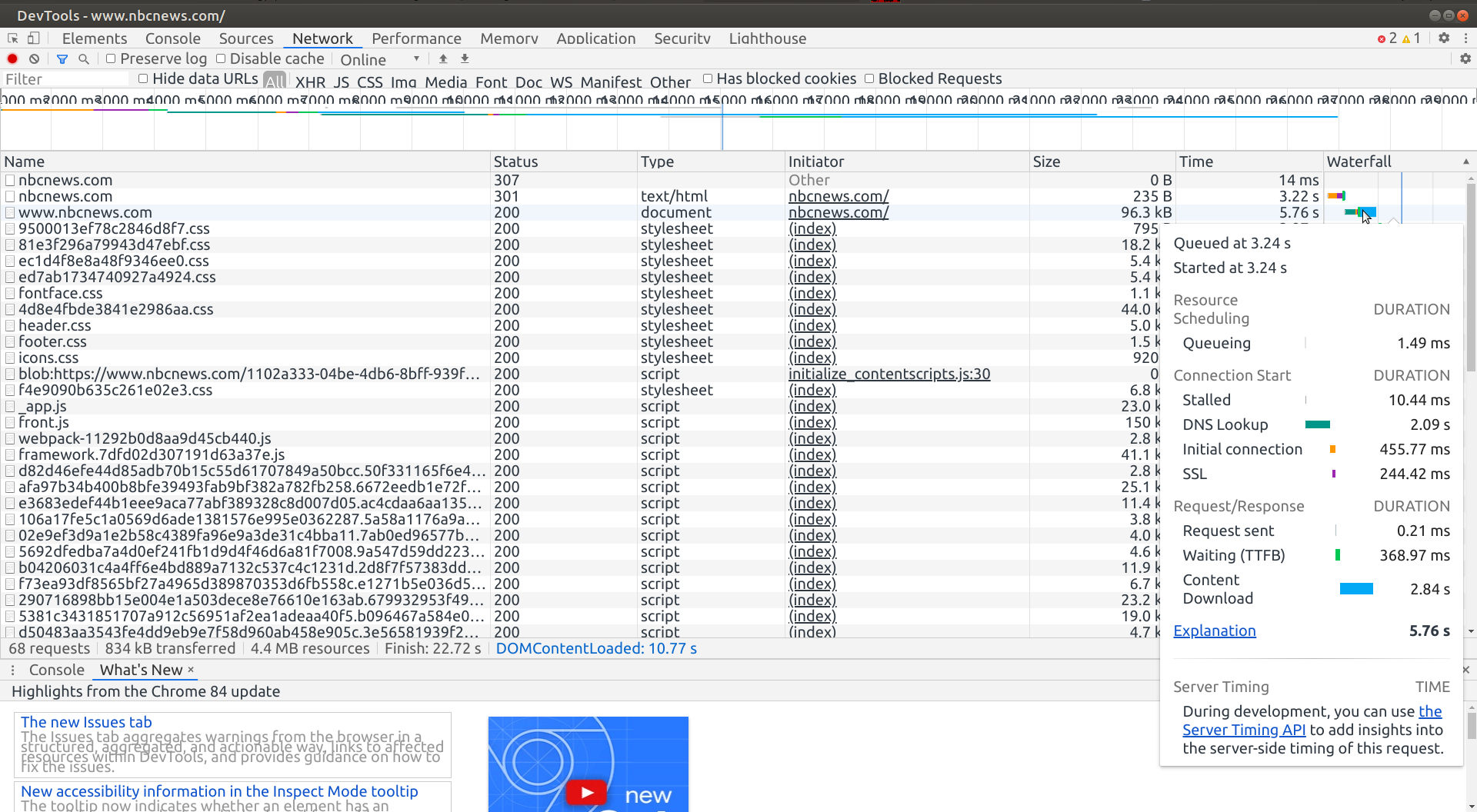
DNS lookup time was still 2.09 s.
TheJags
on 13 Sep 2020
@TheJags In previous comments we found out that the add-ipv6-probing-option.patch was causing the problems in my case (no matter that I've done nothing with IPv6). @Ahrotahn found that that --set-ipv6-probe-false doesn't do anything. So I suggest you recompile ungoogled-chromium without that particular patch and try again. It'll likely solve your problem as from what I've read it's the same problem I had too.
JurajMlich
on 13 Sep 2020
@JurajMlich thanks.
(1) Was the add-ipv6-probing-option.patch aded to Chromium 85.0.4183.83 (18 days ago as of now) ?
Because as I have mentioned earlier, I'm on version 84.0.4147.135 (which was released 25 days ago).
(2) Recompile without the patch: I'm reading the build instaruction on this page:
https://github.com/ungoogled-software/ungoogled-chromium-debian#building
and the question I have is: at what stage I remove the add-ipv6-probing-option.patch and how?
(3) Also, I would have to recompile (without the patch) with every new version, correct?
Thank you so much.
TheJags
on 13 Sep 2020
@TheJags
1) According to commit history, it's been there a lot longer. https://github.com/Eloston/ungoogled-chromium/commits/master/patches/extra/ungoogled-chromium/add-ipv6-probing-option.patch
2) I'm not sure, maybe @Ahrotahn could help? I would try removing the patch file itself and its name from the list in the /patches/series file, that's got to do the trick.
3) Unless somebody fixes the patch, that's correct. I was thinking about doing so but recompiling it every time with new version is not that big of a problem for me. Even if you want to avoid doing so, I would go ahead and try it at least this time - to make sure your problem is the same one.
JurajMlich
on 13 Sep 2020
2. I'm not sure, maybe @Ahrotahn could help? I would try removing the patch file itself and its name from the list in the /patches/series file, that's got to do the trick.
Removing a patch from /patches/series would be sufficient to omit its application.
PF4Public
on 13 Sep 2020
Does this high dns lookup time mean Ungoogled chromium not using the system / Unbound DNS?
For the most part, yes. Chromium (and most major browsers these days) has it's own internal host resolver.
They generally do this so they can implement DNS over HTTPS through the browser, but I believe chromium initially did this to implement asynchronous URL prefetching (and the cynic in me thinks it's also a means to thwart DNS-based adblockers and hosts files).
How do I test this, and what would I change to make UC use system / Unbound DNS please.
There used to be a flag to disable this as well as a build flag, but that has been removed sometime within the last year so there's no easy solution to this at the moment.
Was the add-ipv6-probing-option.patch aded to Chromium 85.0.4183.83 (18 days ago as of now) ?
No, that was when it was last updated. It's actually a pretty old patch and it's current incarnation was implemented in 2017, though it's predecessor is much older.
This is why the --set-ipv6-probe-false flag no longer works. The code it's in has since been spawned asynchronously and doesn't have access to the commandline arguments.
at what stage I remove the add-ipv6-probing-option.patch and how?
Before you build, edit the patches/series file and delete it from line 63.
Also, I would have to recompile (without the patch) with every new version, correct?
For now, yes.
There isn't a simple way to fix that patch short of removing it and allowing the ipv6 probe. Though it might be possible to add a function that returns the flag status in a part of the code that has access to the flags and pass that to the host resolver.
This might be something that needs it's own thread for discussion on the best way to address this if the current one hasn't already become that. Zoraver had trouble with disabling mDNS on the last major version update and it would be just as much trouble trying to disable the inbuilt DNS for the same reasons. All of the host resolver stuff is a moving target right now since Google is attempting to make DoH default, so most solutions would likely be short-lived.
Ahrotahn
on 14 Sep 2020
@Ahrotahn thanks for the detailed reply.
Build failure:
Well, after 6+ hours of building from source, there was a power failure for a few minutes. So I tried to restart the build with:
dpkg-buildpackage -b -uc -nc
Though ultimately it failed with alot of errors, here are the last few messages:
ld.lld: error: too many errors emitted, stopping now (use -error-limit=0 to see all errors)
clang: error: linker command failed with exit code 1 (use -v to see invocation)
ninja: build stopped: subcommand failed.
make[1]: *** [debian/rules:143: override_dh_auto_build-arch] Error 1
make[1]: Leaving directory '/home/admn/Downloads/build/src'
make: *** [debian/rules:119: binary] Error 2
dpkg-buildpackage: error: debian/rules binary subprocess returned exit status 2
Here's a pastebin with all the errors i got:
https://pastebin.com/iNiFk1UX
Warnings:
Even before the power failures after 6+ hours, I got these warnings, which may or may not have anything to do with build failure.
````
ninja -j12 -C out/Release chrome chrome_sandbox content_shell chromedriver
ninja: Entering directory `out/Release'
[16967/39673] CXX obj/media/gpu/vaapi/common/vaapi_wrapper.o
../../media/gpu/vaapi/vaapi_wrapper.cc:437:5: warning: misleading indentation; statement is not part of the previous 'if' [-Wmisleading-indentation]
const char kNvidiaPath[] = "/dev/dri/nvidiactl";
^
../../media/gpu/vaapi/vaapi_wrapper.cc:435:3: note: previous statement is here
if (drm_file.IsValid())
^
1 warning generated.
[26663/39673] CXX obj/chrome/browser/browser/browser_signin_policy_handler.o
../../chrome/browser/policy/browser_signin_policy_handler.cc:52:13: warning: enumeration values 'kDisabled' and 'kEnabled' not handled in switch [-Wswitch]
switch (static_cast
^
1 warning generated.
````
Removing the patch:
(1) Did the following 2, right before starting the building (dpkg-buildpackage -b -uc)
(2) Removed 2 add-ipv6-probing-option.patch files from build directory, and
(3) Deleted the line 63 from these two files:
````
/build/src/debian/patches/series
build/src/debian/ungoogled-upstream/ungoogled-chromium/patches/series
````
Internal host resolver:
Chromium (and most major browsers these days) has it's own internal host resolver.
Zoraver had trouble with disabling mDNS on the last major version update and it would be just as much trouble trying to disable the inbuilt DNS for the same reasons. All of the host resolver stuff is a moving target right now since Google is attempting to make DoH default, so most solutions would likely be short-lived.
This is the most troubling part to me. For me personally, few seconds in DNS lookup is not a big deal but google hardcoding its own DNS servers is a big deal. Well, I would be back to Firefox, 'cause Firefox uses system / Unbound DNS resolver.
Though Firefox does support DNS over HTTPS, but I can disable it completely with network.trr.mode=5 in about:config
Thank you all.
TheJags
on 14 Sep 2020
I'm not familiar enough with how the Debian build is set up, but I would try rebuilding without -nc to recreate the intermediates.
The warnings are to be expected, nothing to worry about.
You don't have to delete the patch, but it won't harm anything. Removing the line in the series file is enough.
While Chromium uses it's own resolver instead of the system's, it will still default to using the same upstream DNS server your system uses so long as you don't enable DoH. In the case of the ipv6 probe 0009-disable-google-ipv6-probes.patch changes the ip from Google's server to the RIPE NCC server. So Ungoogled Chromium shouldn't be using Google's servers by default unless you are using them as your system's servers or enabled DoH. Though we will have to figure out how to handle this for when they enable DoH by default.
Ahrotahn
on 14 Sep 2020
@Ahrotahn thanks again.
I'm not familiar enough with how the Debian build is set up, but I would try rebuilding without -nc to recreate the intermediates.
It would take another 7 hours of CPU (12 core) running at 100%, and it can still fail, so I think I'm not gonna try again buiding from the source, and because of this, I know I will have to live with high DNS lookup time with Ungoogled Chromium. Unless someone fixes the add-ipv6-probing-option.patch
While Chromium uses it's own resolver instead of the system's, it will still default to using the same upstream DNS server your system uses so long as you don't enable DoH.
In the case of the ipv6 probe 0009-disable-google-ipv6-probes.patch changes the ip from Google's server to the RIPE NCC server. So Ungoogled Chromium shouldn't be using Google's servers by default unless you are using them as your system's servers or enabled DoH.
I'm little confused here. If Chrome is using its own resolver how can it use my system's / Unbound resolver..?
That's what I'm actually looking for that Ungoogled Chromium use my system's DNS resolver.
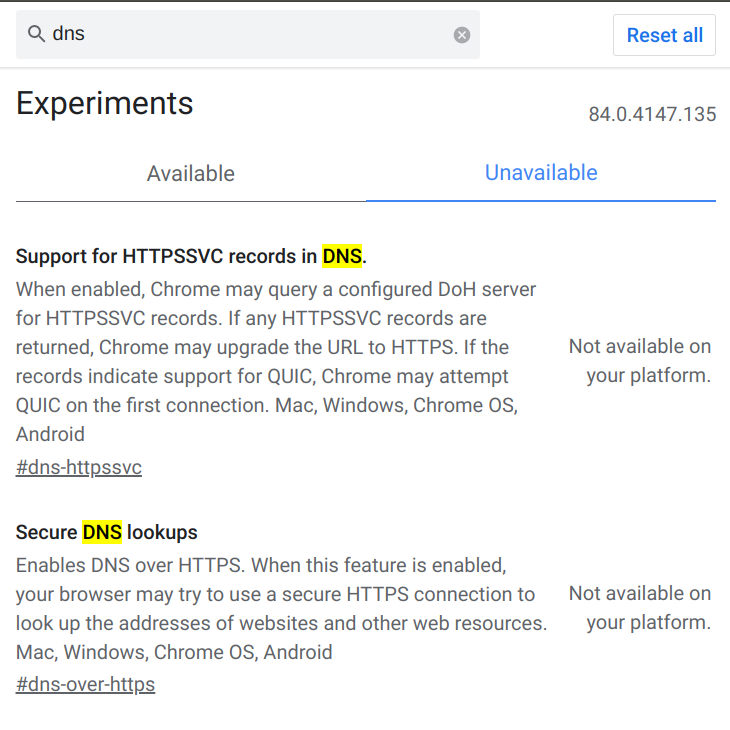
Also, I have not enabled DoH. In fact, DoH is not available on version 84.0.4147.135. I think they have made it available on Android with ver 85, don't know about the desktop / Linux version as I don't have it.
Here's the chrome://flags/ screen:
And just to be extra clear, I'm running Unbound DNS resolver on Ubuntu MATE Focal 20.04 with these root name servers as the upstream resolver.
https://www.internic.net/domain/named.root
TheJags
on 14 Sep 2020
Sorry I'm not much help much with the build issues! Most likely some intermediate files were corrupted when your power went out. I'm not aware of any easy ways to go about fixing that other than rebuilding fresh. I don't see any reason it would fail again unless you were missing some dependencies or something.
I've been experimenting with different methods of fixing that patch. While removing the patch is the quickest fix, I like the ability to be able to specify ipv6 connectivity as well as preventing yet another outside connection. Hopefully a good solution can be found.
So I've probably made things a little confusing since Unbound can be used both as a resolver as well as a local DNS server. It depends on how you're using it. Check your /etc/resolv.conf file. If you have nameserver ::1 and/or nameserver 127.0.0.1 then you are using it as a local server and Chromium should be using it as the upstream DNS server as well.
On POSIX systems Chromium wil read /etc/resolv.conf and use the same DNS servers you have set up there, but will use it's own inbuilt resolver instead of your system's (unbound as a resolver, systemd-resolved, etc).
This is something unrelated to the issue this thread is for, but needs to be addressed as well. It's not too much of a problem in most cases, but once DoH is enabled by default there is a chance that Chromium could use a different, unwatned server if the one you're currently using doesn't support DoH.
I should have also mentioned that linux is the only platform that DoH can't be enabled for at the moment. So that isn't something you would need to worry about just yet.
Ahrotahn
on 15 Sep 2020
So, getting back on track, I've found that the cleanest way to fix the patch is by implementing the flag as a feature instead of it's own switch. This keeps the changes minimal without changing the functionality.
@JurajMlich I uploaded a third build to my releases page. Would you mind trying that out when you get a chance and let me know if there is a difference between launching with and without --enable-features=SetIpv6ProbeFalse?
Ahrotahn
on 15 Sep 2020
@Ahrotahn Sure, just tried it out. There's a difference, the flag now works properly - if I launch that version without the flag, I again experience the problems; if I launch it with the flag, the problem is gone.
JurajMlich
on 15 Sep 2020
Awesome! I'll submit a PR with my changes in a bit then.
I know you don't want to have to rely on using that flag, but I guess it beats having to recompile without the patch.
I'll create a new issue later to get input on what to do about the builtin resolver. Depending on how that ends up being handled the flag may not be needed afterwards.
Ahrotahn
on 16 Sep 2020
I know you don't want to have to rely on using that flag, but I guess it beats having to recompile without the patch.
@Ahrotahn if I understand correctly, those who are not using IPv6 will have to use / launch Ungoogled Chromium with:
--enable-features=SetIpv6ProbeFalse
Now I don't know what number would be bigger, users with IPv4 or IPv6.
But if majority users are with IPv4 only, is it possible to make this "opt-in", instead of "opt-out"?
In other words, those who wants to use IPv6 have to launch the UC with flag, and those are with just IPv4 would not need to use any flag or workaround.
Thank you.
TheJags
on 16 Sep 2020
PF4Public and I have IPv6 disabled and aren't encountering the issue, so I have to assume there's some configuration difference that's causing the problem. Though I simply have it disabled in NetworkManager instead of disabling it at the kernel level.
We could make it work the other way around though! I just wanted to fix the current implementation rather than change the way it was currently (supposed to be) working. Hopefully the flag won't be needed at all in the future, but it will depend on how the resolver stuff gets sorted out.
Ahrotahn
on 16 Sep 2020
@Ahrotahn I actually don't mind using the flag at all, thank you! :)
JurajMlich
on 16 Sep 2020
Related issues
 Eloston
·
42Comments
Eloston
·
42Comments
 pirate1337
·
35Comments
Eloston
·
58Comments
pirate1337
·
35Comments
Eloston
·
58Comments
 nchv
·
32Comments
Eloston
·
34Comments
nchv
·
32Comments
Eloston
·
34Comments