Ungoogled-chromium: Unable to Build in Windows 10
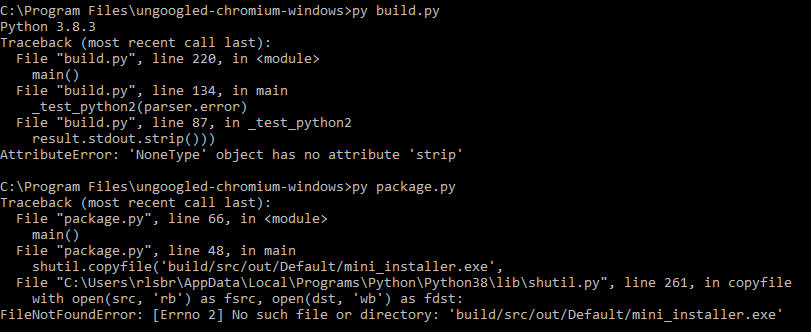
Whenever I try to run the py build.py command in admin CMD, having tried both Python 3.8.3 and 3.7.7, I get the following error:
- Run the following command: "git clone --recurse-submodules https://github.com/ungoogled-software/ungoogled-chromium-windows.git"
- cd into the ungoogled-chromium-windows folder
- Run the following command: "git checkout --recurse-submodules 81.0.4044.138-1.1"
- Run the following command: "py build.py"
You should recieve the same error message I have shown above.
- OS/Platform and version: Windows 10
- ungoogled-chromium version: 81.0.4044.138-1.1
I have set up the Build Environment as follows:
- Followed the build instructions for Ungoogled Chromium listed under "Visual Studio" here: https://chromium.googlesource.com/chromium/src/+/refs/tags/81.0.4044.113/docs/windows_build_instructions.md#visual-studio
- Installed 7-Zip
- Installed Python 3.8.3, also selected Add to Path and the option to lift the MAX_LENGTH restriction
- Installed Python 2.7.18 with pypiwin32 module
- Installed Git with "Git from the command line and also from 3rd-party software"
 rlsbrowning
All 37 comments
Try add stdout=subprocess.PIPE, after line 81 of build.py?
 wchen342
on 14 Jul 2020
wchen342
on 14 Jul 2020
Tried the suggestion, still getting the same error message.
rlsbrowning
on 15 Jul 2020
Maybe because of this issue?
wchen342
on 15 Jul 2020
I don't think so, that looks like a completely different error output than what I've been getting.
rlsbrowning
on 16 Jul 2020
Did you try the methods though? The error you are getting is because somehow your CMD did not return anything as stdout from the subprocess called (which is supposedly to be a python2 in your case). AFAIK this is will not happen on *nix systems so that is why I ended up finding this solution.
EDIT: if you are looking for the same error, here is one: https://stackoverflow.com/questions/54138863/curses-crash-on-execute-python-3-7-2-on-windows-10, but the solutoin is the same as method 1 in my previous link.
wchen342
on 16 Jul 2020
What do you get when you run command python? Does Python 2 launch?
 Eloston
on 17 Jul 2020
Eloston
on 17 Jul 2020
@Eloston Not sure if this is what you're looking for, but it looks like Python 3 launches, I reset the command prompt though so that may affect the results:

rlsbrowning
on 22 Jul 2020
"Make sure Python 2.7 is set in the user or system environment variable PATH as python."
From the readme.
python command should point to your python2.7 version and py should be python 3.8.3.
Here's how to use virtualenv to make it easier
# install virtualenv
pip install virtualenv

cd /path/to/your/chromium_git_folder

# create the virtual environment (check the python path for your python 2.7.18 version)
python -m virtualenv .venvwindows -p C:\Python27\python.exe
.venvwindows\Scripts\activate.bat

# install python2 libraries
pip install pypiwin32

# check python versions
python --version # should give you python 2.7.18

py --version # should give you 3.8.3
If py isn't giving you python3 you can also create an alias and use py3 to run it for instance
set "py3=C:\Users\your_user_name\AppData\Local\Programs\Python\Python38-38\python.exe"
You can leave the virtual environment by typing
deactivate
 kevin-ferrier
on 25 Jul 2020
kevin-ferrier
on 25 Jul 2020
any new progress? anyone else its working on building windows version ?
 lipici
on 31 Jul 2020
lipici
on 31 Jul 2020
Closing because Windows updated to version 84.
Eloston
on 4 Aug 2020
Closing because Windows updated to version 84.
I only see the 81.0.4044.138-1.1 as latest. Where can I get a new version? On this page, there is only the source code, and I don't know how to merge it, and my PC is probably quite slow for it: https://github.com/ungoogled-software/ungoogled-chromium-windows
 Marek33
on 4 Aug 2020
Marek33
on 4 Aug 2020
Closing because Windows updated to version 84.
I only see the 81.0.4044.138-1.1 as latest. Where can I get a new version? On this page, there is only the source code, and I don't know how to merge it, and my PC is probably quite slow for it: https://github.com/ungoogled-software/ungoogled-chromium-windows
Please wait for anyone who will compile it. That can take from 8 hours.
 r4sas
on 4 Aug 2020
r4sas
on 4 Aug 2020
Please wait for anyone who will compile it. That can take from 8 hours.
I think the problem is that _nobody_ does that since 81.
I was thinking some time ago to start compiling and uploading Windows binaries, but unfortunately, don't have sufficient time for that atm.
 PF4Public
on 4 Aug 2020
PF4Public
on 4 Aug 2020
I started build some time ago, maybe tomorrow upload it for x64 firstly.
r4sas
on 4 Aug 2020
@r4sas
Closing because Windows updated to version 84.
I only see the 81.0.4044.138-1.1 as latest. Where can I get a new version? On this page, there is only the source code, and I don't know how to merge it, and my PC is probably quite slow for it: https://github.com/ungoogled-software/ungoogled-chromium-windows
Please wait for anyone who will compile it. That can take from 8 hours.
I understand, but I thought, that it was released, since Eloston has closed it.
@PF4Public
Please wait for anyone who will compile it. That can take from 8 hours.
I think the problem is that _nobody_ does that since 81.
I was thinking some time ago to start compiling and uploading Windows binaries, but unfortunately, don't have sufficient time for that atm.
There are other two versions, but for some very weird reason, the browser, doesn't have a toolbar, and they have a different Audio formats, which is weird as well.
Marek33
on 4 Aug 2020
I understand, but I thought, that it was released, since Eloston has closed it.
That version was released, and that was all what he doing about that repository. Builds provided by users.
r4sas
on 4 Aug 2020
I understand, but I thought, that it was released, since Eloston has closed it.
That version was released, and that was all what he doing about that repository. Builds provided by users.
Yes, now its released, but it wasn't before. I do hope though, there will be a classic version, without the installer, since it's way better, without that. _Thou, the installer doesn't seem to work for me._
Also, I hope, that your version is without the installer.
Marek33
on 4 Aug 2020
thanks for the 84 version, all great
lipici
on 4 Aug 2020
Also, I hope, that your version is without the installer.
You can find them here.
Now starting build for x86.
r4sas
on 5 Aug 2020
Also, I hope, that your version is without the installer.
You can find them here.
Now starting build for x86.
Thanks! Everything seems to be fine, but I don't get, why I need to open a new window, since in normal session, I don't have a visible toolbar, and I can move the browser window, even if it's maximized.
Also, do you have a Discord or an email at least?
Marek33
on 5 Aug 2020
Everything seems to be fine, but I don't get, why I need to open a new window, since in normal session, I don't have a visible toolbar, and I can move the browser window, even if it's maximized.
Can you post screenshot of issue, can't understand correctly.
Also, do you have a Discord or an email at least?
I think better discus such things here, neither in PM because here can be problem with chromium itself.
r4sas
on 5 Aug 2020
Everything seems to be fine, but I don't get, why I need to open a new window, since in normal session, I don't have a visible toolbar, and I can move the browser window, even if it's maximized.
Can you post screenshot of issue, can't understand correctly.
Also, do you have a Discord or an email at least?
I think better discus such things here, neither in PM because here can be problem with chromium itself.
Yes, here: 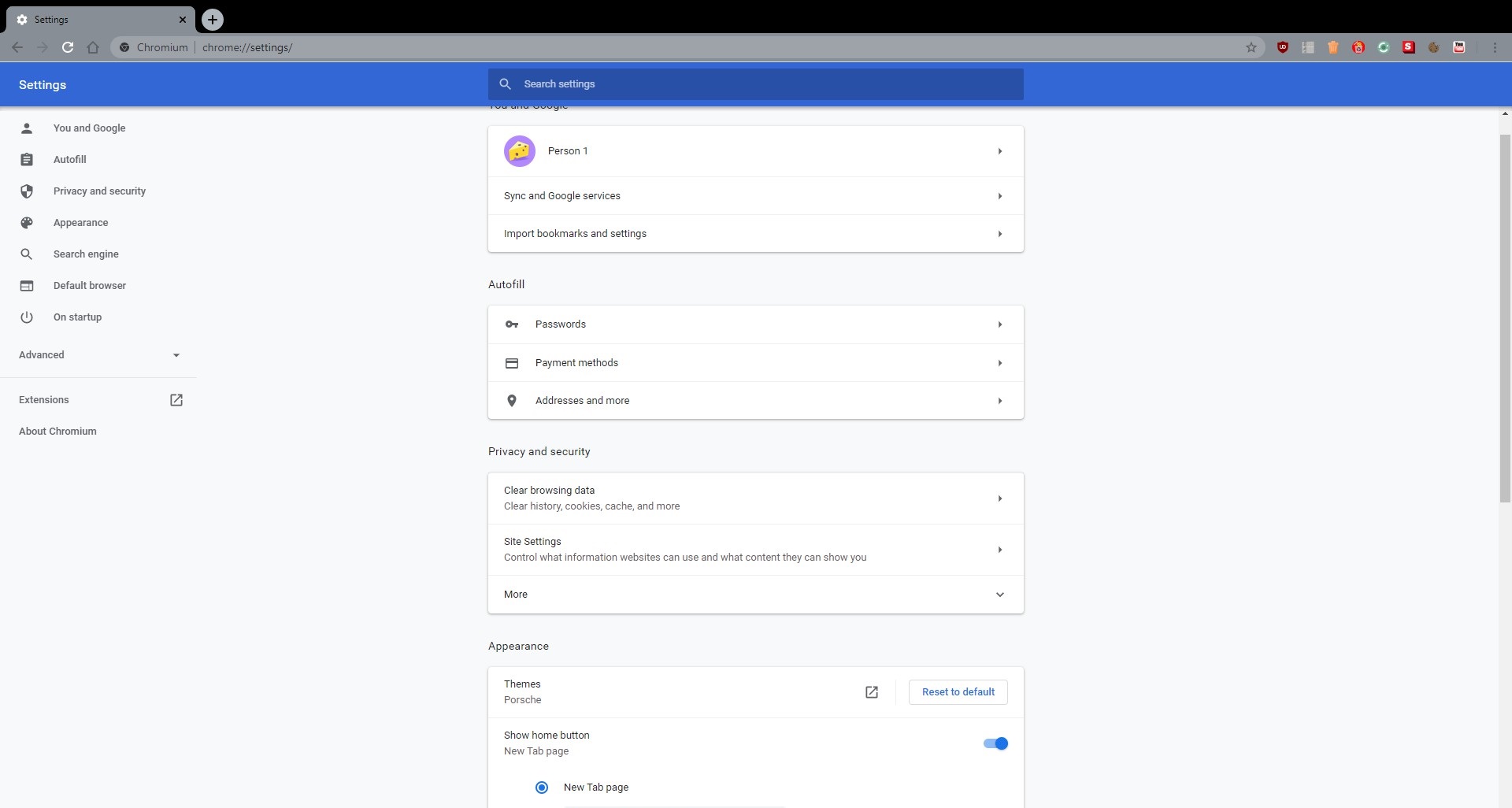
Alright.
Marek33
on 5 Aug 2020
Which one toolbar? With bookmarks?
r4sas
on 5 Aug 2020
Which one toolbar? With bookmarks?
No, the upper toolbar, with the minimize, maximize, and close.
And, whenever, I add the engaged to the next of the start menu, it doesn't have these two flags enabled: _-disable-webgl and -ignore-certificate-errors_. I have to have the second thing enabled, since there is some problem with the Chromium on my system, and I don't know, where exactly.
Also, do you know, if its possible to change the Permissions and Media devices to the Timeout? I think it can be changed in Firefox, but no idea, about the Chromium.
Marek33
on 5 Aug 2020
Ah, I think issue in your system and less possible in chromium. I haven't such problem on Windows 8.1.
r4sas
on 5 Aug 2020
@r4sas So, you don't have any of those problems on Win 8.1?
That's weird, since no previous versions had that. I'm using Win7 64bit. _I mainly want back the upper toolbar, (minimize, recover/maximize, and close)._
Also, what about those things at the end?
Marek33
on 5 Aug 2020
@r4sas So, you don't have any of those problems on Win 8.1?
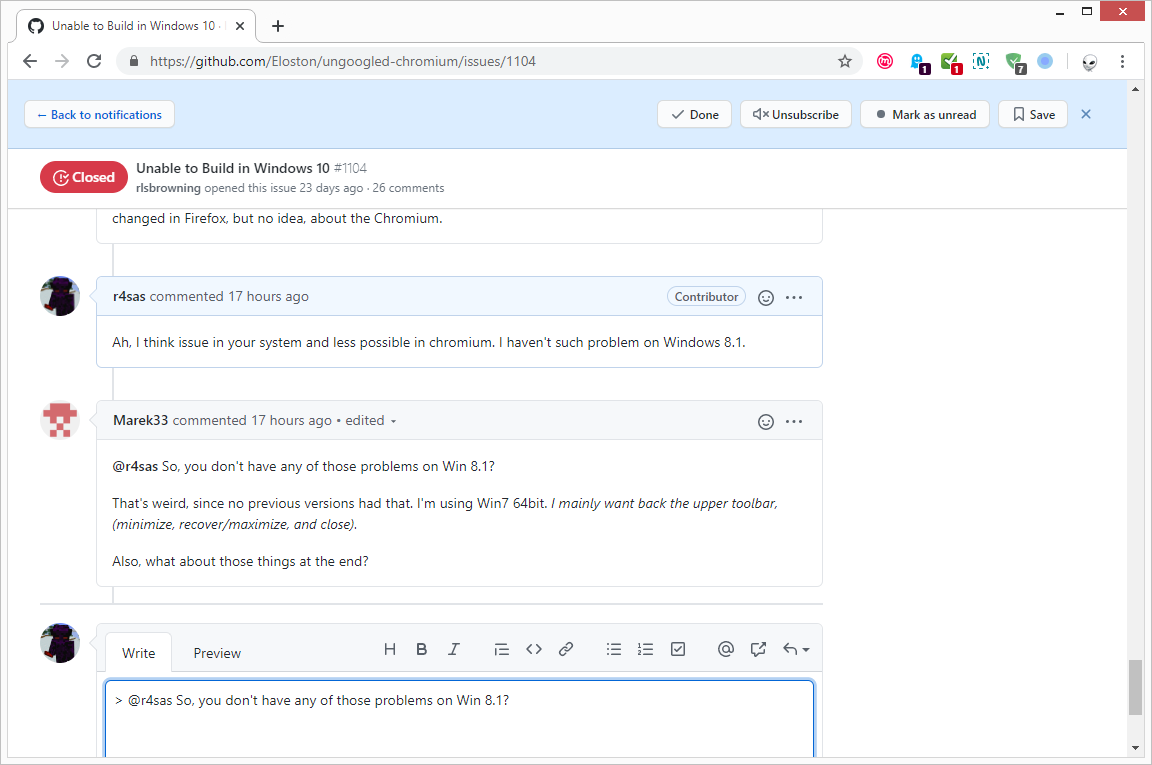
No problems here.
Maybe something changed in chrome about supporting Win7? Have you checked Chrome itself?
r4sas
on 6 Aug 2020
Now starting build for x86.
Builded and added, available at same place.
r4sas
on 6 Aug 2020
No problems here.
Maybe something changed in chrome about supporting Win7? Have you checked Chrome itself?
No, not yet, but I will. Thou, since the Brave has no issues, I don't think that the normal Chrome would have some problems.
That's weird, but as I can see, you also have the card, a bit lower, than usual. When I open a new window, its fixed, but on the normal one, it's almost the same as you have, except the blinding white color and the missing three buttons in the top right.
Also, what are those four extensions, expect Adguard, and the Ghostery?
Marek33
on 6 Aug 2020
No, not yet, but I will. Thou, since the Brave has no issues, I don't think that the normal Chrome would have some problems.
You can try @Mathew-D build, I'm building with MSVC17, maybe he build it with MSVC19 and here will be some differencies.
I remember that I got such issue when using Remote Desktop (RDP) to connect to my computer. After disconnecting and logging in back locally, sometimes such bug happens. Only full chromium restart helps.
Also, what are those four extensions, expect Adguard, and the Ghostery?
Mailvelope, ScriptSafe, Nimbus Screenshot, SwitchyOmega.
r4sas
on 6 Aug 2020
Remote Desktop (RDP) to connect to my computer. After disconnecting and logging in back locally, sometimes such bug happens. Only full chromium restart helps.
Could it be related to GPU then?
PF4Public
on 6 Aug 2020
Could it be related to GPU then?
I think it can be related to OpenGL or D3D (idk what chromium uses by default).
r4sas
on 6 Aug 2020
Yes, I tried that one as well, but I got that bug too.
That's weird, since I have that thing disabled.
Thanks!
I doubt that it's a GPU issue, since I have the same GPU, since I first discovered the Ungoogled Project.
I guess D3D, but it is apparently the ANGLE (Almost Native Graphics Layer Engine). However, why it should be related to that?
Marek33
on 6 Aug 2020
You can try @Mathew-D build,
Turns out there are a lot of people, building binaries, they just don't submit them here… I wasn't aware of that.
I think it can be related to OpenGL or D3D
Yeah, I meant that. @Marek33 you could you try disabling GPU related features in chrome://flags/ like hardware acceleration, rasterisation and so on.
However, why it should be related to that?
That's probably how they draw the window, aren't they?
I doubt that it's a GPU issue, since I have the same GPU, since I first discovered the Ungoogled Project.
Not the GPU itself. I meant the code that Chromium uses to interact with it.
P.S. Quick googling showed that this could be an issue due to a theme. @Marek33 Try reverting the theme to a default one and see if that fixes it.
PF4Public
on 6 Aug 2020
You can try @Mathew-D build,
Turns out there are a lot of people, building binaries, they just don't submit them here… I wasn't aware of that.
Indeed, it's a pity that they don't submit it, anywhere.
I think it can be related to OpenGL or D3D
Yeah, I meant that. @Marek33 you could you try disabling GPU related features in chrome://flags/ like hardware acceleration, rasterisation and so on.
Thanks! I will try it.
However, why it should be related to that?
That's probably how they draw the window, aren't they?
Probably, but why when I open a new window, it's just like it should be?
I doubt that it's a GPU issue, since I have the same GPU, since I first discovered the Ungoogled Project.
Not the GPU itself. I meant the code that Chromium uses to interact with it.
I understand, and thanks for the info!
Marek33
on 6 Aug 2020
Probably, but why when I open a new window, it's just like it should be?
No idea. Try changing the theme, if you ever changed it from the default.
I remember experiencing a similar issue on Linux (max/min/close buttons absent) a while ago, but it solved itself really quick, I didn't have to do anything, just updated a single revision up.
PF4Public
on 6 Aug 2020
Probably, but why when I open a new window, it's just like it should be?
No idea. Try changing the theme, if you ever changed it from the default.
I remember experiencing a similar issue on Linux (max/min/close buttons absent) a while ago, but it solved itself really quick, I didn't have to do anything, just updated a single revision up.
Thanks for the tip! It seems that the issue is fixed, by removing the Porshe theme. It's really pity, that I have to remove that theme, since it's way better, than the normal white background, but after I add it back, there are no issues, and that's the main thing.
Marek33
on 6 Aug 2020
Related issues
Eloston
·
34Comments
 stfnhh
·
61Comments
stfnhh
·
61Comments
 magicgoose
·
33Comments
Eloston
·
34Comments
magicgoose
·
33Comments
Eloston
·
34Comments
 Alvintrmp
·
33Comments
Alvintrmp
·
33Comments
Most helpful comment
That version was released, and that was all what he doing about that repository. Builds provided by users.