Ungoogled-chromium: macOS 10.15: Ungoogled Chromium can't be run because it's not notarized.
See header. Ungoogled Chromium can't be run in any version of macOS 10.15 Catalina, as it is not notarized. Apple enforces this requirement now. Please resolve, I don't want to roll back to macOS 10.14 Mojave.
 Peacock365
All 6 comments
Hello,
firstly, this issue would probably better fit in the macOS repo.
About your issue:
- Currently, the mac binaries of ungoogled chromium are not signed with a Developer ID, which is the prerequisite for using Apple's Notarization Service
- See issue https://github.com/Eloston/ungoogled-chromium/issues/240 for the discussion about signing the mac App
- You should still be able to open and run unsigned (un-notarized) apps by following the Safely open apps on your Mac instructions from Apple
- Short version: do not double click the icon, instead use right-click (Control-click) or Finder’s menu command to open the app – confirm once that you actually want to open the app, after the first successful start you should be able to run it like all other apps (i.e. by double-clicking etc.)
- Alternatively you can also remove the quarantine attribute via command line via
xattr -d com.apple.quarantine $FILE - Maybe the security and privacy preferences of your Mac need to be set to allow apps from the App Store and identified developers (System Preferences, click Security & Privacy, then click General)
Background:
Notarization and code signing are in place for Gatekeeper to decide what to do upon the __first launch__ of __quarantined__ (having the com.apple.quarantine attribute) software launched via __LaunchServices__
See also around 3min into the Video Advances in macOS Security, and this separate video: All About Notarization; both from the WWDC 2019
 kramred
on 13 Nov 2019
kramred
on 13 Nov 2019
Should this be added to the ungoogled-chromium-macos README?
 Eloston
on 16 Nov 2019
Eloston
on 16 Nov 2019
@kramred @Eloston
With all due respect, saying that notarization can be circumvented via Terminal command is not a permanent solution. I found that the Terminal command described above is not even necessary. I opened the DMG file of Ungoogled Chromium, which I was able to install, but not launch. When I clicked on the icon, a message appeared that complained about the lack of notarization. I kept this message open, went to the System Preferences -> Security & Privacy -> General, then opened the lock at the bottom left corner via Admin privilege, and then was presented with an option to run Ungoogled Chromium regardless of notarization. Ungoogled Chromium then started up just fine, and continues to do so. So the Terminal is not strictly required.
That being said, I go to great lengths to install your software, since I don't want to use official Chrome for universally known reasons. The hoops I had to hop through were anything but self-explanatory, and less experienced users might not be able to run Ungoogled Chromium at all. I also suspect that Apple will remove the ability to circumvent the notarization requirement eventually, meaning that your software would be permanently dead eventually on the Mac, perhaps as early as macOS 10.16 next year.
The solution proposed by @kramred is a stop gap at best, and is not even viable today for less experienced users. You should look into notarization eventually, if you care about Mac users.
Peacock365
on 17 Nov 2019
@Peacock365, let me try to address a few points from your reply.
I suggested a workaround as I still don't know what to think about notarization and I lean towards not supporting it, see the wall of text below why.
It is interesting how you describe your experience as having to "hop trough hoops". I think this is exactly the perception Apple wants to create with the (new design of the) warning messages and by removing the option in the GUI to install Software from any source.
You also state that you
suspect that Apple will remove the ability to circumvent the notarization requirement eventually.
I also think this may be one scenario that Apple is evaluating to pursue. A few remarks about that:
- macOS would become almost like iOS in regard to Apple deciding what you can run on your device, a walled garden
- Apple would control the Mac App Distribution and also become the single point of failure (see also this discussion on hn)
- A certain type of users would vote with their wallet and leave Apple computers for other less resctrictive alternatives (Apple might be in the phase of finding out how many restrictions they can impose before it hurts them financially)
- There are viable alternatives (Linux, BSD, etc.) should Apple turn macOS (more and more) into a walled garden, which are also more privacy friendly
Ultimately, you want to be able to trust the software you run on your machines. Google Chrome seems to have crossed the line where you don't trust it any more (this applies to many of us, I would say).
Notarization and the signing of applications desire to build trust as well.
- Signing a binary is basically like creating a checksum/hash of it and attaching that to the binary in a way that any tampering with its contents will invalidate the signature.
- Notarization is an additional service provided by Apple, where you upload your signed binary to an Apple server, where is will be subjected to automated tests (possibly be scanned for known pieces of malicious code). Within minutes you will get another checksum/hash that is "stapled" onto your binary. This notarization hash is read by the Gatekeeper (funny choice of naming) service to examine if your binary passed Apple's notarization procedure.
- The problem here is that Apple entirely controls this opaque procedure and could easily implement some kind of censorship
In their support article Safely open apps on your Mac Apple states
macOS Catalina also requires software to be notarized, so you can be confident that the software you run on your Mac doesn't contain known malware.
- My personal confidence in that would be rather small, given Apple's record in dealing with security and the general ability to detect anything but known malware in an automated way.
- It does work for rejecting known malware, e.g. prevents you from installing a Trojan/Virus disguised as some legitimate software.
- Why this has to run on a closed system, controlled by only one party (Apple) is a question that leads to speculations about other intent than only testing for malware…
- The fact that the user is steered to believe that __anything__ without signature and Apple's notarization is potentially dangerous is a tactic that may border on spreading FUD to trick your brain not to use its higher functions to question what you're being presented.
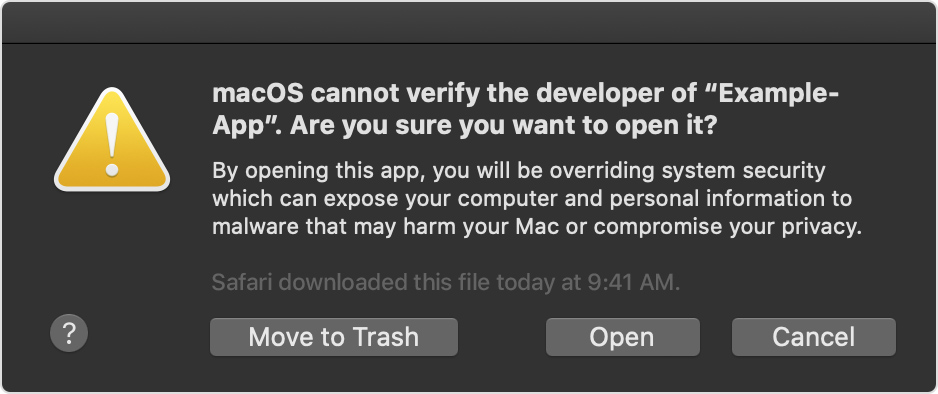
Lastly, about making ungoogle chromium more accessibe to end users (who may be less tech savy):
- In the Video Advances in macOS Security from the WWDC 2019, the presenter from Apple mentions that they need the "help" of the developers to spread the use of notarization – now, you could read this as helping to build the walls around the garden, which Apple will then control. _In my opinion,_ this would be an argument against notarization.
- About the signatures, see issue https://github.com/Eloston/ungoogled-chromium/issues/240 – the hashes provided with the binaries would provide similar functionality (with less convenience, but also without dependence on Apple)
- I think e.g. reproducible builds would be a better and more transparent way to gain trust (see also the README of ungoogle chromium) – this obviously only works for open source
- This project is run by volunteers in their spare time, yet it would be feasible to go the way Apple proposes and add signing and notarization – Is it the right thing to do for such a project? Personally, I'd rather say no, but I really don't know and I can relate to the convenience aspect and how the warnings can seem scary
- The notifications for actual, detected malware look a bit different. In that case the binary either failed notarization or is detected based on a local scanning
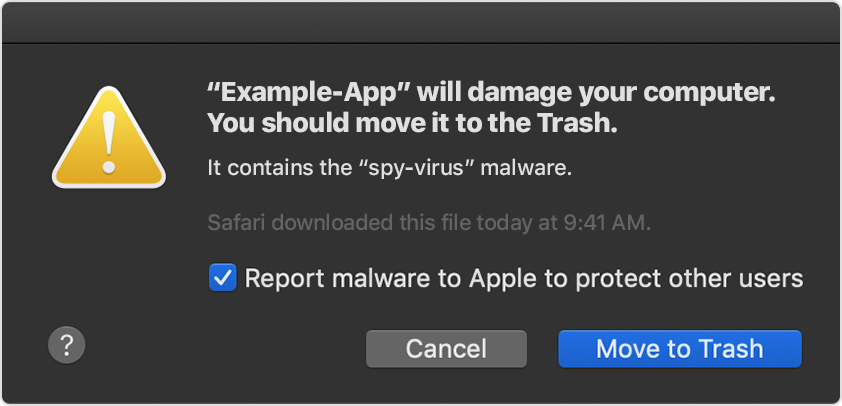
Conclusions:
- Someone (else) could start signing the binaries on macOS and submit them for notarization in the way described by Apple.
- You could build the binaries yourself, in which case you only have to trust the source code, which is easier to audit – if you have the time and resources you could even become the one running the signing and notarization (this is not meant sarcastically)
- Alternatively, you could use a different Browser (based on Chromium) that you trust and that is signed and notarized by their developers
kramred
on 17 Nov 2019
Nice writeup, but doesn't provide any answer. You say that Apple is turning macOS into a walled garden. Fine, I am not blind, I see that as well. The hoops I had to hop through are testament of it. It also adds nothing to say that Apple intends my impression to be the way it is, again, I am not blind, I see that too.
You say that Apple might apply censorship via their notarization process. I think that's an alu hat theory, not sure if this is even possible... Because if they really wanted to censor stuff, there would be no way around checking the code manually, it would literally be the only way, and that would drag out the notarization process quite a bit. Until any kind of censorship is proven, I'd call that an alu hat theory. Sorry to say, you have no proof for any kind of censorship taking place, and the way the notarization process works makes it seem unlikely as well. I think the code is just scanned for known malware within a few seconds and that's it.
You also mention that Apple is trying to spread FUD regarding legitimate software like Ungoogled Chromium. Could be, but fact is, the notarization process checks for known malware, and since software that isn't notarized didn't go through the process, it could potentially(!!!) contain malware. I am not thinking that about Ungoogled Chromium, but I wouldn't bet on it when it comes to other kinds of software, so it isn't exactly FUD.
What I gather from your post is that you are opposed to notarization for ideological reasons, which I would classify as alu hat theories, but if they are valid to you, then that's that. Apple will eventually enforce the notarization requirement, at which point Ungoogled Chromium is dead on the Mac unless you comply with the new security standards. It's as easy as that. And even today, it is extremely difficult to install Ungoogled Chromium in macOS 10.15 Catalina.
I don't know why you suggest to me to switch browsers. Apple won't enforce the notarization requirement in macOS 10.15 Catalina most likely, I am good to go for at least another year. What I was criticizing is the fact that Ungoogled Chromium becomes more and more inaccessible for standard users. I will install it as long as it's possible, until it is dead on the Mac.
Peacock365
on 21 Nov 2019
I think the conclusions/solutions proposed by @kramred are reasonable here.
Someone (else) could start signing the binaries on macOS and submit them for notarization in the way described by Apple.
I believe this is the ideal solution, as it reduces the amount of work that's needed by the user (and it conforms to what Apple wants). But, that also means we need to find such a person.
You could build the binaries yourself, in which case you only have to trust the source code, which is easier to audit – if you have the time and resources you could even become the one running the signing and notarization (this is not meant sarcastically)
If the issue with notarization is with the pop-ups that get in the way, this doesn't help. But if the concern is with users questioning the trust of the binaries, then the pop-ups don't really help either. But it does make it more apparent to the user I suppose.
Alternatively, you could use a different Browser (based on Chromium) that you trust and that is signed and notarized by their developers
Also a perfectly valid conclusion, depending on what the user really wants.
Eloston
on 24 Nov 2019
Related issues
 fredd727
·
36Comments
fredd727
·
36Comments
 hardhub
·
39Comments
hardhub
·
39Comments
 RomanZhilich
·
36Comments
RomanZhilich
·
36Comments
 JurajMlich
·
34Comments
JurajMlich
·
34Comments
 Admicos
·
44Comments
Admicos
·
44Comments
Most helpful comment
@Peacock365, let me try to address a few points from your reply.
I suggested a workaround as I still don't know what to think about notarization and I lean towards not supporting it, see the wall of text below why.
It is interesting how you describe your experience as having to "hop trough hoops". I think this is exactly the perception Apple wants to create with the (new design of the) warning messages and by removing the option in the GUI to install Software from any source.
You also state that you
I also think this may be one scenario that Apple is evaluating to pursue. A few remarks about that:
Ultimately, you want to be able to trust the software you run on your machines. Google Chrome seems to have crossed the line where you don't trust it any more (this applies to many of us, I would say).
Notarization and the signing of applications desire to build trust as well.
In their support article Safely open apps on your Mac Apple states
Lastly, about making ungoogle chromium more accessibe to end users (who may be less tech savy):
Conclusions: