Ungoogled-chromium: Build fails on Windows 10
Description
Build fails on Windows 10 with error subprocess.CalledProcessError: Command [...] returned non-zero exit status 1. Similar to #582. Issue was supposedly solved in #475.
Console output and logs
Full console output available here.
Traceback (most recent call last):
  File "ungoogled_packaging\build.py", line 187, in <module>
    main()
  File "ungoogled_packaging\build.py", line 164, in main
    buildkit.patches.patch_paths_by_bundle(bundle), source_tree, patch_bin_path=None)
  File "C:\Users\marshmallow\Documents\GitHub\ungoogled-chromium\build\src\ungoogled_packaging\buildkit\patches.py", line 95, in apply_patches
    subprocess.run(cmd, check=True)
  File "C:\Users\marshmallow\Python 3.7.1\lib\subprocess.py", line 481, in run
    output=stdout, stderr=stderr)
subprocess.CalledProcessError: Command '['C:\\Users\\marshmallow\\Documents\\GitHub\\ungoogled-chromium\\build\\src\\third_party\\git\\usr\\bin\\patch.exe', '-p1', '--ignore-whitespace', '-i', 'C:\\Users\\marshmallow\\Documents\\GitHub\\ungoogled-chromium\\build\\src\\ungoogled_packaging\\patches\\ungoogled-chromium\\windows\\windows-fix-building-without-safebrowsing.patch', '-d', 'C:\\Users\\marshmallow\\Documents\\GitHub\\ungoogled-chromium\\build\\src', '--no-backup-if-mismatch', '--forward']' returned non-zero exit status 1.
Environment details
- ungoogled-chromium version:
71.0.3578.98-2 - Configuration bundle:
windows - Packaging type:
windows - OS and version for building:
Windows 10 (64-bit) - Compiler toolchain:
Visual Studio Community 2017 C++ tools
- Installed sub-components:
Visual C++ core desktop featuresJust-In-Time debuggerVC++ 2017 version 15.9 v14.16 latest v141 toolsC++ profiling toolsWindows 10 SDK (10.0.17763.0)Visual C++ tools for CMakeVisual C++ ATL for x86 and x64Test Adapter for Boost.TestTest Adapter for Google TestVisual C++ MFC for x86 and x64
Building and packaging steps
- Install
Visual Studio Community 2017with the above sub-components - Enable
Debugging Tools For Windowsfor Windows 10 SDK - Install
Python 2.7.15,Python 3.7.1and7-Zip - Run the command
pip install pypiwin32 - Set
PYTHONuser environment variable pointing toPython 2.7.15 Run the commands below in
ungoogled-chromiumGit repository incmd.exeas administrator:mkdir build\src py get_package.py windows build\src\ungoogled_packaging cd build\src py ungoogled_packaging\build.py
 ghost
ghost
All 14 comments
can someone create an OVA for the windows 64bit build of latest version 71.x and upload it?
 AscendChina
on 31 Dec 2018
AscendChina
on 31 Dec 2018
@hydrogenpi It's failing
 arutr
on 2 Jan 2019
arutr
on 2 Jan 2019
same error, i think the problem with the extraction of the chromium-71.0.3578.98.tar.xz or the file itself even manual extraction for it with winrar stops with errors and freeze every thing it touches the file explorer the winrar
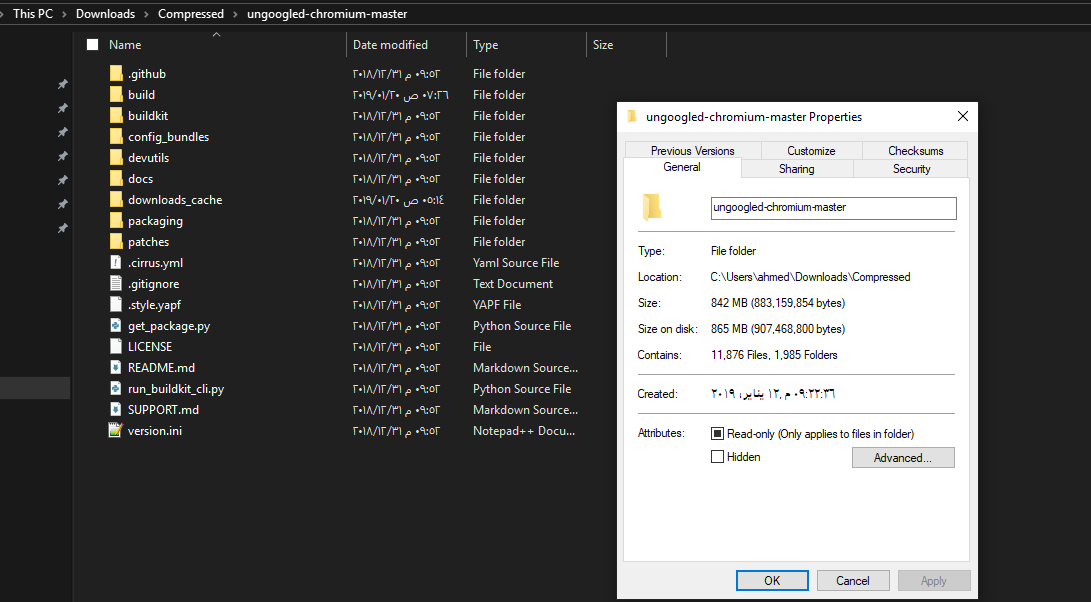
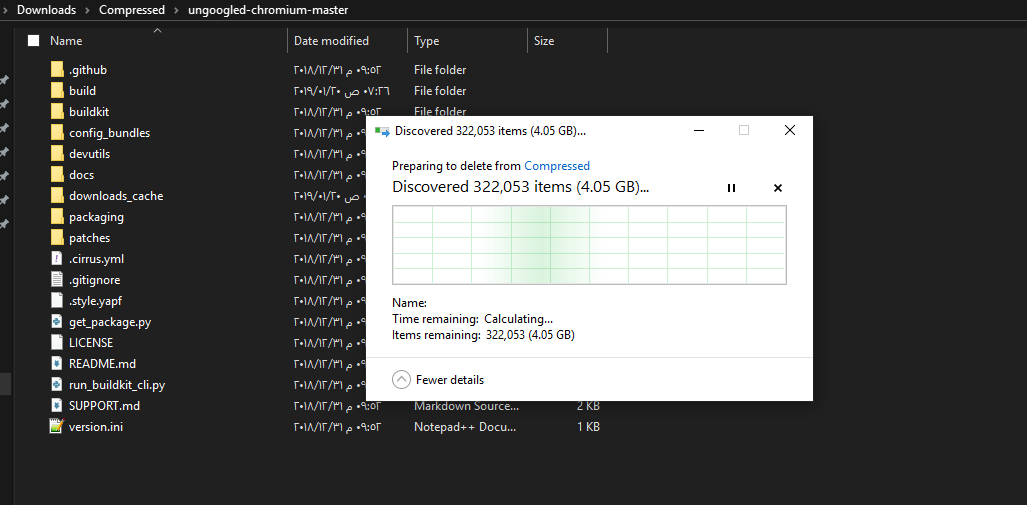
the process from the script messed up my ssd now i have 2 src folder in the same location properties says it's about 900mb folder the delete process which takes half an hour says it's about 12gb and chkdsk command doesn't help

 ahmed-abdelrazek
on 19 Jan 2019
ahmed-abdelrazek
on 19 Jan 2019
My issue with 71.0.3578.98-2 is not about extracting the file, that works fine however, like what happens to @yikjin it fails to patch a bunch of files down the line:
`
patching file chrome/browser/chrome_browser_main_win.cc
Hunk #2 FAILED at 394.
Hunk #3 succeeded at 548 with fuzz 1 (offset -4 lines).
1 out of 3 hunks FAILED -- saving rejects to file chrome/browser/chrome_browser_main_win.cc.rej
patching file chrome/browser/extensions/BUILD.gn
Hunk #1 succeeded at 776 (offset -32 lines).
patching file chrome/browser/prefs/browser_prefs.cc
Hunk #1 succeeded at 111 (offset 2 lines).
Hunk #2 FAILED at 300.
Hunk #3 FAILED at 503.
Hunk #4 succeeded at 586 (offset 16 lines).
Hunk #5 FAILED at 710.
3 out of 5 hunks FAILED -- saving rejects to file chrome/browser/prefs/browser_prefs.cc.rej
patching file chrome/browser/profiles/off_the_record_profile_io_data.cc
Hunk #1 FAILED at 177.
1 out of 1 hunk FAILED -- saving rejects to file chrome/browser/profiles/off_the_record_profile_io_data.cc.rej
patching file chrome/browser/profiles/profile_impl_io_data.cc
Hunk #1 FAILED at 378.
1 out of 1 hunk FAILED -- saving rejects to file chrome/browser/profiles/profile_impl_io_data.cc.rej
patching file chrome/browser/ui/BUILD.gn
Hunk #1 succeeded at 381 (offset -460 lines).
Hunk #2 succeeded at 2145 (offset -421 lines).
patching file chrome/browser/ui/browser_dialogs.h
Hunk #2 succeeded at 292 (offset 1 line).
patching file chrome/browser/ui/webui/settings/chrome_cleanup_handler.cc
Hunk #1 succeeded at 281 (offset 6 lines).
patching file chrome/browser/ui/webui/settings/md_settings_ui.cc
Hunk #2 succeeded at 256 (offset 2 lines).
patching file chrome/common/safe_browsing/BUILD.gn
Hunk #1 FAILED at 95.
1 out of 1 hunk FAILED -- saving rejects to file chrome/common/safe_browsing/BUILD.gn.rej
patching file chrome/renderer/url_loader_throttle_provider_impl.cc
Hunk #1 succeeded at 112 (offset 2 lines).
Hunk #2 succeeded at 166 with fuzz 2 (offset 9 lines).
Traceback (most recent call last):
File "ungoogled_packaging\build.py", line 187, in <module>
main()
File "ungoogled_packaging\build.py", line 164, in main
buildkit.patches.patch_paths_by_bundle(bundle), source_tree, patch_bin_path=None)
File "C:\Users\TCB13\Desktop\ungoogled-chromium-71.0.3578.98-2\build\src\ungoogled_packaging\buildkit\patches.py", line 95, in apply_patches
subprocess.run(cmd, check=True)
File "C:\Program Files\Python36\lib\subprocess.py", line 418, in run
output=stdout, stderr=stderr)
subprocess.CalledProcessError: Command '['C:\\Users\\TCB13\\Desktop\\ungoogled-chromium-71.0.3578.98-2\\build\\src\\third_party\\git\\usr\\bin\\patch.exe', '-p1', '--ignore-whitespace', '-i', 'C:\\Users\\TCB13\\Desktop\\ungoogled-chromium-71.0.3578.98-2\\build\\src\\ungoogled_packaging\\patches\\ungoogled-chromium\\windows\\windows-fix-building-without-safebrowsing.patch', '-d', 'C:\\Users\\TCB13\\Desktop\\ungoogled-chromium-71.0.3578.98-2\\build\\src', '--no-backup-if-mismatch', '--forward']' returned non-zero exit status 1.
 TCB13
on 6 Feb 2019
TCB13
on 6 Feb 2019
Apparently disabling the Safe Browsing patch seems to make the build work, according to this.
arutr
on 6 Feb 2019
@arutr Disabling that patches seem to work...
Update: Also installed depot_tools from https://storage.googleapis.com/chrome-infra/depot_tools.zip (as explained here https://chromium.googlesource.com/chromium/src/+/64.0.3282.168/docs/windows_build_instructions.md#install). -- useless tried with it and without it, same result bellow.
Here is my current build process, you might want to take a look @yikjin :
(All commands bellow run as Admin)
- For faster build you can preemptively disable:
- Windows Defender: Run
gpedit.msc>Local Group Policy Editor; Browse the following pathComputer Configuration > Administrative Templates > Windows Components > Windows Defender Antivirus; Double-click theTurn off Windows Defender Antivirus policy; SelectEnabled` and apply your changes - Windows Update: Control Panel > Administrative Tools > Services; Scroll down to
Windows Update, right-click on the process, click onPropertiesand selectDisabled - Install:
- 7z1806-x64.msi
- python-2.7.15.amd64.msi (add it to path)
- python-3.6.5-amd64.exe (don't add to path; enable py launcher)
- Run
pip install pypiwin32 - Install VSCode (vs_community__735157147.1549731593.exe) with the following components:
- Microsoft.VisualStudio.Workload.NativeDesktop
- microsoft.visualstudio.component.debugger.justintime
- microsoft.visualstudio.component.vc.diagnostictools
- microsoft.visualstudio.component.vc.cmake.project
- microsoft.visualstudio.component.vc.testadapterforboosttest
- microsoft.visualstudio.component.vc.testadapterforgoogletest
- microsoft.component.vc.runtime.ucrtsdk
- microsoft.visualstudio.component.vc.atlmfc
- microsoft.visualstudio.component.vc.cli.support
- microsoft.visualstudio.component.vc.140
- component.linux.cmake
- Open
Settings > Apps & features > Windows SDK 10.0.17763.132 > Modifyand enableDebugging Tools For Windows - Download https://github.com/Eloston/ungoogled-chromium/archive/71.0.3578.98-2.zip and extract it to
c:\ungoogled-chromium-71.0.3578.98-2 - Add a new system variable
DEPOT_TOOLS_WIN_TOOLCHAINwith value0 - Disable safe-browsing patches by:
- Remove lines related to it from
C:\ungoogled-chromium-71.0.3578.98-2\config_bundles\windows\patch_order.list - Remove lines related to it from
C:\ungoogled-chromium-71.0.3578.98-2\config_bundles\common\patch_order.list - Search in the folder
C:\ungoogled-chromium-71.0.3578.98-2\patchesforsafeand delete all files related to safe search - Run:
mkdir build\src
py get_package.py windows build\src\ungoogled_packaging
cd build\src
- Search once again for
safeinsidebuild\srcand also remove any files there - Finally build by running
py ungoogled_packaging\build.py
It goes almost until the end (15581/19963) and then:
In file included from ../..\third_party/skia/include/core/../private/SkOnce.h:13:
../..\third_party/skia/include/core/SkTypes.h(13,10): fatal error: 'SkUserConfig.h' file not found
#include "SkUserConfig.h"
^~~~~~~~~~~~~~~~
1 warning and 1 error generated.
[15581/19963] CXX obj/services/resource_coordinator/public/mojom/mojom_blink/mojom_blink_jumbo_1.obj
ninja: build stopped: subcommand failed.
C:\ungoogled-chromium-71.0.3578.98-2\build\src>exit
Traceback (most recent call last):
File "ungoogled_packaging\build.py", line 187, in <module>
main()
File "ungoogled_packaging\build.py", line 183, in main
'chromedriver')
File "ungoogled_packaging\build.py", line 65, in _run_build_process
**kwargs)
File "C:\Users\TCB13\AppData\Local\Programs\Python\Python36\lib\subprocess.py", line 418, in run
output=stdout, stderr=stderr)
subprocess.CalledProcessError: Command '('cmd.exe', '/k')' returned non-zero exit status 1.
This setup was done on a fresh install of Windows 10:
C:\Users\TCB13>systeminfo | findstr /B /C:"OS Name" /C:"OS Version"
OS Name: Microsoft Windows 10 Enterprise LTSC
OS Version: 10.0.17763 N/A Build 17763
C:\Users\TCB13>python --version
Python 2.7.15
C:\Users\TCB13>py --version
Python 3.6.5
Is there anything broken with skia? Is this a known issue or am I failing at some point.
TCB13
on 9 Feb 2019
Looks like I'm not properly disabling the safe browser, how am I supposed to do that?
TCB13
on 17 Feb 2019
4. Disable safe-browsing patches by:
- Search in the folder
C:\ungoogled-chromium-71.0.3578.98-2\patchesforsafeand delete all files related to safe search
you dont have to delete any files. Only edit the patch.list and gn_flags.map files
- Run:
mkdir build\src py get_package.py windows build\src\ungoogled_packaging cd build\src
- Search once again for
safeinsidebuild\srcand also remove any files there- Finally build by running
py ungoogled_packaging\build.py
Step 9. is not neccessary, because step 8. copies your changes in step 7. into build\src\ungoogled_packaging.
Here the steps for the build process of ungoogled-chromium 71.0.3578.98-2:
checkout tagged version 71.0.3578.98-2 of ungoogled-chromium
delete build/src folder completely (after prior build process)
edit like described for deleting all "safe-browsing" references:
config_bundleswindows\patch_order.list
config_bundles\common\patch_order.list
config_bundles\common\gn_flags.mapRun
mkdir build\src
py get_package.py windows build\src\ungoogled_packaging
cd build\src
py ungoogled_packaging\build.py
py ungoogled_packaging\package.py
thats all
 TN0X
on 22 Feb 2019
TN0X
on 22 Feb 2019
@TN0X should I worry about this error?
[546/20133] ACTION //chrome/test/chromedriver:embed_version_in_cpp(//build/toolchain/win:win_clang_x64)
ERROR:root:Git error: rc=0, output='
TCB13
on 22 Feb 2019
@TN0X should I worry about this error?
`
[546/20133] ACTION //chrome/test/chromedriver:embed_version_in_cpp(//build/toolchain/win:win_clang_x64)
ERROR:root:Git error: rc=0, output='
No, I got the same error message at this point.
TN0X
on 22 Feb 2019
@TN0X I finally managed to get a working build!! Only possible with your precious help!
I did a few things differently this time:
- Used PowerShell instead of cmd.exe to compile it
- Applied your patches using Notepad instead of Subime Text (maybe it was messing line endings?)
- I was downloading the tag as a zip from github, this time I did:
git clone https://github.com/Eloston/ungoogled-chromium.git
git checkout tags/71.0.3578.98-2
Yesterday I was getting a bunch of nonsense erros as you probably saw here https://github.com/Eloston/ungoogled-chromium/issues/675#issuecomment-466378877.
Not sure if there was some issue with that zip download or the path in my computer was way too big, because it used to beC:\ungoogled-chromium\71.0.3578.98-2and this time, it was justC:\ungoogled-chromium.
Thank you very much for all your help!
TCB13
on 22 Feb 2019
safe-browsing patches needs to be updated for windows, i will see what i can do ;)
 intika
on 23 Feb 2019
intika
on 23 Feb 2019
i guess this would be solved here https://github.com/Eloston/ungoogled-chromium/issues/619 later on @Eloston can you close this
intika
on 23 Feb 2019
Closing per @intika's request.
 Eloston
on 24 Feb 2019
Eloston
on 24 Feb 2019
Related issues
 MilesFM
·
4Comments
MilesFM
·
4Comments
 brianegan
·
3Comments
brianegan
·
3Comments
 usernamenotexist
·
4Comments
usernamenotexist
·
4Comments
 Chilcout
·
3Comments
Chilcout
·
3Comments
 lipici
·
3Comments
lipici
·
3Comments