Understrap: Keeping Theme Files Updated with WooCommerce
Ahoy hoy!
I'm wondering what the best method to keep the theme files up to date with the latest release of WooCommerce. I'm currently running:
WooCommerce: 3.4.2
Understrap: 0.8.2
The Woo files with the theme are 3.3.0 but Woo is at 3.4.0. Not sure if this is causing the issues.
The newest version has some layout issues throughout the cart/checkout pages. I've tried simply removing the woocommerce directory from the theme but that makes the layout go bonkers.
Any suggestions?
Thanks!
Q
 virtualimage
All 3 comments
Hello!
WooCommerce 3.4.0 Templates
I have submitted a PR with the updated WooCommerce templates appropriate for 3.4.0. This is currently awaiting review, approval, and merge into Understrap. If you would like to use them now you may view that PR and take the files as needed.
https://github.com/understrap/understrap/pull/700
Also, we recently added some CSS to fix billing field issues:
https://github.com/understrap/understrap/commit/ba5d94d52a1b7b59982efaff2f28b57e73cdc9d4
Keeping Files Updates
If you aren't editing the files you can simply replace the whole woocommerce folder within your theme with the updated files, overwriting the previous ones. If you are making custom edits beyond the provided files from Understrap I recommend using a code compare program.
Personally, I use Meld which is Windows/Linux (they have mac ports that are unsupported officially) - I have no issues with it. You can check the alternatives, which also include some macOS options.
Typically what I do:
- Put the new files in a folder somewhere on your computer
- Open meld, select "Directory Comparison" (3 dropdowns will appear under the button). In the first drop-down select your theme's
woocommercefolder. In the second drop-down select the folder where the new templates are.
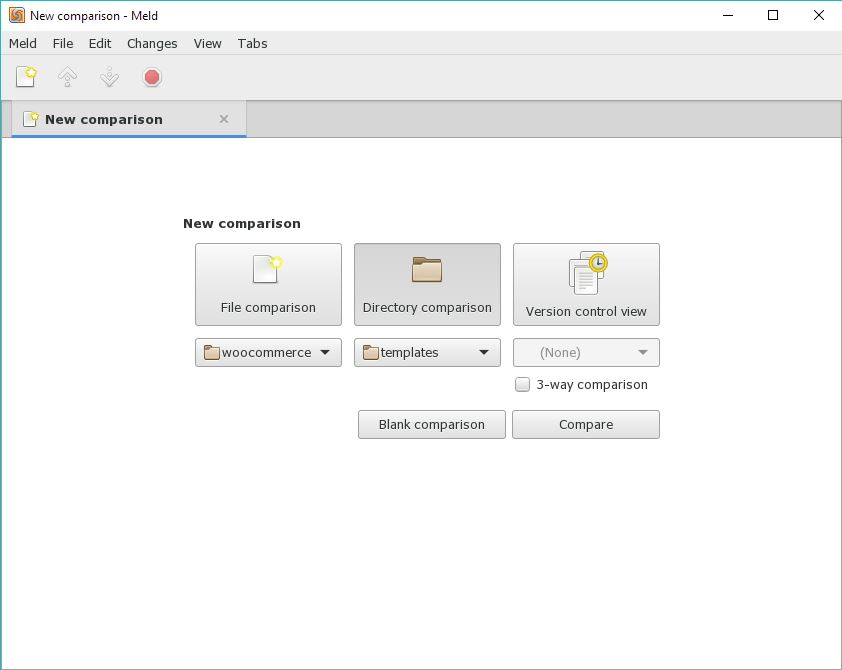
- Click "Compare" button.
- You will now see 2 columns, one for each folder with a tree breakdown of all the files in the folders.
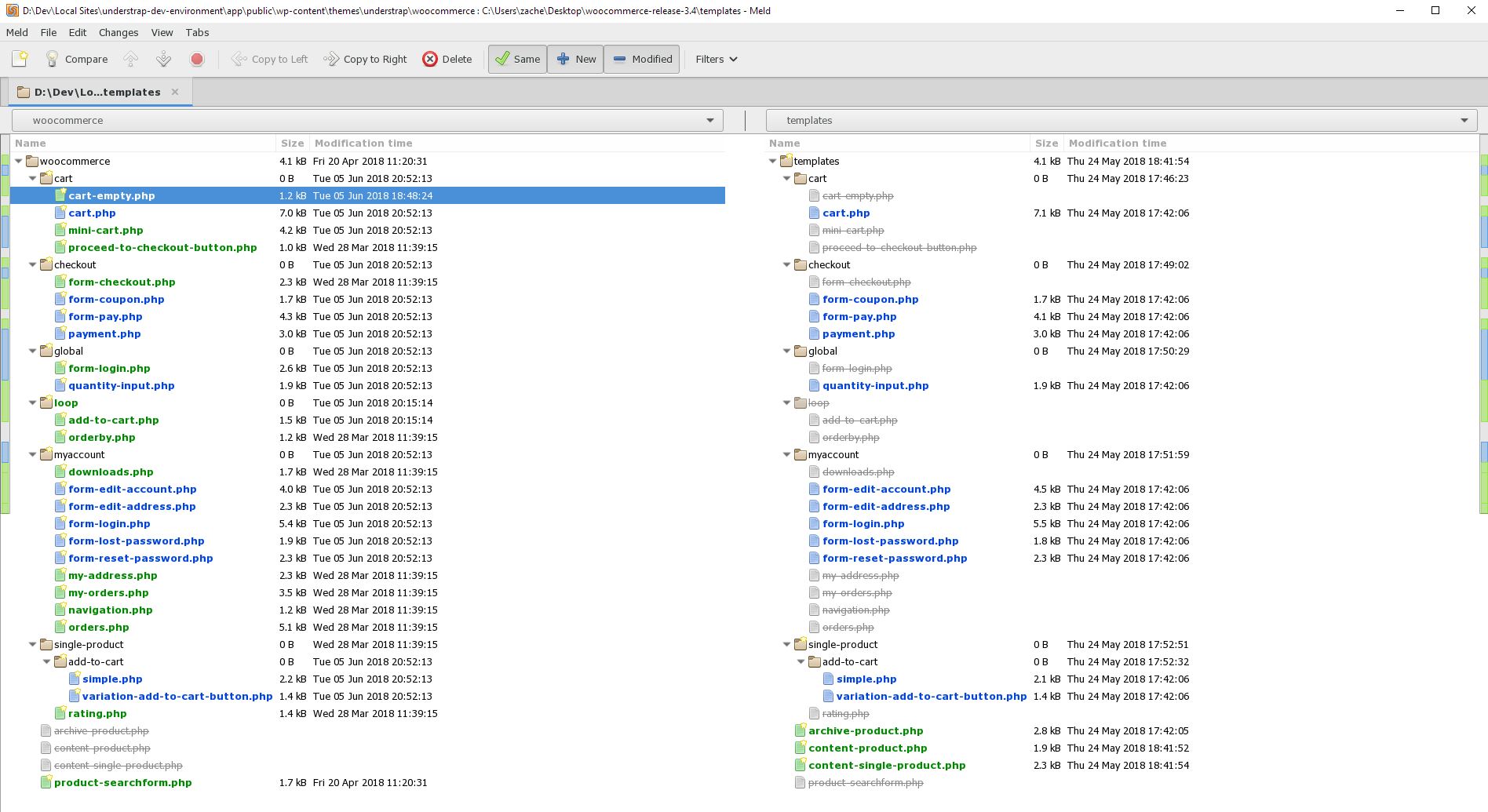
- Notice there are files with strike-through in the right column. I have removed the files that I do not need to update from the temporary update files. I think this makes it easier.
- You can go file-by-file and review the differences. It is most likely that you've added custom edits to only a few files. If you can remember which files you've edited then only edit those files and replace the rest completely with the new files.
- After double-clicking a file (I only double-click the left columns files), you will see something similar to a GitCompare view. The file from your theme will be on the left, and the new on the right.
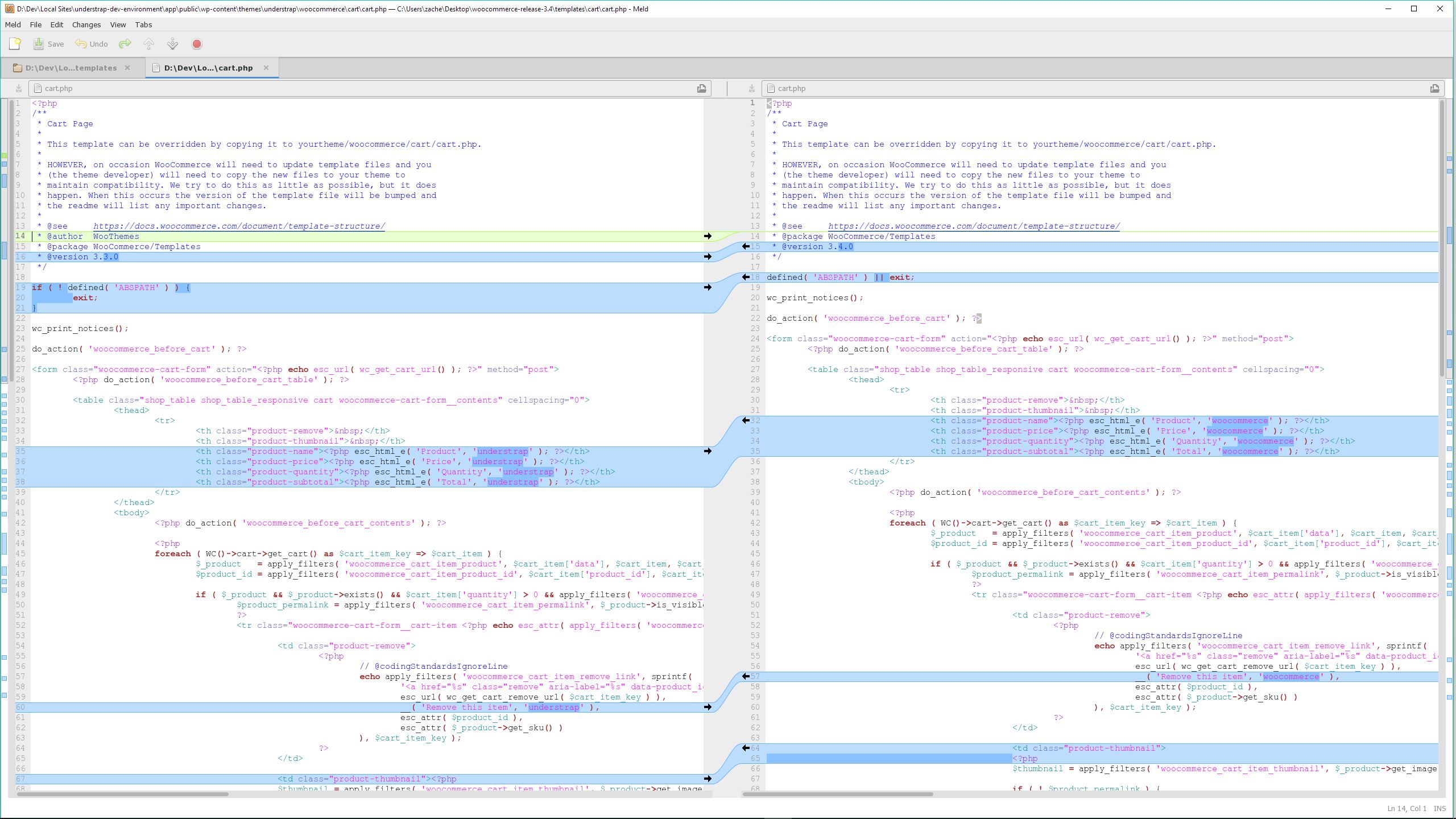
- Review each difference. Meld will allow you to import in the edited lines from the new file with a simple click. There are arrows in the middle of the columns which will allow you to import each changed line, either moving it from the right to the left column, or left to the right column.
- Take your time, be aware of each line. Don't rely on just the arrows. Sometimes it is easier to just copy/paste the bits of changes you need, and sometimes it is easier to just type them in.
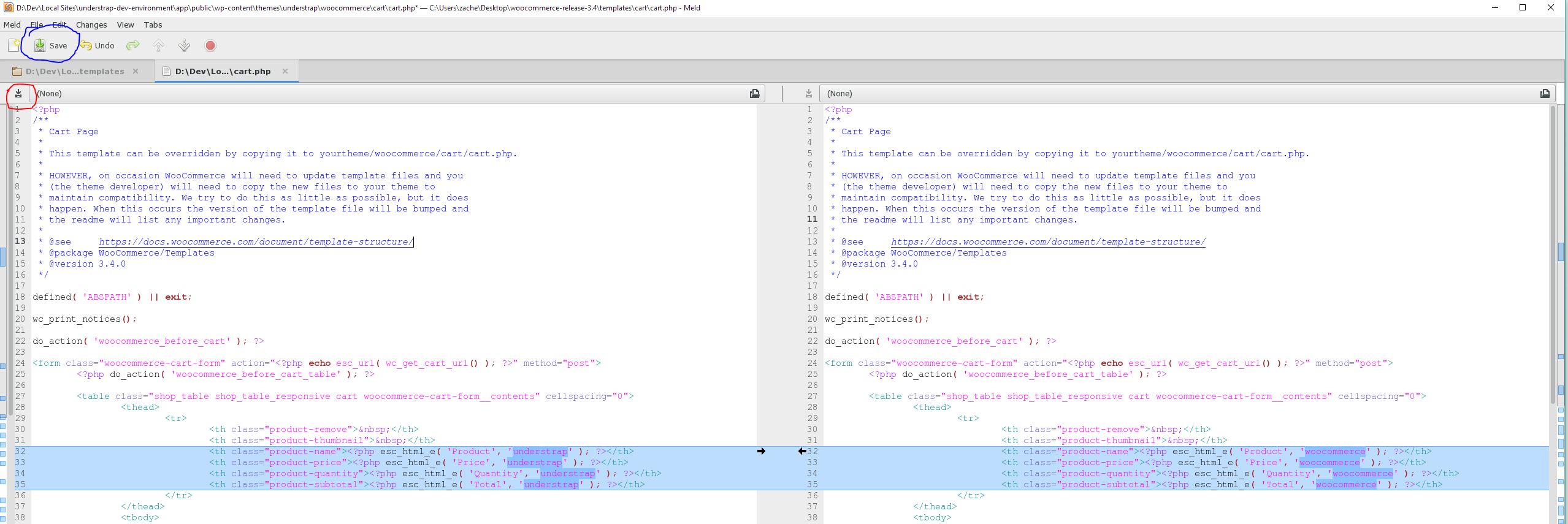
- When finished with the file there is a save button for each column. You can use these to make sure you have made edits to the correct file. The button will be shaded and unclickable if there were no edits made, which should be in the column where your new reference file is. If the file has been edited it will be unshaded and clickable, which should be your theme's version of the file _(circled red)_. Click that button to save. There is also a save button up top which will save both files _(circled blue)_.
 ZacharyElkins
on 20 Jun 2018
ZacharyElkins
on 20 Jun 2018
Thank you, Zachary! Your description is outstanding. Very helpful!
virtualimage
on 20 Jun 2018
+1 Thanks Zachary. Very thorough. I've been using your updated Woocommerce 3.4.0 files with a straight replacement and everything is working fine.
 noelspringer
on 21 Jun 2018
noelspringer
on 21 Jun 2018
Related issues
 sebgates
·
4Comments
sebgates
·
4Comments
 fahaddsheikh
·
5Comments
ZacharyElkins
·
3Comments
fahaddsheikh
·
5Comments
ZacharyElkins
·
3Comments
 davidshq
·
4Comments
davidshq
·
4Comments
 tim-field
·
4Comments
tim-field
·
4Comments
Most helpful comment
Hello!
WooCommerce 3.4.0 Templates
I have submitted a PR with the updated WooCommerce templates appropriate for 3.4.0. This is currently awaiting review, approval, and merge into Understrap. If you would like to use them now you may view that PR and take the files as needed.
https://github.com/understrap/understrap/pull/700
Also, we recently added some CSS to fix billing field issues:
https://github.com/understrap/understrap/commit/ba5d94d52a1b7b59982efaff2f28b57e73cdc9d4
Keeping Files Updates
If you aren't editing the files you can simply replace the whole
woocommercefolder within your theme with the updated files, overwriting the previous ones. If you are making custom edits beyond the provided files from Understrap I recommend using a code compare program.Personally, I use Meld which is Windows/Linux (they have mac ports that are unsupported officially) - I have no issues with it. You can check the alternatives, which also include some macOS options.
Typically what I do:
woocommercefolder. In the second drop-down select the folder where the new templates are.