Undecimus: SE 2/iOS 13.5-Unable to resolve lzma/ldid to a deb
Describe the bug
A clear and concise description of what the bug is and what you expected to happen.
To Reproduce
Steps to reproduce the behavior:
- Go to '...'
- Click on '....'
- Scroll down to '....'
- See error
Screenshots
If applicable, add screenshots to help explain your problem.
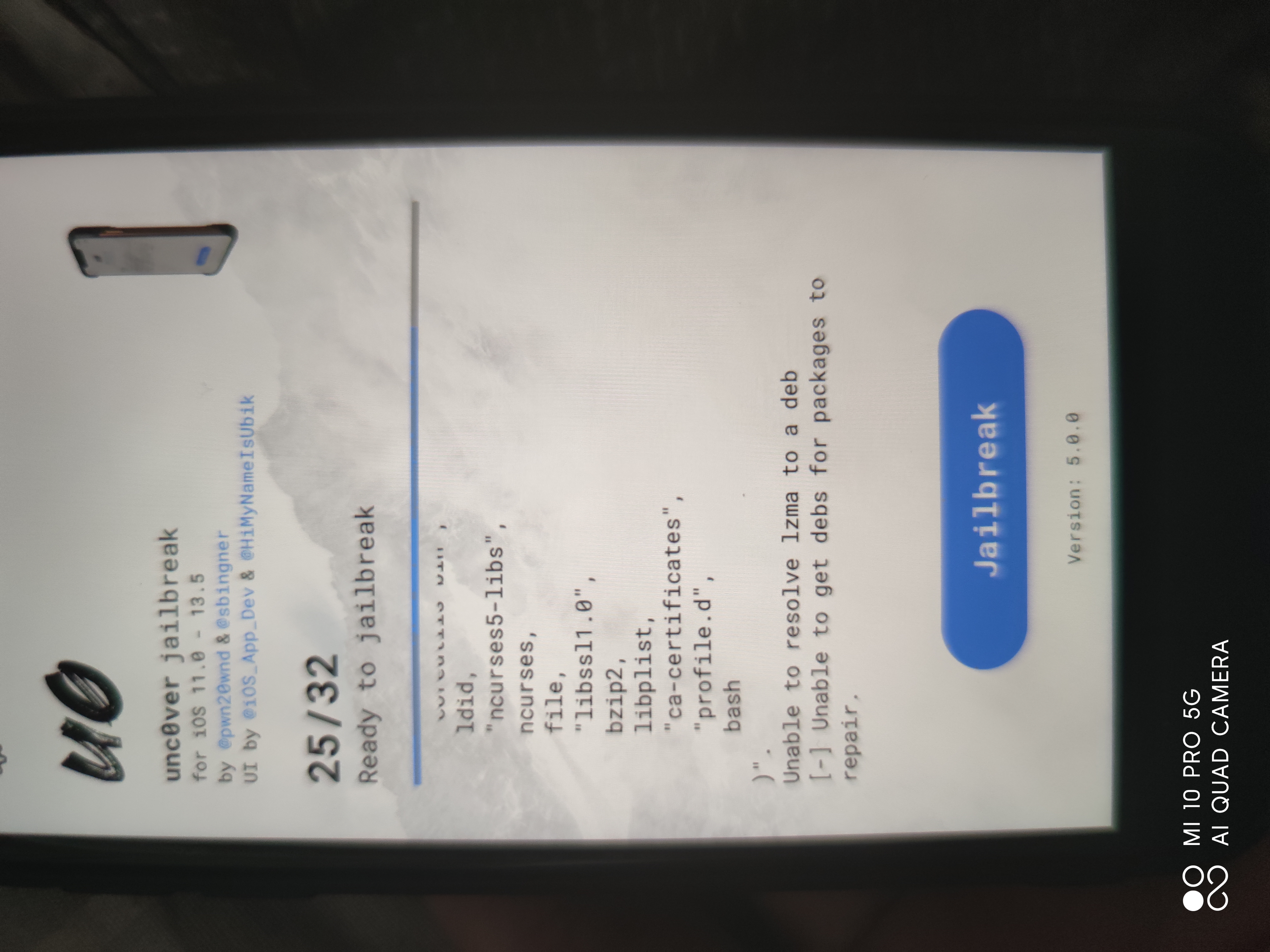
Device (please complete the following information):
- iOS Version: 13.5
- iOS Device: se 2
- unc0ver Version: 5.0.0
Place an "x" between the brackets if true:
- x this is a bug others will be able to reproduce
- [ ] this issue is present with all tweaks uninstalled(except for default packages) or disabled
- [ ] this issue is present after a rootfs restore
- x this issue is present on the latest version of unc0ver
Logs
[] unc0ver is not for sale
[] If you purchased unc0ver, please report the seller
[] Get unc0ver for free at https://unc0ver.dev
[] Configured to share anonymous OS crash logs
[] Machine Name: iPhone12,8
[] Model Name: D79AP
[] Kernel Version: Darwin Kernel Version 19.5.0: Tue Apr 28 22:25:17 PDT 2020; root:xnu-6153.122.1~1/RELEASE_ARM64_T8030
[] Kernel Page Size: 0x4000
[] System Version: iOS 13.5 (Stable) (Build: 17F75)
[] Stage (1): Ensuring resources
[+] Ensured resources
[] Stage (2): Exploiting kernel
[haxx] We in quarantine but still out here!
[+] Exploited kernel
[] Stage (3): Initializing
[] Stage (4): Finding kernel slide
[+] Found kernel slide: 0x23284000
[] Stage (5): Finding kernel offsets
[+] Found kernel offsets
[] Stage (6): Finding data structures
[+] Found data structures
[] Stage (7): Obtaining root priveleges
[+] Obtained root priveleges
[] Stage (8): Disabling sandbox
[+] Disabled sandbox
[] Stage (9): Updating host port
[+] Updated host port
[] Stage (10): Enabling dynamic codesign
[+] Enabled dynamic codesigning
[] Stage (12): Saving kernel task port
[+] Saved kernel task port
[] Stage (13): Saving kernel task info
[+] Saved kernel task info
[] Stage (14): Disabling codesigning
[+] Disabled codesigning
[] Stage (15): Obtaining entitlements
[+] Obtained entitlements
[] Stage (16): Connecting AppleMobileFileIntegrity
[+] Connected to AppleMobileFileIntegrity
[] Stage (17): Purging software updates
: Performing command: PurgeSuspendedUpdate
: Performing se command: PurgeSuspendedUpdate
[+] Purged software updates
[] Stage (18): Setting boot-nonce generator
[+] Set boot-nonce generator
[] Stage (20): Remounting root filesystem
[+] Remounted root filesystem
[] Stage (21): Preparing filesystem
[+] Prepared filesystem
[+] Verified "./usr/lib/substitute-inserter.dylib"
[+] Verified "./usr/libexec/substitute-reload"
[+] Verified "./usr/libexec/substituted"
[+] Verified "./usr/share/entitlements/inject.xml"
[+] Verified "./usr/share/substitute/signcert.p12"
[] No errors in verifying checksums
[] Stage (23): Resolving dependencies
[] Resource Pkgs: "(
firmware,
grep,
"ncurses5-libs",
"coreutils-bin",
"profile.d",
coreutils,
ncurses,
readline,
sed,
bash,
bzip2,
diffutils,
file,
findutils,
gzip,
libplist,
"ca-certificates",
"libssl1.0",
ldid,
lzma,
xz,
tar,
dpkg,
"science.xnu.substituted",
launchctl,
"com.ex.substitute"
)".
[+] Resolved dependencies
[] Stage (24): Verifying resources
[] Need to repair "profile.d".
[] Need to repair "bash".
[] Need to repair "diffutils".
[] Need to repair "ncurses5-libs".
[] Need to repair "ldid".
[] Need to repair "libssl1.0".
[] Need to repair "com.ex.substitute".
[] Need to repair "grep".
[] Need to repair "launchctl".
[] Need to repair "dpkg".
[] Need to repair "readline".
[] Need to repair "gzip".
[] Need to repair "tar".
[] Need to repair "libplist".
[] Need to repair "bzip2".
[] Need to repair "xz".
[] Need to repair "ca-certificates".
[] Need to repair "findutils".
[] Need to repair "lzma".
[] Need to repair "coreutils-bin".
[] Need to repair "coreutils".
[] Need to repair "ncurses".
[] Need to repair "sed".
[] Need to repair "file".
[+] Verified resources
[] Stage (25): Extracting resources
[] (Re-)Extracting "(
"profile.d",
bash,
diffutils,
"ncurses5-libs",
ldid,
"libssl1.0",
"com.ex.substitute",
grep,
launchctl,
dpkg,
readline,
gzip,
libplist,
bzip2,
xz,
"ca-certificates",
findutils,
tar,
lzma,
"coreutils-bin",
coreutils,
ncurses,
sed,
file
)".
Unable to resolve ldid to a deb
[-] Unable to get debs for packages to repair.
[] Stage (1): Ensuring resources
[+] Ensured resources
[] Stage (2): Exploiting kernel
[haxx] We in quarantine but still out here!
[+] Exploited kernel
[] Stage (3): Initializing
[] Stage (4): Finding kernel slide
[+] Found kernel slide: 0x23284000
[] Stage (5): Finding kernel offsets
[+] Found kernel offsets
[] Stage (6): Finding data structures
[+] Found data structures
[] Stage (7): Obtaining root priveleges
[+] Obtained root priveleges
[] Stage (8): Disabling sandbox
[+] Disabled sandbox
[] Stage (9): Updating host port
[+] Updated host port
[] Stage (10): Enabling dynamic codesign
[+] Enabled dynamic codesigning
[] Stage (12): Saving kernel task port
[+] Saved kernel task port
[] Stage (13): Saving kernel task info
[+] Saved kernel task info
[] Stage (14): Disabling codesigning
[+] Disabled codesigning
[] Stage (15): Obtaining entitlements
[+] Obtained entitlements
[] Stage (16): Connecting AppleMobileFileIntegrity
[+] Connected to AppleMobileFileIntegrity
[] Stage (17): Purging software updates
: Performing command: PurgeSuspendedUpdate
: Performing se command: PurgeSuspendedUpdate
[+] Purged software updates
[] Stage (18): Setting boot-nonce generator
[+] Set boot-nonce generator
[] Stage (20): Remounting root filesystem
[+] Remounted root filesystem
[] Stage (21): Preparing filesystem
[+] Prepared filesystem
[+] Verified "./usr/lib/substitute-inserter.dylib"
[+] Verified "./usr/libexec/substitute-reload"
[+] Verified "./usr/libexec/substituted"
[+] Verified "./usr/share/entitlements/inject.xml"
[+] Verified "./usr/share/substitute/signcert.p12"
[] No errors in verifying checksums
[] Stage (23): Resolving dependencies
[] Resource Pkgs: "(
firmware,
grep,
"ncurses5-libs",
"coreutils-bin",
"profile.d",
coreutils,
ncurses,
readline,
sed,
bash,
bzip2,
diffutils,
file,
findutils,
gzip,
libplist,
"ca-certificates",
"libssl1.0",
ldid,
lzma,
xz,
tar,
dpkg,
"science.xnu.substituted",
launchctl,
"com.ex.substitute"
)".
[+] Resolved dependencies
[] Stage (24): Verifying resources
[] Need to repair "grep".
[] Need to repair "file".
[] Need to repair "lzma".
[] Need to repair "findutils".
[] Need to repair "tar".
[] Need to repair "launchctl".
[] Need to repair "readline".
[] Need to repair "ldid".
[] Need to repair "diffutils".
[] Need to repair "profile.d".
[] Need to repair "ncurses".
[] Need to repair "bzip2".
[] Need to repair "coreutils-bin".
[] Need to repair "libssl1.0".
[] Need to repair "ncurses5-libs".
[] Need to repair "dpkg".
[] Need to repair "bash".
[] Need to repair "gzip".
[] Need to repair "coreutils".
[] Need to repair "ca-certificates".
[] Need to repair "xz".
[] Need to repair "libplist".
[] Need to repair "sed".
[] Need to repair "com.ex.substitute".
[+] Verified resources
[] Stage (25): Extracting resources
[] (Re-)Extracting "(
file,
lzma,
findutils,
tar,
ldid,
diffutils,
bzip2,
"coreutils-bin",
"libssl1.0",
ncurses,
"ncurses5-libs",
dpkg,
"profile.d",
gzip,
bash,
grep,
"ca-certificates",
coreutils,
xz,
libplist,
readline,
launchctl,
sed,
"com.ex.substitute"
)".
Unable to resolve lzma to a deb
[-] Unable to get debs for packages to repair.
[] Stage (1): Ensuring resources
[+] Ensured resources
[] Stage (2): Exploiting kernel
[haxx] We in quarantine but still out here!
[+] Exploited kernel
[] Stage (3): Initializing
[] Stage (4): Finding kernel slide
[+] Found kernel slide: 0x23284000
[] Stage (5): Finding kernel offsets
[+] Found kernel offsets
[] Stage (6): Finding data structures
[+] Found data structures
[] Stage (7): Obtaining root priveleges
[+] Obtained root priveleges
[] Stage (8): Disabling sandbox
[+] Disabled sandbox
[] Stage (9): Updating host port
[+] Updated host port
[] Stage (10): Enabling dynamic codesign
[+] Enabled dynamic codesigning
[] Stage (12): Saving kernel task port
[+] Saved kernel task port
[] Stage (13): Saving kernel task info
[+] Saved kernel task info
[] Stage (14): Disabling codesigning
[+] Disabled codesigning
[] Stage (15): Obtaining entitlements
[+] Obtained entitlements
[] Stage (16): Connecting AppleMobileFileIntegrity
[+] Connected to AppleMobileFileIntegrity
[] Stage (17): Purging software updates
: Performing command: PurgeSuspendedUpdate
: Performing se command: PurgeSuspendedUpdate
[+] Purged software updates
[] Stage (18): Setting boot-nonce generator
[+] Set boot-nonce generator
[] Stage (20): Remounting root filesystem
[+] Remounted root filesystem
[] Stage (21): Preparing filesystem
[+] Prepared filesystem
[+] Verified "./usr/lib/substitute-inserter.dylib"
[+] Verified "./usr/libexec/substitute-reload"
[+] Verified "./usr/libexec/substituted"
[+] Verified "./usr/share/entitlements/inject.xml"
[+] Verified "./usr/share/substitute/signcert.p12"
[] No errors in verifying checksums
[] Stage (23): Resolving dependencies
[] Resource Pkgs: "(
firmware,
grep,
"ncurses5-libs",
"coreutils-bin",
"profile.d",
coreutils,
ncurses,
readline,
sed,
bash,
bzip2,
diffutils,
file,
findutils,
gzip,
libplist,
"ca-certificates",
"libssl1.0",
ldid,
lzma,
xz,
tar,
dpkg,
"science.xnu.substituted",
launchctl,
"com.ex.substitute"
)".
[+] Resolved dependencies
[] Stage (24): Verifying resources
[] Need to repair "ncurses5-libs".
[] Need to repair "launchctl".
[] Need to repair "coreutils".
[] Need to repair "gzip".
[] Need to repair "dpkg".
[] Need to repair "diffutils".
[] Need to repair "xz".
[] Need to repair "tar".
[] Need to repair "com.ex.substitute".
[] Need to repair "readline".
[] Need to repair "sed".
[] Need to repair "lzma".
[] Need to repair "findutils".
[] Need to repair "coreutils-bin".
[] Need to repair "grep".
[] Need to repair "ldid".
[] Need to repair "libssl1.0".
[] Need to repair "ncurses".
[] Need to repair "file".
[] Need to repair "bzip2".
[] Need to repair "libplist".
[] Need to repair "ca-certificates".
[] Need to repair "profile.d".
[] Need to repair "bash".
[+] Verified resources
[] Stage (25): Extracting resources
[] (Re-)Extracting "(
coreutils,
launchctl,
dpkg,
diffutils,
xz,
tar,
"com.ex.substitute",
readline,
sed,
gzip,
lzma,
findutils,
grep,
"coreutils-bin",
ldid,
"ncurses5-libs",
ncurses,
file,
"libssl1.0",
bzip2,
libplist,
"ca-certificates",
"profile.d",
bash
)".
Unable to resolve lzma to a deb
[-] Unable to get debs for packages to repair.
 wqk317
All 25 comments
Are you connected to the internet in some way?
 geoff-nixon
on 24 May 2020
geoff-nixon
on 24 May 2020
Are you connected to the internet in some way?
Yes, I'm connected, but you remind me that it may be the cause of the firewall in mainland China
wqk317
on 24 May 2020
Are you connected to the internet in some way?
Yes, I'm connected, but you remind me that it may be the cause of the firewall in mainland China
But I used the VPN still have this situation
 q56535
on 24 May 2020
q56535
on 24 May 2020
Are you connected to the internet in some way?
Yes, I'm connected, but you remind me that it may be the cause of the firewall in mainland China
But I used the VPN still have this situation
都是大陆的就不拽英文了,我试了下,不联网确实报一样的错,但是你说挂了梯也报错,会不会是节点的问题啊?你换个节点试试,确认节点能用,我这边清除数据了,智障爱思助手备份的竟然不能恢复。。。🌶️🐔
wqk317
on 24 May 2020
节点是没有问题的,我测试过了
q56535
on 24 May 2020
It looks like you had a previous JB?
Use Cydia Eraser and then re-try.
geoff-nixon
on 24 May 2020
No,my phone never JB,this is frist
q56535
on 24 May 2020
It looks like you had a previous JB?
Use Cydia Eraser and then re-try.
It's my first JB, too, and I've tried to erase the data, and the same
wqk317
on 24 May 2020
我也存在这个报错,楼主现在解决了吗?
I have this error...
 result-bit
on 24 May 2020
result-bit
on 24 May 2020
我也存在这个报错,楼主现在解决了吗?
I have this error...
@q56535 @result-bit
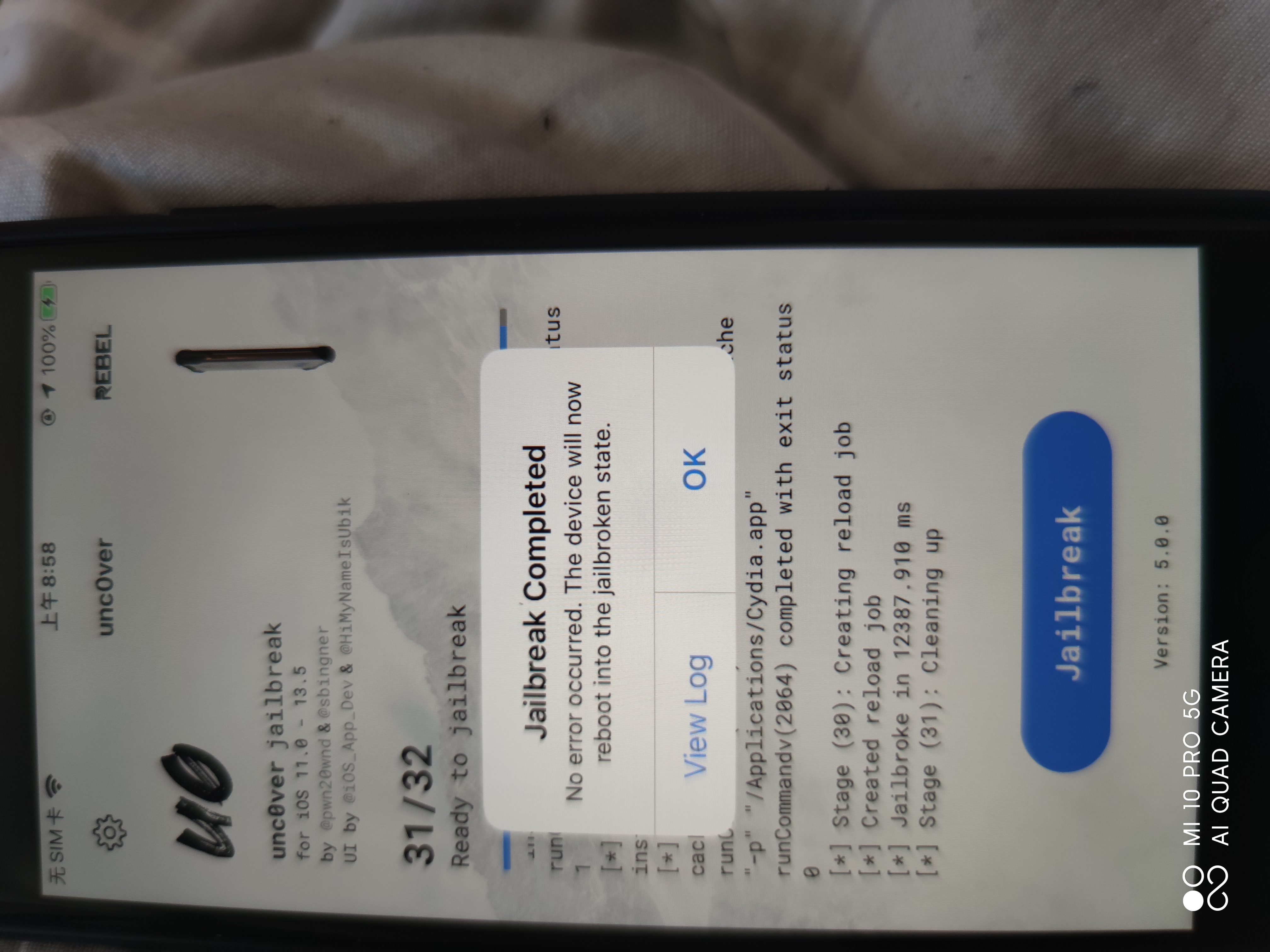
换签名搞定了。。。应该是爱思助手的锅。。。用altstore签名的没问题
如图:
wqk317
on 24 May 2020
Seems this issue is still occurring for many users; not sure why this issue was closed. Also the users attending this are not from China (myself included), so not a firewall issue or other things discussed previously in this issue.
Just one of many examples -
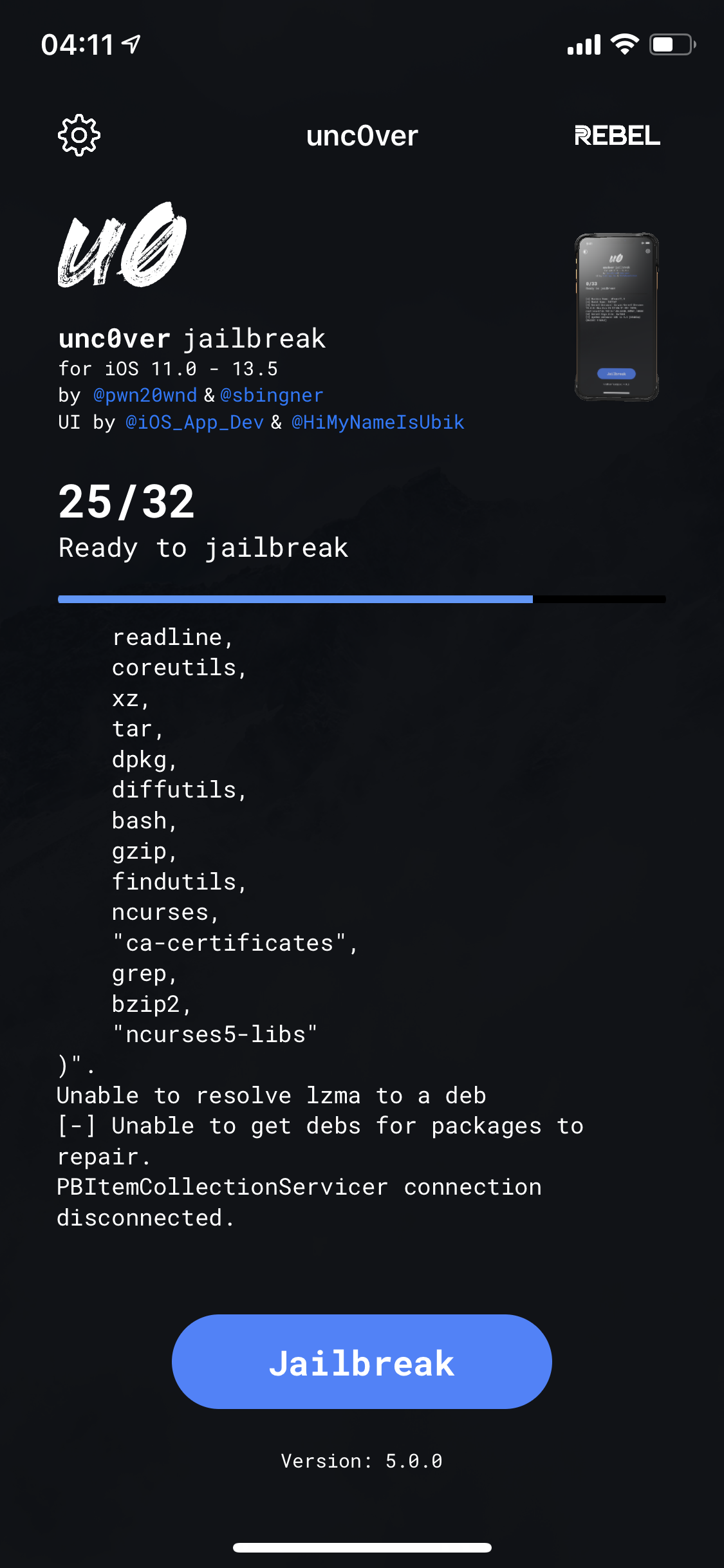
(Note the connection issue is not part of the actual log, just closed the app and reopen when taking this)
 HPaulson
on 24 May 2020
HPaulson
on 24 May 2020
Seems this issue is still occurring for many users; not sure why this issue was closed. Also the users attending this are not from China (myself included), so not a firewall issue or other things discussed previously in this issue.
Just one of many examples -
(Note the connection issue is not part of the actual log, just closed the app and reopen when taking this)
well,This problem is usually caused by authorized,can use altstore authenticating
q56535
on 24 May 2020
@q56535 Can you explain this a bit more? It’s an issue with the way I signed? Seems to also bc occurring using Altserver self-sign.
HPaulson
on 24 May 2020
@q56535 Can you explain this a bit more? It’s an issue with the way I signed? Seems to also bc occurring using Altserver self-sign.
As mentioned above, please replace the official recommendation of the signature software AltStore, try not to use other, I am not sure you are talking about Altserver and this is not the same software, can not rule out the reasons
wqk317
on 24 May 2020
I have same problem,
IOS 13.5
iPhone xs MAX
 elviss116
on 24 May 2020
elviss116
on 24 May 2020
iPhone xs MAX
sign with Altstore. try...
result-bit
on 24 May 2020
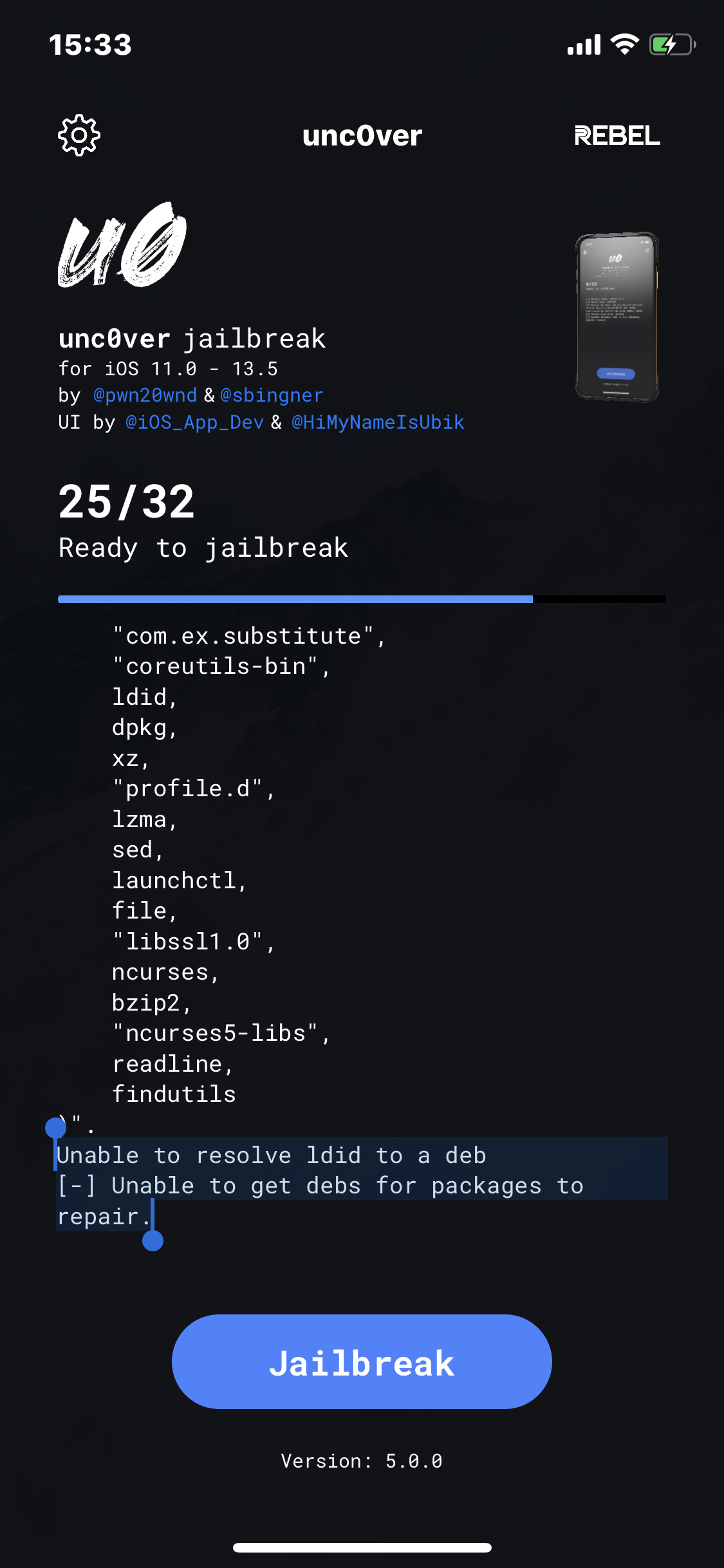
Got the same issue. The first time i wanted to Jailbreak. On an iPhone XS. Not from China, no VPN. I didn’t use Altstore. I just downloaded unc0ver with no Computer here: https://ipa-apps.me/ . Please someone help.
 damndanielw
on 24 May 2020
damndanielw
on 24 May 2020
Also the first time I saw this I Backuped my device and restored it completely. Didn’t help!
damndanielw
on 24 May 2020
Got the same issue. The first time i wanted to Jailbreak. On an iPhone XS. Not from China, no VPN. I didn’t use Altstore. I just downloaded unc0ver with no Computer here: https://ipa-apps.me/ . Please someone help.
Maybe the website's enterprise certificate have some problem,you can use authorized software: AltStore try again.
q56535
on 24 May 2020
I also tried Altstore before on my Windows 10 Laptop and there was another error I don’t have a clue of:
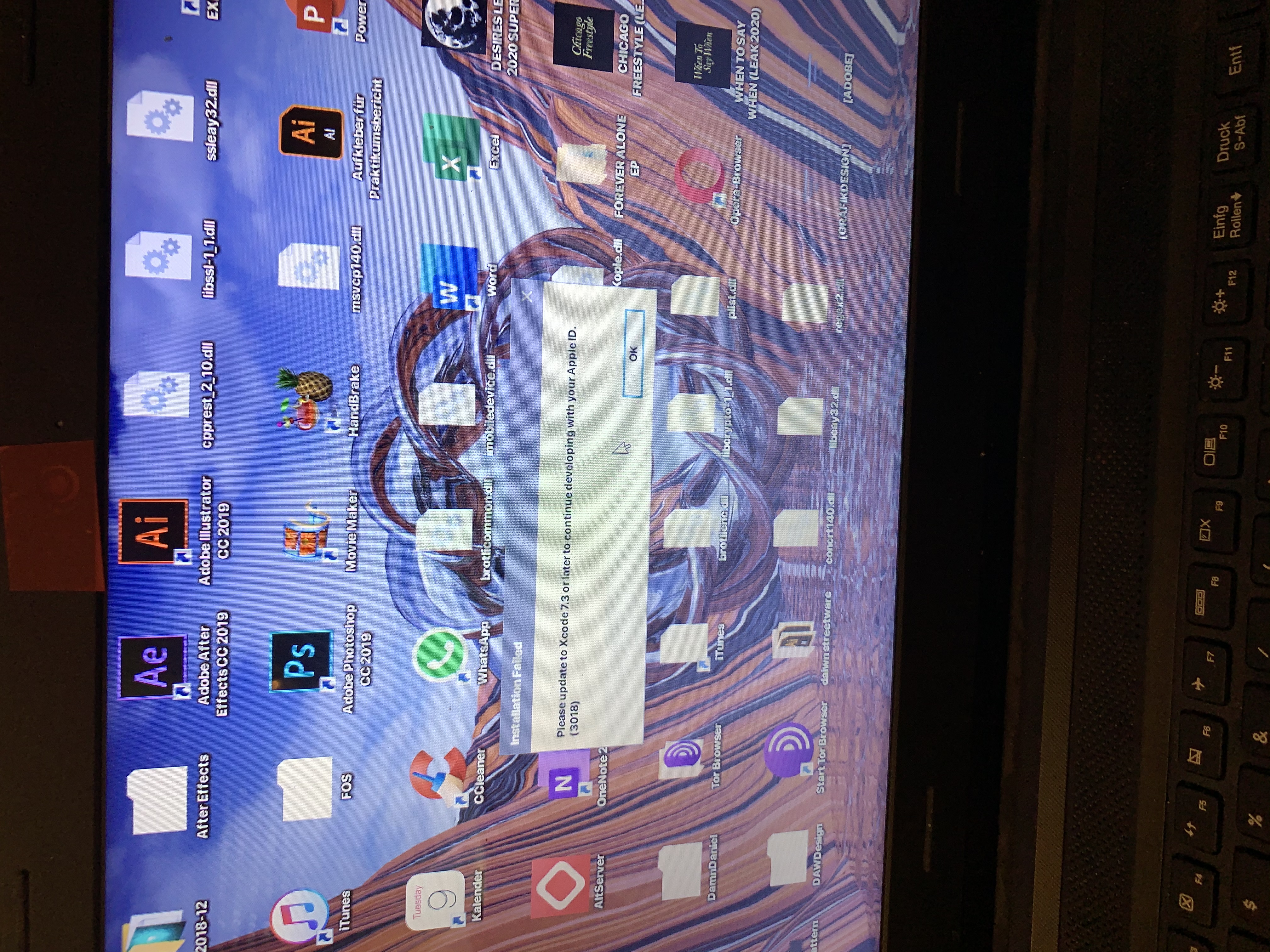
Any solution for that? I also restarted my Laptop a couple times and reinstalled Altstore. And I tried opening Altstore as Admin.
damndanielw
on 24 May 2020
I have the same problem:
IOS 13.5
iPhone xs MAX
any clue?
为什么这个问题已经被关闭,有解决方法了吗?
 sweihub
on 24 May 2020
sweihub
on 24 May 2020
I have the same problem:
IOS 13.5
iPhone xs MAX
any clue?为什么这个问题已经被关闭,有解决方法了吗?
你可以翻翻上面,已经有解决方案了
q56535
on 24 May 2020
I also tried Altstore before on my Windows 10 Laptop and there was another error I don’t have a clue of:
Any solution for that? I also restarted my Laptop a couple times and reinstalled Altstore. And I tried opening Altstore as Admin.
If you use MacOS,I don't konw this problem ,because I use windows
q56535
on 24 May 2020
I have the same problem:
IOS 13.5
iPhone xs MAX
any clue?
为什么这个问题已经被关闭,有解决方法了吗?你可以翻翻上面,已经有解决方案了
感谢,已解决,把步骤写下来,供后面找过来的朋友参考。
Thanks, problem solved, the steps on Mac with xcode installed
- Install AltStore on Mac
- Install Mail Plugin from the AltServer dropdown menu
- Open Mail app, then Preferences -> General -> Manage Plugins -> Tick "AltPlugin.mailbuddle"
- AltStore -> Install to "Your iPhone"
- Download the Unc0ver 5.0.0 on iPhone
- Open the Unc0ver IPA file, copy to AltStore
- Install Unc0ver, click Jailbreak
sweihub
on 24 May 2020
See issue #720 https://github.com/pwn20wndstuff/Undecimus/issues/720
The problem is your Uncover app Install dir /apt/Packages lists lzma .deb that doesn’t exist. You need to find this .deb , perhaps from “apt-get download lzma” on another device. Then update the Packages to match.
In my case I’m on 4.3.1 working for over a year and suddenly unc0ver removed lzma pkg for some reason which has broken my device and cannot run dpkg or apt bc of errors no dyld cached image of /usr/local/lib/liblzma.5.dylib even though the file exists! I even tried copying it to /usr/lib and still no luck.
Now I can only “SSH Only but can’t regain root access, only “mobile” so I can’t even change app dir files in Filza 😩
 badger200
on 26 Oct 2020
badger200
on 26 Oct 2020
Related issues
 miguelr4720
·
3Comments
miguelr4720
·
3Comments
 olibub
·
3Comments
olibub
·
3Comments
 shsh2
·
3Comments
shsh2
·
3Comments
 JBL1503
·
3Comments
JBL1503
·
3Comments
 Xerxious
·
4Comments
Xerxious
·
4Comments
Most helpful comment
感谢,已解决,把步骤写下来,供后面找过来的朋友参考。
Thanks, problem solved, the steps on Mac with xcode installed