Undecimus: Launch Daemon Controller’ (launchctl) update is causing ‘Sub-process /usr/libexec/cydia/cydo returned an error code (2)’ and ‘Unable to repair system’
The Launch Daemon Controller’ (launchctl) update is causing ‘Sub-process /usr/libexec/cydia/cydo returned an error code (2)’ in cydia when installing/uninstalling tweaks.
Unc0ver app shows the message ‘Unable to repair system’ when jailbreaking with the log mentioning:
dpkg: warning: 'launchctl' not found in PATH or not executable
dpkg: error: 1 expected program not found in PATH or not executable
Note: root's PATH should usually contain /usr/local/sbin, /usr/sbin and /sbin
E: Sub-process /usr/bin/dpkg returned an error code (2)
The problem persists after restoring rootFS and updating essential packages because cydia requires you to install essential packages including the bugged ‘Launch Daemon Controller’ (launchctl) update.
The workaround to this problem is to forcibly install Launch Daemon Controller’ (launchctl) via terminal or ssh with dpkg --force-all -i launchctl_22-1_iphoneos-arm.deb
Instructions to workaround:
Download https://apt.bingner.com/debs/1443.00/launchctl_22-1_iphoneos-arm.deb to filza
Open terminal (or ssh) and enter:
su
cd var/mobile/Documents
dpkg --force-all -i launchctl_22-1_iphoneos-arm.deb
To Reproduce
Steps to reproduce the behavior:
- Update essential tweaks
- Error occurs
Device (please complete the following information):
- iOS Version: 12.4
- iOS Device: iPad Air 2
- unc0ver Version: 3.7.0~b3
Place an "x" between the brackets if true:
- [x] this is a bug others will be able to reproduce
- [x] this issue is present with all tweaks uninstalled(except for default packages) or disabled
- [x] this issue is present after a rootfs restore
- [x] this issue is present on the latest version of unc0ver
 Sekkio
All 7 comments
I assume this have been fixed https://mobile.twitter.com/sbingner/status/1201381940646924290
Sekkio
on 2 Dec 2019
no it's not fixed, it's happening again.
iOS 12.4 iPhone XR
 abigchopstick
on 3 Dec 2019
abigchopstick
on 3 Dec 2019
Hi
I got this issue and it's been about 3 weeks and am trying every single TuT i can find on internet, but yet no luck.
I hope someone gets some free time and reply please.
My Device info:
iPad5,1 (iPad mini4) iOS 11.4 - Cydia64_1.1.32~b22
 fizzy-joon
on 21 Dec 2019
fizzy-joon
on 21 Dec 2019
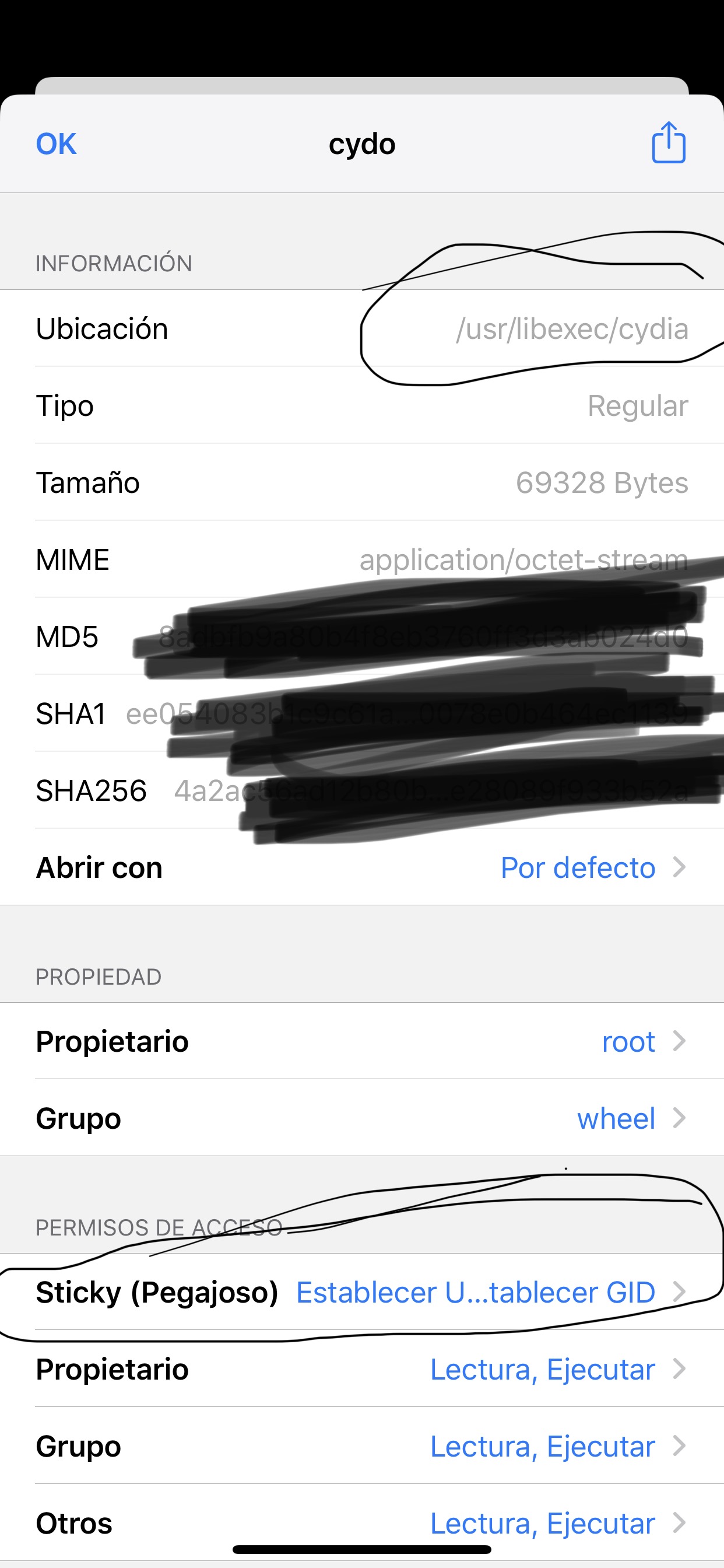
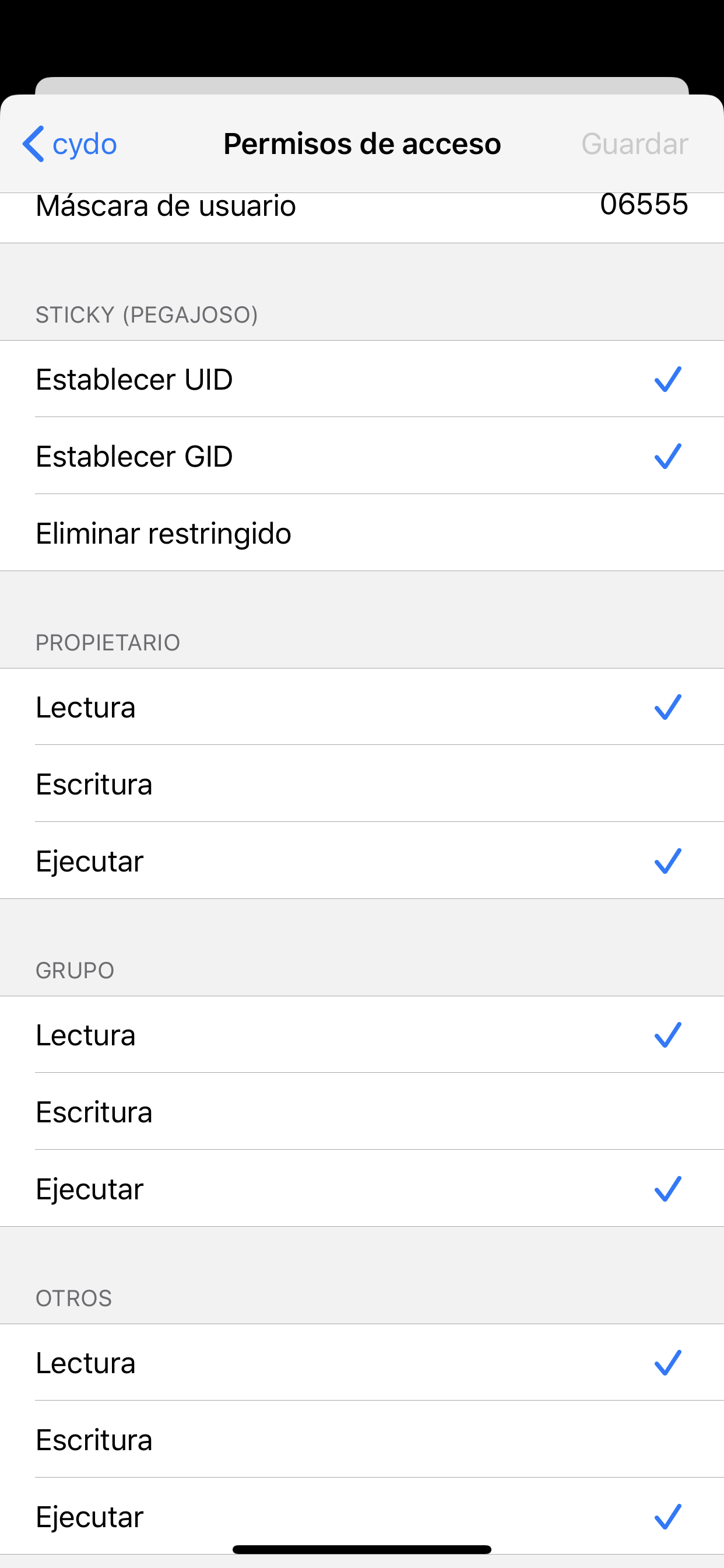
For cydo error (100) and (1) do same setting With Filza or ifile and will work. It’s works for me very well sorry for bad English
 viki512
on 21 Feb 2020
viki512
on 21 Feb 2020
Thanks for reply @viki512, I did unjailbreak with unc0ver and re-jailbreak again and I had my .dep files on (Filza) and installed it all back.
I wish your reply was a bit early, but thank you so much.
fizzy-joon
on 21 Feb 2020
is that yesterday I had that problem and I did a search and found the solution because at the same time I uploaded the solution sorry and sorry for me bad englis
viki512
on 21 Feb 2020
Yea that problem been around and seems some of solutions same as yours worked for some people but not all, good to hear that worked for you and hope some1 out will reach here and get it useful.
fizzy-joon
on 21 Feb 2020
Related issues
 piaoapiao
·
4Comments
piaoapiao
·
4Comments
 JBL1503
·
3Comments
JBL1503
·
3Comments
 Xerxious
·
4Comments
Xerxious
·
4Comments
 rorcores
·
4Comments
rorcores
·
4Comments
 miguelr4720
·
3Comments
miguelr4720
·
3Comments
Most helpful comment
For cydo error (100) and (1) do same setting With Filza or ifile and will work. It’s works for me very well sorry for bad English