Undecimus: Unable to find Kernel Credentials in Kernel Memory
Describe the bug
Unable to find Kernel Credentials in Kernel Memory using Sock puppet on iPad Pro 10.5 on 12.4.
TFP0 was successful. Any chance I can have access to latest src or help debugging? It's the patchfinder :/ OTA updated but also happens on iTunes restored devices.
To Reproduce
Steps to reproduce the behavior:
- Open unc0ver
- Select Sock puppet as exploit
- Click Jailbreak
- Wait for Result
Screenshots
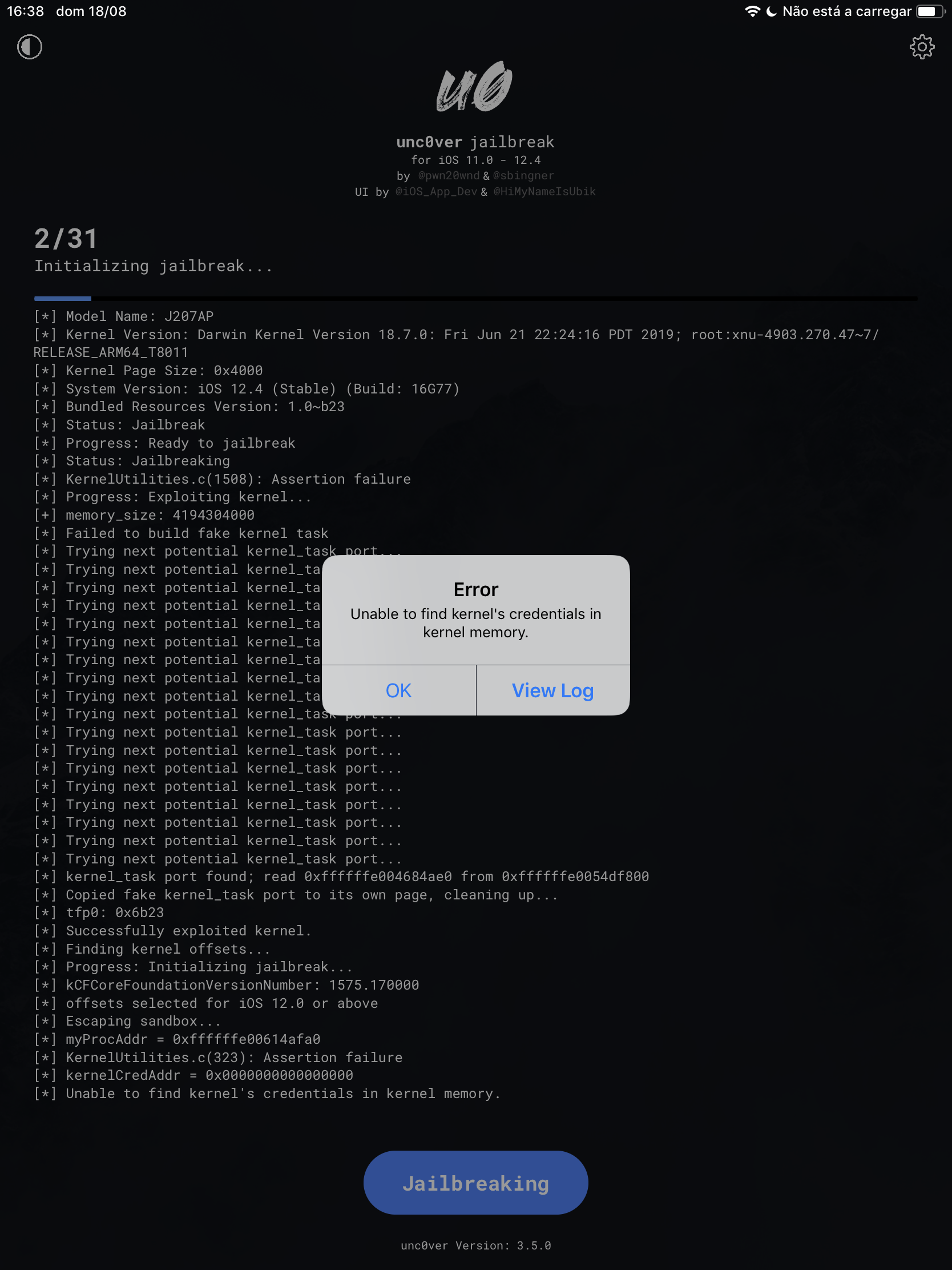
Device (please complete the following information):
- iOS Version: 12.4
- iOS Device: iPad Pro 2nd Gen
- unc0ver Version: 3.5.0
Place an "x" between the brackets if true:
- [x] this is a bug others will be able to reproduce
- [x] this issue is present with all tweaks uninstalled(except for default packages) or disabled
- [x] this issue is present after a rootfs restore
- [x] this issue is present on the latest version of unc0ver
Logs
 clarityzzz
All 11 comments
Same issue on iPhone 8, 12.4.
 ASILVAPT
on 18 Aug 2019
ASILVAPT
on 18 Aug 2019
same problem, ip6s, sock puppet exploit.
(did rootfs before update, didnt restore)
 hyperClink
on 18 Aug 2019
hyperClink
on 18 Aug 2019
same bug on iPhone X (GSM) ios 12.4
 Honda1994
on 18 Aug 2019
Honda1994
on 18 Aug 2019
Same problem on my iPhone 8 using Sock Puppet exploit. I just updated via iTunes from iOS 12.1.1 to iOS 12.4. (No rootfs restore etc)
 romestylez
on 18 Aug 2019
romestylez
on 18 Aug 2019
maybe try https://twitter.com/Pwn20wnd/status/1163125251649110016
"If you are having that error at stage 2, delete and re-install the app and it should work."
 Martin-SF
on 18 Aug 2019
Martin-SF
on 18 Aug 2019
@Martin already tried that after getting the error. Sadly its not fixxing the error.
romestylez
on 18 Aug 2019
maybe try https://twitter.com/Pwn20wnd/status/1163125251649110016
"If you are having that error at stage 2, delete and re-install the app and it should work."
This is correct. I didn't attribute the error to that because I literally unboxed the iPad 1 hour ago and didn't realize that the prefs were kept on the backup.
clarityzzz
on 18 Aug 2019
This is correct. I didn't attribute the error to that because I literally unboxed the iPad 1 hour ago and didn't realize that the prefs were kept on the backup.
Its not working for me and also some others reporting that its not fixxing the problem.
//EDIT:
Okay i now have uninstalled unc0ver and reinstalled it 2-3 times and now the jailbreak is working. All tweaks where uninstalled but i had a list of installed tweaks so easy. Seems like its all working fine !
romestylez
on 18 Aug 2019
I was having same issues as above - plus shinanigans error - iPhone(10,6) full iTunes update from 12.2 to 12.4. confirmed above... Remove and reinstalled Unc0ver (via impactor) several times (about 5); also turned off "Find My iPhone" and put into Airplane Mode for good measure. It took 2mins to reach step 10/31, reboot and another 5 mins to complete the jailbreak.
Such is the cross we bear as early adopters. Have patience and keep trying.
 hicmeister
on 18 Aug 2019
hicmeister
on 18 Aug 2019
Got the same issue 7 Plus (previously jailbroken) but update by iTune.
After Delete the previous cert and revoke those cert also reinstall the Unc0ver 2 times it works fine.
 DavitHin
on 19 Aug 2019
DavitHin
on 19 Aug 2019
Same problem on my iPhone 8 using Sock Puppet exploit. I just updated via iTunes from iOS 12.1.1 to iOS 12.4. (No rootfs restore etc)
I did the same thing. Reinstall the app and you should be fine
 jowangy
on 23 Aug 2019
jowangy
on 23 Aug 2019
Related issues
 miguelr4720
·
3Comments
miguelr4720
·
3Comments
 VeZReVouLiS
·
3Comments
VeZReVouLiS
·
3Comments
 pwn20wndstuff
·
4Comments
pwn20wndstuff
·
4Comments
 gbm777
·
3Comments
gbm777
·
3Comments
 shsh2
·
3Comments
shsh2
·
3Comments