Undecimus: Failed to extract bootstrap
Describe the bug
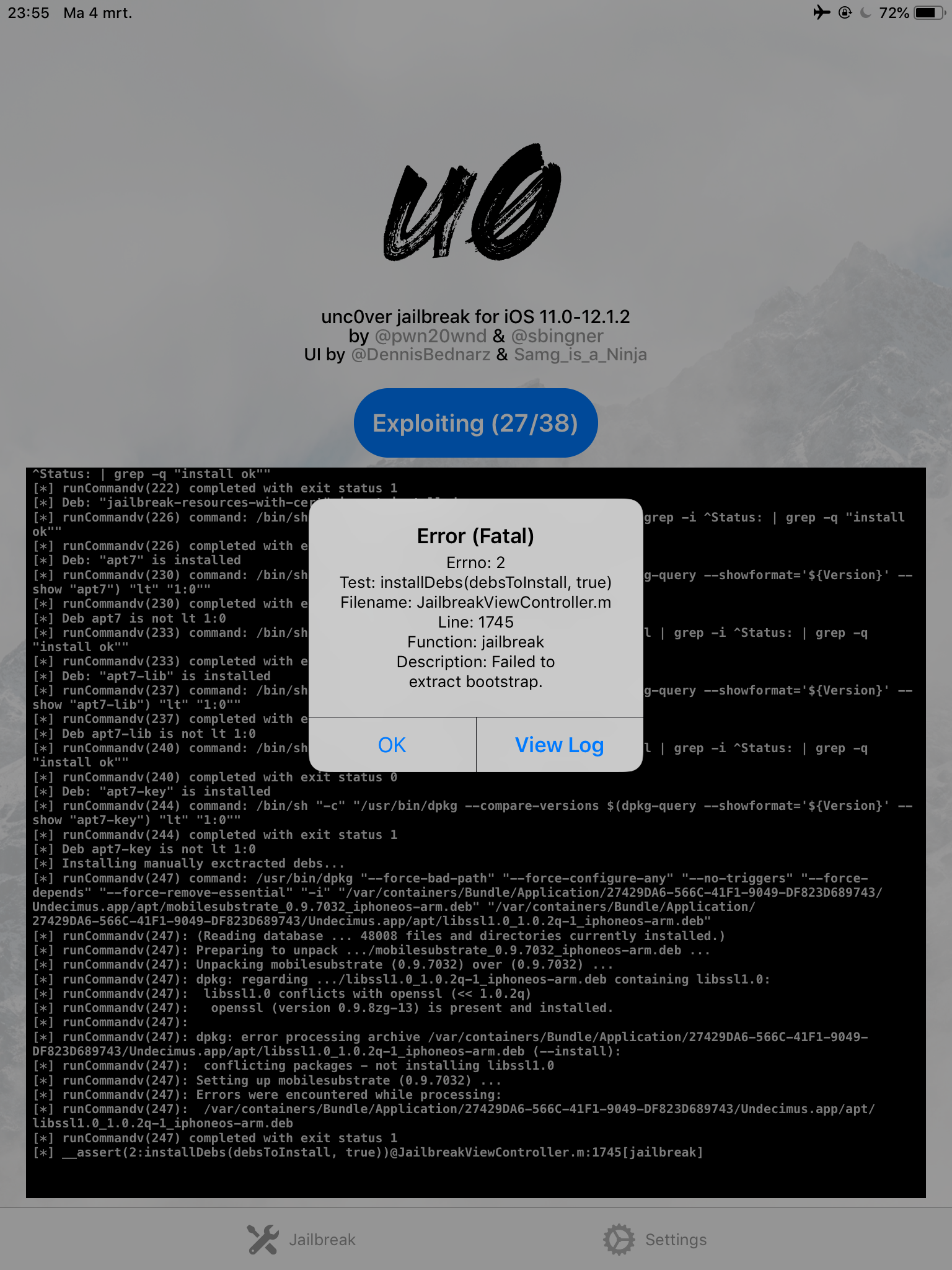
Gets stuckhere everytimr
To Reproduce
Steps to reproduce the behavior:
Get ipad mini 2
Use b40
Screenshots
If applicable, add screenshots to help explain your problem.
Device (please complete the following information):
- iOS Version: 12.1
- iOS Device: Ipad mini 2
- unc0ver Version: b40
Place an "x" between the brackets if true:
- [x ] this is a bug others will be able to reproduce
- [x ] this issue is present with all tweaks uninstalled(except for default packages) or disabled
- [x ] this issue is present after a rootfs restore
- [x] this issue is present on the latest version of unc0ver
Logs
If applicable, add logs or error messages here.
 brianvis
All 3 comments
This Worked for me, try and confirm please.
Airplane Mode "ON"
1 Open unc0ver and go to the settings page
2 Turn «Load Tweaks» off and then jailbreak as you usually would
3 Once Jail Broke and respring, go to Settings in Uncover turn on tweaks
rejailbreak and cydia is loaded
 cadbob
on 5 Mar 2019
cadbob
on 5 Mar 2019
This Worked for me, try and confirm please.
Airplane Mode "ON"
1 Open unc0ver and go to the settings page
2 Turn «Load Tweaks» off and then jailbreak as you usually would
3 Once Jail Broke and respring, go to Settings in Uncover turn on tweaks
rejailbreak and cydia is loaded
Same error as above, IPhone 6 12.1.1 b3
Unfortunately fix didn't work.
UPDATE:
After some testing, the following worked for me:
- Airplane Mode on
- Load Tweaks Off
- Restore RootFS On
Note: May take a few tries, if bootstrap error comes up restore RootFS again. If phone reboots at 2/38 or exploit fails, simply keep trying until it succeeds.
- Jailbreak -> RootFS should be installed/mounted or whatever
- Reboot
- RootFS should be off now. Jailbreak again -> Snapshot
- Jailbreak again, make sure load tweaks is still off. Bootstrap should be successfully extracted.
- Jailbreak, it should succeed and Cydia should be installed.
- Re-Jailbreak with Tweaks On and everything should work fine.
 JmTexas19
on 5 Mar 2019
JmTexas19
on 5 Mar 2019
Duplicate issue #530
 bigmoof
on 5 Mar 2019
bigmoof
on 5 Mar 2019
Related issues
 soum91
·
3Comments
soum91
·
3Comments
 bachle22
·
4Comments
bachle22
·
4Comments
 ghost
·
3Comments
ghost
·
3Comments
 olibub
·
3Comments
olibub
·
3Comments
 Xerxious
·
4Comments
Xerxious
·
4Comments
Most helpful comment
Same error as above, IPhone 6 12.1.1 b3
Unfortunately fix didn't work.
UPDATE:
After some testing, the following worked for me:
Note: May take a few tries, if bootstrap error comes up restore RootFS again. If phone reboots at 2/38 or exploit fails, simply keep trying until it succeeds.