Undecimus: Failed to extract bootstrap: libssl1.0 conflicts with openssl (<< 1.0.2q)


rootFS successfully restores, but after the same error, over and over. (conflicts libssl and openssl, )
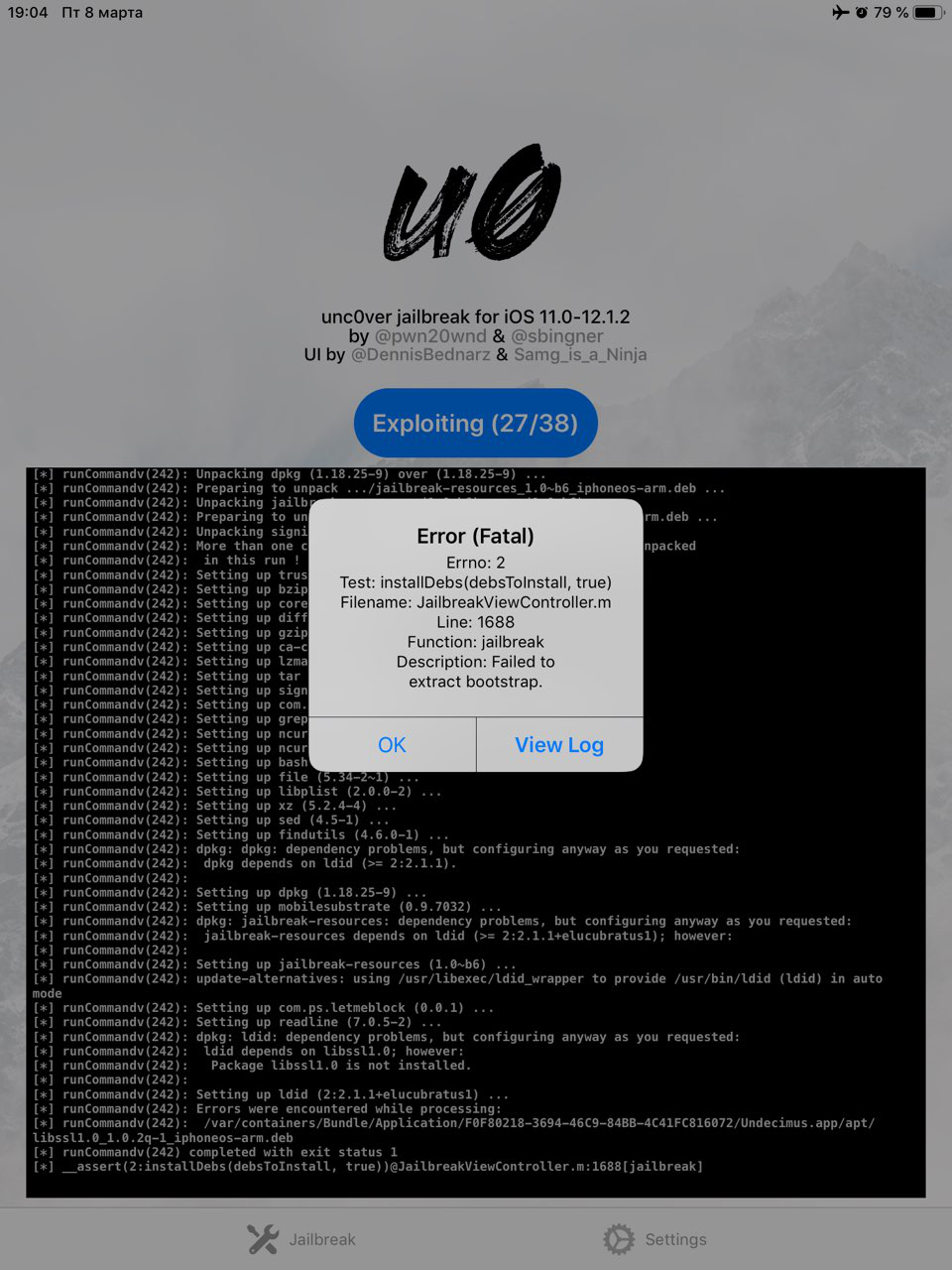
im stuck on errno 2: Line 1646 Failed to extract bootstrap
Tried like 10 times the same, help
ps: find my phone turned off , airplane on, , RootFS Restore every time. No luck
unc0ver b29 b31 b34 b36 b37 b38 b40 b41 b42 b43 (ios 12 ipad air 2 from IOS 9)
 warshell
All 43 comments
I had the same proble on iPhone 6s+ running 12.1.1 b3... I ran restore rootFS got a couple reboots after running Uncover then I reinstalled Cydia..
 L8toH8
on 26 Feb 2019
L8toH8
on 26 Feb 2019
@L8toH8 i made a dozen of restore rootFS and reboots, dosent help , its hangs in the same place as in the screenshot.
warshell
on 26 Feb 2019
Did you reinstall Cydia threw the jailbreak tool? Also try to turn off load tweaks and load deamons they are the first two switches in uncovers options... reinstall Cydia if further down.. when you reboot after reinstalling Cydia the switch will need to be turned back off before the next jailbreak attempt. Let me know if that helps
L8toH8
on 26 Feb 2019
1 . Restore RootFS ( air plaine on ) 1 reboot
2. Second reboot snapshot renamed ( air plane on )
- Turned off daemons and tweaks turned reinstall cydia - bam fatal error
- Step 1 , step 2 turned off daemons and tweaks - bam fatal error
- Step 1 , step 2 , turned on reinstall cydia and clear cydia cache - bam fatal error
It’s the same , I think it doesn’t get into the step reinstalling cydia , no luck . Thank you very much for help
warshell
on 27 Feb 2019
@L8toH8 i made a dozen of restore rootFS and reboots, dosent help , its hangs in the same place as in the screenshot.
You're right. Maybe we need to wait several weeks until uncOver is more stable.
 isaac850904
on 27 Feb 2019
isaac850904
on 27 Feb 2019
@Cryptiiiic hello this issue is still not resolved. thanks
warshell
on 28 Feb 2019
I'm also experiencing this problem on iOS 12.0 on iPad Mini 4, here are my logs https://pastebin.com/q6pzg5Lj
 penbob3
on 2 Mar 2019
penbob3
on 2 Mar 2019
b39, b41 b42 b43 still here...
warshell
on 4 Mar 2019
Same issue on b40
https://pastebin.com/KPN32WwR
On iPad Air 2 A8X
Was updated to 12.1.1b3 from 9.3.3
 bigmoof
on 5 Mar 2019
bigmoof
on 5 Mar 2019
same issue on b42
iphone 6 running 12.1.1b3.
Was running jailbroken on 9.3.3 before going to 12.1.1b3
diagnostics.txt
 jcase0
on 7 Mar 2019
jcase0
on 7 Mar 2019
I got the following to work to overcome this issue....
Clear Diagnostics Data & Restore RootFS (rec0ver) then JB.
Upon reboot, turn on Refresh Icon Cache & Reset Cydia Cache then JB.
Upon every reboot, check settings to ensure RIC & RCC are still on and keep JBing until done.
Good luck!! :)
jcase0
on 8 Mar 2019
@jcae0
keep JBing until done.
You mean you tried how many times? i tested this method for 4 times. Still same. Any other things you have done ? version? this is strange... dosent worked for me
warshell
on 8 Mar 2019
I had the same issue, but following the steps from #694 fixed it for me:
Note: May take a few tries, if bootstrap error comes up restore RootFS again. If phone reboots at 2/38 or exploit fails, simply keep trying until it succeeds.
Jailbreak -> RootFS should be installed/mounted or whatever
Reboot
RootFS should be off now. Jailbreak again -> Snapshot
Jailbreak again, make sure load tweaks is still off. Bootstrap should be successfully extracted.
Jailbreak, it should succeed and Cydia should be installed.
Re-Jailbreak with Tweaks On and everything should work fine.
 commjoen
on 8 Mar 2019
commjoen
on 8 Mar 2019
I get a similar issue when holding volume up button during JB process cannot seem to trigger No-Substrate mode with this AKA safe mode...
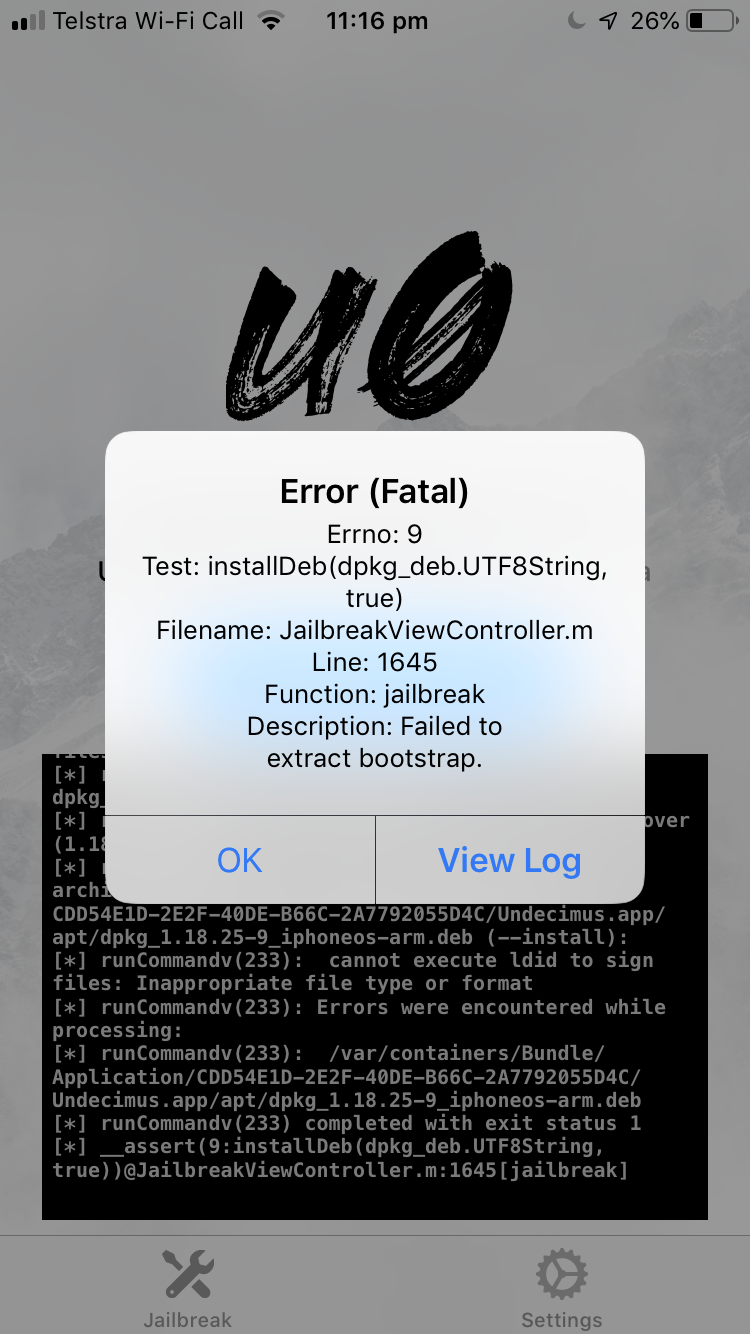
Model ID: iPhone9,3 (iPhone 7)
Console Log: https://gist.github.com/XxUnkn0wnxX/8261827cfbf5254bafb0ceb7a9889879 (using Xcode [devices & simulators] to view full console log during process)
got stuck on step 27 I believe.
also how do I trigger no substrate safe mode via volume up button? am I doing it wrong by holding volume up in Jb process? or is this a bug?
also where "SECRET" I've hidden my name & developer ID as I'm using my own developer certificate to sign un0ver ipa so it doesnt expire..
also on a sidenote: when will unc0ver been stable enough where it won't respring loop or crash from initial respring from JB process. (getting tired of using work arounds to load my tweaks due to failure of initial respring) - or use different method to load tweaks?
 XxUnkn0wnxX
on 8 Mar 2019
XxUnkn0wnxX
on 8 Mar 2019
You mean you tried how many times? i tested this method for 4 times. Still same. Any other things you have done ? version? this is strange... dosent worked for me
(re: keep JBing until done) I meant let system reboot as needed and keep checking settings until the jailbreak completes. I only had to do this entire process once.
I'm using b42. The only other things were I had Reload System Daemons off and had Airport Mode on the entire process.
Odd that it's different for everyone...
jcase0
on 8 Mar 2019
You mean you tried how many times? i tested this method for 4 times. Still same. Any other things you have done ? version? this is strange... dosent worked for me
(re: keep JBing until done) I meant let system reboot as needed and keep checking settings until the jailbreak completes. I only had to do this entire process once.
I'm using b42. The only other things were I had Reload System Daemons off and had Airport Mode on the entire process.Odd that it's different for everyone...
Yes its odd, i saw your diagnostics , its the same error, i tried with reload daemons off and else, still no luck.. erf
 warshell
on 8 Mar 2019
warshell
on 8 Mar 2019
b46 still here
warshell
on 13 Mar 2019
Same problem here, ipad air 2 12.1, uncover version 46
 adz18
on 14 Mar 2019
adz18
on 14 Mar 2019
Same. Have IPad Air 2 uncover version 46
 c141medic
on 15 Mar 2019
c141medic
on 15 Mar 2019
Yes me too @c141medic and @adz18
i have ipad air 2 (before update i had a ios 9 and pangu jailbreak, sometimes TotallyNotSpyware) and you ?
warshell
on 15 Mar 2019
@devcline Same exact situation. Pangu semi tethered JB on iOS 9 something and upgraded to iOS 12.1.1 beta 3 when Apple was still signing it. Every iteration of the uncover JB ends up in the failed to extract bootstrap error. I’ve tried all the recommendations and still same error.
c141medic
on 15 Mar 2019
Yes me too @c141medic and @adz18
i have ipad air 2 (before update i had a ios 9 and pangu jailbreak, sometimes TotallyNotSpyware) and you ?
Same here @devcline iPad Air 2 from jailbroken iOS 9, latest unc0ver still fail at libssl :/
bigmoof
on 16 Mar 2019
Just tried b48 and still getting same error message. As of b47, the jb is supposed to work on 90% of devices. I guess I’m in the 10% 😞.
c141medic
on 26 Mar 2019
Yeah we are the 0.1% damn I’m feeling abandoned , is there any progress on this issue ? Feeling jalouse for those who JB in 2 secs .
warshell
on 26 Mar 2019
@devcline, I don’t get it. Our devices and iOS versions meet all the parameters of the JB so don’t understand why the JB keeps failing. I thought that since I had the pangu 9.3.3 JB maybe somehow some JB files are still in the current iOS version and they’re conflicting with the new JB? But, wouldn’t everything have been overwritten with the upgrade to 12.1.1 beta 3?
c141medic
on 26 Mar 2019
@c141medic yes you are right, but as i understand the libssl cant get installed (overwritten or replaced) right so it cant sign the further packages, it would be very nice if someone of devs could clarify the situation or error or give us a hope 👍
warshell
on 26 Mar 2019
Same issue on b40
https://pastebin.com/KPN32WwR
On iPad Air 2 A8X
Was updated to 12.1.1b3 from 9.3.3
I had the same problem. I'l on iPhone 8 plus ios 12.1
What worked for me everytime is when whenever I jailbreak with uncover(no matter the beta version) when I get the error, I close the app and see that i'm soft jailbroken. I open one of my tweak in settings app (youtube tools) go in the app and just press repspring and voila i'm jailbroken. you can also open the cydia app and just install or uninstall any package or tweak which require your device to respring. after respring, your device should run perfect with 100% jailbroken state
 killerlooks10
on 29 Mar 2019
killerlooks10
on 29 Mar 2019
rootFS successfully restores, but after the same error, over and over. (conflicts libssl and openssl, )
im stuck on errno 2: Line 1646 Failed to extract bootstrap
Tried like 10 times the same, help
ps: find my phone turned off , airplane on, , RootFS Restore every time. No luck
unc0ver b29 b31 b34 b36 b37 b38 b40 b41 b42 b43 (ios 12 ipad air 2 from IOS 9)
I had the same problem. I'l on iPhone 8 plus ios 12.1
What worked for me everytime is when whenever I jailbreak with uncover(no matter the beta version) when I get the error, I close the app and see that i'm soft jailbroken. I open one of my tweak in settings app (youtube tools) go in the app and just press repspring and voila i'm jailbroken.
Alternate method
you can also open the cydia app after getting error on uncover and just install or uninstall any package or tweak which require your device to respring. after respring, your device should run perfect with 100% jailbroken state
killerlooks10
on 29 Mar 2019
@killerlooks10 what tweak are you referring to? Also, the jailbreak does not get to the point of installing Cydia.
c141medic
on 29 Mar 2019
This is interesting. I was able to find a way to respring via settings display and brightness. Just select bold text and device will respring rather than reboot. So, I used the latest uncover jb. Respring and when I open up uncover jb it looks like the jailbreak worked because the option now is to re-jailbreak. However Cydia doesn’t install. So, without Cydia jb is useless.
c141medic
on 30 Mar 2019
@killerlooks10 what tweak are you referring to? Also, the jailbreak does not get to the point of installing Cydia.
I did not do restore rootFS. rather I just simply delete the uncover app and install it from ignition.fun and jailbreak normally. I still get error and follow the instructions above to get my jailbreak to work. I think a lot of ppl are having this problem. I'll make a video of how I did it and upload the link to help.
killerlooks10
on 3 Apr 2019
@killerlooks10 I think you are referring to another similar error , please read all the subject and see a screenshots. After trying like for 2 month everything and everywhere it’s not working as simple as you describe.
warshell
on 3 Apr 2019
@devcline I don’t think @killerlooks10 understands. The problem is even if you respring after a failed uncover jailbreak with the bootstrap error, there’s no Cydia installed. The jailbreak is not getting that far where Cydia gets installed.
c141medic
on 3 Apr 2019
@devcline I don’t think @killerlooks10 understands. The problem is even if you respring after a failed uncover jailbreak with the bootstrap error, there’s no Cydia installed. The jailbreak is not getting that far where Cydia gets installed.
I would suggest you to watch this video. hope this will solve your problem
https://www.youtube.com/watch?v=0mdX-PcsZpk&t=195s
killerlooks10
on 3 Apr 2019
@killerlooks10 I just watched your video and you still don’t understand. The issue is Cydia not getting installed. We’ve tried the rootfs restore without any success. And I noticed when you rebooted your phone and “lost” your jailbreak, Cydia was still installed. As has been mentioned before, the current uncover jailbreak doesn’t even get to the point of installing Cydia for some of us and that’s the issue.
c141medic
on 4 Apr 2019
@c141medic Ohh got it. I found this old video of how to get the cydia icon. It’s for electra jailbreak for ios 11.3.1. I’m not sure if its gonna work for the uncover but give it a try. Maybe its gonna fix ur cydia issue. I thing more i would suggest you to find earlier version of uncover app like beta 29 or 30 and try jailbreaking from that first. This might also solve the issue. Just use cydia impactor to side load it
killerlooks10
on 4 Apr 2019
I’d imagine it’s due to your having been jail broken through another method on another version of iOS. The conflicting file was likely one altered by the previous jb and not over written. Rec0ver will restore your root fs to the state it was in prior to running the jb the first time so that’s what makes sense really. Have you tried to back up and then do a factory reset through settings and then jb after?
 fcktheworld587
on 6 Apr 2019
fcktheworld587
on 6 Apr 2019
I was on 9.3.3 with the pangu jailbreak and upgraded to the 12.1.1 beta 3 when Apple was still signing. And that method was a tethered jailbreak so by the virtue of rebooting everything should’ve been overwritten. I haven’t tried just backing up and doing a factory restore yet. Perhaps that may work.
c141medic
on 6 Apr 2019
I have been struggling with this same problem for weeks on my iPhone X on 11.4b3 (libssl openssl conflict) and have finally worked around it. I suspect that the common theme here is that those who have used Electra in the past have conflicting library versions installed. I tried Rollectra, restore rootFS, etc., all to no avail. What finally worked for me was to use the latest version of Electra without tweaks enabled which gave me SSH access. I then used the delectra script (https://github.com/KirovAir/delectra) to uninstall all traces of Electra. After it rebooted I was able to run Unc0ver b49 and it worked! Specifically, I ran Unc0ver first with restore rootFS enabled and then after it went through the standard two reboots, I ran Unc0ver with tweaks and daemons enabled, and install Cydia enabled and it completed the installation perfectly.
 wires160
on 7 Apr 2019
wires160
on 7 Apr 2019
@wires160 we are on ios 12
ok so the news today i tried a b49 and its no more gives me a libssl error but still no success
i reset a ipad settings (not content) before using a unc0ver, i dont know if its a new version or because of my reset.
something new: it cant remove hackyouriphone.appsyncunified
errno: 0
appInstall [@[@"-f"])
filename: jailbreakViewController.m
line: 1884
Desc: Failed to extract bootstrap
tried to restoreFS and no tweaks , no daemons and dont reload system daemons, reinstall cydia
cant jailbreak, but the good news, no more libssl error
warshell
on 9 Apr 2019
Folks I got a success, I don’t know what method worked , I tried all possible setting in uncover and I didn’t noticed I have cydia icon appeared. Maybe it appeared for the first time. Yay!
warshell
on 9 Apr 2019
I can confirm successfull jailbreak with out any error and all the default setting in uncover !!
warshell
on 9 Apr 2019
I had some bad luck. I backed up my iPad and did a factory reset which deleted everything. I installed uncover b49 and did the jailbreak and it worked. I got Cydia. But a very unstable one. It refused to update some of the packages. So, I was going to just reboot and start over again. Well, that put me into a fatal boot loop which I couldn’t recover from unless I restored the iPad to the latest fw through iTunes. I tried recovery mode, dfu mode to no avail. The only option to get the iPad back to normal was to restore to a current fw 12.2. So, there’s that. And no, I didn’t have blobs saved so I’m done with jail breaking until something else comes out for 12.2. Good luck to all.
c141medic
on 10 Apr 2019
Related issues
 miguelr4720
·
3Comments
miguelr4720
·
3Comments
 olibub
·
3Comments
olibub
·
3Comments
 bachle22
·
4Comments
bachle22
·
4Comments
 kalebe2
·
3Comments
kalebe2
·
3Comments
 ccdffddfddfdsfedeee
·
3Comments
ccdffddfddfdsfedeee
·
3Comments