What happens?
如果使用的是已经迁移到antd@4的pro-layout,此时使用的是图标组件而非Icon组件,这时候如果icon传入字符的话,是无法显示图标的。除非使用@ant-design/compatible包。
当我直接使用组件的时候
config/routes.tsx
{
    path: '/workbench/dashboard',
    component: '@/pages/dashboard',
    menu: {
      name: '概覽',
      icon: <DashboardOutlined />,
    },
},
然后看了一下.umi下的routes
{
    "path": "/workbench/dashboard",
    "component": require('@/pages/dashboard').default,
    "menu": {
        "name": "概覽",
        "icon": {
            "type": {},
            "key": null,
            "ref": null,
            "props": {},
            "_owner": null,
            "_store": {}
        }
    },
    "exact": true
},
应该是umi在编译config时没编译到组件。
相关环境信息
- Umi 版本:3.0.4
- Node 版本:12.9.1
- 操作系统:macOS 10.15.2
 hzgotb
All 16 comments
这个是获取设置在routeItem.icon中的。umi@3的话,是设置在routeItem.menu.icon中的。
hzgotb
on 9 Mar 2020
看了一下源码,umi的route只把component和wrapper进行require。
umi@3中,pro-layout如果使用 @ant-design/icon@4 的话,在没有插件下,必须在menu中的icon直接写成ReactNode。
如果要以插件形式的话,可能需要修改routesToJSON相关的部分。
暂时就研究了这些。
hzgotb
on 9 Mar 2020
你可以运行配置添加 export const layout = { menuItemRender: ( menuItemRender)=> {
return (ReactNode)
}} 自定义渲染菜单项
 felhz
on 11 Mar 2020
felhz
on 11 Mar 2020
你可以运行配置添加 export const layout = { menuItemRender: ( menuItemRender)=> {
return (ReactNode)
}} 自定义渲染菜单项
看了一下props。還得重新去匹配route再生成ReactNode。太麻煩了。
hzgotb
on 11 Mar 2020
现在的办法只能是路由和菜单分两套配置来写。.umi 的 routes 就是个黑盒
 gouflv
on 8 Apr 2020
gouflv
on 8 Apr 2020
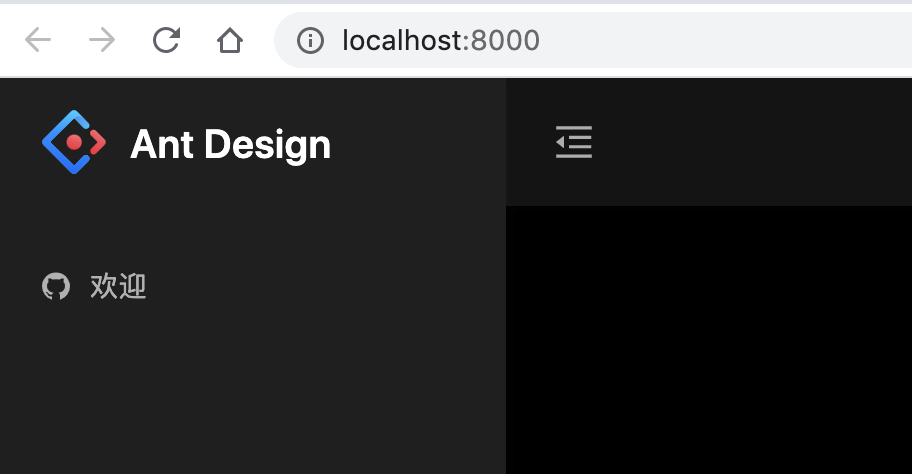
如果是 umi@3 的话,routes这么配置:
import { defineConfig } from "umi";

export default defineConfig({
  antd: {
    dark: true,
  },
  layout:{
    name: 'Ant Design',
  },
  routes: [{
    path: '/welcome',
    component: 'welcome.tsx',
    menu: {
      name: '欢迎',
      icon: 'github',
    },
    layout:{
      hideNav: true,
    },
    access: 'canRead',
  }]
});
注意里面的 icon 配置,使用的是 antd@4 的图标组件,把图标组件 <GithubOutlined /> 名字小写,然后去掉 outlined,剩下的 github 就可以用在 menu 的配置里了
效果如下:
 leftstick
on 8 Apr 2020
leftstick
on 8 Apr 2020
如果是
umi@3的话,routes这么配置:import { defineConfig } from "umi"; export default defineConfig({ antd: { dark: true, }, layout:{ name: 'Ant Design', }, routes: [{ path: '/welcome', component: 'welcome.tsx', menu: { name: '欢迎', icon: 'github', }, layout:{ hideNav: true, }, access: 'canRead', }] });注意里面的
icon配置,使用的是antd@4的图标组件,把图标组件<GithubOutlined />名字小写,然后去掉outlined,剩下的github就可以用在menu的配置里了效果如下:
请问你这个写法在官网文档哪里写出来了?你们指望所有人去猜新写法吗?
 LarryZhao0616
on 9 Apr 2020
LarryZhao0616
on 9 Apr 2020
@LarryZhao0616 强行解释的话,文档里有 当前菜单的左侧 icon,可选 antd 的 icon name 和 url。不过如你所言,icon name 也不是那么友好。稍后文档做些调整吧
leftstick
on 9 Apr 2020
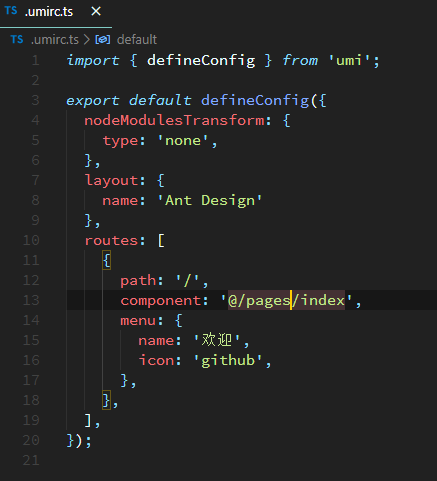
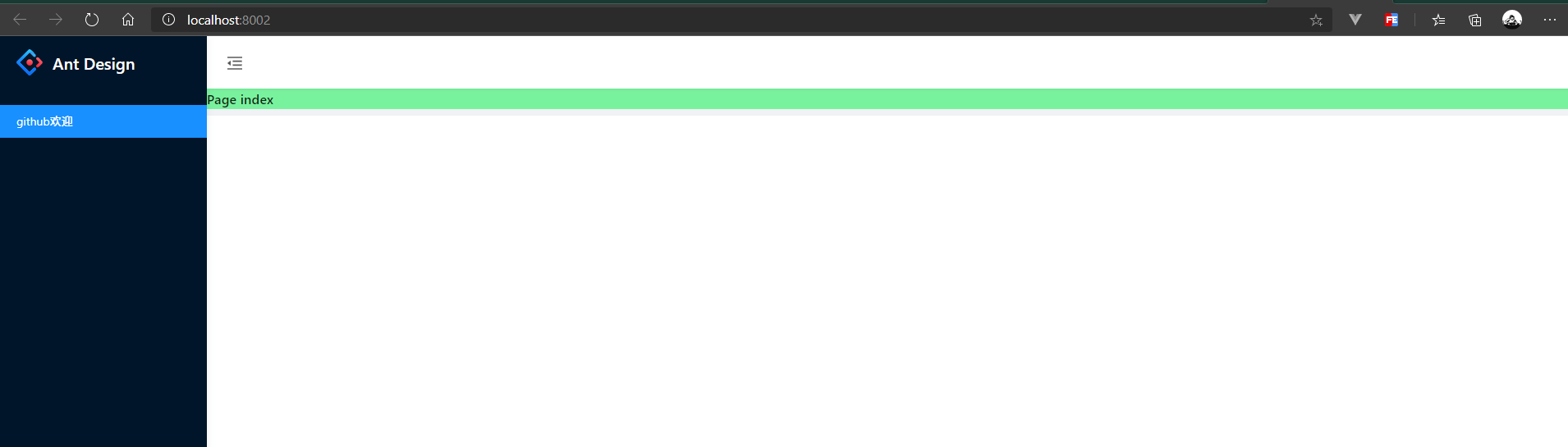
使用最新的yarn create @umijs/umi-app,安装了依赖,只做了如上图的配置,菜单栏的图标不生效
 terryz95
on 22 Apr 2020
terryz95
on 22 Apr 2020
@mouseTrip 给个可复现的repo吧。我弄不出来这个效果
leftstick
on 23 Apr 2020
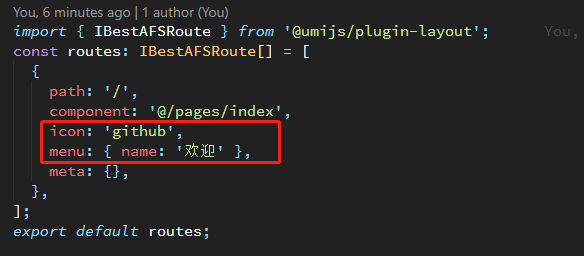
基于最新umi脚手架踩坑,icon不能配置在menu里面,要和menu平级单独写出,才能读取到,也不能安装umi-plugin-antd-icon-config这个插件,否则启动会报toUpperCase错误。
terryz95
on 23 Apr 2020
基于最新umi脚手架踩坑,icon不能配置在menu里面,要和menu平级单独写出,才能读取到,也不能安装
umi-plugin-antd-icon-config这个插件,否则启动会报toUpperCase错误。
这个方法有用,感谢大佬
 zhangminggeek
on 14 May 2020
zhangminggeek
on 14 May 2020
这也太操蛋了吧, 全靠猜?
 io-o
on 16 Jun 2020
io-o
on 16 Jun 2020
约定式路由配置的 icon 不能被解析出来
 EmiyaYang
on 18 Jun 2020
EmiyaYang
on 18 Jun 2020
这也太操蛋了吧, 全靠猜?
新版本总是要有个踩坑的过程,淡定
 erichDuanET
on 23 Jun 2020
erichDuanET
on 23 Jun 2020
约定式路由 icon 没有被解析
 edvardchen
on 9 Jul 2020
edvardchen
on 9 Jul 2020
Related issues
 sorrycc
·
4Comments
sorrycc
·
4Comments
 ironyfive
·
3Comments
ironyfive
·
3Comments
 zhanchengkun
·
3Comments
zhanchengkun
·
3Comments
 RunningCoderLee
·
3Comments
RunningCoderLee
·
3Comments
 six-666
·
3Comments
six-666
·
3Comments
Most helpful comment
约定式路由配置的 icon 不能被解析出来