在定义了layout的情况下,我在/pages下做了个自定义的404.js页面,production模式中任意输入一个不存在的路由展示的404页面还是用layout展示的。
我在layouts的Index.js里设定的当props.location.pathname === '/404'不走layout实际上是不起效的。
请问如何让404页面不使用layout呢?
 LingzhiLiu
All 7 comments
你是怎么设置的?把 /layouts/index.js 下的代码贴出来看看。
或者试试下面的代码。如果不行的话,可以打印 props.location.pathname 的值看一看是否等于 '/404'
// layout/index.js
import BasicLayout from './BasicLayout/index.js'
import Page404 from '../pages/404'
class Layout extends React.Component {
render () {
if (this.props.location.pathname === '/404') {
return <Page404 />
}
return (
<BasicLayout>
{ this.props.children }
</BasicLayout>
)
}
}
 dkvirus
on 24 May 2019
dkvirus
on 24 May 2019
我把props.location.pathname打印了,并不等于'/404'。而是我输入的不存在的路由。
我的代码如下:
function BasicLayout(props) {
console.log(props.location.pathname)
if (props.location.pathname === '/404') {
return (
<Theme>
<Header />
<div>{props.children}</div>
</Theme>
)
}
return (
<Theme>
<Header />
<Body {...props}>{props.children}</Body>
<Notification _onCloseFunc={()=>{console.log('Close Notification')} } />
<LeavingDialog />
<ErrorDialog/>
</Theme>
)
}
BasicLayout.propTypes = {
children: PropTypes.element,
}
export default withRouter(BasicLayout)
@dkvirus
LingzhiLiu
on 28 May 2019
@LingzhiLiu 你如果用约定式路由的话,我暂时没有好的建议。如果是配置式路由,这个问题还是比较容易解决的。
.umirc.js 文件或者 configs/config.js 文件添加 route 配置。
// .umirc.js
routes: [
    // 登录路由
    {
        path: '/user', component: '../layouts/LoginLayout/index', routes: [
            { path: '/user', component: './login/index' },
            { path: '/user/login', component: './login/index' },
        ]
    },
    // 后管普通页面
    {
        path: '/basic', component: '../layouts/BasicLayout/index', routes: [
            { path: '/basic', component: './dashboard/index' },
            { path: '/basic/dashboard', component: './dashboard/index' },
        ]
    },
    // 其它瞎写的路径
    { path: '/*', component: './Page404/index' },
]
虽然功能实现了,但代码很不优雅,可以看到普通页面的路由必须前面加个前缀 /basic 才行。
其实我不太理解为什么你的 404 页面不嵌套在 BasicLayout 布局下。如果是做后管系统,也就是一个登陆页面,以及登录进来之后的普通页面,总共只需要两个布局而已。
登录页面,如果瞎输地址,可以通过代码一直保留在登录页面,做法是判断用户是否登录,比如是否存在 userId,未登录直接路由到登录页面;
登录成功后进入普通页面,如果瞎输地址,只是输入地址的页面不存在而已,404页面嵌套在 BasicLayout 中并无不可吧。
dkvirus
on 29 May 2019
This issue has been automatically marked as stale because it has not had recent activity. It will be closed if no further activity occurs. Thank you for your contributions.
![stale[bot] picture](https://avatars.githubusercontent.com/in/1724?v=4&s=40) stale[bot]
on 28 Jul 2019
stale[bot]
on 28 Jul 2019
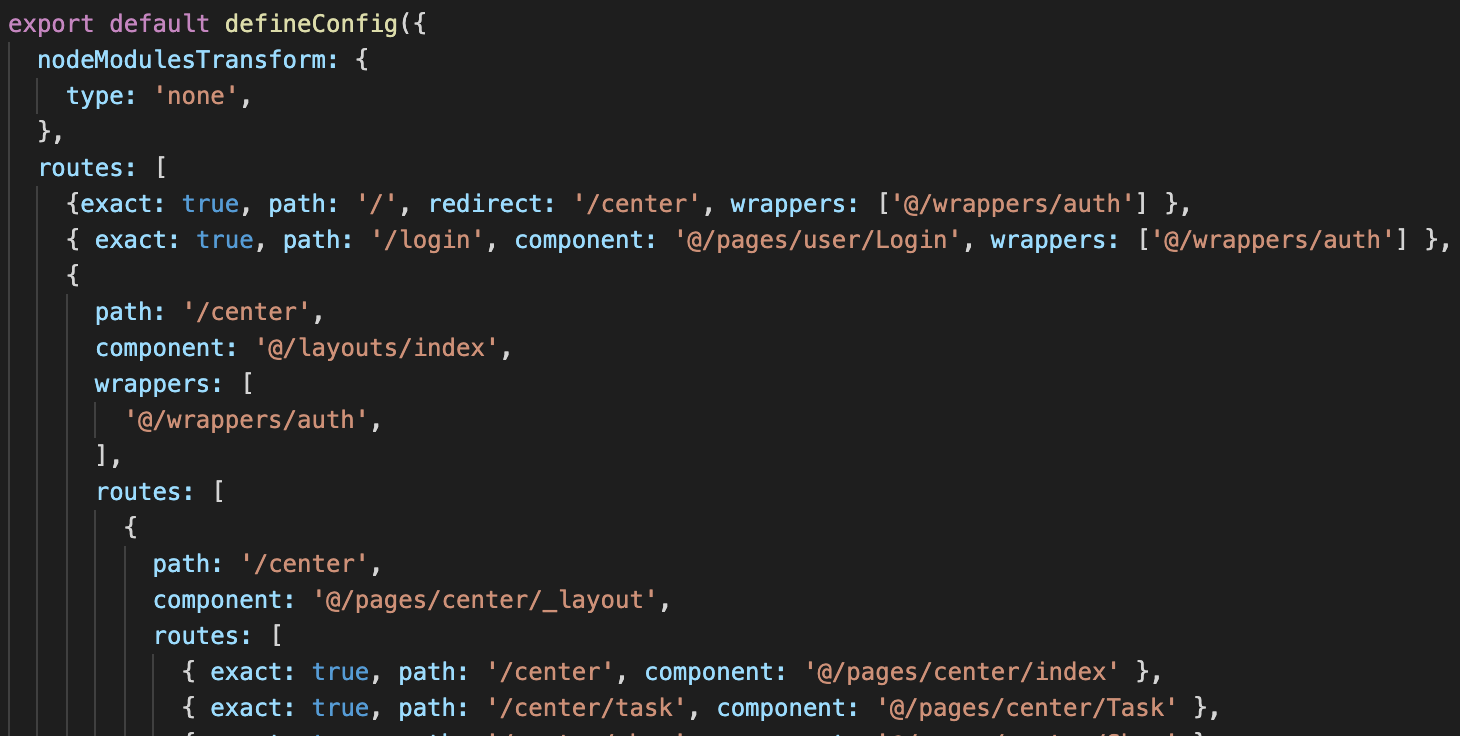
谢谢,搞定了,就等于说是多包了一层在最外侧
 aiyuchen
on 11 Jan 2021
aiyuchen
on 11 Jan 2021
我试了下@dkvirus 的方法,可以实现,但是存在几个问题:
- 只能适用于顶级route,如果你有一个层级是
/user的layout,但是/user下有一个404的url就会先加载/user的layout,之后再空白展示,除非你每个层级都做一个404,而且又不理想 - 对于网站前台基本上都是一个主要的layout,这样写等于多包了一层layout
- 对于2多包一层并没有什么问题,问题在于,比如你有一个
/user,还有一个/order两个层级,他们同时用一个layout,但是为了404分开来并行写一个route,你第一次打开/user,再打开/order,相同的layout会重复再加载一次
于是我花了1天时间,发现有个更好的方法,这里做个记录:
- 先去掉umirc文件router中的404
- 在运行时中添加
onRouteChange方法,我发现给出的参数中如果页面存在location.pathname和matchedRoutes最后一个路由匹配url必然相同,否则就是404
export function onRouteChange({ location, matchedRoutes }) {
    const num = matchedRoutes.length - 1;
    location.p404 = location.pathname !== matchedRoutes[num].match.url;
}
- 在顶级的layout中对于
location.p404为真的情况直接抛出404页面
export default function LayoutFc(props: IRouteComponentProps) {
    const { children, location, route, history, match } = props;
    if (location.pathname === '/login') {
        return children;
    }

    if (location.p404) {
        return <P404 />
    }
    ...
};
- 这点可选,我自己目前情况是这样的,将网站前台整体用一个layout
    {
      path: '/',
      component: '@/layouts/index',
      wrappers: [
        '@/wrappers/auth',
      ],
      routes: [
        ...
      ],
  }
这样就解决了:
- 无论是顶层url不存在,还是子路由404,都能抛出独立的404页面
- 因为前台主要就一个layout,不会因为route同级切换,重复加载
aiyuchen
on 12 Jan 2021
还是上面的方法,继续完善一个需求,
- 假设一个route,
/user顶级是不让访问需要404的, - 而
/user/info,/user/setting这样的子路由是允许访问的 - 而子路由共享
/user下同一个_layout,那么就会造成默认有一个/user的url可以访问
目前的解决方法是可以将/user通过redirect到一个能够访问的url上,还有一个方法,我在route中这样设置
{
     path: '/user',
    component: '@/pages/user/_layout',
     routes: [
        { exact: true, path: '/user', p404: true, },
        ...
    ],
}
然后修改运行时的onRouteChange方法
export function onRouteChange({ location, matchedRoutes }) {
    const num = matchedRoutes.length - 1;
    location.p404 = matchedRoutes[num].route.p404 === true || location.pathname !== matchedRoutes[num].match.url;
}
这样就能屏蔽这个url给出一个404页面了
aiyuchen
on 12 Jan 2021
Related issues
 ironyfive
·
3Comments
ironyfive
·
3Comments
 Artoria-0x04
·
3Comments
Artoria-0x04
·
3Comments
 miaojinxing
·
3Comments
miaojinxing
·
3Comments
 liuxinqiong
·
3Comments
liuxinqiong
·
3Comments
 stoneWeb
·
3Comments
stoneWeb
·
3Comments
Most helpful comment
@LingzhiLiu 你如果用约定式路由的话,我暂时没有好的建议。如果是配置式路由,这个问题还是比较容易解决的。
.umirc.js 文件或者 configs/config.js 文件添加 route 配置。
虽然功能实现了,但代码很不优雅,可以看到普通页面的路由必须前面加个前缀
/basic才行。其实我不太理解为什么你的 404 页面不嵌套在 BasicLayout 布局下。如果是做后管系统,也就是一个登陆页面,以及登录进来之后的普通页面,总共只需要两个布局而已。
登录页面,如果瞎输地址,可以通过代码一直保留在登录页面,做法是判断用户是否登录,比如是否存在 userId,未登录直接路由到登录页面;
登录成功后进入普通页面,如果瞎输地址,只是输入地址的页面不存在而已,404页面嵌套在 BasicLayout 中并无不可吧。