👋 Hello I'm in a tough spot with Docker on my Umbrel, wondering how to recover.
Running on a Raspberry Pi 4.
The Umbrel is ssh'able but all actions involving Docker, directly or indirectly, just hang for long times before timing out.
- The
startscript hangs at the Docker step. - The
stopscript hangs at the first app stop. Nothing to stop I reckon, just crashes. - The
debugscript hangs at the Docker step. Just like #417 - The
docker system infocommand never returns after minutes of waiting for something. - The
docker system prunecommand never returns, same thing.
What's the guidance on revitalizing Docker or, ultimately, reinstalling Umbrel?
Point me in the right direction and I'll add a Reinstalling Umbrel section in the docs, which is sorely needed.
Thanks in advance!
 StevenBlack
All 18 comments
You should never run the start/stop script on the Raspberry Pi, because it doesn't check for the SSD and can cause damage. Instead, in your case, I'd recommend trying to reflash the SD card.
 AaronDewes
on 13 Apr 2021
AaronDewes
on 13 Apr 2021
Yeah definitely re-flash the SD card. Only OS files are stored on the SD card, all Umbrel specific data lives on the SSD and will persist through an SD card flash.
So if theres some sort of error with your Docker installation, flashing the SD card should fix it while keeping your Umbrel data intact.
 lukechilds
on 13 Apr 2021
lukechilds
on 13 Apr 2021
Thanks lads @lukechilds @AaronDewes certainly some footguns to address here. I'd like to help address that if you're open to PRs in this area.
...all Umbrel specific data lives on the SSD and will persist through an SD card flash.
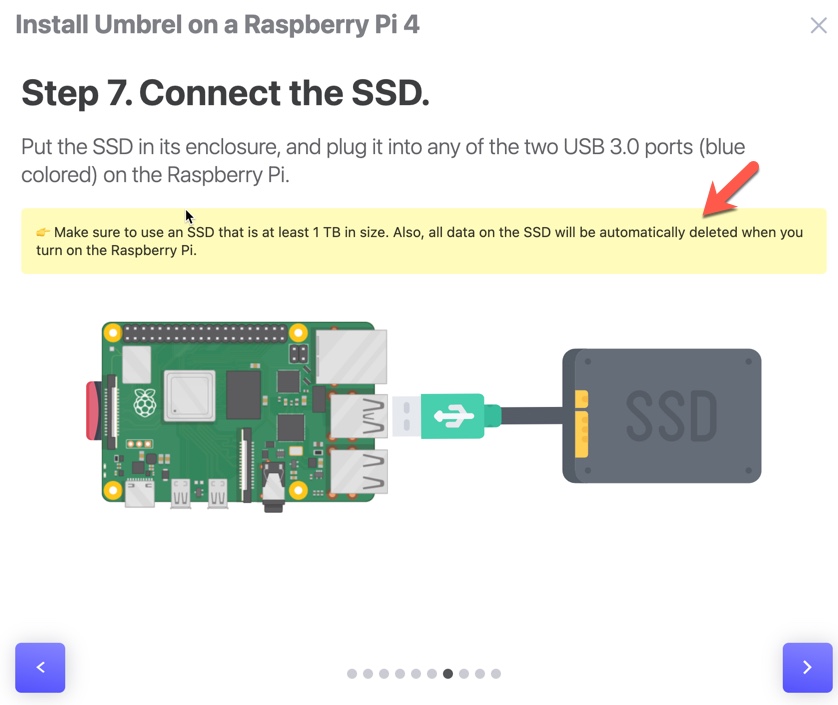
Luke @lukechilds I understand, though that's wholly inconsistent with docs, for example this screen shot. That sentence should be qualified, agreed? I can do that.
Aaron @AaronDewes said:
You should never run the start/stop script on the Raspberry Pi, because it doesn't check for the SSD and can cause damage.
That's a momentous problem. Can you tell me, is there a plan to address this? If not I'll create an issue just for that.
StevenBlack
on 13 Apr 2021
That's a momentous problem. Can you tell me, is there a plan to address this? If not I'll create an issue just for that.
No, it's fully intentional. On Umbrel OS, Umbrel is started automatically or via systemctl start umbrel-startup. Umbrel OS isn't designed for this, and the start script is recommended nowhere for the OS. Adding specifc logic for the start script to check this would be really complicated and probably isn't worth it.
I can do that.
While you can make suggestions, please never open a PR to the website, all changes are done by Mayank in Webflow and exported as HTML.
I understand, though that's wholly inconsistent with docs, for example this screen shot. That sentence should be qualified, agreed? I can do that.
The docs should be as simple as possible, also, reflashing is nearly never needed, especially when 0.3.9 is released, which will reduce SD writes by a lot.
AaronDewes
on 13 Apr 2021
@AaronDewes what an imperious reply. Unbelievable.
StevenBlack
on 13 Apr 2021
@AaronDewes what an imperious reply. Unbelievable.
Sorry if it sounded rude to you, that was not my intention. I just wanted prevent you from submitting a PR that couldn't be merged anyway, and I also wanted to save us a few GitHub issues, because every issue that is a wontfix will take some time to read and review.
AaronDewes
on 13 Apr 2021
@AaronDewes LOL spare me.
Adding specifc logic for the start script to check this would be really complicated and probably isn't worth it.
No. Trust me, it's an easy get. It's bash.
Scripts named start and stop that can brick the product in on its primary intended hardware a bug. A comment in the script conveying a warning is trivial. Displaying a Yes/No warning would be trivial. Documenting the bricking footgun is trivial. The mislabeling of the UI element that leads to the script discovery (in the first place) is trivial.
StevenBlack
on 13 Apr 2021
Flashing the hard drive seems to have worked great in this case.
I'm pleased that umbrel passwords remain unchanged, and lightning channel balances appear intact.
SSH access is borked, seeing the The ECDSA host key for umbrel.local has changed message which is not surprising.
Guys normally when I converse with other engineers about brittle misdocumented stuff, I rarely get churlish pushback like I got from @AaronDewes earlier in this thread. I see @AaronDewes' reply to me as an evident red-flag, a sign that all is not tight on this ship. I say this charitably, please don't misunderstand.
Sometimes inexperience shows, sometimes it's hidden. The worst is ignoring it when it shows. Technical debt will kill you faster than you imagine. Fix mistakes when they are cheap to fix, meaning, as early as possible. Always fix footguns immediately. You've got footguns.
StevenBlack
on 14 Apr 2021
Just to clarify a few things.
@AaronDewes what an imperious reply. Unbelievable.
Sorry about that, I can assure you @AaronDewes would not have intended his message to come across in that way and was just trying to be helpful.
Luke @lukechilds I understand, though that's wholly inconsistent with docs, for example this screen shot. That sentence should be qualified, agreed? I can do that.
That comment on the website is correct. Umbrel OS will detect if the SSD contains an Umbrel install, if so, it will boot it, if not, it will format it and install Umbrel.
So:
Plugging in an existing SSD with valuable data = data gets nuked.
Re-flashing SD card with an existing Umbrel install on the SSD = nothing will be deleted.
You should never run the start/stop script on the Raspberry Pi, because it doesn't check for the SSD and can cause damage.
That's a momentous problem. Can you tell me, is there a plan to address this? If not I'll create an issue just for that.
There are two separate code bases with separate responsibilities here. Umbrel, the service, which you can start and stop with it's included start/stop scripts. That works fine.
Then there is Umbrel OS, which is run on specific hardware, and includes it's own systemd services for mounting block devices and starting services in the correct order. This works fine.
The issue arrises in the rare circumstance that your SSD failed to mount. Umbrel OS does already detect this and will not start the Umbrel service to prevent Bitcoin Core syncing on the SD card. If a user then SSHs in to the device and manually starts the start script themselves, that will then cause the data to be written to the SD card.
It wouldn't make sense to force a hard check for a mounted block device in the Umbrel start script itself, that's a specific detail in the Umbrel OS environment. That would means if someone installed Umbrel on a VPS for example, Umbrel would not start unless they mounted a block device.
Does that make sense?
This will be a non issue once https://github.com/getumbrel/umbrel/issues/632 is implemented, since the users will be notified via the web UI of the problem and how to resolve.
Also, SSH access in general is not really supported. The idea is that users use Umbrel 100% via the dashboard, if users regularly need to login via SSH to do something, that's a failure on our part and we should implement whatever it is people are trying to do in the dashboard UI. SSH is currently enabled more as a debugging tool during beta, and to allow more technical users to tinker at their own risk if they wish.
We could definitely make that clearer.
@StevenBlack Does that clear up your concerns?
lukechilds
on 14 Apr 2021
Also could you clarify what you mean by this:
The mislabeling of the UI element that leads to the script discovery (in the first place) is trivial.
lukechilds
on 14 Apr 2021
Sometimes inexperience shows
I hope you're not one of these people who expect 20 years of job experience from a 13-year-old. :wink:
SSH access is borked, seeing the The ECDSA host key for umbrel.local has changed message which is not surprising.
Umbrel OS, for security purposes, creates a new SSH key for any new setup. By deleting the line containing umbrel.local from the file referenced in the error message, you should be able to fix this.
AaronDewes
on 14 Apr 2021
Thanks @lukechilds
That comment on the website is correct. Umbrel OS will detect if the SSD contains an Umbrel install, if so, it will boot it, if not, it will format it and install Umbrel.
So:
Plugging in an existing SSD with valuable data = data gets nuked.
Re-flashing SD card with an existing Umbrel install on the SSD = nothing will be deleted.
That's not what the documentation says. The documentation says, when you plug in the SSD into a flashed Umbrel, "...all the data on the SSD will be automatically deleted". My proposal is, clarify that, so it says what you say in this issue, which took me two days to learn. Because what you say is not documented.
Also, SSH access in general is not really supported. The idea is that users use Umbrel 100% via the dashboard, if users regularly need to login via SSH to do something, that's a failure on our part and we should implement whatever it is people are trying to do in the dashboard UI. SSH is currently enabled more as a debugging tool during beta, and to allow more technical users to tinker at their own risk if they wish.
When docker is hosed, there is no Umbrel dashboard to load because that's dependent on Docker. Therefore "SSH access in general is not really supported" means, recovering from most failure modes is not supported. Which is absurd. Furthermore none of this is documented, which is also absurd.
Also could you clarify what you mean by this:
The mislabeling of the UI element that leads to the script discovery (in the first place) is trivial.
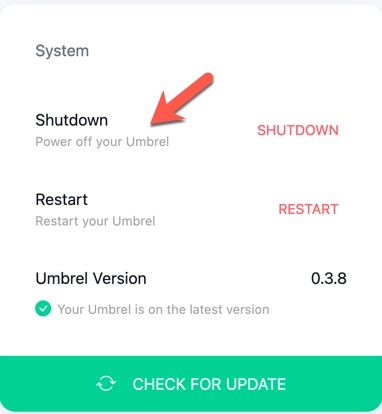
This is mislabeled. This is also 100% undocumented. One does not "shutdown" or "power off" Umbrel just like one does not "shutdown" or "power off" Vim or any other software. shutdown is a Linux command, shuts down the box. "Power off" relates strictly to the object directly consuming electrical power. Is this a second-language English thing?
This should say, "Power off your hardware". That's clear. To a user that seeks to "Stop" Umbrel, to safely disconnect the SSD for example, or to perform any of dozens of maintenance things we do every day on all our other machines, this ultimately leads to the scripts/stop and scripts/start bash files, which appear to do EXACTLY what the hardware owner needs to do, nevermind that there are no warnings in the bash file comments, nor are these things documented anywhere.
It's just a freaking mess.
Edit to clarify: It's just a freaking mess when something goes awry. Very thin docs, there's no date or version number applicability on ANY community/userland docs that I can find. So I end up here.
StevenBlack
on 14 Apr 2021
When docker is hosed, there is no Umbrel dashboard to load because that's dependent on Docker. Therefore "SSH access in general is not really supported" means, recovering from most failure modes is not supported. Which is absurd. Furthermore none of this is documented, which is also absurd.
The most common issue for this was SD corruption. Umbrel 0.3.9 reduces SD writes by a lot so this problem shouldn't happen.
Umbrel OS is made for users who just want to run Umbrel. If you think you're able to do these things:
safely disconnect the SSD for example
Just shutdown the node for this
or to perform any of dozens of maintenance things we do every day on all our other machines
Umbrel OS doesn't really require many maintenance things, that's why it was made, to make Umbrel simple to install and not require maintenance.
For example, Umbrel OS automatically installs security updates or prunes unused Docker images. What "maintenance things" do you want to do exactly?
If you're skilled enough to do these things, you should be able to manually install Umbrel.
this ultimately leads to the scripts/stop and scripts/start bash files, which appear to do EXACTLY what the hardware owner needs to do, nevermind that there are no warnings in the bash file comments, nor are these things documented anywhere.
- The stop script works perfectly fine.
- In most cases, the start script works too, but it should never be used if Umbrel doesn't start.
Edit to clarify: It's just a freaking mess when something goes awry. Very thin docs, there's no date or version number applicability on ANY community/userland docs that I can find. So I end up here.
In our Telegram chat, we always help users with problems, and if you are able to diagnose this yourself, you should just check if the SSD is mounted.
That's not what the documentation says. The documentation says, when you plug in the SSD into a flashed Umbrel, "...all the data on the SSD will be automatically deleted". My proposal is, clarify that, so it says what you say in this issue, which took me two days to learn. Because what you say is not documented.
Reflashing is almost never needed from 0.3.9 on, and getumbrel.com is intended for users who don't have much technical experience. If you have that, just have a look at this GitHub repo and see how mounting is implemented.
AaronDewes
on 15 Apr 2021
I am having a similar issue with Docker hanging. I went ahead and flashed the SD card again with the latest version and that seemed to fix the issue (I can now access umbrel.local).
However, I am now unable to login to the node via the GUI. I keep getting an Incorrect password error. Does flashing the sd card set a new default password? I tried moneyprintergobrrr, same thing, incorrect password.
 KayBeSee
on 15 Apr 2021
KayBeSee
on 15 Apr 2021
No, flashing the SD card should not affect the dashboard password, all Umbrel specific account data lives on the SSD.
Your LND wallet is also using the same password as the dashboard login, you could confirm there is no bug in the dashboard auth by SSHing in to your Umbrel ssh [email protected] (password should be moneyprintergobrrr if you just reflashed) and then trying to unlock LND with cd ~/umbrel && docker-compose exec lnd lncli unlock.
lukechilds
on 15 Apr 2021
@AaronDewes please.
We're on Version 0.3.8, not version 0.3.9. I'll make a deal with you: Let's talk about version 0.3.9 when 0.3.9 is in userland. Is that a good deal for you? Doing this will take up less bandwidth because, you know, people are on 0.3.8 right now.
Umbrel OS doesn't really require many maintenance things,
The reason I'm here is Umbrel DOES require maintenance. Why would I care about some theoretical general case? I had an Umbrel with a completely hosed Docker, and recovery from that is NOT documented, and here you are talking to me about the general case, while I have a SPECIFIC case.
Again, please, talking about 0.3.9 is not helpful. That takes up bandwidth, and wastes everyone's time, including yours.
StevenBlack
on 15 Apr 2021
Luke @lukechilds do you generally agree that Docker recovery tips, like this comment in this issue, should be documented? I think stuff like this needs to be documented because otherwise, even a moderate adoption wave will crush the whole organization.
StevenBlack
on 15 Apr 2021
Yes, it's been a priority for us recently, we are currently working on some documentation for troubleshooting common issues that we intend to make public shortly.
lukechilds
on 15 Apr 2021
Related issues
 jaonoctus
·
3Comments
jaonoctus
·
3Comments
 mayankchhabra
·
3Comments
mayankchhabra
·
3Comments
mayankchhabra
·
5Comments
mayankchhabra
·
4Comments
mayankchhabra
·
3Comments
mayankchhabra
·
3Comments
mayankchhabra
·
5Comments
mayankchhabra
·
4Comments