I just changed the password for my umbrel install to a more complex one after discovering the dashboard can be accessed via Tor and noticed the change got accepted, I was logged out and redirected to the login screen but can no longer login. This usually means that either a few chars did not get accepted or my password was too long and the maxlength on the password change form and login password form are not the same or it did not get inserted into the database properly. Can someone have a look at this? The only way I could get it back to work again was to reinstall Umbrel.
Password used that got accepted in the change but can't be used to login:
Z0DU8iKz{geX-'*t$fWIY)Y`:E)fzj8C$%X/;7KRFEE#/'?#T
old password that worked without issues:
R&wiN2'@XV@76]8l
Thanks!
 martijnw
All 15 comments
I second this.
At first, I thought I messed up a copy/paste from passwordmanager etc. but apparently there seems to be an issue.
- changed passwords on a synced-up Umbrel to something more complex (64 chars, upper-, lower-case, digits, brackets, special charaters)
- update-succesful message on the password change form
logged out, not able to sign in after
format Umbrel, initiliaze from scratch with different 64 char password (importing the same 24 word seed given from previous synched-up umbrel)
while doing the IBD I logged out/in a couple of times, worked
after IDB finished I wasn't able to sign in anymore,
- when using a 'wrong' password it shows 'incorrect password' under password-field
- when using the 'correct' password it shows 'Error Unable to unlock wallet, invalid passphrase for master public key' in a red box at center-top
 pvig0q1s
on 15 Jan 2021
pvig0q1s
on 15 Jan 2021
Thanks for the detailed report guys!
Let me try to recreate this.
 lukechilds
on 16 Jan 2021
lukechilds
on 16 Jan 2021
Thanks in advance, Luke!
Meanwhile, I was setting up another instance of Umbrel and I don't have good news.
There has to be some generel issue with the password in Umbrel UI :(
So, this run (I nuked the Umbrel and started from scratch) just got fully-synced:
- not able to sign in anymore after the IBD went to a 100%
- password I gave Umbrel on its first boot is 64 chars, upper-, lower-case, digits, brackets, special characters
- using a freshly generated seed given on first boot (deviating from my previous run 2 where I imported the given seed from run 1; where I initially set a more complex password and wasn't able to sign in after).
I checked the Umbrel last night @~99% sync. When Trying to log-in now, I again get this msg 'Error Unable to unlock wallet, invalid passphrase for master public key'
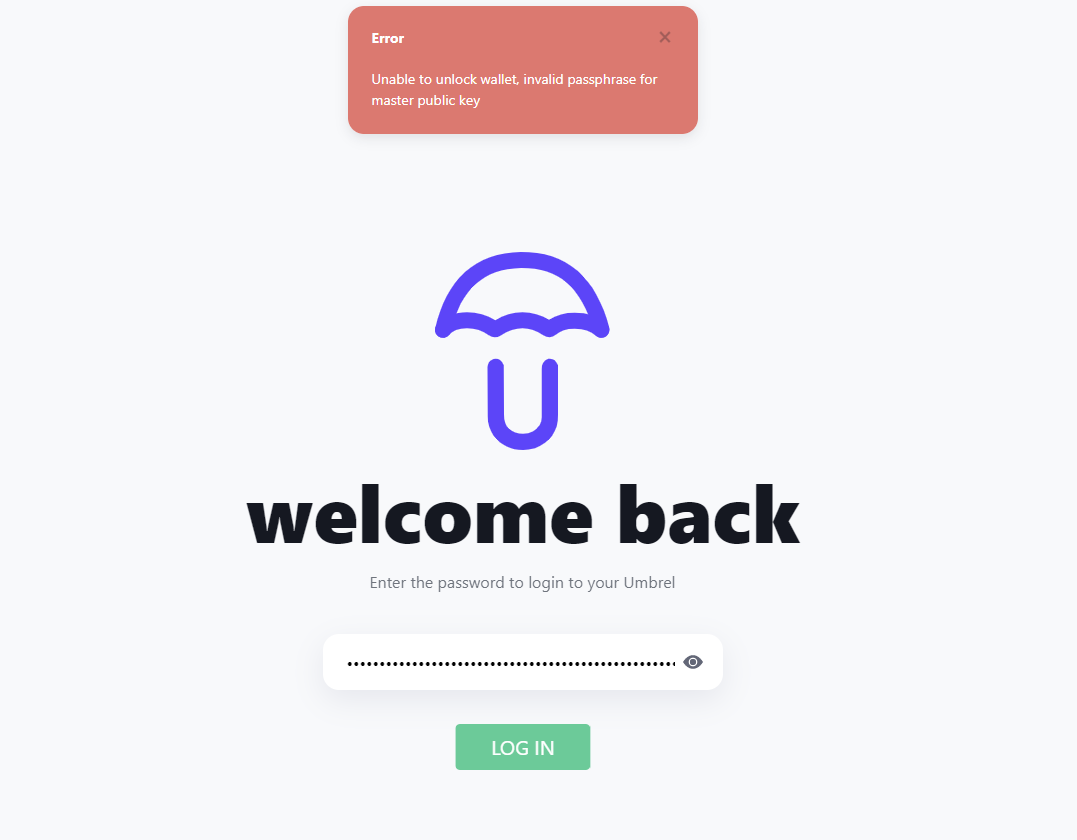
pvig0q1s
on 17 Jan 2021
I don't know if this is related, but I've just had a similar problem with the setup password (that one you use when you're starting Umbrel for the 1st time).
After copying the seed words and trying to proceed, I'd always get this message: "Must be 12 or more characters".
I could only get past that screen after I removed punctuation from the password.
 ottosch
on 20 Jan 2021
ottosch
on 20 Jan 2021
Same problem here, fail to login after node restart (no password change)
- hardware: Raspberry Pi4 8Gb
- bitcoin status on shutdown: ~10% synced
- initial password: 32 chars mixed case alphanumeric with special characters
 dzdidi
on 3 Feb 2021
dzdidi
on 3 Feb 2021
Sorry about this issue, guys. Thanks for all your reports. Looks like the colon messes it up as discovered by another user on Twitter:
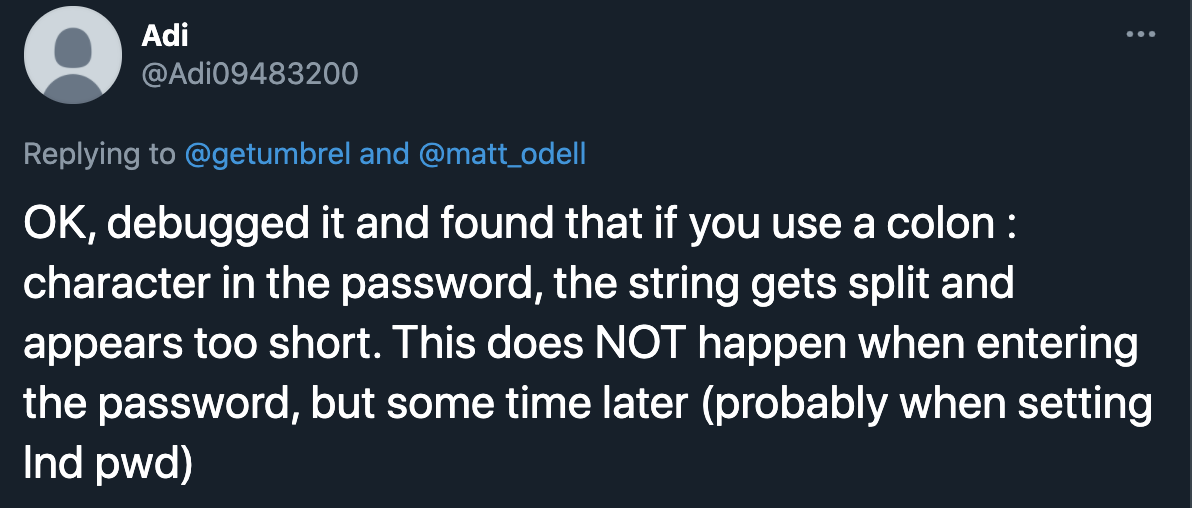
While we fix this on priority, here's an easy way for anyone looking to reset their Umbrel without deleting the blockchain:
Warning: this is only safe to use if there are no open lightning channels, and will also delete all the installed apps.
SSH into your Umbrel:
```
ssh [email protected]
Password: `moneyprintergobrrr`

2. Reset wallets:
sudo systemctl stop umbrel-startup && sudo rm -rf ~/umbrel/lnd/!(lnd.conf) && sudo rm ~/umbrel/db/user.json && sudo rm ~/umbrel/db/umbrel-seed/seed && sudo systemctl start umbrel-startup
```
The above command can take 3-4 minutes to execute. After it’s finished, wait for ~5 minutes and open http://umbrel.local. You can now continue the setup from scratch and use a password without a ":" meanwhile.
 mayankchhabra
on 5 Feb 2021
mayankchhabra
on 5 Feb 2021
Could it potentially be an issue withing the grpc package? If yes, https://github.com/getumbrel/umbrel-middleware/pull/77 might help. (Building an image at aarondewes/umbrel-middleware:master right now, in a videoconference then, so I can't test myself right now, but I'll test it later)
 AaronDewes
on 5 Feb 2021
AaronDewes
on 5 Feb 2021
That worked, thanks ❤️
As a thing to consider, this also removed installed apps (IMO no biggy)
dzdidi
on 5 Feb 2021
Oops, sorry I missed that. Thanks for pointing it out.
mayankchhabra
on 5 Feb 2021
Could it potentially be an issue withing the grpc package? If yes, getumbrel/umbrel-middleware#77 might help. (Building an image at aarondewes/umbrel-middleware:master right now, in a videoconference then, so I can't test myself right now, but I'll test it later)
GRPC update didn't seem to help, I'm trying something different right now
AaronDewes
on 5 Feb 2021
Hey @mayankchhabra, just want to add that my password had a colon and it was an issue while creating the password.
I was setting up Umbrel for the first time and couldn't get past the "copy your seed" screen.
ottosch
on 5 Feb 2021
@mayankchhabra just ran into the same issue with a colon in the password. Resetting and removing fixed it. What is the plan to ensure users dont step into the same pothole? Validate password on the client-side to ensure they dont contain a semicolon, or fix the underlying issue that causes a semicolon to break login?
 LaserHodl
on 14 Feb 2021
LaserHodl
on 14 Feb 2021
@LaserHodl The fix (https://github.com/getumbrel/umbrel-manager/pull/78) has been merged and will be included in the next release.
 louneskmt
on 14 Feb 2021
louneskmt
on 14 Feb 2021
Hello together, @mayankchhabra @lukechilds ,
I the did same for my password and was able to login (also had a colon in there). That went well for a couple of days.
After Updating to v0.3.2 I was still able to login (Besides installing mempool I was doing nothing special).
Today, I'm trying to login but got stuck on welcome screen 'Loading LND...' (with v0.3.3/4 being released in the meantime, to which I did not update).
I tried to ssh into getting a 'permission denied' (moneyprintergobrrr and dashboard password, known_host cleared). After un/replugging my Raspi I was able to sign in to the dashboard. Thereafter (~1min later) got auto-logged out and landed on sign-in page. ssh into also doenst work. Reapeted un/replugging, same result.
You guys have an idea?
Cheers!
//edit: 504 in console as well ( #324 / #516 )
pvig0q1s
on 17 Feb 2021
SSH PW is now your dashboard PW
AaronDewes
on 18 Feb 2021
Related issues
 junderw
·
3Comments
lukechilds
·
3Comments
mayankchhabra
·
3Comments
junderw
·
3Comments
lukechilds
·
3Comments
mayankchhabra
·
3Comments
 Rubinoussoren
·
5Comments
Rubinoussoren
·
5Comments
 snapo
·
9Comments
snapo
·
9Comments
Most helpful comment
Could it potentially be an issue withing the grpc package? If yes, https://github.com/getumbrel/umbrel-middleware/pull/77 might help. (Building an image at aarondewes/umbrel-middleware:master right now, in a videoconference then, so I can't test myself right now, but I'll test it later)