Umbraco-cms: Add support for webp as an image type and the ability to use the cropper / imageprocessor
Brief Description
Media picker responds with " Cannot upload this file, it does not have an approved file type" if file has a .webp extension if "Pick only images" is selected in the Data Type.
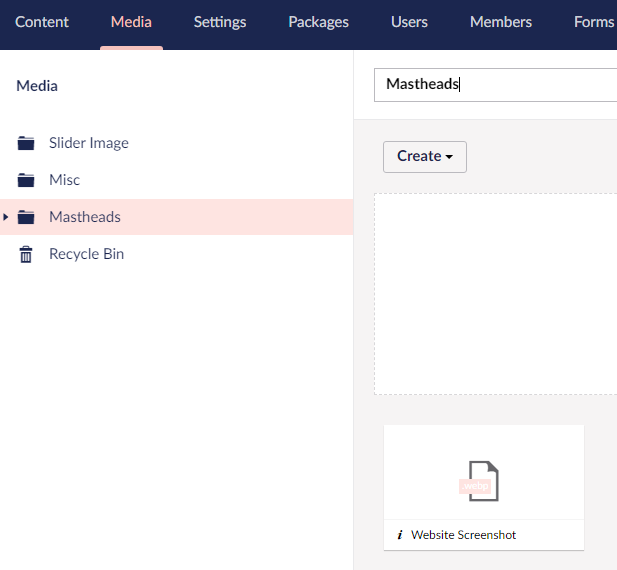
The Media section will allow .webp files to be uploaded but does not generate a thumbnail.
Umbraco version
I am seeing this issue on Umbraco version: 8.9.0
Reproduction
Steps to reproduce
In the back office, open a page with a Media Picker in it that has "Pick only images" on and click on the "+" sign in the Media Picker.
In the slide out panel, click on the "Upload" button then click on the "-or click here to choose file" link.
Select a webp file to upload.
Expected result
The file uploads as normal and a thumbnail is created.
Actual result
An error of "Cannot upload this file, it does not have an approved file type" is displayed under the upload control.
Media Picker Failure

Media Section lack of thumbnail
 craigs100
All 15 comments
In order for Umbraco to identify something as an image in the media picker it needs to be declared as such, you can do that in the imaging section which can be added to the <content> node.
<imaging>
<imageFileTypes>jpeg,jpg,gif,bmp,png,tiff,tif,svg,webp</imageFileTypes>
</imaging>
The default is jpeg,jpg,gif,bmp,png,tiff,tif and I've added svg,webp.
The thing that's missing is the thumbnail. I don't know if / how we can make a thumbnail of a webp image, but we'd love some help with that!
 nul800sebastiaan
on 4 Nov 2020
nul800sebastiaan
on 4 Nov 2020
Hi @craigs100,
We're writing to let you know that we would love some help with this issue. We feel that this issue is ideal to flag for a community member to work on it. Once flagged here, folk looking for issues to work on will know to look at yours. Of course, please feel free work on this yourself ;-). If there are any changes to this status, we'll be sure to let you know.
For more information about issues and states, have a look at this blog post
Thanks muchly, from your friendly Umbraco GitHub bot :-)
 umbrabot
on 4 Nov 2020
umbrabot
on 4 Nov 2020
Hi @nul800sebastiaan,
Thanks for that. Adding that section into umbracoSettings.config allows the media picker to upload a webp file AND it gets a thumbnail ;)
craigs100
on 4 Nov 2020
@craigs100 Huh, interesting! I don't get a thumbnail! Or maybe I didn't upload a valid webp file, that seems more likey. Do you have a screenshot? We should make svg and webp images by default really..
nul800sebastiaan
on 5 Nov 2020
@nul800sebastiaan you need to install the WebP plugin https://www.nuget.org/packages/ImageProcessor.Plugins.WebP/ to get ImageProcessor to work with WebP images
 rasmusjp
on 5 Nov 2020
rasmusjp
on 5 Nov 2020
Ah I don't have that one, but it turns out I was missing the mime type:
<remove fileExtension=".webp" />
<mimeMap fileExtension=".webp" mimeType="image/webp" />
Seems to work fine with ImageProcessor.. but I haven't tried anything but picking images.
nul800sebastiaan
on 5 Nov 2020
Cropping seems to work too, what does the plugin do extra?

nul800sebastiaan
on 5 Nov 2020
According to https://imageprocessor.org/imageprocessor/plugins/webp/ it adds support for WebP 😄
rasmusjp
on 5 Nov 2020
😂
Okay, I have found that adding querystrings like width and height don't really do anything unless that plugin is installed 👍
We should ship with that plugin and with defaults adding svg and webp as images.
nul800sebastiaan
on 5 Nov 2020
@nul800sebastiaan be carefull with shipping the WebP plugin. Check the requirements it needs some stuff installed on the server before it can work.
 dawoe
on 5 Nov 2020
dawoe
on 5 Nov 2020
Hmm..
Requires msvcr120.dll from the Visual C++ Redistributable Package for Visual Studio 2013 to be installed on the server.
Wonder what happens when you don't have it installed..?
nul800sebastiaan
on 5 Nov 2020
Ah, to be fair, I already had the imageprocessor.plugins.webp package installed before I opened the issue. It sounds like that's why they suddenly started to appear once the content section change was added in. Maybe that should be a permanent addition as well.
The reason I thought it was a bug is because I use webp files in a 7.5.4 site and they just seemed to work once I'd added this to web.config:-
<remove fileExtension=".webp" />
<mimeMap fileExtension=".webp" mimeType="image/webp" />
We should ship with that plugin and with defaults adding svg and webp as images.
Just like @dawoe commented, this shouldn't be shipped by default because of the specific requirements of the WebP plugin. SVG support is already added, including showing a preview.
This is also a duplicate of https://github.com/umbraco/Umbraco-CMS/issues/8314.
I'm also quite curious why you would want to upload WebP images, as browser support isn't very high yet (Safari just recently added support): https://caniuse.com/webp.
You're probably better off uploading JPEG or PNG images and conditionally serve converted WebP images using responsive image tags (picture source with type) or content negotiation to supporting browsers.
 ronaldbarendse
on 6 Nov 2020
ronaldbarendse
on 6 Nov 2020
@ronaldbarendse I uploaded webp's to my own site to see if I could get 3 x 100%s on the Lighthouse check, which I did :) I checked caniuse before I did as I was concerned most browsers may not support it, but they do. I'm not that concerned that Safari has only partial support at the moment. It'll either improve with time or die off.
craigs100
on 6 Nov 2020
@craigs100 It's much easier to just upload JPEG/PNG images and let browsers pick the right supported image type using something like this:
<picture>
    <source srcset="@image.GetCropUrl(200, 200, furtherOptions: "&format=webp")" type="image/webp">
    <img src="@image.GetCropUrl(200, 200)" width="200" height="200" alt="" />
</picture>
This only requires installing the ImageProcessor.Plugins.WebP package to add support for changing the image format to WebP. You might want to tweak the quality of the WebP image depending on the source image type (e.g. 100% for PNGs, so it's a lossless WebP image). If you're concerned about performance/scores, installing ImageProcessor.Web.PostProcessor will also help considerably (make sure to clear your ImageProcessor cache, as it's only applied to newly generated images).
ronaldbarendse
on 6 Nov 2020
Related issues
 creativesuspects
·
3Comments
creativesuspects
·
3Comments
 callumbwhyte
·
3Comments
callumbwhyte
·
3Comments
 aochmann
·
3Comments
aochmann
·
3Comments
 robertjf
·
3Comments
robertjf
·
3Comments
 HannesWinston
·
3Comments
HannesWinston
·
3Comments
Most helpful comment
@craigs100 It's much easier to just upload JPEG/PNG images and let browsers pick the right supported image type using something like this:
This only requires installing the
ImageProcessor.Plugins.WebPpackage to add support for changing the image format to WebP. You might want to tweak the quality of the WebP image depending on the source image type (e.g. 100% for PNGs, so it's a lossless WebP image). If you're concerned about performance/scores, installingImageProcessor.Web.PostProcessorwill also help considerably (make sure to clear your ImageProcessor cache, as it's only applied to newly generated images).