Umbraco-cms: 8.9rc: x.properties.UmbracoBackOfficeExternalLoginOptions is undefined (Azure AD)
x.properties.UmbracoBackOfficeExternalLoginOptions is undefined (Azure AD & 8.9RC)
I am trying to configure backoffice login with Azure AD in the new 8.9RC.
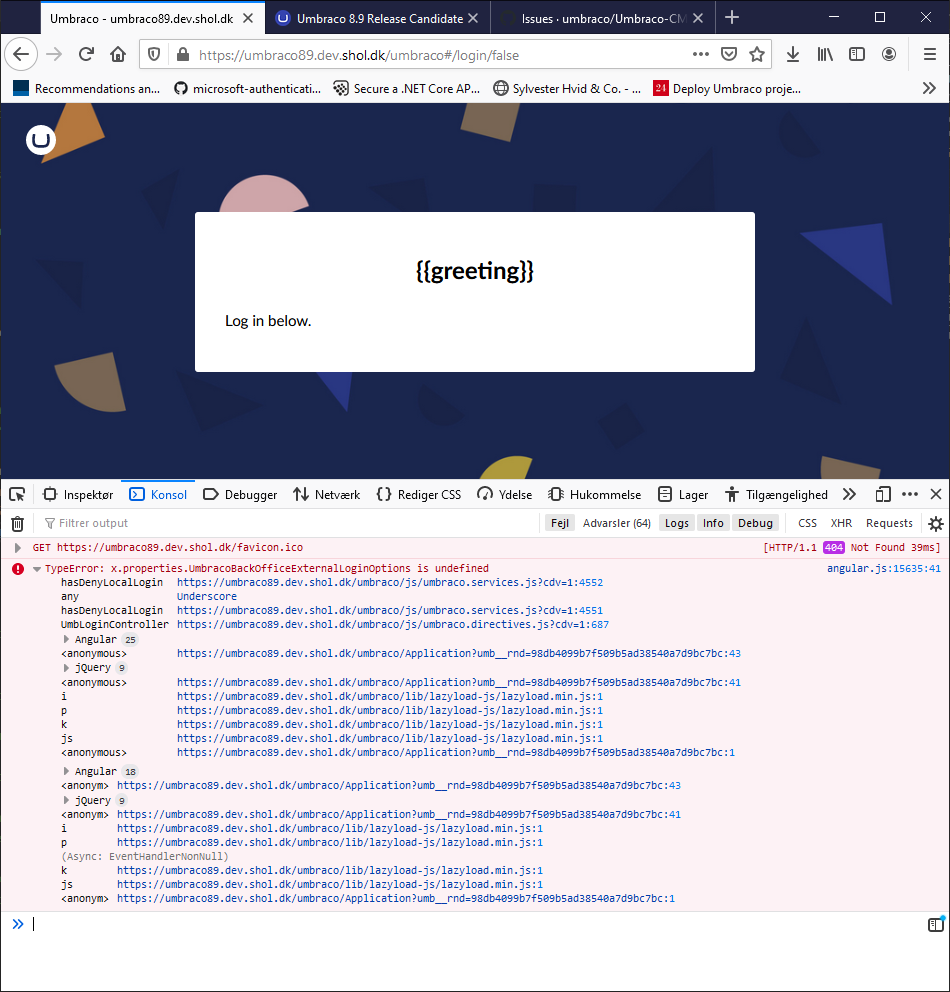
I run into a javascript error on the login page:
TypeError: x.properties.UmbracoBackOfficeExternalLoginOptions is undefined
    hasDenyLocalLogin https://umbraco89.dev.shol.dk/umbraco/js/umbraco.services.js?cdv=1:4552
    any Underscore
    hasDenyLocalLogin https://umbraco89.dev.shol.dk/umbraco/js/umbraco.services.js?cdv=1:4551
    UmbLoginController https://umbraco89.dev.shol.dk/umbraco/js/umbraco.directives.js?cdv=1:687
    Angular 25
    <anonymous> https://umbraco89.dev.shol.dk/umbraco/Application?umb__rnd=98db4099b7f509b5ad38540a7d9bc7bc:43
    jQuery 9
    <anonymous> https://umbraco89.dev.shol.dk/umbraco/Application?umb__rnd=98db4099b7f509b5ad38540a7d9bc7bc:41
    i https://umbraco89.dev.shol.dk/umbraco/lib/lazyload-js/lazyload.min.js:1
    p https://umbraco89.dev.shol.dk/umbraco/lib/lazyload-js/lazyload.min.js:1
    k https://umbraco89.dev.shol.dk/umbraco/lib/lazyload-js/lazyload.min.js:1
    js https://umbraco89.dev.shol.dk/umbraco/lib/lazyload-js/lazyload.min.js:1
    <anonymous> https://umbraco89.dev.shol.dk/umbraco/Application?umb__rnd=98db4099b7f509b5ad38540a7d9bc7bc:1
angular.js:15635:41
    Angular 18
    <anonym> https://umbraco89.dev.shol.dk/umbraco/Application?umb__rnd=98db4099b7f509b5ad38540a7d9bc7bc:43
    jQuery 9
    <anonym> https://umbraco89.dev.shol.dk/umbraco/Application?umb__rnd=98db4099b7f509b5ad38540a7d9bc7bc:41
    i https://umbraco89.dev.shol.dk/umbraco/lib/lazyload-js/lazyload.min.js:1
    p https://umbraco89.dev.shol.dk/umbraco/lib/lazyload-js/lazyload.min.js:1
    (Async: EventHandlerNonNull)
    k https://umbraco89.dev.shol.dk/umbraco/lib/lazyload-js/lazyload.min.js:1
    js https://umbraco89.dev.shol.dk/umbraco/lib/lazyload-js/lazyload.min.js:1
    <anonym> https://umbraco89.dev.shol.dk/umbraco/Application?umb__rnd=98db4099b7f509b5ad38540a7d9bc7bc:1
I have configured the backend according to the examples given in the two packages:
Install-Package UmbracoCms.IdentityExtensions
Install-Package UmbracoCms.IdentityExtensions.AzureActiveDirectory
I think my configuration is correct, and I wouldn't expect a frontend error like this if it was wrong.
_This item has been added to our backlog AB#8847_
 SimonHilo
All 11 comments
Screenshot:
SimonHilo
on 9 Oct 2020
Thanks @SimonHilo Any chance you can share your configuration (without giving away the secrets that you need to put in there)?
 nul800sebastiaan
on 9 Oct 2020
nul800sebastiaan
on 9 Oct 2020
When adding an external login, you will also need to provide the autoLinkOptions. (Omitting will result in the {{ greeting }} and the error in the console).
For example I added this to the UmbracoADAuthExtensions example to make it work.
var autoLinkOptions = new ExternalSignInAutoLinkOptions(true);  // autoLinkExternalAccount = true
autoLinkOptions.AllowManualLinking = false;

adOptions.SetBackOfficeExternalLoginProviderOptions(new BackOfficeExternalLoginProviderOptions
{
    AutoRedirectLoginToExternalProvider = false,
    DenyLocalLogin = false, // if ANY external provider has this property set, local login will be disabled
    AutoLinkOptions = autoLinkOptions,
});
 mebrein
on 11 Oct 2020
mebrein
on 11 Oct 2020
@mebrein Yes, that solved the problem for me.
It would be helpful to include this in the initial UmbracoADAuthExtensions.
SimonHilo
on 12 Oct 2020
we'll be sure to make it not throw and set a default value.
 Shazwazza
on 12 Oct 2020
Shazwazza
on 12 Oct 2020
Hi all,
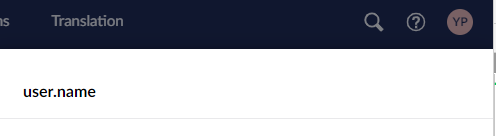
Seems this is still affecting the user dialog in the backoffice. (8.9.1)
It just says "user.name".
I'll see about our AD options later, but just thought I'd drop a heads up.
 lars-erik
on 16 Dec 2020
lars-erik
on 16 Dec 2020
Hi all,
Seems this is still affecting the user dialog in the backoffice. (8.9.1)
It just says "user.name".
I'll see about our AD options later, but just thought I'd drop a heads up.
We are also experiencing this issue. Is there a fix for it?
 yasserpadia
on 7 Jan 2021
yasserpadia
on 7 Jan 2021
I will also post your other question from the other places you've mentioned for completeness:
Shazwazza
on 7 Jan 2021
@yasserpadia can you replicate the issue from a vanilla Umbraco install? Can you replicate the problem in 8.9?
Shazwazza
on 7 Jan 2021
@yasserpadia can you replicate the issue from a vanilla Umbraco install? Can you replicate the problem in 8.9?
Yes this is a problem on vanilla as well.
The following from @mebrein post with a tweak has actually fixed this issue.
Changing autoLinkOptions.AllowManualLinking = false to true as below.
Are you able to check if this is a complete fix and if it needs to be added to any documentation?
_var autoLinkOptions = new ExternalSignInAutoLinkOptions(true); // autoLinkExternalAccount = true
autoLinkOptions.AllowManualLinking = true;adOptions.SetBackOfficeExternalLoginProviderOptions(new BackOfficeExternalLoginProviderOptions
{
AutoRedirectLoginToExternalProvider = false,
DenyLocalLogin = false, // if ANY external provider has this property set, local login will be disabled
AutoLinkOptions = autoLinkOptions,
});_
yasserpadia
on 7 Jan 2021
Thanks @yasserpadia that sounds like a bug, are you able to open a new one with simple steps to replicate?
Shazwazza
on 7 Jan 2021
Related issues
 glombek
·
4Comments
glombek
·
4Comments
 junkin77
·
3Comments
junkin77
·
3Comments
 janvanhelvoort
·
4Comments
janvanhelvoort
·
4Comments
 robertjf
·
3Comments
robertjf
·
3Comments
 Luksor
·
3Comments
Luksor
·
3Comments