Umbraco-cms: Mandatory fields in nested content not marked as required in 8.7.0
After upgrading from 8.6.4 to 8.7.0 the red asterisk is now missing for mandatory fields in nested content.
Umbraco version
I am seeing this issue on Umbraco version: 8.7.0
Reproduction
- Installed a clean Umbraco 8.6.4
- Created an element doc type with one mandatory textstring field
- Created a nested content data type and allowed the element type I just created
- Created a page doc type with the following fields
- A textstring field marked as mandatory
- A field for the nested content data type created in step 3
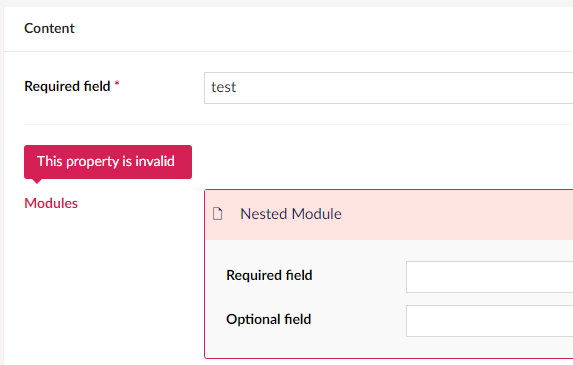
Created a page and got the following (as expected)

Upgrade Umbraco from 8.6.4 to 8.7.0 from NuGet
- Now the red asterisk in on the nested content field is missing, but still there for the page field

Also it doesn't tell which field in the nested element that's failing the validation
_This item has been added to our backlog AB#8782_
 jesperweber
All 14 comments
Getting this one as well. Setting up new doctypes and datatype in the updated version gives the same result.
Adding a value to the required field once the validation message has been shown does not get rid of the message. The only way to save is to remove the nested content item and then add it again filling out the value from start.
 limpa123
on 25 Sep 2020
limpa123
on 25 Sep 2020
@limpa123 Yes that's also what I experience.
jesperweber
on 28 Sep 2020
I found that in my 8.5.5 prod website, the red * is not set either so i think is a regression of 8.6.
But the error appear correctly :
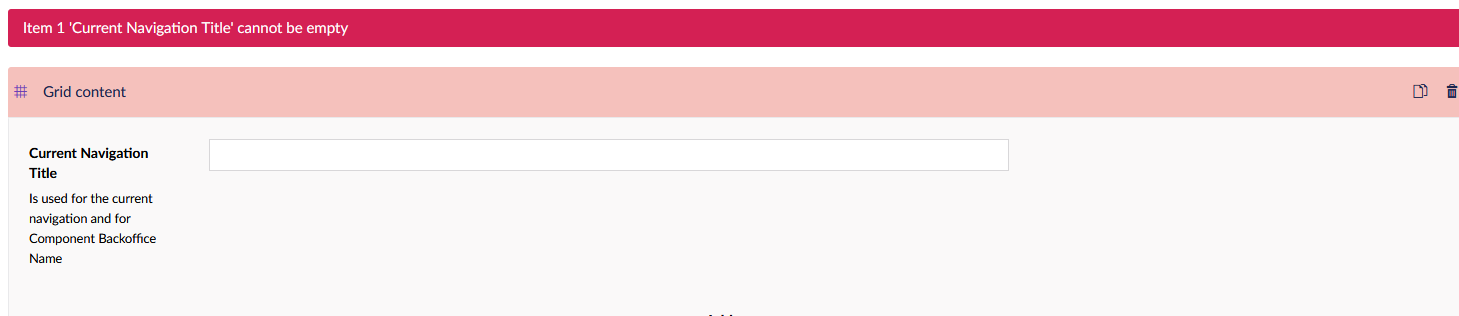
(Current Navigation Title is mandatory)
 filefontaine
on 5 Oct 2020
filefontaine
on 5 Oct 2020
First of your nested validation in 8.7+ should look a bit better, like this:
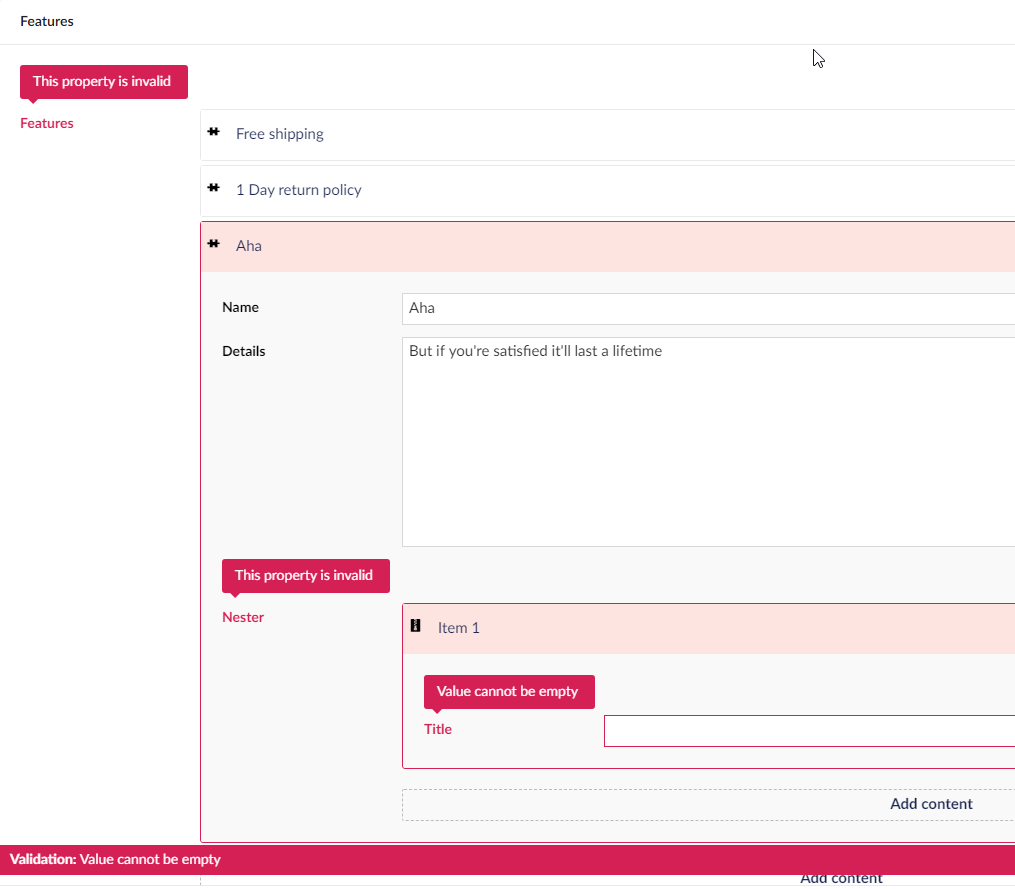
However I am not sure what happened to the mandatory indicator, might have been a conscious choice not to have it any more or it might have accidentally been removed.
I'll call in some feedback from @nielslyngsoe on this one!
 nul800sebastiaan
on 5 Oct 2020
nul800sebastiaan
on 5 Oct 2020
@nul800sebastiaan Strange, I also see the new validation i the clean solution now, don't why I didn't the first time? How ever if I select the interface in danish, some of the validation is in danish and some in english. This is properbly just a missing translation.
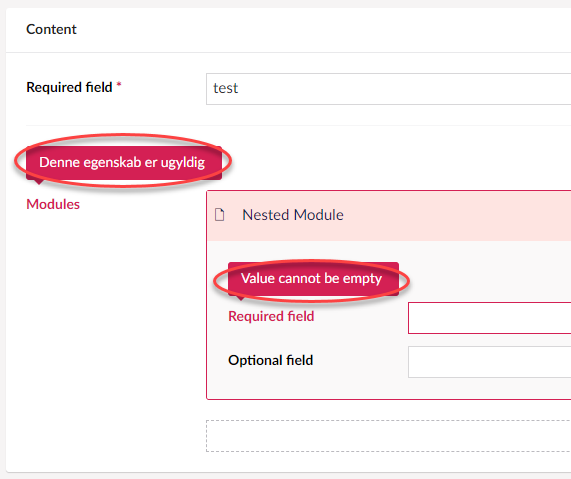
But yes I'm still missing the mandatory indicator and this is a problem for our editors. Hopefully this is just an error and not a conscious choice. The editors should know which fields are required and also the fields on the page (not nested content fields) are still marked with a mandatory indicator, so it should be aligned.
jesperweber
on 6 Oct 2020
Strange, I also see the new validation i the clean solution now, don't why I didn't the first time?
@jesperweber I have the same problem, you found a solution, to make them appear on an existing solution?
filefontaine
on 6 Oct 2020
I have the same problem, you found a solution, to make them appear on an existing solution?
@filefontaine Nope I did nothing, I just started the solution again today and it worked. So don't know how both of us could experience the same thing and now it just works for me? I'm still running 8.7.0, haven't upgraded to 8.8.0 yet.
jesperweber
on 6 Oct 2020
Thanks for the feedback all! I've spoken to @nielslyngsoe and it's definitely a regression we will need to fix. Maybe if any of you are quick you can find the problem and send a PR? It will definitely count for Hacktoberfest! 😉
But in any case we should look at it at HQ and fix it soon.
nul800sebastiaan
on 7 Oct 2020
I have made some research and i found in the umbraco.directives.directive:umbProperty an not correct parameter for the *
For now 8.8.0 (same in 8.7.0)
<span ng-if="vm.property.validation.mandatory"> <strong class="umb-control-required">*</strong> </span>
And i found in the definition of the umbProperty a set up like
'umb-nested-content--mandatory': property.ncMandatory
so normaly
<span ng-if="vm.property.ncMandatory"> <strong class="umb-control-required">*</strong> </span>
i dont have the time now do to the pr
But for now if you need a quick fix
filefontaine
on 8 Oct 2020
ok i found that the umbraco.directives.directive:umbProperty is used for all property in the web site so i think a convertion is needed for this like
vm.property.validation.mandatory = vm.property.ncMandatory
filefontaine
on 8 Oct 2020
There is a note in the .less file for this which might explain what is actually going on here:
.umb-nested-content--mandatory {
    /*
        yeah so this is a pain, but we must be super specific in targeting the mandatory property labels,
        otherwise all properties within a reqired, nested, nested content property will all appear mandatory
    */
    > ng-form > .control-group > .umb-el-wrap > .control-header label:after {
        content: '*';
        color: @red;
    }
}
ok so if in the UmbPropertyController
you set something like this the message and the * work as expected (for now not the custom message if you set one)
if(vm.property.ncMandatory){
                    vm.property.validation.mandatory = vm.property.ncMandatory;
                }
But i dont thinks its really a proper way to do this
filefontaine
on 8 Oct 2020
There is a note in the .less file for this which might explain what is actually going on here:
.umb-nested-content--mandatory {
    /*
        yeah so this is a pain, but we must be super specific in targeting the mandatory property labels,
        otherwise all properties within a reqired, nested, nested content property will all appear mandatory
    */
    > ng-form > .control-group > .umb-el-wrap > .control-header label:after {
        content: '*';
        color: @red;
    }
}
linked to this nov 2019 commit :
https://github.com/umbraco/Umbraco-CMS/commit/880d65bb42128b7eb3ef15870cf544766f30bd09#diff-76962e8b784d85838edd5fa0affff403
i dont know if it is always relevent as the nested content have now a proper property editors view
filefontaine
on 8 Oct 2020
Fixed in https://github.com/umbraco/Umbraco-CMS/pull/9250
Cherry picked for 8.7.1+ in f3aad864133546793b3887eb7e917d41440e2b5e
nul800sebastiaan
on 22 Oct 2020
Related issues
 PullensDennis
·
3Comments
PullensDennis
·
3Comments
 sofietoft
·
3Comments
sofietoft
·
3Comments
 robertjf
·
3Comments
robertjf
·
3Comments
 Luksor
·
3Comments
Luksor
·
3Comments
 Matthew-Wise
·
4Comments
Matthew-Wise
·
4Comments
Most helpful comment
Thanks for the feedback all! I've spoken to @nielslyngsoe and it's definitely a regression we will need to fix. Maybe if any of you are quick you can find the problem and send a PR? It will definitely count for Hacktoberfest! 😉
But in any case we should look at it at HQ and fix it soon.