Umbraco-cms: Empty javascript item in package.manifest causes cpu overload
I accidently left an empty item in the javascript array in a package.manifest.
  "javascript": [
    ""
  ]
It appears to send the backoffice into meltdown

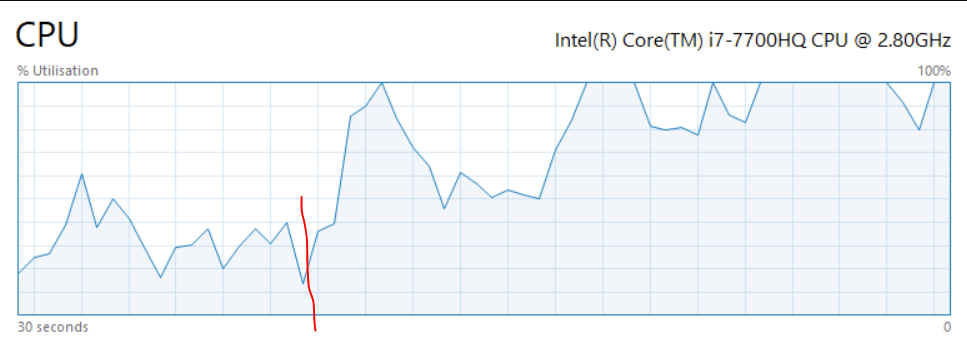
The red line is where I opened the backoffice,
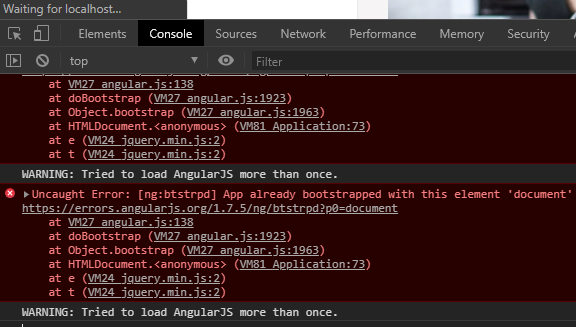
Observed this repeating error in the console

and then killed the tab
Umbraco version
I am seeing this issue on Umbraco version: 8.4.0
 tompipe
All 6 comments
Well that's fun. We build the list of javascript URLs in /umbraco/Application, and paths are interpreted as being relative to the current URL. So an empty string resolves to /umbraco/Application and the script ends up loading itself as a dependency. Repeat until your browser gets bored.
A check for empty strings in Umbraco.Web.JavaScript.AssetInitialization.OptimizeAssetCollection would avoid it.
 stevemegson
on 5 Feb 2020
stevemegson
on 5 Feb 2020
Whoa!! 😅😅😅
Nice browser crash there! Would be great to get this fixed yep.
 nul800sebastiaan
on 5 Feb 2020
nul800sebastiaan
on 5 Feb 2020
Hi @tompipe,
We're writing to let you know that we've added the Up For Grabs label to your issue. We feel that this issue is ideal to flag for a community member to work on it. Once flagged here, folk looking for issues to work on will know to look at yours. Of course, please feel free work on this yourself ;-). If there are any changes to this status, we'll be sure to let you know.
For more information about issues and states, have a look at this blog post
Thanks muchly, from your friendly PR team bot :-)
 umbrabot
on 5 Feb 2020
umbrabot
on 5 Feb 2020
Yikes! I can reproduce the issue, will throw in a fix for it asap 👍
 kjac
on 8 Feb 2020
kjac
on 8 Feb 2020
PR in #7633
kjac
on 10 Feb 2020
nul800sebastiaan
on 25 Feb 2020
Related issues
 jesperordrup
·
3Comments
jesperordrup
·
3Comments
 PullensDennis
·
3Comments
PullensDennis
·
3Comments
 junkin77
·
3Comments
junkin77
·
3Comments
 aochmann
·
3Comments
aochmann
·
3Comments
 Myronics
·
3Comments
Myronics
·
3Comments