Umbraco-cms: List View performance degradation
If we rapidly add lots of content under the same node the list view starts to slow down to the point where some pages will not load and an SQL timeout error will be thrown.
Umbraco version 8
I am seeing this issue on Umbraco version: 8.2.1 and 8.3.0 (didn't test any other version).
Both Cloud and On Premise have this issue.
Reproduction
Bug summary
List View slows down once we start to push lots of data under the same node. I' talking about 500+ items (which is technically not a lot of data). Each page starts to load a bit slower.
- 1st page - 180ms
- 5th page - 245ms
- 10th page - 321ms
- 30th page - 1200ms
It looks like a linear progression.
Sometimes the issue resolves itself and load times start becoming the same for each of the page - 300ms. If I load more data it will start "lagging" again.
I've used an SQL Profiler and it seems that the query which actually retrieves data slows down depending on which page we retrieve. If I try to run the query separately it works fast (doesn't go into seconds - only milliseconds).
It feels like there is something parallel going on when we request a page of the list to load which slows down this specific query.
This is an example of the query:
exec sp_executesql N'SELECT [umbracoDocument].[nodeId] AS [NodeId], [umbracoDocument].[published] AS [Published], [umbracoDocument].[edited] AS [Edited] , [umbracoContent].[nodeId] AS [ContentDto__NodeId],
[umbracoContent].[contentTypeId] AS [ContentDto__ContentTypeId] , [umbracoNode].[id] AS [ContentDto__NodeDto__NodeId], [umbracoNode].[uniqueId] AS [ContentDto__NodeDto__UniqueId], [umbracoNode].[parentId] AS
[ContentDto__NodeDto__ParentId], [umbracoNode].[level] AS [ContentDto__NodeDto__Level], [umbracoNode].[path] AS [ContentDto__NodeDto__Path], [umbracoNode].[sortOrder] AS [ContentDto__NodeDto__SortOrder],
[umbracoNode].[trashed] AS [ContentDto__NodeDto__Trashed], [umbracoNode].[nodeUser] AS [ContentDto__NodeDto__UserId], [umbracoNode].[text] AS [ContentDto__NodeDto__Text], [umbracoNode].[nodeObjectType] AS
[ContentDto__NodeDto__NodeObjectType], [umbracoNode].[createDate] AS [ContentDto__NodeDto__CreateDate] , [umbracoDocumentVersion].[id] AS [DocumentVersionDto__Id], [umbracoDocumentVersion].[templateId] AS
[DocumentVersionDto__TemplateId], [umbracoDocumentVersion].[published] AS [DocumentVersionDto__Published] , [umbracoContentVersion].[id] AS [DocumentVersionDto__ContentVersionDto__Id],
[umbracoContentVersion].[nodeId] AS [DocumentVersionDto__ContentVersionDto__NodeId], [umbracoContentVersion].[versionDate] AS [DocumentVersionDto__ContentVersionDto__VersionDate], [umbracoContentVersion].[userId]
AS [DocumentVersionDto__ContentVersionDto__UserId], [umbracoContentVersion].[current] AS [DocumentVersionDto__ContentVersionDto__Current], [umbracoContentVersion].[text] AS [DocumentVersionDto__ContentVersionDto__Text] , [pdv].[id] AS [PublishedVersionDto__Id], [pdv].[templateId] AS [PublishedVersionDto__TemplateId], [pdv].[published] AS [PublishedVersionDto__Published] , [pcv].[id] AS [PublishedVersionDto__ContentVersionDto__Id], [pcv].[nodeId] AS [PublishedVersionDto__ContentVersionDto__NodeId], [pcv].[versionDate] AS [PublishedVersionDto__ContentVersionDto__VersionDate], [pcv].[userId] AS [PublishedVersionDto__ContentVersionDto__UserId], [pcv].[current] AS [PublishedVersionDto__ContentVersionDto__Current], [pcv].[text] AS [PublishedVersionDto__ContentVersionDto__Text] , COALESCE([ccv].[name],[umbracoNode].[text]) AS variantName FROM [umbracoDocument] INNER JOIN [umbracoContent] ON [umbracoDocument].[nodeId] = [umbracoContent].[nodeId] INNER JOIN [umbracoNode] ON [umbracoContent].[nodeId] = [umbracoNode].[id] INNER JOIN [umbracoContentVersion] ON ([umbracoDocument].[nodeId] = [umbracoContentVersion].[nodeId]) INNER JOIN [umbracoDocumentVersion] ON ([umbracoContentVersion].[id] = [umbracoDocumentVersion].[id]) LEFT JOIN [umbracoContentVersion] [pcv] INNER JOIN [umbracoDocumentVersion] [pdv] ON (([pcv].[id] = [pdv].[id]) AND [pdv].[published] = @0) ON ([umbracoDocument].[nodeId] = [pcv].[nodeId]) LEFT JOIN [umbracoContentVersionCultureVariation] [ccv] INNER JOIN [umbracoLanguage] [lang] ON (([ccv].[languageId] = [lang].[id]) AND ([lang].[languageISOCode] = @1)) ON ([umbracoContentVersion].[id] = [ccv].[versionId]) WHERE (([umbracoNode].[nodeObjectType] = @2)) AND ([umbracoContentVersion].[current] = @3) AND (([umbracoNode].[parentId] = @4)) ORDER BY [DocumentVersionDto__ContentVersionDto__VersionDate] DESC , [ContentDto__NodeDto__NodeId]
OFFSET @5 ROWS FETCH NEXT @6 ROWS ONLY',N'@0 int,@1 nvarchar(4000),@2 uniqueidentifier,@3 int,@4 int,@5 bigint,@6 bigint',@0=1,@1=N'en-US',@2='C66BA18E-EAF3-4CFF-8A22-41B16D66A972',@3=1,@4=1053,@5=11400,@6=100
I've also tried rebuilding some indexes (the most fragmented ones). That seemed to have helped improve performance however the underlying issue of page retrieval speed still persisted.
Steps to reproduce
Create 2 document types (parent and child) and enable the list view on the parent.
Use any way of inserting lots of data into the list
- for loop in the API using
IContentService - run a JS loop in browser and use
umbraco/backoffice/UmbracoApi/Content/PostSave
Add at least 500 items (preferably 2000 items).
Try navigating the list while opening the network tab and recording times to finish GetChildren calls. Go to first page, middle page, last page.
JS code to insert many items into the list (needs to be updated with correct values and can be run from any backoffice page):
function uuidv4() {
  return 'xxxxxxxx-xxxx-4xxx-yxxx-xxxxxxxxxxxx'.replace(/[xy]/g, function(c) {
    var r = Math.random() * 16 | 0, v = c == 'x' ? r : (r & 0x3 | 0x8);
    return v.toString(16);
  });
}

for (var i = 0; i < 500; i++)
{
    var uuid = uuidv4();
    var data = new FormData();
    data.append('contentItem', `{"id":0,"contentTypeAlias":"item","parentId":1136,"action":"publishNew","variants":[{"name":"${uuid}","properties":[{"id":0,"alias":"text","value":"${uuid}"}],"culture":null,"publish":true,"save":true,"releaseDate":null,"expireDate":null}],"expireDate":null,"releaseDate":null,"templateAlias":null}`);

    var result = await fetch('https://mvc-asa-solutionlab-net.s1.umbraco.io/umbraco/backoffice/UmbracoApi/Content/PostSave', { method: 'post', body: data } );
    console.log(`Adding '${i}' item. Status: '${result.status}'`);
}
Expected result
Each page have a similar load time as the SQL Query should differ only by offset.
Actual result
The first page loads fast.
Middle page loads a lot slower (depends on the number of pages)
Last page load really slow or doesn't load at all (throws SQL Timeout exception)
_This item has been added to our backlog AB#4023_
 asmailov
All 12 comments
I spotted this issue the other day and just came here to post this same issue! We were doing some performance testing and noticed a massive performance drop-off between V7 and V8 for this. In our case, we had a list view with 8000 child pages that we were using for running some benchmark tests.
In V7, list view pages load in a handful of seconds. In V8, the list view takes a LONG time to load, in some cases the back office logs you out afire it's finished loading. I've not managed to dig into it, but it feels like it might be loading the ENTIRE data set on each page rather than just the current page that's being displayed. If I get a chance I'll try and dig deeper into this at some point.
 Attackmonkey
on 5 Dec 2019
Attackmonkey
on 5 Dec 2019
Hi all,
I have 10k chid nodes in a list view and I cannot replicate the problem. So I need to understand some more information:
- Is the DB you are working with an upgrade from a v7 one or is it a new v8 site?
- I can see that you are ordering by last date edited which I am also doing, but what columns do you have displayed?
- I assume you are running these tests with SQL server and not SqlCE? please confirm
 Shazwazza
on 11 Dec 2019
Shazwazza
on 11 Dec 2019
Hi Shannon,
It's a brand new V8 install for us (v8.3).
On our version we're ordering by Last edited and the fields Name, Status, Last Edited and Created By are showing the list view.
In our case it's using a local SDF file rather than full blown SQL. I'll copy the DB to SQL tonight when I'm back on my home machine and see if that makes a difference.
Attackmonkey
on 11 Dec 2019
Hi all,
I have 10k chid nodes in a list view and I cannot replicate the problem. So I need to understand some more information:
- Is the DB you are working with an upgrade from a v7 one or is it a new v8 site?
- I can see that you are ordering by last date edited which I am also doing, but what columns do you have displayed?
- I assume you are running these tests with SQL server and not SqlCE? please confirm
Hi Shannon,
- It's a brand new v8 site (created only to test this issue)
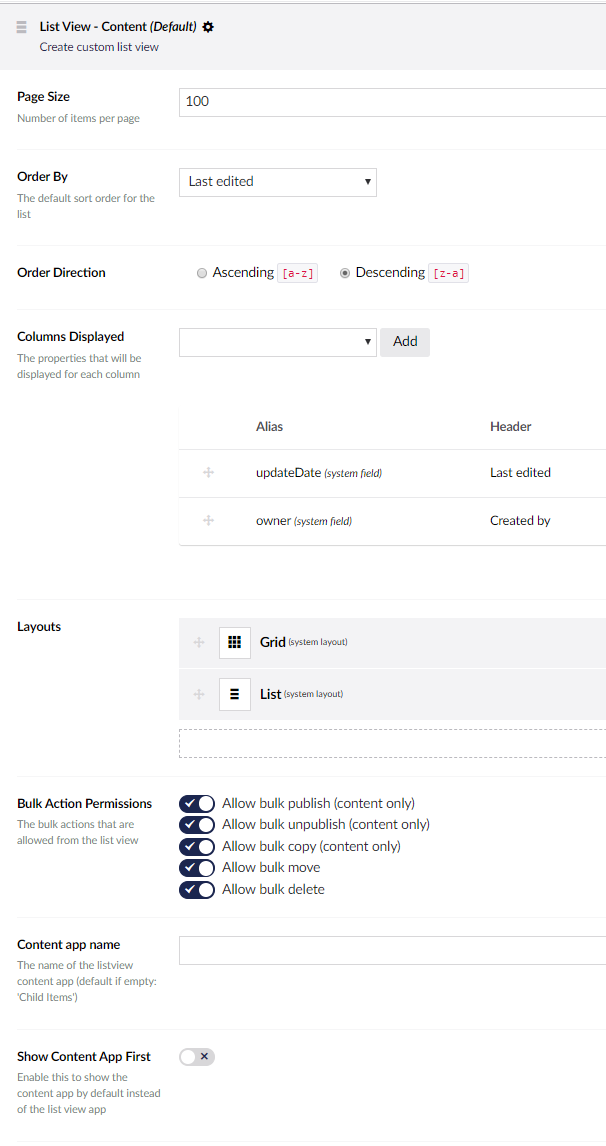
- List view is a default one (100 items per page, columns: updateDate, owner).
- Yes. I am using SQL Server (Express)
Here is a screenshot of the list view:
asmailov
on 11 Dec 2019
Thanks!
Although I cannot replicate the performance issue locally, i do know the problem, or at least part of the problem. Running these queries through SQL execution plans it shows that there are indexes missing. In fact (and unfortunately) the main index that is missing we have a TODO note in the codebase to add it :/ The other part of the issue is that for each paged block of data it is performing additional queries to get all property and publishing schedule data which is mostly unnecessary (unless of course you are showing property data). These additional queries execute quickly though so I don't believe that is the main bottleneck, it will be mainly missing db indexes.
I'll start creating a PR and run some more tests and report back.
Shazwazza
on 11 Dec 2019
Thank you!
Please note, that the issue sometimes resolves itself.
I've had a 10K+ list start working properly and return first/last page in the same amount of time :/ Adding even more content (quickly) seems to disrupt that and the issue persists again.
asmailov
on 11 Dec 2019
This will most likely be an index we'll be adding. You can do this now to see how this affects your list view performance and please let me know if this resolves the issue for you
CREATE NONCLUSTERED INDEX [IX_umbracoContentVersion_NodeId] ON [dbo].[umbracoContentVersion]
(
    [nodeId] ASC,
    [current] ASC
)WITH (PAD_INDEX = OFF, STATISTICS_NORECOMPUTE = OFF, SORT_IN_TEMPDB = OFF, DROP_EXISTING = OFF, ONLINE = OFF, ALLOW_ROW_LOCKS = ON, ALLOW_PAGE_LOCKS = ON) ON [PRIMARY]
GO
There's some other optimizations were doing too but this hopefully should be the main culprit
Shazwazza
on 11 Dec 2019
Have submitted a PR here https://github.com/umbraco/Umbraco-CMS/pull/7316
Shazwazza
on 11 Dec 2019
This will most likely be an index we'll be adding. You can do this now to see how this affects your list view performance and please let me know if this resolves the issue for you
CREATE NONCLUSTERED INDEX [IX_umbracoContentVersion_NodeId] ON [dbo].[umbracoContentVersion]
(
  [nodeId] ASC,
  [current] ASC
)WITH (PAD_INDEX = OFF, STATISTICS_NORECOMPUTE = OFF, SORT_IN_TEMPDB = OFF, DROP_EXISTING = OFF, ONLINE = OFF, ALLOW_ROW_LOCKS = ON, ALLOW_PAGE_LOCKS = ON) ON [PRIMARY]
GO
There's some other optimizations were doing too but this hopefully should be the main culprit
Thanks!
The index exponentially speeds up the load times! 👍
asmailov
on 12 Dec 2019
Can also confirm that the index works on full SQL Server!
Attackmonkey
on 16 Dec 2019
I am also experience this issue on our site running umbraco 8.4.0 in umbraco cloud. I don't experience the same issue in my local dev-machine.
We have about 120 pages and list 40 items per list page so it's not that much data. We have loading times between 15-30 seconds for every request in umbraco cloud, it doesn't looks like the query getting cached either because it's always the same waiting time. In my local machine the answer time is just about 500 ms so it seems to be an cloud issue in our case. Locally we are using a .sdf-database.
This is the query that we having problems with, the field "LastModifiedDate" are a custom field that we list and order by.
/umbraco/backoffice/UmbracoApi/Content/GetChildren?id=3414&includeProperties=lastModifiedDate,updateDate,owner&pageNumber=1&pageSize=40&orderBy=lastModifiedDate&orderDirection=Descending&orderBySystemField=false&filter=&cultureName=sv

Will the list view fix be included in the next release or is it recommended that we are testing to run the datebase query by our self?
 Prizonic
on 18 Dec 2019
Prizonic
on 18 Dec 2019
Will be included in 8.6 so prob early in the new year. You will gain performance by manually adding the DB indexes mentioned above. But note that sorting on a custom property will not perform as well and there's unfortunately nothing that can be done about that because custom property data cannot have a DB index applied to it due to the way the DB is structured. That said, applying the index mentioned above will still yield much better performance.
Shazwazza
on 19 Dec 2019
Related issues
 junkin77
·
3Comments
junkin77
·
3Comments
 sniffdk
·
3Comments
sniffdk
·
3Comments
 callumbwhyte
·
3Comments
callumbwhyte
·
3Comments
 Myronics
·
3Comments
Myronics
·
3Comments
 glombek
·
4Comments
glombek
·
4Comments