Umbraco-cms: Umbraco Fails to Boot Repeatedly on Azure during auto Machine switchover
I did some research on this before reporting it.
This is a complex issue to describe so I'll present my conclusions first, give a narrative of what happened and present evidence to support my conclusions.
Conclusions:
1. The Umbraco implementation of a system wide semaphore does not work on Azure (or any other system)
2. The Umbraco implementation of nucache does not work on Azure - not because of the semaphore issue but because of the way it keeps locks on NuCache.Content.db when switching machines.

3. mainDom.Register - locks on the wrong lock ( _locko instead of  _asyncLock ) prior to running the install, so attempts to lock the Nuchache.Content.db too early i.e. before the main dom and hence nucache.content.db is released by another machine. It is not actually using the system wide semaphore.
Narrative:
I have been using Umbraco on Azure for approx 1 year with no real issues. In the last 2 months 1 ported a website to Umbraco 8 - currently on 8.1.2. The site has very little traffic, and uses the lowest spec possible on Azure - a single machine. Now, I have a global error handler implemented that catches any unhandled errors and emails them to me. Yesterday, for the first time, I got a dozen e-mails over the space of approx 1 hour that reported Umbraco failed to Boot. On investigatiion it turns out that Azure randomly decided to switch my Umbraco Web App to another completely new machine for approx 1 hour and then switched it back to the original machine where Umbraco booted up ok. For the duration of that hour I received emails roughly every 5 minutes indicating Umbraco failed to boot - all for the same reason "The process cannot access the file "NuCache\NuCache.Content.db' because it is being used by another process." Now I read several posts on this issue that suggest this should not happen because the file is protected by a system wide semaphore. My research indicates the wrong lock is being used described above, and even if the right lock was being used it would still not work as even when the original machine released the dom and system wide semaphore, the lock on the "NuCache.Content.db" is never released by the original machine. This is witnessed by the logs still reporting the locking problem on the file after the main dom and sysem wide semaphore has been released by original machine.
Evidence :
umbraco log files attached.
Azure Problem: Occurred as soon as a switch to a new machine named
RD00155D4B4222 from machine RD0003FF28F99D and then stopped only when Azure switched back to original machine RD0003FF28F99D
Details: The process cannot access the file 'D:\home\site\wwwroot\App_Data\TEMP\NuCache\NuCache.Content.db' because it is being used by another process.
Observation: AppDomainAppId remains the same on both machines LMW3SVC117498742ROOT, so the same system wide domain semaphore is referenced by original machine and new machine.
[Step 1] Original Machine: RD0003FF28F99D
Last entries:
Time that dom was released: 2019-10-01T03:51:24
{"@t":"2019-10-01T03:51:24.7611204Z","@mt":"Released ({SignalSource})","SignalSource":"environment","SourceContext":"Umbraco.Core.MainDom","ProcessId":13808,"ProcessName":"w3wp","ThreadId":16,"AppDomainId":2,"AppDomainAppId":"LMW3SVC117498742ROOT","MachineName":"RD0003FF28F99D","Log4NetLevel":"INFO "}
Time that last background task completed: 2019-10-01T03:51:24
{"@t":"2019-10-01T03:51:24.8556638Z","@mt":"{LogPrefix} Tasks {TaskStatus}, terminated","LogPrefix":"[KeepAlive] ","TaskStatus":"completed","SourceContext":"Umbraco.Web.Scheduling.BackgroundTaskRunner","ProcessId":13808,"ProcessName":"w3wp","ThreadId":28,"AppDomainId":2,"AppDomainAppId":"LMW3SVC117498742ROOT","MachineName":"RD0003FF28F99D","Log4NetLevel":"INFO "}
[Step 2]
Switch to new machine: RD00155D4B4222 at 2019-10-01T03:50:36
First Message on new machine.
{"@t":"2019-10-01T03:50:36.8858525Z","@mt":"{StartMessage} [Timing {TimingId}]","StartMessage":"Booting Umbraco 8.1.2.","TimingId":"c88e7e5","SourceContext":"Umbraco.Core.Runtime.CoreRuntime","ProcessId":9144,"ProcessName":"w3wp","ThreadId":1,"AppDomainId":2,"AppDomainAppId":"LMW3SVC117498742ROOT","MachineName":"RD00155D4B4222","Log4NetLevel":"INFO ","HttpRequestNumber":1,"HttpRequestId":"e7f3d65c-2d0a-45bd-8d1b-8f03d229d23e"}
Observations:
1) Got email messages for approx 1 hour all with the same process access issue against NuCache.Content.db.
2) AppDomainAppId remains the same on both machines LMW3SVC117498742ROOT, only AppDomainId is different.
3) Last message in this log file is 2019-10-01T04:44:16.4905379Z
4) No further issues after this.
5) Original machine only released lock at "2019-10-01T03:51:24.7611204Z" - copied from above.
{"@t":"2019-10-01T03:51:24.7611204Z","@mt":"Released ({SignalSource})","SignalSource":"environment","SourceContext":"Umbraco.Core.MainDom","ProcessId":13808,"ProcessName":"w3wp","ThreadId":16,"AppDomainId":2,"AppDomainAppId":"LMW3SVC117498742ROOT","MachineName":"RD0003FF28F99D","Log4NetLevel":"INFO "}
This is 36 seconds after new machine tried to access NuCache.Content.db file (because new machine was using wrong protection lock for resource i.e. _locko instead of _asyncLock):
{"@t":"2019-10-01T03:50:48.4942133Z","@mt":"{EndMessage} ({Duration}ms) [Timing {TimingId}]","EndMessage":"Resolved.","Duration":7542,"TimingId":"1aed07c","SourceContext":"Umbraco.Core.Runtime.CoreRuntime","ProcessId":9144,"ProcessName":"w3wp","ThreadId":1,"AppDomainId":2,"AppDomainAppId":"LMW3SVC117498742ROOT","MachineName":"RD00155D4B4222","Log4NetLevel":"INFO ","HttpRequestNumber":1,"HttpRequestId":"e7f3d65c-2d0a-45bd-8d1b-8f03d229d23e"}
{"@t":"2019-10-01T03:50:51.3343872Z","@mt":"{FailMessage} ({Duration}ms) [Timing {TimingId}]","@l":"Error","@x":"Umbraco.Core.Exceptions.BootFailedException: Boot failed. ---> System.IO.IOException: The process cannot access the file 'D:\home\site\wwwroot\App_Data\TEMP\NuCache\NuCache.Content.db' because it is being used by another process.
6) This new machine aquired the domain lock at "2019-10-01T03:50:37.3709338Z" i.e. 47 seconds before it was released by original machine at "2019-10-01T03:51:24.7611204Z"
This suggests (proves?) the system wide semaphore as implemented by umbraco does not work.
{"@t":"2019-10-01T03:50:37.3709338Z","@mt":"Acquired.","SourceContext":"Umbraco.Core.MainDom","ProcessId":9144,"ProcessName":"w3wp","ThreadId":1,"AppDomainId":2,"AppDomainAppId":"LMW3SVC117498742ROOT","MachineName":"RD00155D4B4222","Log4NetLevel":"INFO ","HttpRequestNumber":1,"HttpRequestId":"e7f3d65c-2d0a-45bd-8d1b-8f03d229d23e"}
7) Even after the semaphore lock was released by original machine - the lock on the NuCache.Content.db file was not released. This is evidenced by the following log message showing a locking issue 52 minutes after the semaphore lock was acquired.
{"@t":"2019-10-01T04:42:04.2199523Z","@mt":"An unhandled exception occurred","@l":"Error","@x":"Umbraco.Core.Exceptions.BootFailedException: Boot failed: Umbraco cannot run. See Umbraco's log file for more details.\n\n-> Umbraco.Core.Exceptions.BootFailedException: Boot failed.\n\n-> System.IO.IOException: The process cannot access the file 'D:\home\site\wwwroot\App_Data\TEMP\NuCache\NuCache.Content.db' because it is being used by another process.\n
Suggestion: The original machine needs to release the lock on this file before releasing the system wide semaphore.
[Step 3]
Switch back to Original Machine: RD0003FF28F99D
1) First message after switching back from machine switch is 2019-10-01T04:42:04.4484590Z
The boot process completed and all was fine with the site.
It would appear that this machine never gave up the original lock on the NuCache.Content.db file and was able to continue using it.
{"@t":"2019-10-01T04:42:04.4484590Z","@mt":"{StartMessage} [Timing {TimingId}]","StartMessage":"Booting Umbraco 8.1.2.","TimingId":"5b666f7","SourceContext":"Umbraco.Core.Runtime.CoreRuntime","ProcessId":3504,"ProcessName":"w3wp","ThreadId":1,"AppDomainId":2,"AppDomainAppId":"LMW3SVC117498742ROOT","MachineName":"RD0003FF28F99D","Log4NetLevel":"INFO ","HttpRequestNumber":1,"HttpRequestId":"1331b5c2-6a68-4c7b-b9a9-cb1d1bfb49ef"}
2) This time is 2m 12 seconds BEFORE last message of switched machine 2019-10-01T04:44:16.4905379Z which released the lock.
{"@t":"2019-10-01T04:44:16.4905379Z","@mt":"Released ({SignalSource})","SignalSource":"environment","SourceContext":"Umbraco.Core.MainDom","ProcessId":9144,"ProcessName":"w3wp","ThreadId":23,"AppDomainId":2,"AppDomainAppId":"LMW3SVC117498742ROOT","MachineName":"RD00155D4B4222","Log4NetLevel":"INFO "}
Suggestion: Umbraco has a 1 minute 30 seconds timeout wait on the system wide semaphore - this is inadequate and should be increased.
[Recommended code reviews]
1) Unmanaged semaphore handle not disposed of correctly - see
https://stackoverflow.com/questions/7300522/best-practices-for-handling-idisposable
Also suggest you free the semaphore handle AFTER done operating on the semaphore i.e. make the Free call the last in the following - but only do that in the finalizer.
private void Dispose(bool disposing)
{
// critical
_handle.Free();
_semaphore.Release();
_semaphore.Dispose();
}
2)Implementation of mainDom.Register looks wrong:
Umbraco are attempting to lock the "NuCache.Content.db" before the main dom is released.
This method is locking on _locko when it should be locking on the _asyncLock system wide semaphore before running the install.
var registered = mainDom.Register(
() =>
{
//"install" phase of MainDom
//this is inside of a lock in MainDom so this is guaranteed to run if MainDom was acquired and guaranteed
//to not run if MainDom wasn't acquired.
//If MainDom was not acquired, then _localContentDb and _localMediaDb will remain null which means this appdomain
//will load in published content via the DB and in that case this appdomain will probably not exist long enough to
//serve more than a page of content.
                    var path = GetLocalFilesPath();
                    var localContentDbPath = Path.Combine(path, "NuCache.Content.db");
                    var localMediaDbPath = Path.Combine(path, "NuCache.Media.db");
                    _localDbExists = File.Exists(localContentDbPath) && File.Exists(localMediaDbPath);
                    // if both local databases exist then GetTree will open them, else new databases will be created
                    _localContentDb = BTree.GetTree(localContentDbPath, _localDbExists);
                    _localMediaDb = BTree.GetTree(localMediaDbPath, _localDbExists);
                }


3) There is an option not to use the "NuCache.Content.db" when booting up - but this will may give severe performance issues on some systems and is really just masking the problem. A robust mechanism of freeing the lock on this file is needed when switching machines.
UmbracoTraceLog.RD00155D4B4222.20191001.zip
_This item has been added to our backlog AB#3008_
 John-Blair
All 109 comments
Thanks @John-Blair ,
this is related directly to this one here https://github.com/umbraco/Umbraco-CMS/issues/5035
the original issue was another race condition but perhaps there's another locking issue and I very much appreciate the detail and effort you've written here! I have some things to investigate.
In the meantime, there's a work around and more discussion posted on that issue: https://github.com/umbraco/Umbraco-CMS/issues/5035#issuecomment-529303493 and you can use the IgnoreLocalDb option for now.
I will dive into all of the details above next week and get back to you. I will add this to our backlog.
 Shazwazza
on 2 Oct 2019
Shazwazza
on 2 Oct 2019
Also related https://github.com/umbraco/Umbraco-CMS/issues/6363
Shazwazza
on 2 Oct 2019
Interesting and detailed report, going to review the suggestions for semaphore & MainDom.
One remark though... you write:
Observation: AppDomainAppId remains the same on both machines LMW3SVC117498742ROOT, so the same system wide domain semaphore is referenced by original machine and new machine.
The named semaphores used by MainDom are system-wide, ie operating-system-wide. Therefore... if your site goes from machine RD0003FF28F99D to machine RD00155D4B4222 and they are different machines as in, different OS environments, then they do not share their semaphores.
Meaning that they both can happily own a MainDom.
And then, if the two sites run on the same filesystem, they will both try to access the shared NuCache files (but would probably face the same issue with Lucene Indexes?).
Making sense?
_now going to review your suggestions_
 zpqrtbnk
on 2 Oct 2019
zpqrtbnk
on 2 Oct 2019
You raise an important point that I was not sure about.
My 2 machines RD0003FF28F99D and RD00155D4B4222 - as they are virtual I was not sure if they share the same operating system or have their own. I did think that they would be different operating systems, but then when I saw you were using a system wide semaphore to synchronize between umbraco instances I thought perhaps it was the same operating system.
If they are indeed different operating systems - then there is no point in using a system wide semaphore to manage anything when switching machines.
Note: Azure did the machine switching automatically for me - I didn't ask it to or have this configured anywhere.
It would appear that both machines run on the same filesystem - but again I have no definitive reference for this - but the errors do indicate this to be the case.
Now, if we assume separate O/S per machine and a shared file system, then a mechanism is required to safely handle file system access.
I reviewed the logs again, and when the new machine starts at "03:50:35" the old machine is still running and umbraco does not attempt "stopping" until "03:51:24" - so there is 49 seconds when both machines are concurrently accessing the same file system files both for nucache and examine. I see nucache uses BTree+ db which does not appear to support concurrent access.
A mechanism is needed for the 2 machines to synchronize access to the file system. I'd like to propose the following:
Use an umbraco table in SQL Server. Table umbracoEnvironment.computerName initially set to blank on install. When umbraco starts up it does nothing until this field is blank.
When blank it sets the current machine name in the field, and accesses the file system.
When umbraco shuts down the last thing it does after closing all file system handles is clear this field - thus freeing up the new machine to access the common file system knowing that no other machine is using any files on the common file system.
Umbraco should use a long timeout - suggest 5 minutes on waiting for this field to clear before proceeding anyway in case the shutting down machine has crashed and will never clear the field.
Note: You may be able to re-use existing table umbracoServer.computerName - but im not sure how you are using that field.
John-Blair
on 2 Oct 2019
Hi, just some initial feedback
It would appear that both machines run on the same filesystem - but again I have no definitive reference for this - but the errors do indicate this to be the case.
Now, if we assume separate O/S per machine and a shared file system, then a mechanism is required to safely handle file system access.
This is more or less correct. There's a lot of info in this thread so need to break it down a little. Fistly, Azure websites runs IIS sites from a network drive. Azure websites may move your website between workers whenever it feels like doing that, so it is true that while one IIS website is being spun down on one worker, it may start initializing on another worker for the same website. This is one reason why it's important to configure your website for Azure correctly which I'm unsure you have done since we haven't asked about your configuration yet. There's some info here about this https://our.umbraco.com/documentation/Getting-Started/Setup/Server-Setup/azure-web-apps however it hasn't been updated specifically for v8.
To run v8 in Azure websites you must:
- in your appSettings, use
<add key="Umbraco.Core.LocalTempStorage" value="EnvironmentTemp" /> - in your appSettings, use
<add key="Umbraco.Examine.LuceneDirectoryFactory" value="Examine.LuceneEngine.Directories.SyncTempEnvDirectoryFactory" />or this could be "Examine.LuceneEngine.Directories.TempEnvDirectoryFactory" depending on your requirements (see docs above)
These settings are ultra important, else you will get file locking conflicts for both the nucache files and lucene indexes. These settings are synonymous with the settings mentioned for v7 in the doc link posted above. These are similar settings used in load balancing too. No file synchronizing needs to take place because each server that is using physical files for caches (i.e. nucache, lucene, and there are others) stores these files in their own isolated way. On Azure websites with these settings, these files are stored on the local fast drive (not the network share).
Based on your description above, I'm assuming that you currently are not using these settings?
Shazwazza
on 9 Oct 2019
Hi @Shazwazza
I have a 8.1.5 site hosted on Azure, where we tried swapping deploymentslots when deploying new code.
It uses the app settings you mentioned, but still fails to boot because of file locking on the nucache file. I have to restart the web app from the azure portal to get the site working after a swap, which kind of defeats the purpose of swapping :)
I would happy to provide more information, but I don't know what information is useful for you (or how to get it maybe?).
 skttl
on 9 Oct 2019
skttl
on 9 Oct 2019
Hi @Shazwazza,
Thanks for the update.
You are correct - I do not have the Azure settings you mention.
Given the Umbraco.Core.LocalTempStorage storage is not documented anywhere I'd guess most Umbraco 8 sites are not configured correctly - as this was known as umbracoLocalTempStorage in version 7.x?
Anyway, I took a look at the code for that settings - and I'm not convinced that will fix the issue.
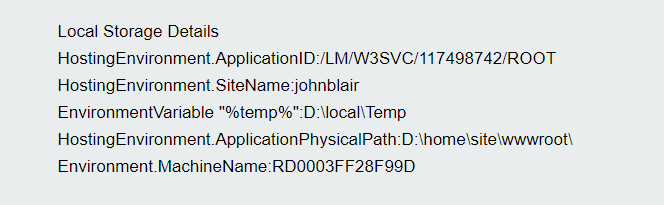
The %temp% environment variable which this setting is based off of appears to be on the same network drive - see screenshot - this is D: drive for both the IIS website and the temp directory
i.e. website is D:\home\site\wwwroot\ and %temp% is D:\localTemp
Now, given that the ApplicationId and SiteName are the same on both the original machine and the swapped to machine - see logs above - then the same temp directory on that shared filesystem would be targeted using your code for generating the siteTemp. Your code for sitename makes the assumption "site name is a Guid on Cloud" - this is not the case - on my Azure website this is just the name of my site "johnblair" - see https://johnblair.azurewebsites.net/error-tester/
Now, what my logs show is that the machine name is different when Azure auto-swaps machines - so I'd suggest creating a new guid in the construction of siteTemp path used on Azure instead of using site name.
John-Blair
on 9 Oct 2019
Something to think about - if you just used the machine name in the App_Data/Temp path i.e. App_Data/Temp+"MachineName" you may be able to get away with not needing this separate setting for Azure and all temp files would be isolated at the machine level - which would work for localhost sites too.
John-Blair
on 9 Oct 2019
FYI - I see the Lucene index locations are also based off of the %TEMP% environment variable too when using the Examine.LuceneEngine.Directories.SyncTempEnvDirectoryFactory setting - which is the name of a type.
In case anyone else is following this....the Examine reference to inspect the above type was not available in my solution until I built the Umbraco CMS via build/build.ps1 script as it is a package reference that hadn't been downloaded until I built umbraco. You may need to run Set-ExecutionPolicy Unrestricted or equivalent to allow the powershell script to execute.
John-Blair
on 9 Oct 2019
Hi all,
%temp% on azure is temp on the local fast drive, they just hide it. Before an update they made a few years ago, if you did cd %temp% from kudu it would go to the actual temp folder, but with recent changes where they make kudu a separate process entirely from w3wp, this is no longer the case, you can see the docs here: https://github.com/projectkudu/kudu/wiki/Understanding-the-Azure-App-Service-file-system#temporary-files
So yes - both lucene, the nucache file (and other things too, like distcache, cdf files, etc..) all exist on the local fast drive which is unique to that IIS website, it is definitely not shared. You can disable the separation with that config flag they mention and then when you do cd %temp% in kudu, it will take you to the w3wp temp folder which is on the local fast drive.
@John-Blair can you please retry with all of these settings and report back.
I understand that some folks are still having issues with site swapping and file locks, but not others. The original cause for this was because of race condition, see this issue for details: https://github.com/umbraco/Umbraco-CMS/issues/5035
Shazwazza
on 10 Oct 2019
Hi @Shazwazza,
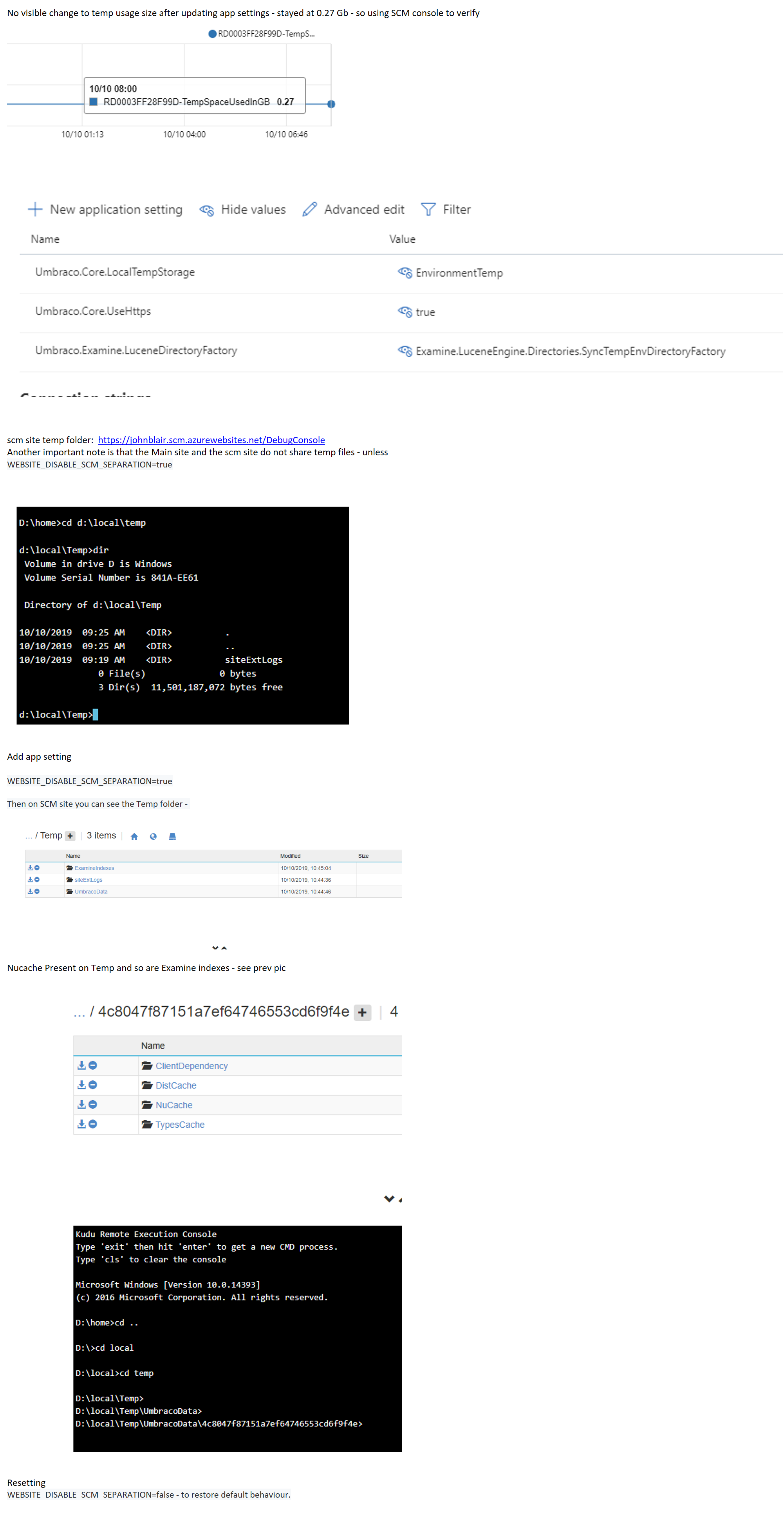
Interesting article on the temporary files being local to the site instance. As a result I have changed my settings to those advised and verified that both Nucache and Examine indexes are now in the local temp directory.
I will keep you updated on any issues - however I only experienced this once when Azure auto swapped my web app to a new machine. However, I do have global error handling in place and I will get an e-mail if it happens again.
Anyone interested - I had to add the setting WEBSITE_DISABLE_SCM_SEPARATION=true to see the website temp files on the scm DebugConsole (and then reset it after verifying).
Testing output showing the TEMP directory containing Nucache and Examine indexes - attached as a screen shot in the next comment.
John-Blair
on 10 Oct 2019
John-Blair
on 10 Oct 2019
The above changes did not work. Got the same error today repeatedly - email at 5:21 and every 5 or 10 minutes until 7:41 (not sure time zone) - my live site is still offline - so will restart the Web App on Azure.
I'm busy at the moment but will investigate when I get some time. Error details below but you can see that the its the local disk that is being used - which is meant to be isolated to the site instance :
Error Message:Boot failed: Umbraco cannot run. See Umbraco's log file for more details. -> Umbraco.Core.Exceptions.BootFailedException: Boot failed. -> System.IO.IOException: The process cannot access the file 'D:\local\Temp\UmbracoData\4c8047f87151a7ef64746553cd6f9f4e\NuCache\NuCache.Content.db' because it is being used by another process. at System.IO.__Error.WinIOError(Int32 errorCode, String maybeFullPath) at System.IO.FileStream.Init(String path, FileMode mode, FileAccess access, Int32 rights, Boolean useRights, FileShare share, Int32 bufferSize, FileOptions options, SECURITY_ATTRIBUTES secAttrs, String msgPath, Boolean bFromProxy, Boolean useLongPath, Boolean checkHost) at System.IO.FileStream..ctor(String path, FileMode mode, FileAccess access, FileShare share, Int32 bufferSize, FileOptions options) at CSharpTest.Net.IO.TransactedCompoundFile..ctor(Options options) at CSharpTest.Net.Storage.BTreeFileStoreV2..ctor(Options options) at CSharpTest.Net.Collections.BPlusTree2.OptionsV2.CreateStorage() at CSharpTest.Net.Collections.BPlusTree2.NodeCacheBase..ctor(BPlusTreeOptions2 options) at CSharpTest.Net.Collections.BPlusTree2.NodeCacheNone..ctor(BPlusTreeOptions2 options) at CSharpTest.Net.Collections.BPlusTree2..ctor(BPlusTreeOptions2 ioptions) at Umbraco.Web.PublishedCache.NuCache.DataSource.BTree.GetTree(String filepath, Boolean exists) in D:a\1\s\src\Umbraco.Web\PublishedCache\NuCache\DataSource\BTree.cs:line 27 at Umbraco.Web.PublishedCache.NuCache.PublishedSnapshotService.<.ctor>b__22_6() in D:a\1\s\src\Umbraco.Web\PublishedCache\NuCache\PublishedSnapshotService.cs:line 128 at Umbraco.Core.MainDom.Register(Action install, Action release, Int32 weight) in D:a\1\s\src\Umbraco.Core\MainDom.cs:line 102 at Umbraco.Web.PublishedCache.NuCache.PublishedSnapshotService..ctor(PublishedSnapshotServiceOptions options, IMainDom mainDom, IRuntimeState runtime, ServiceContext serviceContext, IPublishedContentTypeFactory publishedContentTypeFactory, IdkMap idkMap, IPublishedSnapshotAccessor publishedSnapshotAccessor, IVariationContextAccessor variationContextAccessor, ILogger logger, IScopeProvider scopeProvider, IDocumentRepository documentRepository, IMediaRepository mediaRepository, IMemberRepository memberRepository, IDefaultCultureAccessor defaultCultureAccessor, IDataSource dataSource, IGlobalSettings globalSettings, IEntityXmlSerializer entitySerializer, IPublishedModelFactory publishedModelFactory, UrlSegmentProviderCollection urlSegmentProviders) in D:a\1\s\src\Umbraco.Web\PublishedCache\NuCache\PublishedSnapshotService.cs:line 118 at DynamicMethod(Object[] ) at LightInject.ServiceContainer.<>c__DisplayClass150_0.b__0() in C:\projects\lightinject\src\LightInject\LightInject.cs:line 3798 at LightInject.ServiceContainer.<>c__DisplayClass198_0.b__1() in C:\projects\lightinject\src\LightInject\LightInject.cs:line 4657 at LightInject.PerContainerLifetime.GetInstance(Func1 createInstance, Scope scope) in C:\projects\lightinject\src\LightInject\LightInject.cs:line 6169 at LightInject.ServiceContainer.EmitLifetime(ServiceRegistration serviceRegistration, Action1 emitMethod, IEmitter emitter) in C:\projects\lightinject\src\LightInject\LightInject.cs:line 4656 at LightInject.ServiceContainer.<>c__DisplayClass197_0.b__1(IEmitter methodSkeleton) in C:\projects\lightinject\src\LightInject\LightInject.cs:line 4649 at LightInject.ServiceContainer.<>c__DisplayClass153_0.b__0(IEmitter ms) in C:\projects\lightinject\src\LightInject\LightInject.cs:line 3856 at LightInject.ServiceContainer.EmitConstructorDependency(IEmitter emitter, Dependency dependency) in C:\projects\lightinject\src\LightInject\LightInject.cs:line 4158 at LightInject.ServiceContainer.EmitConstructorDependencies(ConstructionInfo constructionInfo, IEmitter emitter, Action1 decoratorTargetEmitter) in C:\projects\lightinject\src\LightInject\LightInject.cs:line 4120 at LightInject.ServiceContainer.EmitNewInstanceUsingImplementingType(IEmitter emitter, ConstructionInfo constructionInfo, Action1 decoratorTargetEmitMethod) in C:\projects\lightinject\src\LightInject\LightInject.cs:line 4080 at LightInject.ServiceContainer.EmitNewInstance(ServiceRegistration serviceRegistration, IEmitter emitter) in C:\projects\lightinject\src\LightInject\LightInject.cs:line 4034 at LightInject.ServiceContainer.EmitNewInstanceWithDecorators(ServiceRegistration serviceRegistration, IEmitter emitter) in C:\projects\lightinject\src\LightInject\LightInject.cs:line 3929 at LightInject.ServiceContainer.<>c__DisplayClass197_0.b__2(IEmitter ms) in C:\projects\lightinject\src\LightInject\LightInject.cs:line 4649 at LightInject.ServiceContainer.CreateDynamicMethodDelegate(Action1 serviceEmitter) in C:\projects\lightinject\src\LightInject\LightInject.cs:line 3776 at LightInject.ServiceContainer.<>c__DisplayClass198_0.b__1() in C:\projects\lightinject\src\LightInject\LightInject.cs:line 4657 at LightInject.PerContainerLifetime.GetInstance(Func1 createInstance, Scope scope) in C:\projects\lightinject\src\LightInject\LightInject.cs:line 6169 at LightInject.ServiceContainer.EmitLifetime(ServiceRegistration serviceRegistration, Action1 emitMethod, IEmitter emitter) in C:\projects\lightinject\src\LightInject\LightInject.cs:line 4656 at LightInject.ServiceContainer.<>c__DisplayClass197_0.b__1(IEmitter methodSkeleton) in C:\projects\lightinject\src\LightInject\LightInject.cs:line 4649 at LightInject.ServiceContainer.<>c__DisplayClass153_0.b__0(IEmitter ms) in C:\projects\lightinject\src\LightInject\LightInject.cs:line 3856 at LightInject.ServiceContainer.EmitConstructorDependency(IEmitter emitter, Dependency dependency) in C:\projects\lightinject\src\LightInject\LightInject.cs:line 4158 at LightInject.ServiceContainer.EmitConstructorDependencies(ConstructionInfo constructionInfo, IEmitter emitter, Action1 decoratorTargetEmitter) in C:\projects\lightinject\src\LightInject\LightInject.cs:line 4120 at LightInject.ServiceContainer.EmitNewInstanceUsingImplementingType(IEmitter emitter, ConstructionInfo constructionInfo, Action1 decoratorTargetEmitMethod) in C:\projects\lightinject\src\LightInject\LightInject.cs:line 4080 at LightInject.ServiceContainer.EmitNewInstance(ServiceRegistration serviceRegistration, IEmitter emitter) in C:\projects\lightinject\src\LightInject\LightInject.cs:line 4034 at LightInject.ServiceContainer.EmitNewInstanceWithDecorators(ServiceRegistration serviceRegistration, IEmitter emitter) in C:\projects\lightinject\src\LightInject\LightInject.cs:line 3929 at LightInject.ServiceContainer.<>c__DisplayClass197_0.b__2(IEmitter ms) in C:\projects\lightinject\src\LightInject\LightInject.cs:line 4649 at LightInject.ServiceContainer.CreateDynamicMethodDelegate(Action1 serviceEmitter) in C:\projects\lightinject\src\LightInject\LightInject.cs:line 3776 at LightInject.ServiceContainer.<>c__DisplayClass198_0.b__1() in C:\projects\lightinject\src\LightInject\LightInject.cs:line 4657 at LightInject.PerContainerLifetime.GetInstance(Func1 createInstance, Scope scope) in C:\projects\lightinject\src\LightInject\LightInject.cs:line 6169 at LightInject.ServiceContainer.EmitLifetime(ServiceRegistration serviceRegistration, Action1 emitMethod, IEmitter emitter) in C:\projects\lightinject\src\LightInject\LightInject.cs:line 4656 at LightInject.ServiceContainer.<>c__DisplayClass197_0.b__1(IEmitter methodSkeleton) in C:\projects\lightinject\src\LightInject\LightInject.cs:line 4649 at LightInject.ServiceContainer.<>c__DisplayClass153_0.b__0(IEmitter ms) in C:\projects\lightinject\src\LightInject\LightInject.cs:line 3856 at LightInject.ServiceContainer.EmitConstructorDependency(IEmitter emitter, Dependency dependency) in C:\projects\lightinject\src\LightInject\LightInject.cs:line 4158 at LightInject.ServiceContainer.EmitConstructorDependencies(ConstructionInfo constructionInfo, IEmitter emitter, Action1 decoratorTargetEmitter) in C:\projects\lightinject\src\LightInject\LightInject.cs:line 4120 at LightInject.ServiceContainer.EmitNewInstanceUsingImplementingType(IEmitter emitter, ConstructionInfo constructionInfo, Action1 decoratorTargetEmitMethod) in C:\projects\lightinject\src\LightInject\LightInject.cs:line 4080 at LightInject.ServiceContainer.EmitNewInstance(ServiceRegistration serviceRegistration, IEmitter emitter) in C:\projects\lightinject\src\LightInject\LightInject.cs:line 4034 at LightInject.ServiceContainer.EmitNewInstanceWithDecorators(ServiceRegistration serviceRegistration, IEmitter emitter) in C:\projects\lightinject\src\LightInject\LightInject.cs:line 3929 at LightInject.ServiceContainer.<>c__DisplayClass197_0.b__0(IEmitter methodSkeleton) in C:\projects\lightinject\src\LightInject\LightInject.cs:line 4646 at LightInject.ServiceContainer.<>c__DisplayClass153_0.b__0(IEmitter ms) in C:\projects\lightinject\src\LightInject\LightInject.cs:line 3856 at LightInject.ServiceContainer.CreateDynamicMethodDelegate(Action1 serviceEmitter) in C:\projects\lightinject\src\LightInject\LightInject.cs:line 3776 at LightInject.ServiceContainer.CreateDelegate(Type serviceType, String serviceName, Boolean throwError) in C:\projects\lightinject\src\LightInject\LightInject.cs:line 4743 at LightInject.ServiceContainer.CreateDefaultDelegate(Type serviceType, Boolean throwError) in C:\projects\lightinject\src\LightInject\LightInject.cs:line 4705 at LightInject.ServiceContainer.GetInstance(Type serviceType) in C:\projects\lightinject\src\LightInject\LightInject.cs:line 3437 at Umbraco.Core.Composing.LightInject.LightInjectContainer.GetInstance(Type type) in D:\a\1\s\src\Umbraco.Core\Composing\LightInject\LightInjectContainer.cs:line 111 at Umbraco.Core.Composing.ComponentCollectionBuilder.CreateItem(IFactory factory, Type itemType) in D:\a\1\s\src\Umbraco.Core\Composing\ComponentCollectionBuilder.cs:line 33 at Umbraco.Core.Composing.CollectionBuilderBase3.<>c__DisplayClass10_0.b__0(Type x) in D:a\1\s\src\Umbraco.Core\Composing\CollectionBuilderBase.cs:line 100 at System.Linq.Enumerable.WhereSelectArrayIterator2.MoveNext() at System.Linq.Buffer1..ctor(IEnumerable1 source) at System.Linq.Enumerable.ToArray[TSource](IEnumerable1 source) at Umbraco.Core.Composing.CollectionBuilderBase3.CreateItems(IFactory factory) in D:\a\1\s\src\Umbraco.Core\Composing\CollectionBuilderBase.cs:line 99 at Umbraco.Core.Composing.ComponentCollectionBuilder.CreateItems(IFactory factory) in D:\a\1\s\src\Umbraco.Core\Composing\ComponentCollectionBuilder.cs:line 25 at Umbraco.Core.Composing.CollectionBuilderBase3.CreateCollection(IFactory factory) in D:a\1\s\src\Umbraco.Core\Composing\CollectionBuilderBase.cs:line 117 at Umbraco.Core.Composing.LightInject.LightInjectContainer.<>c__DisplayClass20_01.b__0(IServiceFactory f) in D:\a\1\s\src\Umbraco.Core\Composing\LightInject\LightInjectContainer.cs:line 172 at DynamicMethod(Object[] ) at LightInject.ServiceContainer.<>c__DisplayClass150_0.b__0() in C:\projects\lightinject\src\LightInject\LightInject.cs:line 3798 at LightInject.ServiceContainer.<>c__DisplayClass198_0.b__1() in C:\projects\lightinject\src\LightInject\LightInject.cs:line 4657 at LightInject.PerContainerLifetime.GetInstance(Func1 createInstance, Scope scope) in C:\projects\lightinject\src\LightInject\LightInject.cs:line 6169 at LightInject.ServiceContainer.EmitLifetime(ServiceRegistration serviceRegistration, Action1 emitMethod, IEmitter emitter) in C:\projects\lightinject\src\LightInject\LightInject.cs:line 4656 at LightInject.ServiceContainer.<>c__DisplayClass197_0.b__1(IEmitter methodSkeleton) in C:\projects\lightinject\src\LightInject\LightInject.cs:line 4649 at LightInject.ServiceContainer.<>c__DisplayClass153_0.b__0(IEmitter ms) in C:\projects\lightinject\src\LightInject\LightInject.cs:line 3856 at LightInject.ServiceContainer.CreateDynamicMethodDelegate(Action1 serviceEmitter) in C:\projects\lightinject\src\LightInject\LightInject.cs:line 3776 at LightInject.ServiceContainer.CreateDelegate(Type serviceType, String serviceName, Boolean throwError) in C:\projects\lightinject\src\LightInject\LightInject.cs:line 4743 at LightInject.ServiceContainer.CreateDefaultDelegate(Type serviceType, Boolean throwError) in C:\projects\lightinject\src\LightInject\LightInject.cs:line 4705 at LightInject.ServiceContainer.GetInstance(Type serviceType) in C:\projects\lightinject\src\LightInject\LightInject.cs:line 3437 at Umbraco.Core.Composing.LightInject.LightInjectContainer.GetInstance(Type type) in D:a\1\s\src\Umbraco.Core\Composing\LightInject\LightInjectContainer.cs:line 111 at Umbraco.Core.FactoryExtensions.GetInstanceT in D:a\1\s\src\Umbraco.Core\FactoryExtensions.cs:line 22 at Umbraco.Core.Runtime.CoreRuntime.Boot(IRegister register, DisposableTimer timer) in D:a\1\s\src\Umbraco.Core\Runtime\CoreRuntime.cs:line 158
Stack Trace: at Umbraco.Core.Exceptions.BootFailedException.Rethrow(BootFailedException bootFailedException) in D:a\1\s\src\Umbraco.CoreExceptions\BootFailedException.cs:line 57 at Umbraco.Web.UmbracoInjectedModule.<>c.b__23_0(Object sender, EventArgs args) in D:a\1\s\src\Umbraco.Web\UmbracoInjectedModule.cs:line 438 at System.Web.HttpApplication.SyncEventExecutionStep.System.Web.HttpApplication.IExecutionStep.Execute() at System.Web.HttpApplication.ExecuteStepImpl(IExecutionStep step) at System.Web.HttpApplication.ExecuteStep(IExecutionStep step, Boolean& completedSynchronously)
Inner Exception:No inner exception`
John-Blair
on 12 Oct 2019
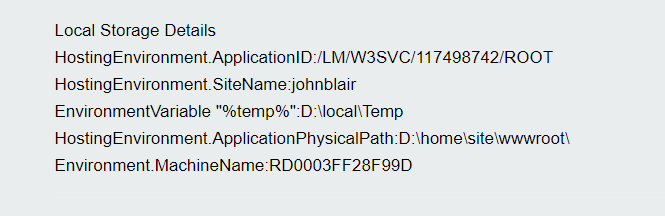
Restarting web app brought the site back up.
Environment details below:
John-Blair
on 12 Oct 2019
There was no machine switch this time the error occurred - from the logs - attached.
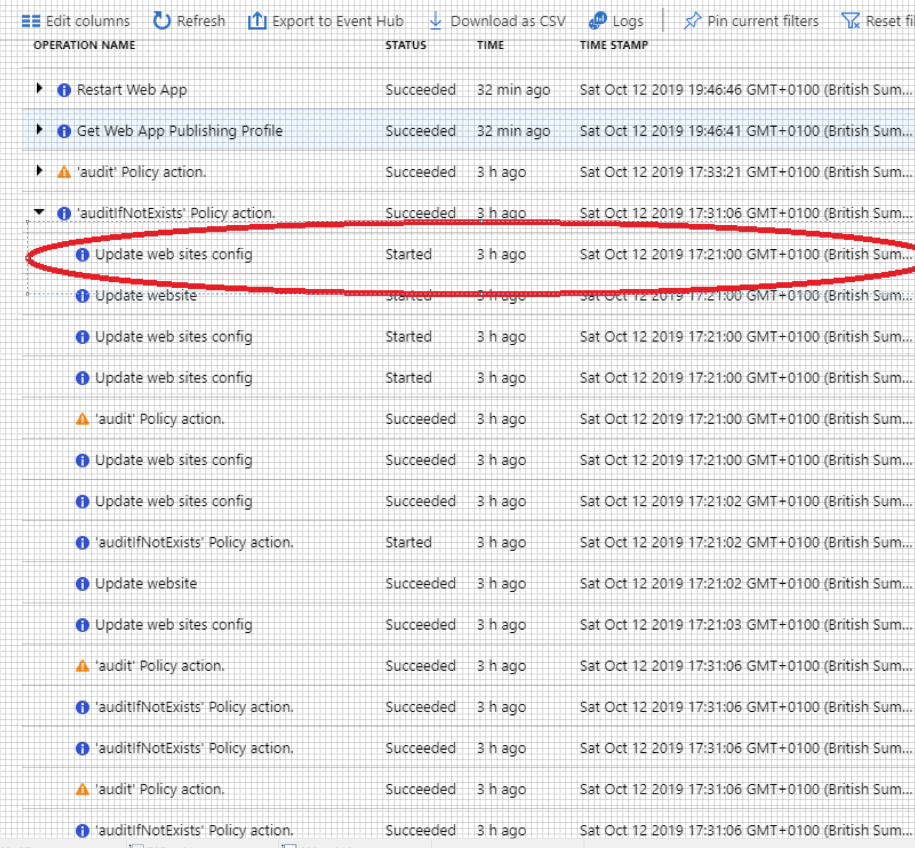
I found the trigger point for this error - I added a new Config Application Setting for the Live site exactly at 17:21
I saved the new setting - there was no manual restart of the Web App - Azure triggered that.
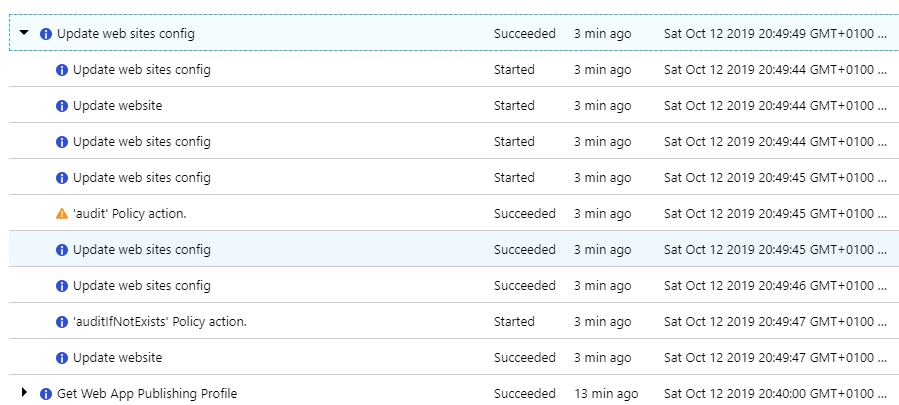
Screen shot of the trigger action: update web sites config exactly at 17:21. The setting was added in the Azure config section (to override the web.config in the web site).
 John-Blair
on 12 Oct 2019
John-Blair
on 12 Oct 2019
FYI - i noticed the above screenshot shows 6 updates to the web.config - I only added 1 setting - and MAY have saved it twice - but I can't see me having done a save any more times than that - anyway I'll investigate some more around that area.
John-Blair
on 12 Oct 2019
The error was repeatable - I updated an existing App Setting and did a single save and got the e-mail error immediately.

John-Blair
on 12 Oct 2019
Looking back at the activity log - there were 5 entries for "update web sites config" and I am positive I did a single save. I am thinking these 5 items may be causing multiple restarts of the site - only a guess.
John-Blair
on 12 Oct 2019
Could I refer you to my recommended code reviews at the top of this issue - specifically I don't think you are doing the main dom locking on the system wide semaphore correctly. Copied below for ref:
[Recommended code reviews]
Unmanaged semaphore handle not disposed of correctly - see
https://stackoverflow.com/questions/7300522/best-practices-for-handling-idisposable
Also suggest you free the semaphore handle AFTER done operating on the semaphore i.e. make the Free call the last in the following - but only do that in the finalizer.
private void Dispose(bool disposing)
{
// critical
_handle.Free();
_semaphore.Release();
_semaphore.Dispose();
}
2)Implementation of mainDom.Register looks wrong:
Umbraco are attempting to lock the "NuCache.Content.db" before the main dom is released.
This method is locking on _locko when it should be locking on the _asyncLock system wide semaphore before running the install.
John-Blair
on 12 Oct 2019
Hi @John-Blair , this trigger point you mention was similar to the one discussed on #5035 with enabling/disabling application insights since this did something similar and causes several restarts of the application.
When we fixed that issue, it was due to a race condition and i couldn't replicate it again. I am going to go re-test this all with the latest version to see what is going on and have a look at your comments regarding the code.
Shazwazza
on 15 Oct 2019
Quick update - I have tested my site on Azure with 8.1.0 and then again with 8.1.5 both with applicationInitialization turned on and off, then also tested with appInsights on and off. I have tested adding/removing appSettings, toggling appInsights, swapping slots, all several times and I cannot replicate the problem. I have <add key="Umbraco.Core.LocalTempStorage" value="EnvironmentTemp" /> and <add key="Umbraco.Examine.LuceneDirectoryFactory" value="Examine.LuceneEngine.Directories.SyncTempEnvDirectoryFactory, Examine" /> as appSettings. I've also upgraded the live/staging sites from 8.1.0 to 8.1.5 while testing and I still see no errors at all. At this stage I'm wondering what is different in my configuration and how I can replicate the issue.
As for the code, @John-Blair you've referenced a SO article on IDisposable, but I am unsure what part of that you are referring to and why you say the handle isn't disposed of properly? I assume you are referring to only disposing the _semaphore when disposing == true ?
I think some of the code dealing with the semaphore may have take some inspiration from this post https://stackoverflow.com/questions/19411887/global-class-instance-counting-with-semaphores
Based on reading the code and comments for this, I can easily make changes to be:
private void Dispose(bool disposing)
{
    if (disposing)
    {
        _semaphore.Release();
        _semaphore.Dispose();
    }

    // critical
    _handle.Free();
}
Which i think is safe but i don't really think this is going to make any difference to managing the semaphore. Dispose(true) is called by within Umbraco which will release all resources and unpin the handle so everything is free to collect. When the object is finalized the same release will occur while ensuring no AlreadyDisposedException's are not thrown. I think i would be fine to change to the above - but I would ask how you think think this can currently be posing a problem?
Also note, that you can always check if Dispose has been called because we log that with _logger.Info<MainDom>("Released ({SignalSource})", source); which In all my tests always gets called when the site is restarting or shutting down.
2)Implementation of mainDom.Register looks wrong:
Umbraco are attempting to lock the "NuCache.Content.db" before the main dom is released.
This method is locking on _locko when it should be locking on the _asyncLock system wide semaphore before running the install.
The way MainDom works is:
- At the very beginning of the boot sequence, CoreRuntime calls
MainDom.Acquire.Acquirelocks on the static_lockoso that all method acess to MainDom are synchronized.
- During Acquire, it might be possible that the app has been signaled to shutdown already (could be a config file changed already during restart) or another appdomain has come online and is asking this one to release the semaphore. In these cases, acquire returns false, nothing is registered with MainDom and this appdomain will be shutdown since it's not the active one.
- Then a system-wide signal is sent for this website to tell any other running appdomain to release MainDom. When that is done we lock on _asyncLock (not a good name, it's just a wrapper for the semaphore). When Lock is called, the appdomain blocks until the semaphore is released from any other running appdomain (if any).
- Then the appdomain is marked as the current MainDom and the boot phase continues
- Closer to the end of CoreRuntime.Boot, when it calls
_components = _factory.GetInstance<ComponentCollection>();... this is whenPublishedSnapshotServiceis instantiated and this is when it registers itself withMainDom.
- The call to register locks on
_locko- to synchronize calls to methods on MainDom. At this stage MainDom has been acquired already, the _asyncLock (semaphore) is already acquired. It could be possible that sometime between callingAcquireandPublishedSnapshotServicecallingRegisterthat this appdomain has been signaled to release MainDom, in that case, the call toRegisterwill exit, also calls toMainDom.RegisterandMainDom.OnSignalare synchronized with locking on_lockospecifically to prevent race conditions.
- The call to register locks on
I don't think that the locking is incorrect and we don't ever intend on locking directly on the _asyncLock, that is just managing the semaphore. The nucache file will only be locked if MainDom is active and it hasn't been signaled to release.
Suggestion: Umbraco has a 1 minute 30 seconds timeout wait on the system wide semaphore - this is inadequate and should be increased.
If there was a timeout you would have a TimeoutException logged or displayed - have you seen this?
Moving forward
- I would love to know how I can get my own app to exhibit this problem, i've tried every combination and I cannot replicate the issue
- I've put a note in MainDom.Acquire some time ago:
//TODO: This can throw a TimeoutException - in which case should this be in a try/finally to ensure the signal is always reset?. If there was anyTimeoutException(would love to know if anyone has seen this!) then I don't think we're handling this correctly since the acquire method will exit on this exception meaning that some fairly critical things are not happening: the signal is not reset and and MainDom isn't subscribed to the hosting environment shutdown signal. This is only an issue if a TimeoutException is actually occuring - We have a system-wide
EventWaitHandlewhich is used to signal an appdomain's MainDom to release when a new one comes online. This is currently not being closed/disposed. I don't think this matters for this issue but might be leaking some resources. This is easily fixed by making MainDom IDisposable and closing/disposing this object. - We actually don't Dispose of the
_asyncLockerunless the current appdomain is signaled ... which is done on appdomain shutdown but if for some reason that is not called, we are also not disposing it in a MainDom.Dispose (since that doesn't exist yet) which would be called at the very end of the app shutting down. Happy to make this change, and potentially might have something to do with this: https://github.com/umbraco/Umbraco-CMS/issues/6363
Please let me know what you think of all the above questions/coments
Shazwazza
on 15 Oct 2019
Hi @Shazwazza, Thanks for the update. There is a lot in there for me to process - so I'll reply in snippets. The first point is I am running Umbraco version 8.1.2 on Live. My web.config settings are the same as yours except I don't include the assembly name "Examine" for Umbraco.Examine.LuceneDirectoryFactory - as you didn't advise I should - but I did verify that local temp was being used without it - as I saw Examine was included in the v7 setting.

John-Blair
on 15 Oct 2019
My app is low spec which may affect timings - App Service Plan is "S1"

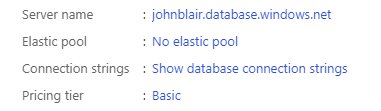
My Db is on the Basic plan
John-Blair
on 15 Oct 2019
I found Application Insights to be useless so had turned this off a long time ago.

John-Blair
on 15 Oct 2019
W.r.t. application insights I had also deleted all the the Config , App Settings related to it - I don't remember the key names but there were about 8 to 10 values that were auto added when application insights was enabled by default when the Web App was created.
John-Blair
on 15 Oct 2019
Sharing some logs here, as we also had an issue with the same error as mentioned in the first comment (as the cause is still uncertain, I don't know if its exactly the same problem, apologies if it isn't). We have two sites ('CMS' and 'PUB') running on different app services, connecting to the same (S0) database, Umbraco version 8.2. In the web.config we have the following set, as recommended:
<add key="Umbraco.Core.LocalTempStorage" value="EnvironmentTemp" />
<add key="Umbraco.Examine.LuceneDirectoryFactory" value="Examine.LuceneEngine.Directories.SyncTempEnvDirectoryFactory, Examine" />
In this it looks like both sites were actually running on the same machine(!) and were booting at the same time (I don't know what caused the boot). The boot failed and both sites stopped working due to the 'NuCache.Content.db' error mentioned in the first comment. The attached logs are from the start of the log, and are truncated after the error starts repeating itself. The rest of the logs are simply the same two errors repeating exactly every 5 minutes. It stayed like that until we restarted the sites in Azure.
 rbottema
on 15 Oct 2019
rbottema
on 15 Oct 2019
W.r.t. Semaphore. Yes I would implement Dispose as you list above. My version attached.
I just thought it looked suspect that the handle(unmanaged resource) was freed first and then the semaphore was still operated on - it just looked dangerous as I couldn't tell what affect running semaphore methods after its handle had been freed.
I would also question whether you should be using CriticalFinalizerObject - with your comment suggesting that the finalizer may get run twice which would try and free the handle twice with unknown consequences - forcing you to add a try catch error handler in the finalizer.
I don't think this will fix the problem - it was more me reporting an observation while looking at the main dom code.
John-Blair
on 15 Oct 2019
@rbottema - I took a look at your logs - you do indeed seem to have 2 instances of umbraco on the same machine - but different site instances. Imho this will almost certainly cause problems as the 2 config settings you mention will both point at the local machine fast drive D:\local\temp - which is isolated to machine level - not web instance.
Im my case I just checked and my TEST enviornment and Live environment are different machines - probably because I have them in 2 different locations.

John-Blair
on 15 Oct 2019
I discussed with our hosting guys and it seems that setup is done to save on costs, but still replicate the different environments. When the site is in production, it will run on different machines. Do we need to change our config in this set-up (specifically: two Umbraco applications connecting to the same DB running on the same machine)? Or is it not supported by Umbraco?
rbottema
on 15 Oct 2019
@Shazwazza - FYI This may affect bootup timing - "Log4NetLevel":"INFO " is set on both cases above - this is higher than it should be for prod and will cause excessive logging. This is useful while debugging this problem but maybe in your testing you had your setting to the recommended WARN ERROR or FATAL?
John-Blair
on 15 Oct 2019
If there was a timeout you would have a TimeoutException logged or displayed - have you seen this?
No - I've checked all logs and no timeout exceptions. I also (limited) checked that the "Released" and "Acquired" log messages are appearing in the correct order - and they are.
I took a closer look at the logs and I can see that Examine appears to shut down cleanly
{"@t":"2019-09-30T11:31:54.0732591Z","@mt":"{StartMessage} [Timing {TimingId}]","StartMessage":"Examine shutting down"
- but I don't see any log messages for Nucache attempting to shutdown cleanly. Where is the log message that Nucache has release the file lock on "NuCache.Content.db" when the web app shuts down? Could it be that the file lock is being retained - causing a lock on the next start up?
John-Blair
on 15 Oct 2019
Please see my comment on #6363
https://github.com/umbraco/Umbraco-CMS/issues/6363#issuecomment-542222061
John-Blair
on 15 Oct 2019
Thanks for the explanation of MainDom - it makes sense.
I've just started reviewing it...the first thing that jumps out at me is the declaration of the system wide EventWaitHandle private readonly EventWaitHandle _signal;
I would have expected this to be defined and initialised as a static:
private **static** readonly EventWaitHandle _signal = new EventWaitHandle(false, EventResetMode.AutoReset, "yourname");
The MainDom constructor assigns to this for each instance run - I see it uses a named instance so may be ok - but my concern is that _signal may get overwritten when it has just been signalled. Using static will guarantee 1 instance.
The named EventWaitHandle is needed as it needs to be accessible across processes - as the process id may change due to saving an app setting.
John-Blair
on 15 Oct 2019
Summary: Acquiring the Domain lock does not work. In the example below saving an app setting causes a new process (pid:4240) for the web app to be created which acquires the Domain lock, 19 seconds before the original process (4792) released it. This example was indeed a case where the web site was not used for hours before making the app setting change.
{"@t":"2019-10-12T10:55:03.8455168Z","@mt":"Result for {HealthCheckName}: {HealthCheckResult}, Message: '{HealthCheckMessage}'","HealthCheckName":"HTTPS Configuration","HealthCheckResult":"Success","HealthCheckMessage":"Your website's certificate is valid.","SourceContext":"Umbraco.Web.HealthCheck.HealthCheckResults","ProcessId":4792,"ProcessName":"w3wp","ThreadId":39,"AppDomainId":2,"AppDomainAppId":"LMW3SVC117498742ROOT","MachineName":"RD0003FF28F99D","Log4NetLevel":"INFO "}
Original Process: 4792
Make config change and note the Process Id changes to 4240
The AppDomainAppId and MachineName remain the same.
{"@t":"2019-10-12T16:21:18.5412570Z","@mt":"{StartMessage} [Timing {TimingId}]","StartMessage":"Booting Umbraco 8.1.2.","TimingId":"10fca1d","SourceContext":"Umbraco.Core.Runtime.CoreRuntime","ProcessId":4240,"ProcessName":"w3wp","ThreadId":1,"AppDomainId":2,"AppDomainAppId":"LMW3SVC117498742ROOT","MachineName":"RD0003FF28F99D","Log4NetLevel":"INFO ","HttpRequestNumber":1,"HttpRequestId":"2e250d72-ac26-4b5e-9b7c-d2963a310935"}
Now, what is interesting is that the new process acquires the Main DOM lock almost immediately i.e. before the original process id has released it!
{"@t":"2019-10-12T16:21:19.2161109Z","@mt":"Acquired.","SourceContext":"Umbraco.Core.MainDom","ProcessId":4240,"ProcessName":"w3wp","ThreadId":1,"AppDomainId":2,"AppDomainAppId":"LMW3SVC117498742ROOT","MachineName":"RD0003FF28F99D","Log4NetLevel":"INFO ","HttpRequestNumber":1,"HttpRequestId":"2e250d72-ac26-4b5e-9b7c-d2963a310935"}
The original process 4792 only starts terminating 18 seconds after the new process has acquired the lock - the above Acquired should not have happened.
{"@t":"2019-10-12T16:21:37.1052378Z","@mt":"{LogPrefix} Terminating {Immediate}","LogPrefix":"[LogScrubber] ","Immediate":"","SourceContext":"Umbraco.Web.Scheduling.BackgroundTaskRunner","ProcessId":4792,"ProcessName":"w3wp","ThreadId":21,"AppDomainId":2,"AppDomainAppId":"LMW3SVC117498742ROOT","MachineName":"RD0003FF28F99D","Log4NetLevel":"INFO "}
The original process 4792 only released the MainDom at 2019-10-12T16:21:38 - 19 seconds after the new process has acquired the lock
{"@t":"2019-10-12T16:21:38.5294256Z","@mt":"Released ({SignalSource})","SignalSource":"environment","SourceContext":"Umbraco.Core.MainDom","ProcessId":4792,"ProcessName":"w3wp","ThreadId":21,"AppDomainId":2,"AppDomainAppId":"LMW3SVC117498742ROOT","MachineName":"RD0003FF28F99D","Log4NetLevel":"INFO "}
John-Blair
on 15 Oct 2019
@John-Blair both processes are on the same machine (RD0003FF28F99D) and the same AppDomainAppId (LMW3SVC117498742ROOT) - now the unique name used for the "system-wide" lock used in MainDom is derived from a hash obtained with:
var appId = string.Empty;
if (HostingEnvironment.ApplicationID != null)
    appId = HostingEnvironment.ApplicationID.ReplaceNonAlphanumericChars(string.Empty);

var appPath = HostingEnvironment.ApplicationPhysicalPath;
var hash = (appId + ":::" + appPath).ToSHA1();
And considering your AppDomainAppId, HostingEnvironment.ApplicationID is quite probably /LM/W3SVC/117498742/ROOT. And, both apps probably have their physical path being D:\home. So unless I am missing something obvious, the two instances have the same lock name.
Now this is where the _signal is not being static, and has a name: it's supposed to be system-wide, same as the lock, so a process could signal another process and they should lock each other. This has been tested and worked well, to the best of my knowledge, on standard (non-Azure) machines.
On standard machines, during restarts, either because the AppDomain is unloading (for instance, web.config has changed) or because the AppPool is recycling, we can see the new process/domain signaling the old one, then waiting for the lock.
However what you describe matches what I saw with other users: despite using the very same lock & signal names, on the same Azure machine, the new instance seems to acquire the lock immediately. Which leaves me wondering how Azure Web Apps are isolated, and whether the supposedly "system-wide" semaphores are actually isolated, too. As in, despite being on the same "machine", they really are running in different VMs with different sets of "system-wide" objects.
In which case, of course, they would not work at all... and for the sake of NuCache db, they would need to be replaced with some file-level lock management.
zpqrtbnk
on 15 Oct 2019
@zpqrtbnk , I agree with you - both have the same lock name.
You are right....static would not work - as static is local to the App Domain and not shared between processes..only the named EventWaitHandle would work across processes....sorry, had to refresh my knowledge of the scope of appdomains/processes and static scope.
Slight digression but related ... we were chatting in another thread about the named semaphore creation which is also meant to be system wide. I did some testing in Azure using the following overload of that from a razor file - and even though I would only expect createdNew to be true 1 time as it is a system semaphore ....at random it sometimes reported another true ....I could not find a scenario that it was repeatable...just happened randomly. It may be nothing but I thought it odd at the time.
 public  class SemaphoreUtils
    {
        private Semaphore _semaphore2;
        public void Create (int initialCount, int maximumCount, string name, out bool createdNew)
        {
            _semaphore2 = new System.Threading.Semaphore(initialCount, maximumCount, name, out createdNew);
        }

    }
Azure is behaving the same as my Win 10 local IIS PC w.r.t. acquiring the main dom. If you re-cycle the app pool in IIS for a web site you will notice in the umbraco logs that the Main Dom is always released before the new process for the website starts Booting Umbraco. However if you use task manager and "End Task" for the w3wp.exe process - the umbraco logs will not show the Main Dom being released, and the new w3wp.exe process is always able to acquire the Main Dom immediately - just like on Azure. I am unable to get the file locking error locally though and my logs are in the website's App_Data folder.
John-Blair
on 15 Oct 2019
Hi all, with all my tests previously i can't replicate that a system-side semaphore or EventWaitHandle would operates differently on Azure. If this were the case, this would cause all sorts of other problems for many other products and one would have to assume there would be a big warning about this in the docs. Like the last fix, we assumed it was a semaphore not behaving correctly on Azure but it turned out to be a race condition in our code. Of course stranger things have happened, so if we are to investigate this, it should be done on a vanilla azure website without umbraco with the bare minimum required to show the problem.
Regarding how processes + appdomains start/stop: A w3wp.exe process can host multiple appdomains. Typically when you bump your web.config, it doesn't start a new process, the same process will spawn a new appdomain and in this scenario there will be 2 or more appdomains concurrently running in the same process while only 1 appdomain will become the MainDom. If you website is forced to shutdown over and over again, than IIS may spawn another w3wp.exe process which in itself will also contain 1 or more appdomains. If you want to test this locally, you can basically follow all instructions here https://docs.microsoft.com/en-us/iis/get-started/whats-new-in-iis-8/iis-80-application-initialization ... and in IIS you can configure your site to restart every 5 requests, then in your IIS process monitor, you will see directly how many w3wp + appdomains that IIS will be creating a unwinding for your single site if you hammer your site with requests. In all of my tests, the MainDom never fails when doing this even though I had up to 5x w3wp processes with multiple appdomains in each.
And considering your AppDomainAppId, HostingEnvironment.ApplicationID is quite probably /LM/W3SVC/117498742/ROOT. And, both apps probably have their physical path being D:\home. So unless I am missing something obvious, the two instances have the same lock name.
... could it be possible that HostingEnvironment.ApplicationPhysicalPath resolves to a slightly different location on Azure per process? Could it be possible that it might resolve to a different case? (i.e. D:\home\site\wwwroot\ vs D:\Home\site\wwwroot\) Not that I see any evidence that this is happening, even in the logs that have been added here.
However if you use task manager and "End Task" for the w3wp.exe process - the umbraco logs will not show the Main Dom being released, and the new w3wp.exe process is always able to acquire the Main Dom immediately - just like on Azure.
This might be more worth investigation. I feel like potentially part of the issue might just be how Azure deals with spawning new processes and unwinding/killing off previous processes. Perhaps it does this in a different manner than windows/IIS. If w3wp is terminated, then there's really no way to release MainDom and the file will remain locked. This still doesn't explain how your logs (or some previous ones though) have this sequence:
Timestamp   2019-10-12T16:21:19.2161109+00:00
@MessageTemplate    Acquired.
SourceContext   Umbraco.Core.MainDom
ProcessId   4240
ProcessName w3wp
ThreadId    1
AppDomainId 2
AppDomainAppId  LMW3SVC117498742ROOT
MachineName     RD0003FF28F99D
Log4NetLevel    INFO
HttpRequestNumber   1
HttpRequestId   2e250d72-ac26-4b5e-9b7c-d2963a310935
Timestamp   2019-10-12T16:21:38.5294256+00:00
@MessageTemplate    Released ({SignalSource})
SignalSource    environment
SourceContext   Umbraco.Core.MainDom
ProcessId   4792
ProcessName w3wp
ThreadId    21
AppDomainId 2
AppDomainAppId  LMW3SVC117498742ROOT
MachineName     RD0003FF28F99D
Log4NetLevel    INFO
I wonder... does this odd sequence that should seamingly be impossible ever occur when it's within the same process? As above, this is a process switch 🤔
This is consistent with @rbottema logs - MainDom is acquired before it is released, and it is a different process taking over, not just a new appdomain.
Timestamp   2019-10-04T09:50:12.126886+00:00
@MessageTemplate    Acquired.
SourceContext       Umbraco.Core.MainDom
ProcessId   13548
ProcessName w3wp
ThreadId    1
AppDomainId 2
AppDomainAppId  LMW3SVC247608532ROOT
MachineName     RD0003FF204523
Log4NetLevel    INFO
HttpRequestNumber   1
HttpRequestId   b3f04cac-0b05-4479-938a-8760fd638dde
Timestamp   2019-10-04T09:50:19.2654971+00:00
@MessageTemplate    Stopping ({SignalSource})
SignalSource    environment
SourceContext   Umbraco.Core.MainDom
ProcessId   16680
ProcessName w3wp
ThreadId    51
AppDomainId 2
AppDomainAppId  LMW3SVC247608532ROOT
MachineName     RD0003FF204523
Log4NetLevel    INFO
@John-Blair Regarding my setup: I am also running very basic plans: S1, i have info logs enabled, I am running 8.1.0 and 8.1.5, i don't think any changes to 8.1.2 would make a difference - but if you could, maybe run 8.1.5 just to make sure?
Regarding this:
I took a look at your logs - you do indeed seem to have 2 instances of umbraco on the same machine - but different site instances. Imho this will almost certainly cause problems as the 2 config settings you mention will both point at the local machine fast drive D:\local\temp - which is isolated to machine level - not web instance.
@John-Blair + @rbottema this will not matter if you have 2x instances on the same machine. The %temp% location of the files will be different because this location is based on the appdomainappid, you can see how that is configured here: https://github.com/umbraco/Umbraco-CMS/blob/v8/dev/src/Umbraco.Core/Configuration/GlobalSettings.cs#L300, it is based on a hash of the appdomainappid + sitename, similar to the hash for the semaphore like @zpqrtbnk mentions above
Next steps?
- It would be good to see if we can validate that this locking error is always occuring when MainDom is acquired before it is released and if it is a different process taking over. I'm unsure when Azure starts a new w3wp process. I'm fairly sure if you log into Kudu and just bump the web.config from in there, it will not start a new process and will just spawn a new appdomain. However, if you change config settings from within the Azure portal, perhaps it does create a new process.
- Fix up some code based on the "Moving Forward" section above ... though i don't think this will solve the issue
- Other thoughts?
Shazwazza
on 16 Oct 2019
If you kill the process with eg task manager, then all named semaphores that process may hold are immediately released. This, and the process being killed, it stops executing immediately, and therefore cannot log anything about what is happening.
zpqrtbnk
on 16 Oct 2019
Yep, the semaphore is released, but the file lock might not be because it didn't wind down properly so MainDom will not be released so nucache won't release the local db file. File locks are at the OS level. So in this theory killing the process could keep file locks but would need to verify that.
Shazwazza
on 16 Oct 2019
Killing a process should eventually release all its resources, including named semaphores and files, but when and in which order... depends on the OS. Could be that the file locks survive longer than the semaphore.
But in the examples above, the old process is not killed, it even logs that it is releasing its MainDom. Note that it logs Stopping ({SignalSource}) with SignalSource being environment - this means that it's signaled by the host to shutdown, not by the other process.
... could it be possible that HostingEnvironment.ApplicationPhysicalPath resolves to a slightly different location on Azure per process?
Well, one last thing to do is log the MainDom hash when acquiring MainDom. Just to be absolutely sure both process want the exact same thing, or not. I remember doing this when debugging this issue. IIRC they were identical.
Hence my questions about isolation. If MainDom hashes are identical, yet MainDom is acquired before it is released... then it looks like the two processes don't see each other semaphores.
zpqrtbnk
on 16 Oct 2019
Good morning, Thanks for the update.
Code Change Suggestion:
Change to MainDom constructor
var appPath = HostingEnvironment.ApplicationPhysicalPath;
to
var appPath = HostingEnvironment.ApplicationPhysicalPath.ToLower();
This would rule out any subtle case changes to the path name causing a different hash for the locks.
I reviewed my logs - attached - and I do see 1
UmbracoTraceLog.RD0003FF28F99D.20190930.zip
potential entry that there may be subtle changes to the directory name happening. Though all the logs for the HostingPhysicalPath path do look the same.
{"@t":"2019-09-30T11:28:13.2021074Z","@mt":"Application shutdown. Details: {ShutdownReason}\r\n\r\n_shutDownMessage={ShutdownMessage}\r\n\r\n_shutDownStack={ShutdownStack}","ShutdownReason":"ConfigurationChange","ShutdownMessage":"CONFIG change\r\nHostingEnvironment initiated shutdown\r\nCONFIG change\r\nChange in GLOBAL.ASAX\r\nChange in GLOBAL.ASAX\r\nCONFIG change\r\nCONFIG change\r\nCONFIG change\r\nCONFIG change\r\nCONFIG change\r\nCONFIG change\r\nChange Notification for critical directories.\r\nbin dir change or directory rename\r\nChange Notification for critical directories.\r\nbin dir change or directory rename\r\nChange Notification for critical directories.\r\nbin dir change or directory rename\r\nChange Notification for critical directories.\r\nbin dir change or directory rename\r\nChange Notification for critical directories.\r\nbin dir change or directory rename\r\nChange Notification for critical directories.\r\nbin dir change or directory rename\r\nChange Notification for critical directories.\r\nbin dir change or directory rename\r\nChange Notification for critical directories.\r\nbin dir change or directory rename\r\nChange Notification for critical directories.\r\nbin dir change or directory rename\r\nChange Notificati
John-Blair
on 16 Oct 2019
If w3wp is terminated, then there's really no way to release MainDom and the file will remain locked.
JB: But I terminate the w3wp process on win 10 and no file locking on nucache occurs - any locks appear to get released even with the process being killed (End Task), and the new process always starts up ok with no locking issues.
John-Blair
on 16 Oct 2019
but if you could, maybe run 8.1.5 just to make sure?
JB: I have a live environment that demos the problem - I'd prefer not to loose that as we don't have any other to demo the problem, but what I will do is update my test environment on azure to 8.1.5 and see if the problem is reproducible on that.
Though that has an even poorer environment than my live one (F1, with Basic DB).
John-Blair
on 16 Oct 2019
I was wondering if I could have an answer to my earlier question:
I don't see any log messages for Nucache attempting to shutdown cleanly. Where is the log message that Nucache has released the file lock on "NuCache.Content.db" when the web app shuts down?
John-Blair
on 16 Oct 2019
In all of my tests, the MainDom never fails when doing this even though I had up to 5x w3wp processes with multiple appdomains in each.
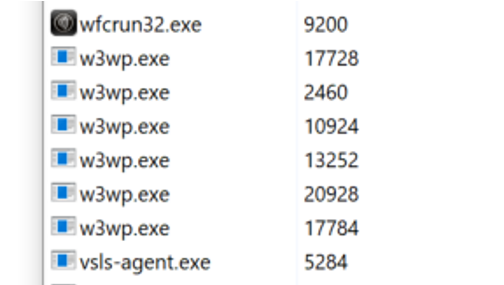
JB: I decided to repeat your test. I had 6x w3wp processes running concurrently against a single site. The good news is I got no errors or nucache file locking problems.
The bad news is that it appears to show the Main Dom locking not working correctly.
In attached file ..._003 you will see process id 13252 releases the DOM before Waiting for tasks to complete i.e. the reversal of what we normally see. And after the dom is released another process 10924 is busy logging before those tasks of 13252 are complete.
John-Blair
on 16 Oct 2019
but if you could, maybe run 8.1.5 just to make sure?
Ok, I upgraded to 8.1.5 on TEST and could not reproduce the problem in that environment - and I really hammered the site with multiple config changes and web app restarts. The only test i didn't do was to wait a few hours for the site to go idle and then try a config change - might try that first thing in the morning.
Anyway, I decided to push the upgrade to Live and the first config change triggered the error - logs attached.
Summary of one of the errors in the log:
Starting PID: 6816
"@t":"2019-10-16T17:11:19.8998779Z","@mt":"ApplicationUrl: {UmbracoAppUrl} (UmbracoModule request)","UmbracoAppUrl":"http://johnblair.azurewebsites.net/umbraco","SourceContext":"Umbraco.Core.Sync.ApplicationUrlHelper","ProcessId":6816,"ProcessName":"w3wp","ThreadId":22,"AppDomainId":2,"AppDomainAppId":"LMW3SVC117498742ROOT","MachineName":"RD0003FF28F99D","Log4NetLevel":"INFO ","HttpRequestNumber":5,"HttpRequestId":"4c8edc35-477c-4d3e-9702-ad1e277496c7"}
Make a settings change - triggers Booting Umbraco on a new process
PID: 6120
{"@t":"2019-10-16T17:25:33.1928742Z","@mt":"{StartMessage} [Timing {TimingId}]","StartMessage":"Booting Umbraco 8.1.5.","TimingId":"aa8c08c","SourceContext":"Umbraco.Core.Runtime.CoreRuntime","ProcessId":6120,"ProcessName":"w3wp","ThreadId":1,"AppDomainId":2,"AppDomainAppId":"LMW3SVC117498742ROOT","MachineName":"RD0003FF28F99D","Log4NetLevel":"INFO ","HttpRequestNumber":1,"HttpRequestId":"bbdeb0b0-4617-43b5-a716-2077add00120"}
PID: 6120 immediately acquires the Main Dom lock.
{"@t":"2019-10-16T17:25:33.7528558Z","@mt":"Acquired.","SourceContext":"Umbraco.Core.MainDom","ProcessId":6120
Original process PID: 6816 releases the Main Dom lock 19 seconds later.
{"@t":"2019-10-16T17:25:52.1407749Z","@mt":"Released ({SignalSource})","SignalSource":"environment","SourceContext":"Umbraco.Core.MainDom","ProcessId":6816
UmbracoTraceLog.RD0003FF28F99D.20191016_002.zip
John-Blair
on 16 Oct 2019
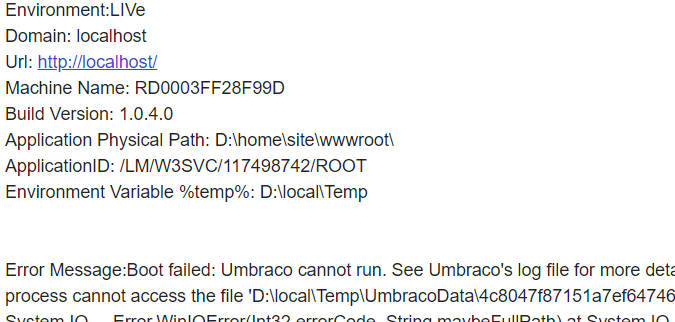
Just reporting an oddity with the first umbraco boot failure - the url of the site was misreported as localhost all subsequent booting failures reported the correct url.
Code for the url is
public static string Url => HttpContext.Current?.Request?.Url?.ToString() ?? "Unknown";
John-Blair
on 16 Oct 2019
The only test i didn't do was to wait a few hours for the site to go idle and then try a config change - might try that first thing in the morning.
For completeness, I did an Application Settings change on TEST and LIVE first thing this morning.
TEST was ok, but Live reported the usual Nucache locking issue.
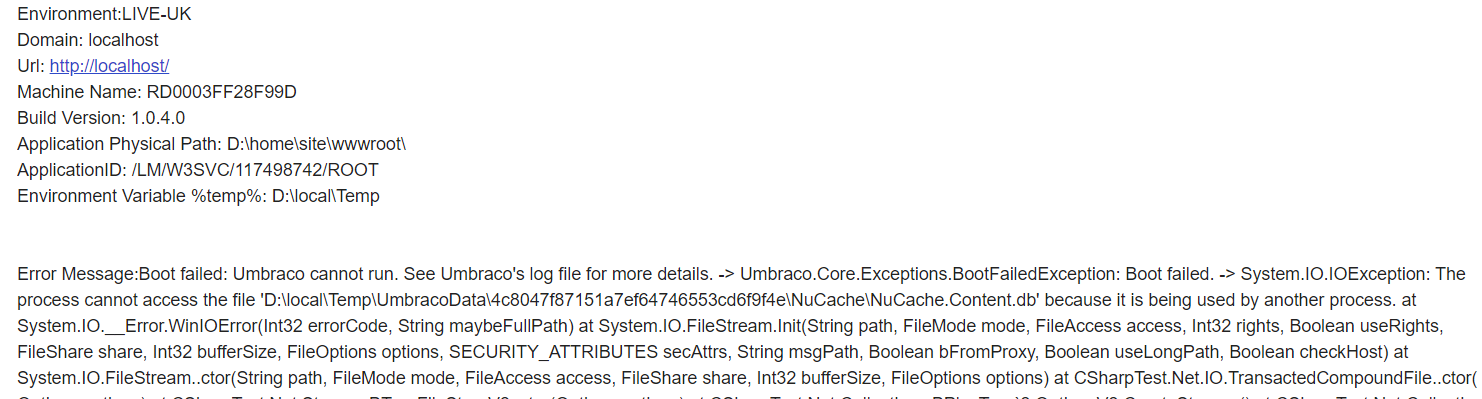
John-Blair
on 17 Oct 2019
In case you are wondering about the localhost in the previous message. The above screenshot is from an email sent from my global application error handler (UmbracoApplication.OnApplicationError method) which tries to capture any current url and domain from the current HttpContext. It normally reports my correct domain name - but oddly the first error of the day seems to get reported as localhost.
John-Blair
on 17 Oct 2019
It's localhost because Azure does the pre app initialization (like in that MS link i sent before), so even before the site is live IIS pings itself.
Shazwazza
on 17 Oct 2019
I'll have to dig into your logs, etc.. later on, a bit swamped today but will get back to you when I can.
Shazwazza
on 17 Oct 2019
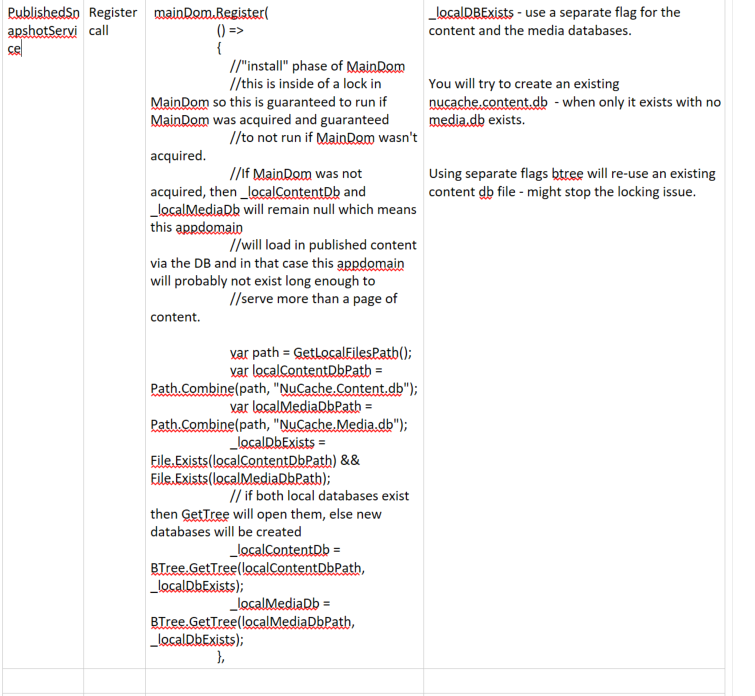
Suggested change to the PublishedSnapshotService Register method - use separate flags for the content and media dbs when deciding whether to create or use an existing db file.
If an existing content db exists but no media db file - it will try to create an existing file instead of using the existing one.
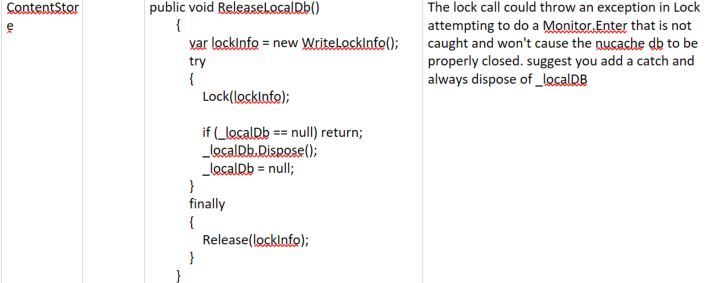
Suggested change to the way you attempt to dispose of the local content db:
John-Blair
on 17 Oct 2019
Make sure the content and media dbs are always disposed of in the Release phase of the Dom i.e. change the code to the following:
//"release" phase of MainDom
                    lock (_storesLock)
                    {
                        _contentStore?.ReleaseLocalDb(); //null check because we could shut down before being assigned
                        _localContentDb?.Dispose();
                        _localContentDb = null;
                        _mediaStore?.ReleaseLocalDb(); //null check because we could shut down before being assigned
                        _localMediaDb?.Dispose();
                        _localMediaDb = null;
                    }
Change CoreRuntime.Boot method. This method when it calls AcquireMainDom - ignores the return value of false when it has been signalled to release the DOM and continues to run the initialise for all boot components - it should stop doing anymore boot activity - so wrap the call in an if statement.
` // acquire the main domain - if this fails then anything that should be registered with MainDom will not operate
if (AcquireMainDom(mainDom))
{
// determine our runtime level
DetermineRuntimeLevel(databaseFactory, ProfilingLogger);
                // get composers, and compose
                var composerTypes = ResolveComposerTypes(typeLoader);
                composition.WithCollectionBuilder<ComponentCollectionBuilder>();
                var composers = new Composers(composition, composerTypes, ProfilingLogger);
                composers.Compose();

                // create the factory
                _factory = Current.Factory = composition.CreateFactory();

                // create & initialize the components
                _components = _factory.GetInstance<ComponentCollection>();
                _components.Initialize();
            }`
Thought it would be easier for you if I started creating pull requests. So I added one for the previous code suggestions.
https://github.com/umbraco/Umbraco-CMS/pull/6752
John-Blair
on 17 Oct 2019
AsyncLock.cs comment is interesting. This suggests the semaphore system object is destroyed when the whole process goes down - which is what we are seeing when a config change is made.
The comment also suggests this might not happen if a handle to the semaphore is retained. I'm thinking we should not dispose of the semaphore - to ensure a handle always exists?
// it is important that managed code properly release the Semaphore before
// going down else it will maintain the lock - however note that when the
// whole process (w3wp.exe) goes down and all handles to the Semaphore have
// been closed, the Semaphore system object is destroyed - so in any case
// an iisreset should clean up everything
John-Blair
on 17 Oct 2019
Hi @John-Blair definitely easier via PRs, I'd also like to incorporate the changes I mentioned above myself. I'll create a new temp branch with the changes I've mentioned we need to do previously and then will review and merge your PR into that branch to work from there. I've submitted some review notes on your PR, lets keep the conversation about those particular things there (since this thread is becoming huge!).
... more notes to come soon...
Shazwazza
on 18 Oct 2019
I have created a draft PR with other changes: https://github.com/umbraco/Umbraco-CMS/pull/6757 which is based off of the branch in the repo: v8/bugfix/6546-MainDom-Cleanup, it's based on the 8.1 build, so I'll post up a build of that here so some potential testing can start of these changes.
I've added extensive notes to the PRs changes. I believe that some of these problems may lead to odd things with winding down the application correctly.
My gut feeling with all of this is: Semaphores work correctly on Azure, if this were not the case then I'm sure we'd hear about it because this is a pretty critical thing within .NET. So I think either our handling of either/both the system-wide Semaphores and EventWaitHandle is not entirely correct and/or we have other issues that impact the way we perceive the correct handling of these is done.
Shazwazza
on 18 Oct 2019
Regarding this
AsyncLock.cs comment is interesting. This suggests the semaphore system object is destroyed when the whole process goes down - which is what we are seeing when a config change is made.
The comment also suggests this might not happen if a handle to the semaphore is retained. I'm thinking we should not dispose of the semaphore - to ensure a handle always exists?
The semaphore definitely needs to be disposed, it's a managed resource. The important part of that comment is the 'and'
however note that when the whole process (w3wp.exe) goes down and all handles to the Semaphore have been closed, the Semaphore system object is destroyed - so in any case an iisreset should clean up everything
Meaning, if a process is terminated AND there are no more references in other processes to the named semaphore, then the entire semaphore is discarded. Which is what we expect. It's saying that if you do an IIS reset, it will kill ALL w3wp processes which would then discard all semaphores.
Shazwazza
on 18 Oct 2019
Whether or not any of the changes I've done in the #6757 make a difference, i'm unsure, but @John-Blair if you wanted to test, here are the binaries:
UmbracoCms.AllBinaries.8.1.5-alpha.5951.zip
You should be able to just drop these in the /bin (take a backup first). You might need to change the version in your web.confg to 8.1.5-alpha.5951
Shazwazza
on 18 Oct 2019
Unfortunately those changes made no difference - got multiple reports of the usual error when i changed a configuration value.
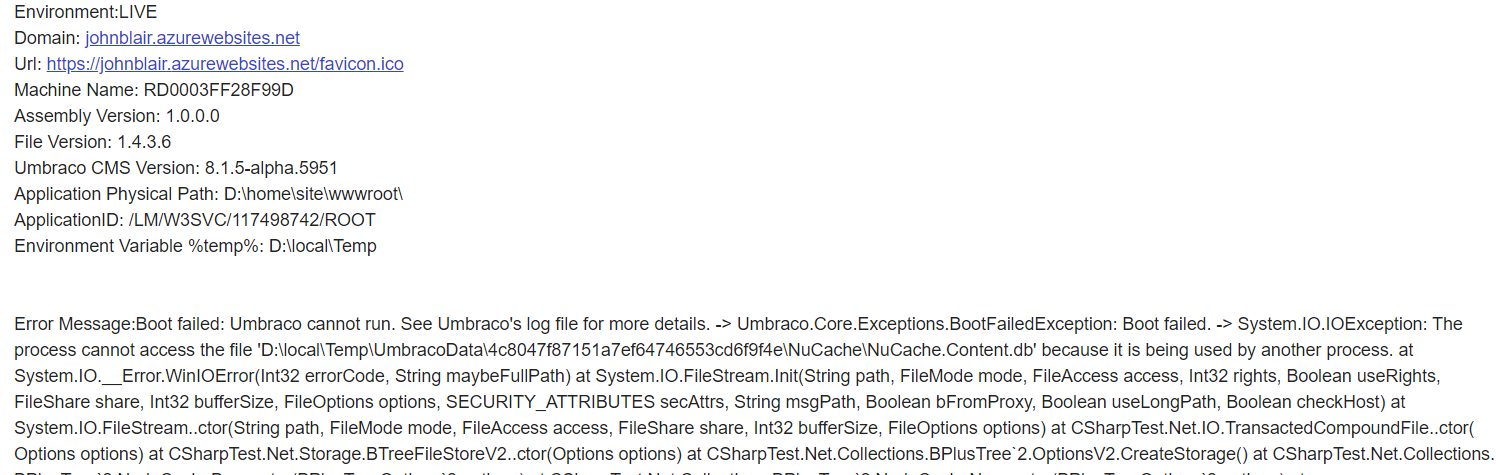
John-Blair
on 18 Oct 2019
Thought it was time to do a basic test to check if a named system wide semaphore works across processes on Azure. Yes it does.
I create a console app that creates a named system semaphore with initial count of 5.
Console app tried to access 3 units. I run 2 copies of this console app and the 2nd one blocks waiting on 1 unit - this behaviur is seen in the screenshot below.
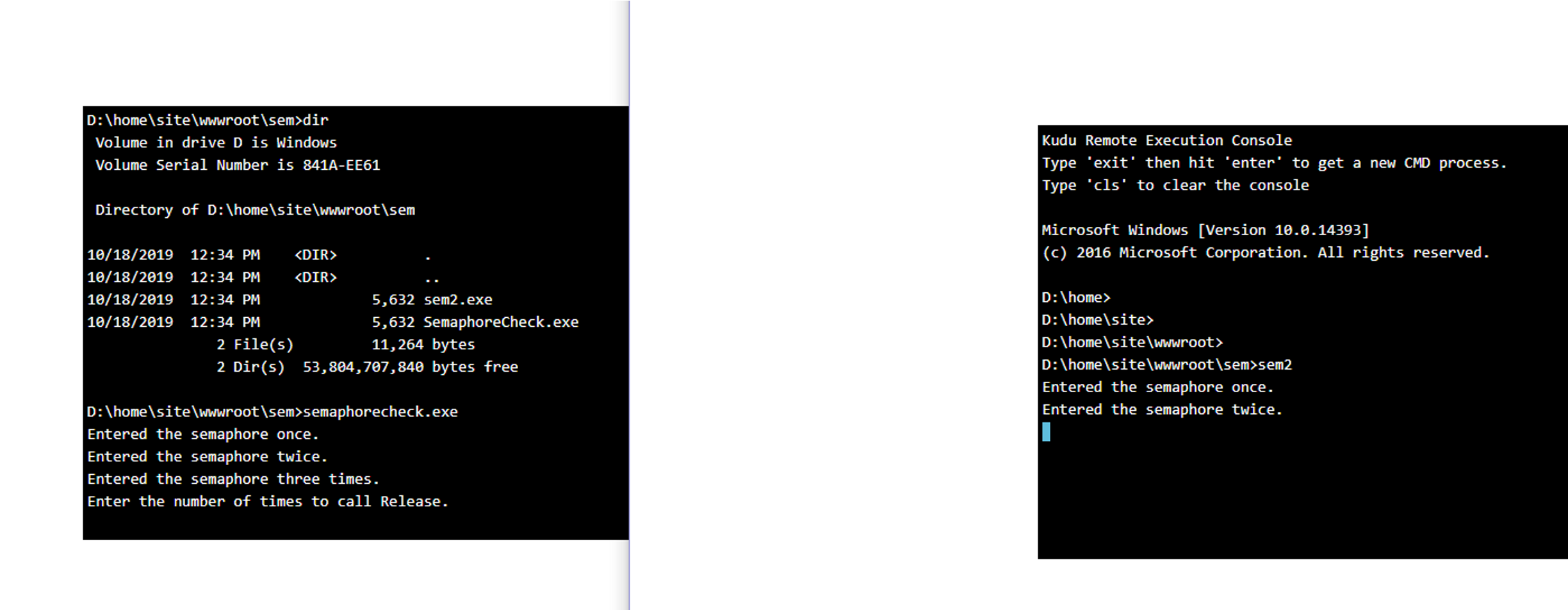
In the first instance of the console app - I release 1 unit to the semaphore allowing the 2nd instance of the console app to acquire the 3rd unit - and this is seen in the screenshot below - showing processes can communicate using a named semaphore on azure.
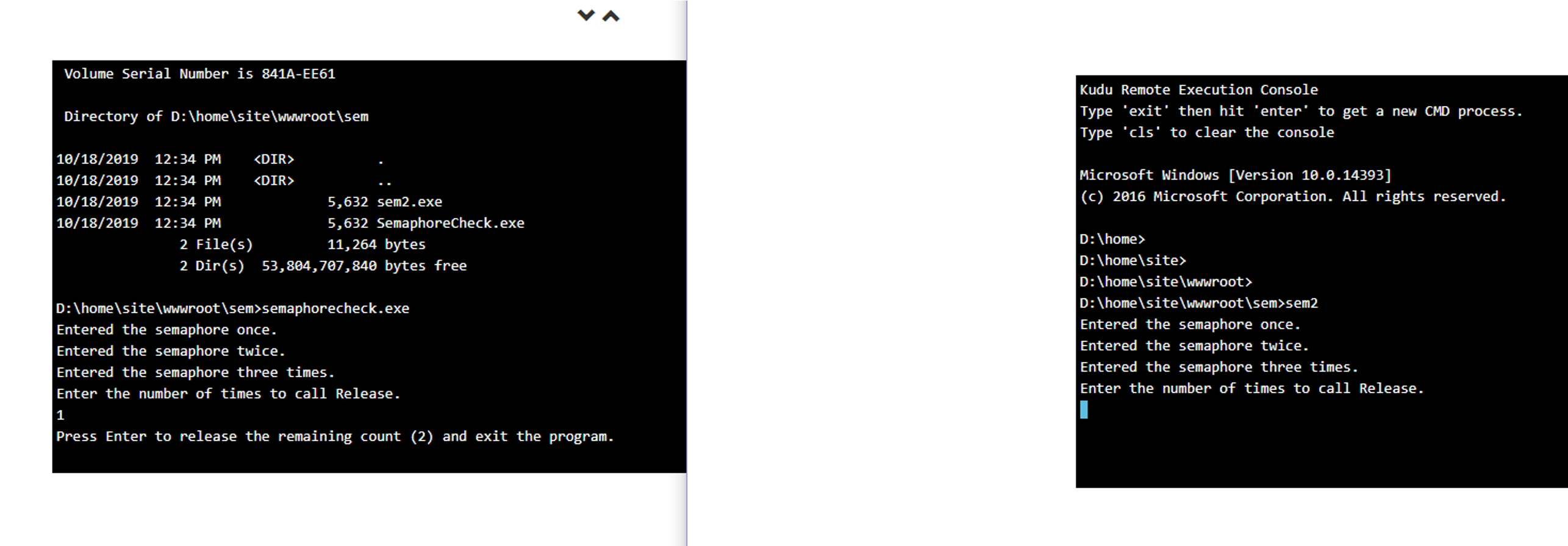
John-Blair
on 18 Oct 2019
Suggest we try the new SystemSemaphoreReleaser class for releasing the system
semaphore - that I checked in.
The existing class seems to have all sorts of dangerous code in it with unmanaged handles and deriving from CriticalFinalizerObject. I wouldn't be surprised if somewhere in there the semaphore is being destroyed prematurely. Thought it would be useful to start from a standard release and dispose and build up to address any problems we encounter. If you've corrected the code for IRegisteredObject then we should always have a call to OnSignal to dispose of the semaphore.
If you do a build with this I will check it out on my live site with the problem.
John-Blair
on 18 Oct 2019
If you do have any robust instructions on how i can get a branched version of the code on my local PC - I'm happy to do local builds and push it onto my site.
My setup is I have a forked copy of the Umbraco CMS project - I did this as i dont have checkin privilege - and i normal just checkin to my repo , push to my remote, and then create a pull request. Not sure what mods i need to do to work with branches - my earlier battles with it failed - VS just never seemed to show me branched code - always seemed to be the main trunk.
John-Blair
on 18 Oct 2019
I reviewed the main dom architecture - and have some issues (red items) in the attached diagram, and some suggestions for fixing them(blue items). I'd welcome your thoughts.
umbraco-main-dom-architecture.zip
John-Blair
on 20 Oct 2019
@John-Blair Thanks for all your efforts thus far, much appreciated. I'll get some things updated, see if i can get some changes from any of your PRs added to this build and post builds as I can make them.
For your notes in the excel sheet
We have the lock but not yet registered with hosting environment and a new w3wp process may have been spun up by config change
Fix:Register asap - in constructor
I beleive this is resolved in my changes https://github.com/umbraco/Umbraco-CMS/pull/6757
_signal.Dispose() not called.
I beleive this is resolved in my changes https://github.com/umbraco/Umbraco-CMS/pull/6757
Note: A timeout on acquiring the lock means we are not the main dom but still running the install action - possibly trying to create nuchache.
I think if there was a timeout, the exception caused by that would cease the entire app from starting and we'd end up with a boot exception. However, it does seem odd that a check to isMainDom isn't checked within the MainDom.Register code.
... I'll update that in my PR, including some additional logging, see beb16a2f79b847dcc2cb6de5752d7e56b2ede3ce
Lock on partial method code : _isMainDom and semaphore manipulated outside lock
This is because when they are accessed within the lock the method exits if they've already been cleared/disposed, so the access to these things outside of the lock is guaranteed to not be executed in tandem or more than once.
Fix: Do whole method within the lock
I can make it all within the lock just in case, see eb670fd1ac91c8d1074a2897cf0c253783dfe0e8
Fix: Don't throw on exception - always run all release actions that exist - ensure nucache is always cleaned up
I am unsure why all actions are not executed if an exception occurs on one of them. There was probably a reason for this but it seems to me that all actions should be tried since they are probably critical to try to unwind the app correctly. It might be something to do with something expecting an exception to be thrown from within signal if something went wrong, but i don't see any code for that. For now I'll change this to ensure all actions are executed. see eb670fd1ac91c8d1074a2897cf0c253783dfe0e8
Registered actions will not be released - possibly no nucache cleanup, no semaphore disposal
If it's not MainDom then there will be nothing to release, and like above, if it was MainDom then there would be semaphore to release and it would be released one time and then not again since isMainDom is then reset.
Fix: Use my SystemSemaphoreReleaser
Yep, this is referring to your comment here https://github.com/umbraco/Umbraco-CMS/issues/6546#issuecomment-543852555 which i agree with. I might have missed a PR or something but I haven't seen a PR from you with SystemSemaphoreReleaser, just let me know where I can find it.
I'll post a build to the recent changes I've made here shortly.
Shazwazza
on 21 Oct 2019
Here's the latest build with all changes from https://github.com/umbraco/Umbraco-CMS/pull/6757
UmbracoCms.AllBinaries.8.1.5-alpha.5984.zip
Shazwazza
on 21 Oct 2019
No, didn't work on Azure - worked fine on local PC - even with Task Manager - End Task. Details of test below. I'll take a look at the logs.
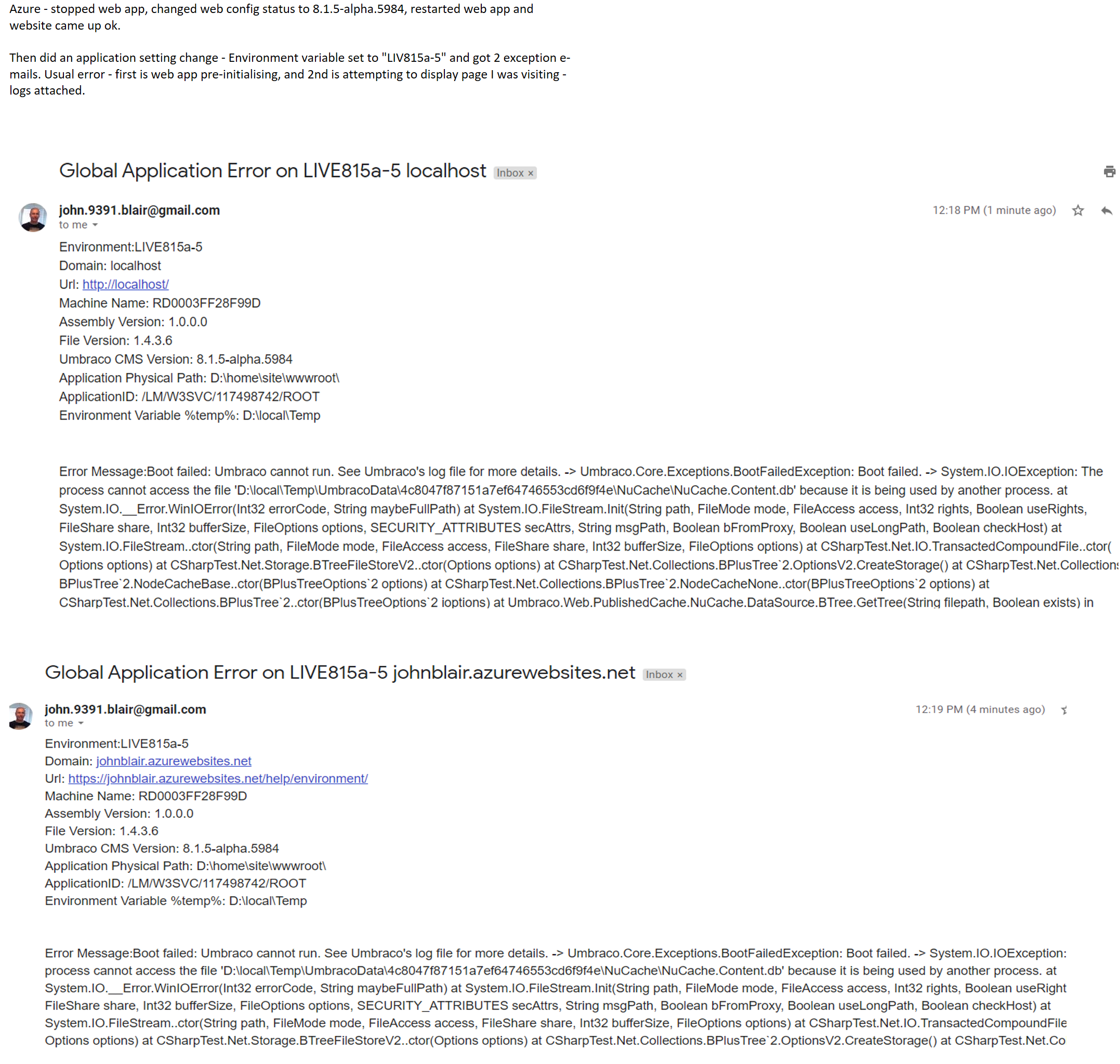
John-Blair
on 21 Oct 2019
Log entries for "Url": "https://localhost/umbraco", are unexpected as I did not
visit the back office. further in the log file this generates an error:
"Error",
"@x": "System.Net.Http.HttpRequestException: An error occurred while sending the request.
This happens during the pre-init for the app - why is it going to the backoffice?"Error pinging the URL https://localhost/umbraco - 'Unable to connect to the remote server'" - why is it doing this from localhost - it will never succeed and there are lots of them?
This happens during the pre-init for the app - so probably can be ignored?Starts with pid: 5100, and suspect as soon as i make the app config change it switches to pid: 13208 - where we see the Booting Umbraco msg, and http request number reset to 1. AppDomainAppId and Machine Name unchanged.
HostingPhysicalPath unchanged - including case - so lock hashes should be identical.Pid: 13208 acquires the lock immediately before pid:5100 releases it.
Error occurs, and then Pid: 5100 starts terminating.The first terminating we see is {LogPrefix} Terminating {Immediate} - what triggers this?
Further on after the shutdown we see the Hosting Environment signals a Stop and a msg "Released from MainDom for Published Snapshot service" - which is too late to avoid the nucache collision/error.
"Stopping ({SignalSource})",
"SignalSource": "environment",
Aside: My gut is telling me something is destroying the semaphore after it has been acquired, but before it is released.
We need more logging around the acquiring and release of the semaphore.
There is a final parameter on the Semaphore creation that tells if it was a new creation - we should use that and log the results.
The process cannot access the file error re-occurs - 2 times.
what is causing a 2nd attempt to access the nucache?"Released" is logged - 2019-10-21T11:18:59.5099868Z
There should be no more activity,
but there are lots of entries from "Umbraco.Web.Scheduling.BackgroundTaskRunner"
where does that get the signal to stop running?
Can we simplify the testing by not having the BackgroundTaskRunner not run?
Using reflector I see you are still manually allocating windows handles - I suggested we do not do that in https://github.com/umbraco/Umbraco-CMS/pull/6784/commits/5e02ac4206cdfd126ef894351ed1e61d75585fe3
But the main question is why is the 2nd process able to acquire the semaphore immediatly?
John-Blair
on 21 Oct 2019
We should also log the semaphore hash values to make sure they are identical. I have issues with the following code used in the generation of the hash. The enumerator is being modified while it is being enumerated - generally a bad practice.
internal static string ReplaceNonAlphanumericChars(this string input, string replacement)
        {
            //any character that is not alphanumeric, convert to a hyphen
            var mName = input;
            foreach (var c in mName.ToCharArray().Where(c => !char.IsLetterOrDigit(c)))
            {
                mName = mName.Replace(c.ToString(CultureInfo.InvariantCulture), replacement);
            }
            return mName;
John-Blair
on 21 Oct 2019
FYI. I'm building my own version of umbraco for testing. I fixed the semaphore lock name to "ABC" and it made no difference - same error - so its not the semaphore hash name changing.
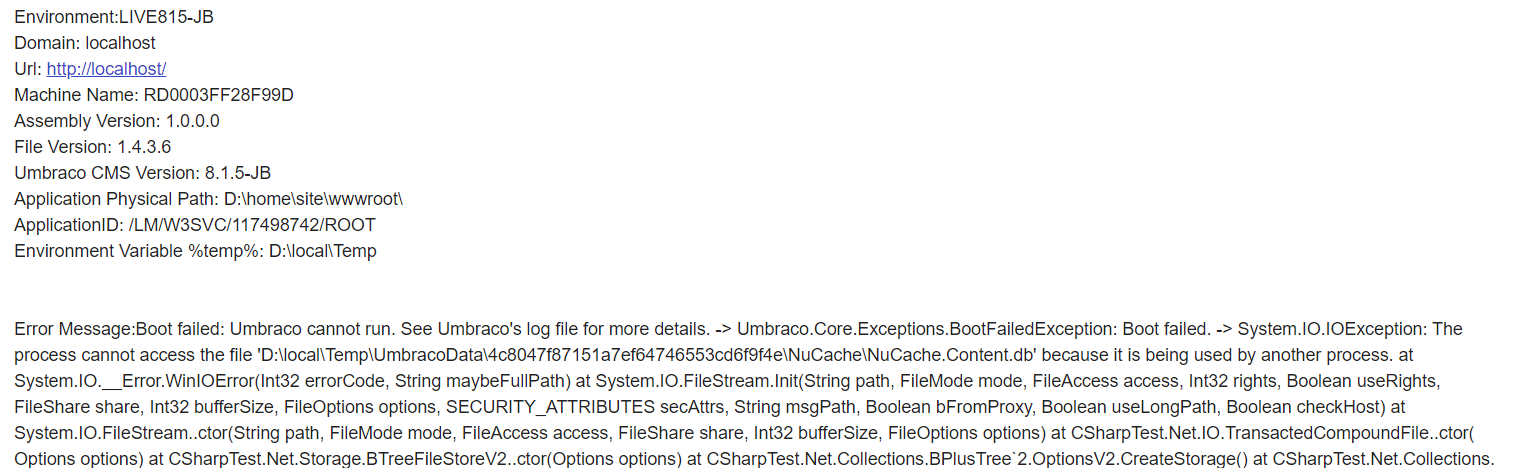
John-Blair
on 21 Oct 2019
FYI: Added extra logging around the semaphore. It turns out that every time IIS spins up a new process as the result of an app config change a new semaphore is created rather than re-use the existing one. This is different behaviour to that being seen in a console application. Log entries for 3 processes 12180, 7504, 12300.
{"@t":"2019-10-21T15:58:26.8113735Z","@mt":"Semaphore ({name}) ({createdNew})","name":"ABC","createdNew":true,"SourceContext":"Umbraco.Core.MainDom","ProcessId":12180,"ProcessName":"w3wp","ThreadId":31,"AppDomainId":3,"AppDomainAppId":"LMW3SVC117498742ROOT","MachineName":"RD0003FF28F99D","Log4NetLevel":"INFO ","HttpRequestNumber":1,"HttpRequestId":"f779d8d1-ed5f-4ea1-b5bf-a37b09dad03d"}
{"@t":"2019-10-21T15:59:28.9841003Z","@mt":"Semaphore ({name}) ({createdNew})","name":"ABC","createdNew":true,"SourceContext":"Umbraco.Core.MainDom","ProcessId":7504,"ProcessName":"w3wp","ThreadId":1,"AppDomainId":2,"AppDomainAppId":"LMW3SVC117498742ROOT","MachineName":"RD0003FF28F99D","Log4NetLevel":"INFO ","HttpRequestNumber":1,"HttpRequestId":"79b64296-d96b-4d2d-a019-cc10fdad42b6"}
{"@t":"2019-10-21T16:06:49.3669117Z","@mt":"Semaphore ({name}) ({createdNew})","name":"ABC","createdNew":true,"SourceContext":"Umbraco.Core.MainDom","ProcessId":12300,"ProcessName":"w3wp","ThreadId":1,"AppDomainId":2,"AppDomainAppId":"LMW3SVC117498742ROOT","MachineName":"RD0003FF28F99D","Log4NetLevel":"INFO ","HttpRequestNumber":1,"HttpRequestId":"098819b4-7edf-4b31-abcb-6175d59f2984"}
John-Blair
on 21 Oct 2019
My testing indicates that semaphores are isolated at the process level on azure. I did some research and found an old post that had same problem on win 7 - and the fix was to prefix the name of the semaphores with "Global\" - however this did not work - I tried other namespaces "Session\" and "Local\" but none worked. I am trying to find out if there is such a global namespace on Azure on SO.
John-Blair
on 21 Oct 2019
Also raised this question for guaranteeing releasing of a semaphore.
John-Blair
on 21 Oct 2019
Thanks @John-Blair - I'll integrate your changes from your other PR https://github.com/umbraco/Umbraco-CMS/pull/6752 into my branch and then get that PR closed. I'll also integrate your proposed changes of not using the GC Alloc stuff.
With all of the changes we've made, i think it's certainly better than what we had before. But with your find that a named semaphore can actually be isolated between processes, this leads me to think that this is a true thing - even though I didn't beleive it the whole time since that just seemed impossible to me without having them document this.
I will ask a question on the MS MVP mail list to see if anything comes back. In the meantime i'll update my PR.
As for logging, there is additional logging if you change the serilog log level to Debug instead of Info - you will end up with a boat load of logs but there is more. I'll reply back here soon.
Shazwazza
on 22 Oct 2019
regarding:
ReplaceNonAlphanumericChars - The enumerator is being modified while it is being enumerated - generally a bad practice.
It is not being modified in this case, ToCharArray() creates a new array which is iterated and each of its components are changed during the iteration. If this were the case, an exception would be thrown since .net doesn't allow you to modify an iterator.
Shazwazza
on 22 Oct 2019
Ok folks, here's the gist from MS:
Each site running on Azure App Service (Windows) has its own “BaseNamedObjects” directory which basically explains the behavior you are seeing where two sites (in this case the overlapped recycle means two sites WRT this discussion) are not sharing the same named semaphore.
We are apparently the first to notice this since it's been like this for many years. Have asked if there's a work around that we can use.
Shazwazza
on 22 Oct 2019
Am I correct in that you're trying to synchronize across web app instances for this local cache file? Given the temporary nature of this cache, it would make more sense that you simply write to a instance-specific location (e.g. generate a GUID at app start and append it to Umbraco.Core.LocalTempStorage), and eliminate all this synchronization overhead.
 riverar
on 22 Oct 2019
riverar
on 22 Oct 2019
The cache file is purely there for startup performance. If it needs to be regenerated on each startup anyways, then there's no point in having it. We already have a work around by disabling the local db (see https://github.com/umbraco/Umbraco-CMS/issues/5035#issuecomment-509557491), which definitely works fine but folks wish to continue to be able to utilize the localdb feature for startup performance reasons.
Shazwazza
on 22 Oct 2019
Got it. Will see myself right out. 😂
riverar
on 22 Oct 2019
Fantastic to get an answer from MS. So it confirms my intuition, that semaphores are not shared by site instances. Which means that, should we want to still protect a shared FS object, we'd need to implement FS-level locking.
zpqrtbnk
on 22 Oct 2019
UmbracoTraceLog.RD0003FF28F99D.20191022_002.zip
Thought I had a potential workaround - but it didn't work. Posting in case it triggers other variants. The reason not seeing the semaphore was an issue was the 2nd w3wp process was spinning up before the first one was fully closed down. There is an IIS app pool setting to disable that behaviour which is also avaiable on Azure via a transform on the applicationhost.config file. Anyway I tried that but it did not work - I still got overlapping writes in the log files for a config change. I verified
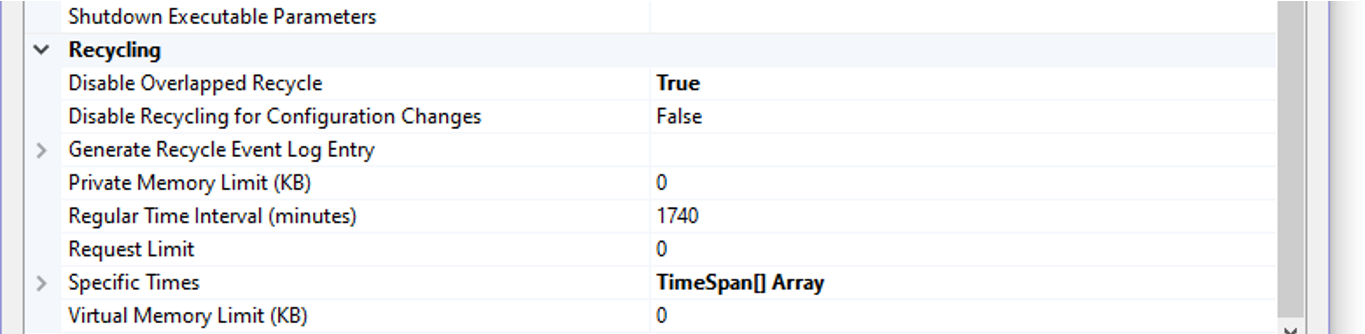

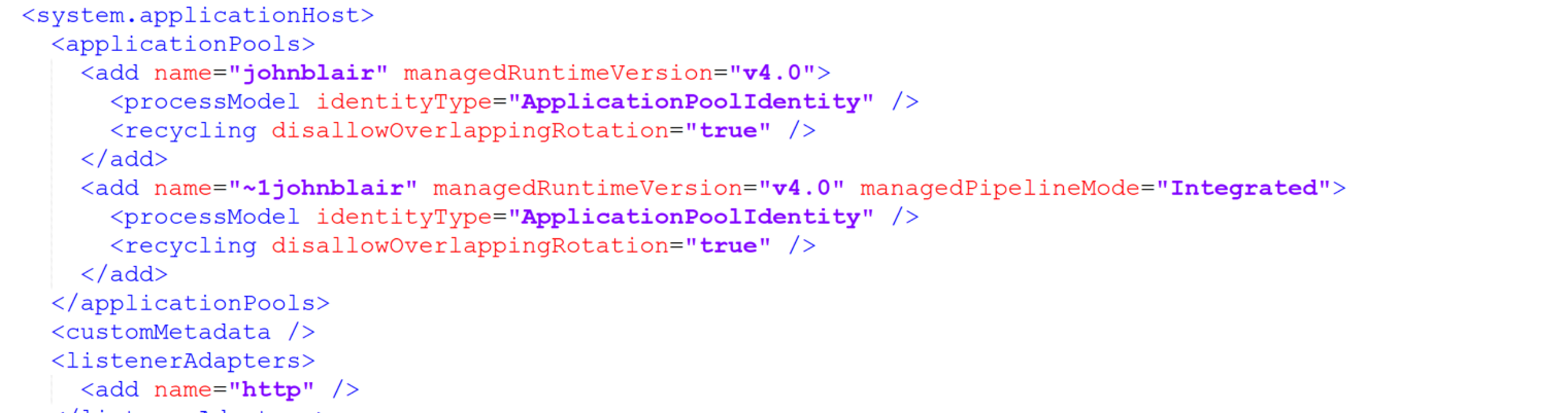
The above test was triggered by an insightful reply to my SO question:
There is another app pool setting for disable recycling for config changes - but i don't think it is wise to use that one.
John-Blair
on 22 Oct 2019
FYI I got another suggestion to try a named Mutex using the "Global\" prefix for the name. I tried that but got the same results as the semaphore.
John-Blair
on 22 Oct 2019
@John-Blair That would still live in the siloed kernel object namespace. Semaphores, events, mutexes -- all out. Given instances are not guaranteed to be on the same box, all those solutions are out.
You do have the file itself though. If you can't open it for exclusive read/write, it's safe to assume it's in use elsewhere.
riverar
on 22 Oct 2019
Agreed - just wanted to rule out the suggestions for sure. Per above, my next thought was to try and force serial operation of the w3wp processes i.e. a config change would shut one w3wp process down and start a new one up - if i could make this a serial action instead of a parallel/concurrent action then this would potentially do away with the need for the semaphore - as the shutdown of a process would release all necessary file locks, before the startup of the next process - which would acquire the file ok as no other process would be using it. My understanding was the app pool setting "Disable Overlapped Recycle=true" <recycling disallowOverlappingRotation="true"> would have ensured that - but the log files show this not to be the case with both processes having interwoven logging - instead of the desired/expected serial logging.
John-Blair
on 22 Oct 2019
FYI I tried another thing that should have worked. After the main dom issues _signal.Set() to tell the other process to shutdown - i put a delay in before progressing on the assumption this would give the other process time to shutdown and clean up - before the new process continues. To my surprise this did not work. What I found was if i delay by 10 seconds it took the other process 33s to reach the released state. If I delayed 60 seconds then it took it 74 seconds to reach the released state - and both times the lock on nucache was still happening. So I'm wondering why it is taking so long to shutdown - I would have thought files closed, services stopped could be done in under a second. I notice Umbraco.Web.Scheduling.BackgroundTaskRunner kicks in after a long delay - not sure what is triggering it to shutdown - but the Registered release callbacks don't kick in until the
60sec-delay-74-sec-release.zip
10-sec-delay-33-sec-release.zip
Uploading 60sec-delay-74-sec-release.zip…
BackgroundTaskRunner does it thing. Anyway attaching the logs.
John-Blair
on 23 Oct 2019
MS have responded:
You can set the app-setting WEBSITE_DISABLE_OVERLAPPED_RECYCLING to 1 in order to disable overlapped recycling – this should prevent your site from getting into a state where there are two W3WPs running for your site at the same time.
AppDomains that are running within the same process will share the same system object namespace, so your synchronization should work.
@John-Blair If you want to give that setting a try in Azure, in theory this 'should' work
If that work around works, it will buy some time while we investigate a better solution. Although IMainDom is an abstraction, it cannot be 'swapped' out in the CMS currently. First step will be making it swappable, then there's a number of implementations we can choose to do. I'd like to focus on just using the SQL distributed locking mechanisms we already have in place, other solutions are things like using blob storage leases for distributed locks (example https://medium.com/veyotech/using-an-azure-lease-blob-as-a-distributed-mutex-a9608c918801 and https://github.com/Azure/azure-webjobs-sdk/tree/b798412ad74ba97cf2d85487ae8479f277bdd85c/src/Microsoft.Azure.WebJobs.Host.Storage/Singleton) ... but that's a whole other discussion which we should take elsewhere.
@John-Blair regarding shutdown delays, part of what I fixed in https://github.com/umbraco/Umbraco-CMS/pull/6757 is that the BackgroundTaskRunner was unregistering itself eagerly instead of waiting for immediate - yet - there is critical code when immediate == true for the runner which would never execute, so when immediate == false each background task simply tries to wait till each one is finished - this could be part of what you are seeing, not sure if your custom build is based on the code in that PR? I will have another look at the runner to see if 'latched' tasks could be holding up a shutdown too.
Shazwazza
on 23 Oct 2019
Re: background task runner - I can confirm in my tests that HostingEnvironment.Stop is always called with the immediate == true flag, but it is not always called with immediate == false flag. This depends on how many app restarts may be occuring at a given time. I can also confirm that when a single/simple restart occurs, Stop is called instantly with immediate == false but then Stop is only called again with immediate == true when the next request arrives in the app domain, or some other timeout occurs which could be a while. There are some issues with the background task runner with shutdowns:
- The _shutdownToken cancelation token isn't actually canceled until
immediate == truewhich is way too late. For any 'latched' tasks, this means they'll be just waiting a holding up the shutdown of the app
- The bg task runner is being way too lenient with canceling tasks, it should be canceling all tasks the first time Stop is called, not only when
immediate == true(which wasn't even occuring until https://github.com/umbraco/Umbraco-CMS/pull/6757)
- The bg task runner is being way too lenient with canceling tasks, it should be canceling all tasks the first time Stop is called, not only when
I'll make some changes in #6757 and push another build
Shazwazza
on 23 Oct 2019
MS have responded:
You can set the app-setting WEBSITE_DISABLE_OVERLAPPED_RECYCLING to 1 in order to disable overlapped recycling – this should prevent your site from getting into a state where there are two W3WPs running for your site at the same time.
Sure, I will try this. But this looks the same as what i did yesterday - see above with the "Disable Overlapped Recycle" change to applicationhost.config (IIS app pool setting) via a config transform - which is meant to do the same thing. It didn't work and I couldn't figure out why not.
It looks like you made changes to BackgroundTaskRunner 7 hours ago - so I wouldn't have been using that code - I'll get latest.
I like the sound of using your SQL distributed locking mechanism.
The _shutdownToken cancelation token isn't actually canceled until immediate == true which is way too late. For any 'latched' tasks, this means they'll be just waiting a holding up the shutdown of the app
This could explain the long delays i was seeing. The other thing about the shutdown I don't understand - is that the Register actions to release - only happen after all the background task runners complete. It would make more sense to me to have the Register release actions run first - so the locks on Nucache are released as early as possible.
John-Blair
on 23 Oct 2019
I'll make some changes in #6757 and push another build
Is there a location I could just take your build from to make sure im using the right code?
John-Blair
on 23 Oct 2019
Good news - though I can hardly believe it! Setting WEBSITE_DISABLE_OVERLAPPED_RECYCLING to 1 worked (on my custom build which was failing) - even though this didn't work via my IIS app pool config transform above.
I've attached the logs which I've not examined yet. I'll do another run later with latest code to verify it still works.
UmbracoTraceLog.RD0003FF28F99D.20191023.zip
John-Blair
on 23 Oct 2019
Log analysis - all process logging sequential and DOM released before next process started up.
PID 11176, Released, 14660, Released, 13624, Released, 7924.
For the last process - I really hammered the config change saving button in Azure - it stays enabled during saving so I clicked it massively to try and break it - no e-mail errors received.
John-Blair
on 23 Oct 2019
Ok - did a run with the latest code. The good news is all tests ran without any errors and logging was sequential for processes and the main dom was released before the next process started up.
Logs attached.
PID 8480, Released, 15288, Released, 8984, Released, 15140, Released, 12952 - and as per earlier test hammered the config save button on last test - all ok.
I also noticed the shutdown time was much improved at about 2 seconds.
The 1 item that concerns me in the logs is there is a consistent delay of approx 35 seconds between the end of 1 process and the ""Booting Umbraco" message of the next process.
UmbracoTraceLog.RD0003FF28F99D.20191023.zip
John-Blair
on 23 Oct 2019
@John-Blair that's good news! At least there's a work around for now until we get an alternate distributed lock mechanism in place.
The other thing about the shutdown I don't understand - is that the Register actions to release - only happen after all the background task runners complete. It would make more sense to me to have the Register release actions run first - so the locks on Nucache are released as early as possible.
I'll try to investigate this, haven't seen why or how this could happen, only thing I can think of is that one of the other IRegisteredObjects is taking some time to process during it's Stop call before the call is made to MainDom.Stop. IRegisteredObject's Stop calls are made by the same aspnet thread, so they are made sequentially, not in parallel.
Shazwazza
on 24 Oct 2019
I have confirmed that:
- IRegisteredObject.Stop methods are all run by the same aspnet thread regardless of whether immediate == true or false, this means that all shutdown oeprations are executed sequentially which means that it's very easy to delay another object's shutdown logic
- MainDom.Stop is executed after most of the BackgroundTaskRunners - this will most likely be due to the ordering of IRegisteredObject.Register calls during startup, this means that MainDom.Stop might be delayed by background task runners
I have pushed some new changes:
- BackgroundTaskRunner.Stop will call StopInitial and/or StopImmediate on a threadpool thread as to not delay any other IRegisteredObject's from shutting down
- There is no more Task.Delay, instead there's a Thread.Sleep since StopInitital is already running on a threadpool thread
- Thread.Sleep is not used unless the runner still has tasks to process
- StopImmediate is not called on a threadpool thread unnecessarily, all shutdown logic will attempt to be done immediately unless there is a pending task to complete
This should make shutdown a bunch quicker i think. Will post a build shortly.
Shazwazza
on 24 Oct 2019
_latest changes breaks some tests so need to fix that before i can post a build, but it's the tests that aren't working with the changes, not the actual changes, so feel free to pull down the latest for that branch to build your own release, i won't have time to fix these tests today_
Shazwazza
on 24 Oct 2019
@Shazwazza , The changes all look good - great job. If shutdown gets any quicker it will be appearing in "Back to the Future Part IV"!
Ok, I've just received an IRegisteredObject.Stop(true) call from my bank manager. Been a real pleasure for me working on this. I now need to return to my main Task of finding a job.
John-Blair
on 24 Oct 2019
Thanks for all your help @John-Blair very much appreciated!
Shazwazza
on 25 Oct 2019
@nul800sebastiaan Hope you're well. This is the issue we discussed at the Umbraco UK festival. We have done this workaround and still we have production websites going down whenever Azure recycles their resources. It seems that since the recent Umbraco release, there's now a NEW issue related to this one.
This new issue now requires killing the w3wp.exe process and before the last release it didn't require this.
Do you know when Umbraco will have a fix for this issue, as it's prevalent only in Umbraco v8 and we have a global client production site continuously going down (almost daily now) and we have to manually restart the app and kill the w3wp.exe process to get it back up?
cc @Shazwazza @owen-roberts
 bluegrass-digital-dev
on 11 Dec 2019
bluegrass-digital-dev
on 11 Dec 2019
@bluegrass-digital-dev can you elaborate on what work around you are referring to here since this thread is incredibly long and includes a lot of different info on several different issues.
Shazwazza
on 11 Dec 2019
@John-Blair that WEBSITE_DISABLE_OVERLAPPED_RECYCLING appSetting, does it go in the web.config or in the configuration in the Azure portal?
I have a 8.4.0 site which has run into this issue 4 times this week, despite having the setting in web.config.
skttl
on 24 Jan 2020
@John-Blair that
WEBSITE_DISABLE_OVERLAPPED_RECYCLINGappSetting, does it go in the web.config or in the configuration in the Azure portal?I have a 8.4.0 site which has run into this issue 4 times this week, despite having the setting in web.config.
Azure setting, must go into the portal config.
 luke-barnett
on 24 Jan 2020
luke-barnett
on 24 Jan 2020
@luke-barnett either should be fine - the Configuration/Application Settings just overrides the web.config so I put it in the Application Settings.
Note: @Shazwazza indicated there was a deadlock issue with 8.4.0 and suggested you move to 8.4.1 to fix that see comment below cut from that conversation:
please try 8.4.1 which contains the #7404 deadlock issue fix https://our.umbraco.com/download/releases/841 also be sure your config is correct.
—
John-Blair
on 25 Jan 2020
Sorry @skttl - I meant to reply to you in my previous comment!
John-Blair
on 25 Jan 2020
Thanks @John-Blair, the site survived a recycle today!
skttl
on 25 Jan 2020
Hi all, i know this issue has been long running and there's several fixes and work arounds that seem to be working for most people but like i mentioned above we had been working on a different fix that doesn't require working around Azure's non support of named semaphores.
This fix is here https://github.com/umbraco/Umbraco-CMS/pull/7306
You can try this in the 8.6 RC and I will be updating the docs for working with Azure websites. There's a single appSetting you need to enable:
<add key="Umbraco.Core.MainDom.Lock" value="SqlMainDomLock" />
If anyone gets a chance to test this out with the RC that would be great. Internally we've tested quite a lot including stress testing both locally and on Azure and I couldn't break it. WIll close this for now but please let me know any results.
Shazwazza
on 2 Mar 2020
I have sent a PR to the docs team https://github.com/umbraco/UmbracoDocs/pull/2330
Shazwazza
on 2 Mar 2020
@Shazwazza thanks for this Shannon! Upgraded to 8.6 a while ago and just suffered this problem tonight - but didnt know about this new Umbraco.Core.MainDom.Lock appSetting until finding it here. Will test it and keep my fingers crossed!
 dmeineck
on 21 May 2020
dmeineck
on 21 May 2020
Related issues
 aochmann
·
3Comments
aochmann
·
3Comments
 janvanhelvoort
·
4Comments
janvanhelvoort
·
4Comments
 glombek
·
4Comments
glombek
·
4Comments
 junkin77
·
3Comments
junkin77
·
3Comments
 pralthom
·
3Comments
pralthom
·
3Comments
Most helpful comment
@Shazwazza , The changes all look good - great job. If shutdown gets any quicker it will be appearing in "Back to the Future Part IV"!
Ok, I've just received an IRegisteredObject.Stop(true) call from my bank manager. Been a real pleasure for me working on this. I now need to return to my main Task of finding a job.