Umbraco-cms: umboverlay.directive isn't context aware
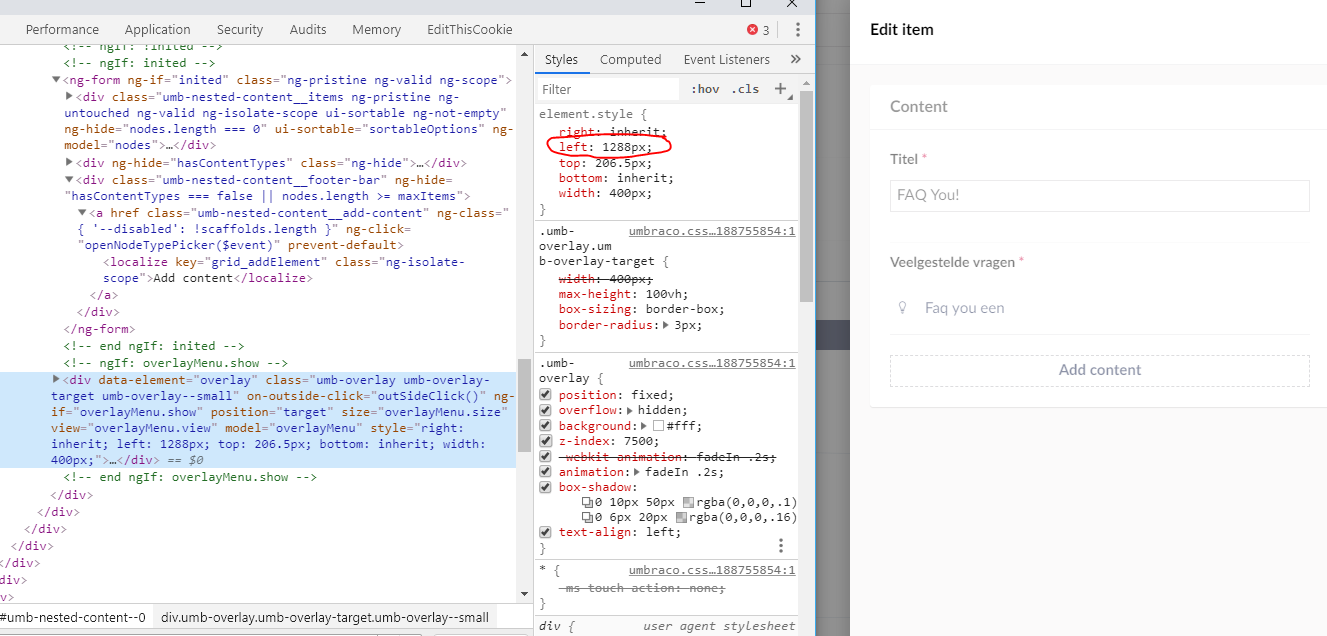
The umboverlay.directive directive isn't context aware. The location is always based on the $("#contentwrapper");
- copy a nested content value using the new copy functionality
- Open a small editor overlay where also a nested content is in (no infinite overlay)
- Click the left side of the 'add content' button of nested content (clicking right side will base the overlay on the right side of the screen -> no problem then....)
- the 'left' and 'top' position of the 'paste or new' overlay will be relative to the small editor overlay and be place off-screen.
It should be based on the context you are in
But seem to be here: https://github.com/umbraco/Umbraco-CMS/blob/040ebfe9dd7d7053ccf4393f8a83c11fc3866b69/src/Umbraco.Web.UI.Client/src/common/directives/components/overlays/umboverlay.directive.js#L383
The bug is created by using the position of $("#contentwrapper") instead of the editor itself (mabye use the element clicked to set the position?)
 ArnoldV
All 16 comments
ArnoldV
on 31 Jul 2019
Haven't tested completely, but maybe container can be retrieved from el like
            var container = el[0].closest(".umb-editor");
            var containerLeft = container.offsetLeft;
            var containerRight = containerLeft + container.offsetWidth;
            var containerTop = container.offsetTop;
            var containerBottom = containerTop + container.offsetHeight;
This uses the closest .umb-editor as the container instead of #contentwrapper
 skttl
on 31 Jul 2019
skttl
on 31 Jul 2019
Thanks @skttl I can make pull request for this, but maybe HQ (@nul800sebastiaan ) has an idea to fix this in another way?
ArnoldV
on 31 Jul 2019
Ah, it's position:fixed, so using the closes .umb-editor won't do...
skttl
on 31 Jul 2019
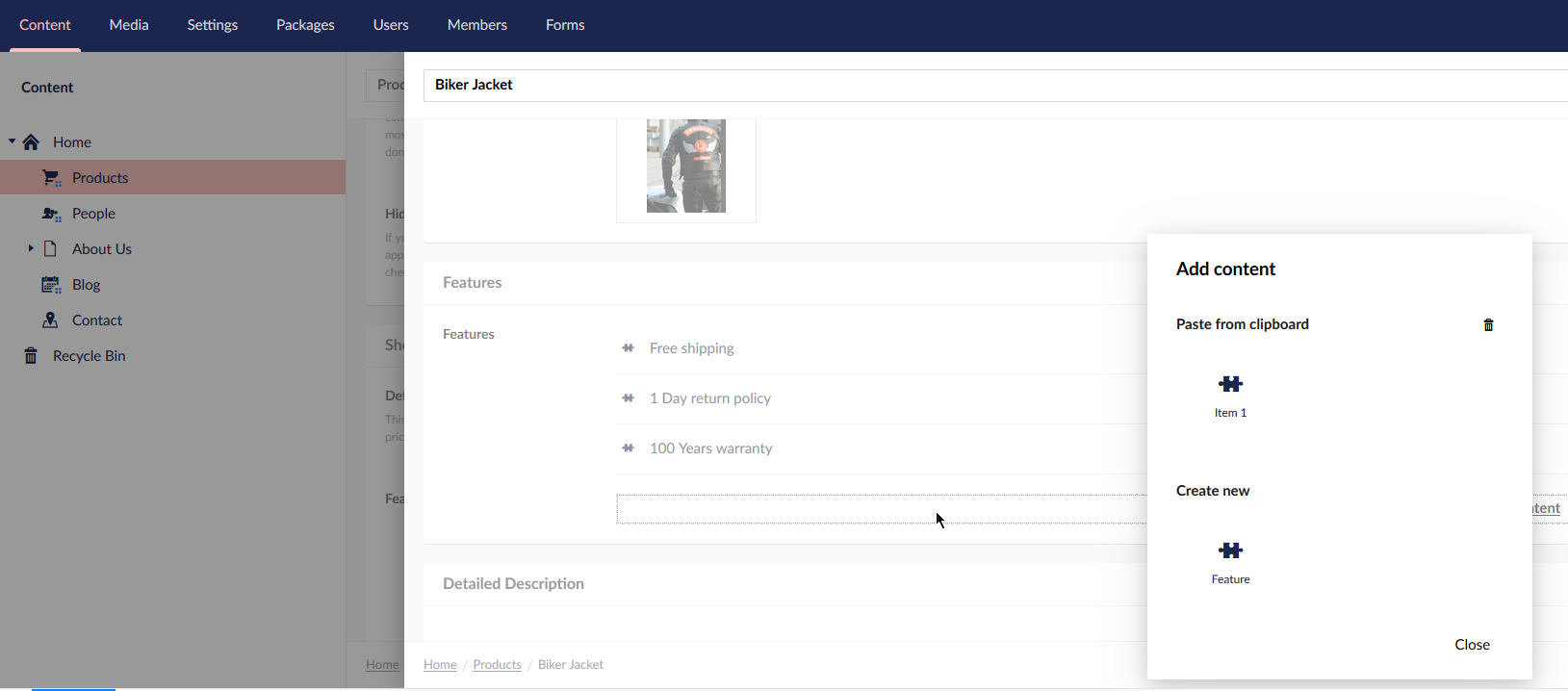
The real problem is about css positioning, this is where it's placed in the default infinite editor dialog. Note the cursor, showing where I clicked.
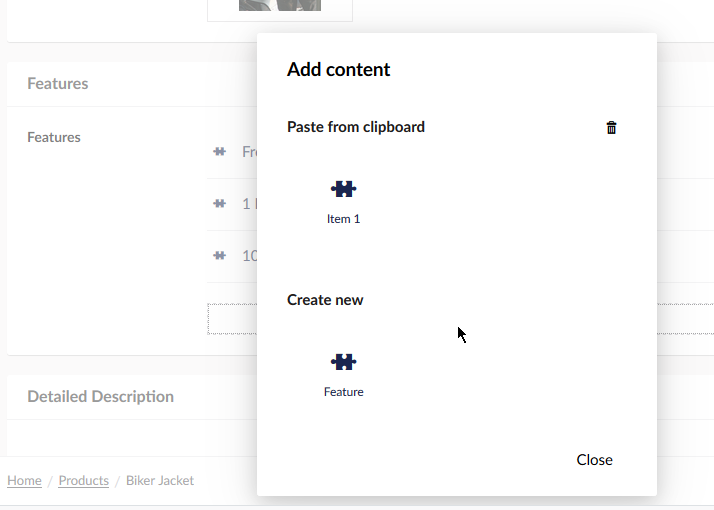
Correct behaviour would be to have the overlay centered around the click position, like here:
skttl
on 31 Jul 2019
This is the same issue as described here, correct?
https://github.com/umbraco/Umbraco-CMS/issues/6011
It should be fixed somehow by making sure we know from which element in the DOM we're opening the dialog and positioning it relative to that it seems like, not relative to the mouse cursor though, it needs to be consistent so it opens on the middle of the element you clicked.
 nul800sebastiaan
on 5 Aug 2019
nul800sebastiaan
on 5 Aug 2019
@nul800sebastiaan that seems a duplicate indeed.
Do you want to have me/community a go at this or do HQ want to take a look at this since it might impact more then we see now?
ArnoldV
on 5 Aug 2019
I don't think it should impact more, but it's a bit hard to tell without experimenting. I am very happy for someone in community looking at it for now if anyone has the time! 👍
nul800sebastiaan
on 5 Aug 2019
Hi @ArnoldV,
We're writing to let you know that we've added the Up For Grabs label to your issue. We feel that this issue is ideal to flag for a community member to work on it. Once flagged here, folk looking for issues to work on will know to look at yours. Of course, please feel free work on this yourself ;-). If there are any changes to this status, we'll be sure to let you know.
For more information about issues and states, have a look at this blog post
Thanks muchly, from your friendly PR team bot :-)
 umbrabot
on 5 Aug 2019
umbrabot
on 5 Aug 2019
I hope this issue is resolved soon as it is also causing issues for the behaviour of the Doc Type Grid Editor extension. See this related issue for further information about that.
 timeverts
on 10 Dec 2019
timeverts
on 10 Dec 2019
Running into this all the time when I use DTGE with a Nested Content editor inside it. When you copy a NC item and click the Add button, the dialog for choosing the copied item or a new item is positioned outside the viewport.
 stefankip
on 28 Apr 2020
stefankip
on 28 Apr 2020
This sounds like the same issue described here: https://github.com/umbraco/Umbraco-CMS/issues/7754
Luckily this is fixed in 8.7 😄
 abjerner
on 28 Apr 2020
abjerner
on 28 Apr 2020
That would be awesome! :-)
stefankip
on 28 Apr 2020
Aaah yes, I knew it sounded familiar. Fixed for 7.4.0 already 👍 I'll close this one as a duplicate of #7754, thanks!
nul800sebastiaan
on 28 Apr 2020
Aaah yes, I knew it sounded familiar. Fixed for 7.4.0 already 👍 I'll close this one as a duplicate of #7754, thanks!
7.4.0? 😮
stefankip
on 28 Apr 2020
I'm getting senile.. I meant 8.7.0 😅 😂
nul800sebastiaan
on 28 Apr 2020
Related issues
 Myronics
·
3Comments
Myronics
·
3Comments
 janvanhelvoort
·
4Comments
janvanhelvoort
·
4Comments
 Luksor
·
3Comments
Luksor
·
3Comments
 vonbv
·
4Comments
vonbv
·
4Comments
 Matthew-Wise
·
4Comments
Matthew-Wise
·
4Comments