Umbraco-cms: Media tree doesn't show folders in 7.15.0 any more for folders created before 7.8.0
See for original report: https://our.umbraco.com/forum/using-umbraco-and-getting-started/98092-umbraco-715-media-folders-not-appearing-in-the-tree
In 7.8.0 we introduced a new table cmsMedia in which all media items get populated when they have a mediaPath - sadly, media items of type Folder do not have a path so they never got into the cmsMedia table during the upgrade.
This was no problem until we introduced this part of the query:
An INNER JOIN on cmsMedia will exclude the old Folders from being return since they do not exist in cmsMedia. When changing this query to a LEFT JOIN, the media tree returns to normal.
Workaround if you are already on 7.15.0 and need to fix your media tree right now
The complete SQL script that works great is in this comment, it has been updated after some tests came in and it is now complete: https://github.com/umbraco/Umbraco-CMS/issues/5848#issuecomment-510801892
_This item has been added to our backlog AB#1714_
 nul800sebastiaan
All 27 comments
Any idea when this will make it into 7.15.1 and when it will be released? Currently have a live site that no one can add new content on because cannot pick images for the content.
 YodasMyDad
on 12 Jul 2019
YodasMyDad
on 12 Jul 2019
A 7.15.1 release will have to wait a little longer.
If you need to fix it now, make sure to roll back to either 7.14.0, use the build output from the related PR.
nul800sebastiaan
on 12 Jul 2019
I feel that this is a serious issue that needs to be fixed in a patch update or hotfix as soon as possible.
 MichaelNielsenDK
on 12 Jul 2019
MichaelNielsenDK
on 12 Jul 2019
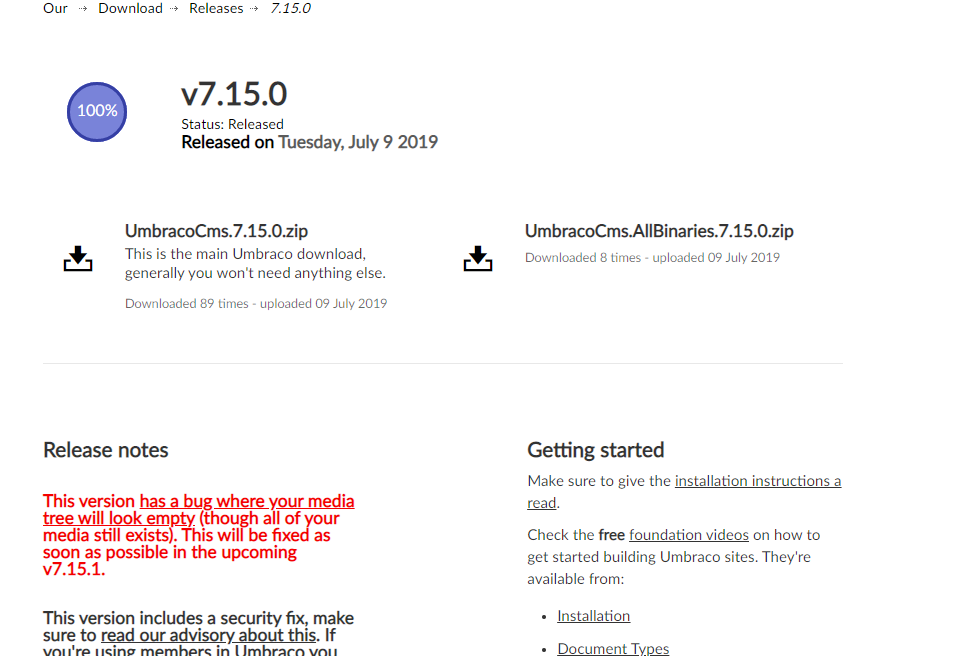
This is a reasonably large problem for users. Perhaps HQ needs to highlight this issue on the 7.15.0 release page on Our ?
 benjimedia
on 12 Jul 2019
benjimedia
on 12 Jul 2019
Sure, there you go: 😊
nul800sebastiaan
on 12 Jul 2019
@MichaelNielsenDK Obviously this is being fixed ASAP.
nul800sebastiaan
on 12 Jul 2019
@nul800sebastiaan Awesome... 🤘🏻
MichaelNielsenDK
on 12 Jul 2019
As a workaround, we can populate the cmsMedia table with some SQL. Note, this is mostly untested, make backups and copy the output of this script to make sure you can revert the INSERT statement if needed later
DECLARE @i int
DECLARE @nodeId int
DECLARE @numrows int
DECLARE @versionId varchar(50)
DECLARE @rootNodes TABLE (
    idx smallint Primary Key IDENTITY(1,1)
    , NodeId int
)

INSERT @rootNodes
SELECT id FROM umbracoNode WHERE nodeObjectType = 'B796F64C-1F99-4FFB-B886-4BF4BC011A9C' AND id NOT IN (SELECT nodeId FROM cmsMedia)

SET @i = 1
SET @numrows = (SELECT COUNT(*) FROM @rootNodes)
IF @numrows > 0
    WHILE (@i <= (SELECT MAX(idx) FROM @rootNodes))
    BEGIN

        SET @nodeId = (SELECT NodeId FROM @rootNodes WHERE idx = @i)

        --Do something with Id here
        SET @versionId = (SELECT TOP 1 VersionId FROM cmsContentVersion WHERE ContentId = @nodeId ORDER BY VersionDate DESC)
        PRINT(@versionId)
        PRINT(@nodeId)
        INSERT INTO cmsMedia(nodeId, versionId) VALUES(@nodeId, @versionId)

        SET @i = @i + 1
    END
What does it do? It finds all nodes of type 'B796F64C-1F99-4FFB-B886-4BF4BC011A9C' (media types) that are not yet in the cmsMedia table.
It then loops through each of them and finds the newest version in the cmsContentVersion table. Then it inserts the nodeId and versionId in cmsMedia which will then ensure it ends up in the media tree again as it is part of the LEFT JOIN query again,
Did I tell you to make backups? And copy the output?
In the output you should see the result of the first SELECT (in my case 5 items, (5 rows affected)) and then for each item the versionId and the nodeId that are inserted into cmsMedia.
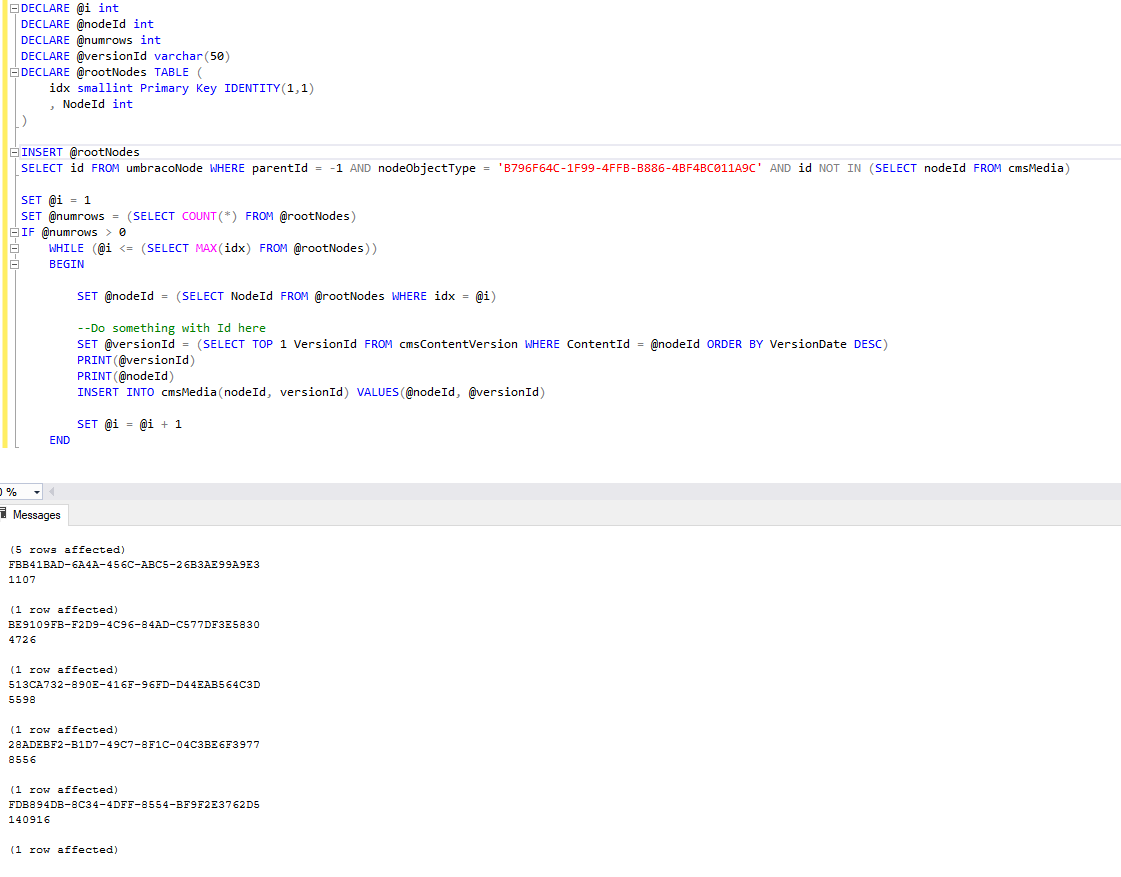
Ps. Make backups!
nul800sebastiaan
on 12 Jul 2019
Ok so I didn't make any backups... 😬😉
This half works. It gets back the top level folders, but still doesn't show the folders under the top level ones. I.e.
Media
- Folder (Was missing, but now shows after running your SQL)
- Sub Folder (Still missing in tree but shows in list view if I click folder above)
YodasMyDad
on 12 Jul 2019
So, I thought screw it. I'm going to remove the 'parentId = -1' in the first select query... And it fixes all my problems with the folders. Now all are showing 👍
YodasMyDad
on 12 Jul 2019
We had 2 environments with the issue (live and development) and 2 without (staging and localhost); the 2 without were cloned sometime after 7.8 had been deployed.
An alternative we have used successfully on Cloud is to compile 7.15 from source with the LeftJoin change from the first comment.
Hopefully the official update will resolve the issue with cmsMedia table being populated correctly for older databases.
 gavinfaux
on 12 Jul 2019
gavinfaux
on 12 Jul 2019
We ran the patch SQL (with the additional notes from Lee) and that fixed the issue for us on Umbraco Cloud.
Thanks @nul800sebastiaan and @YodasMyDad
 protherj
on 12 Jul 2019
protherj
on 12 Jul 2019
Yep a Left join is what is needed, the PR looks good #5865, we'll test.
 Shazwazza
on 15 Jul 2019
Shazwazza
on 15 Jul 2019
Merged into v7/dev and cherry picked into v7/7.15
 bergmania
on 16 Jul 2019
bergmania
on 16 Jul 2019
Considering that there should be massive amount of sites out there that is affected by this issue, I would say that a releases hot fix would be preferable. Modifying the DB manually feels like the wrong fix. I would _REALLY_ like that the 7.15.1 release got closed and shipped. That said, I would prefer to upgrade via Nuget.
In our case we updated 12 sites, after reading about the update before the warning came up. We obviously didn't return to the releases-page after that.
 andersbrohall
on 17 Jul 2019
andersbrohall
on 17 Jul 2019
We upgraded to v7.15.0 in part because of the security advisory issued by Umbraco on 9th July:
https://umbraco.com/blog/security-advisory-july-9th-2019/
Being able to select media in folders is critical functionality for editors.
I understand the focus in now on v8, but this isn't a new feature request, this is a request to fix existing functionality that was broken in the last release.
Is there an expected release date for this fix so I can relay this to our clients?
 snerpton
on 17 Jul 2019
snerpton
on 17 Jul 2019
@nul800sebastiaan @Shazwazza Whats the outlook for making a patch for this issue alone? Or at least close 7.15.1 as is? Our clients are upset. And the Security Advisory July 9th 2019 makes it somewhat official that we've done the correct thing upgrading.
andersbrohall
on 22 Jul 2019
Using the workaround in the SQL script is the correct thing to do for now until we have a 7.15.1 release ready soon.
Note that for security fixes we also listed workarounds for all older versions that can be used.
nul800sebastiaan
on 22 Jul 2019
@nul800sebastiaan Any news on the 7.15.1 release? Don't want to hassle, but it's been over two weeks now and this is a show-stopper bug in the only release that contains an important security fix. If it's just changing one query to a LeftJoin then I would have expected a release much sooner. Are there other issues or some reason for the delay? Normally critical patches are release quickly. Or is there something political at work, with v8 taking all the priority?
 DanDiplo
on 24 Jul 2019
DanDiplo
on 24 Jul 2019
As mentioned above, the issue is resolved when running the SQL script if this is a blocker for now. Expect 71.5.1 to be out early next week.
nul800sebastiaan
on 24 Jul 2019
Hi @nul800sebastiaan It wasn't clear how stable that script was given it says, "this is mostly untested" and someone had commented "it half works". You can understand, even with backups, that it can be worrying running an SQL script like this (and if a client is actively populating a site, then restoring the DB from backup a week later if a problem arises isn't really viable as they will lose all content added since that point).
DanDiplo
on 24 Jul 2019
Understood. It's stable. After Lee said it "half works" he fixed it, the script has been updated and I mentioned a few times that you should use it if you need to get up and running on 7.15.0 for now.
For future readers:
Workaround if you are already on 7.15.0 and need to fix your media tree right now
The complete SQL script that works great is in this comment, it has been updated after some tests came in and it is now complete: https://github.com/umbraco/Umbraco-CMS/issues/5848#issuecomment-510801892
nul800sebastiaan
on 24 Jul 2019
I can also confirm I've used the SQL script to resolve the media tree issue and all is well. It was quite a large database too, so much so that it timed out a few times during the upgrade as it was trying to create the index on the new cmsMedia table! It worked in the end though, after a little persistence :)
 millscj
on 24 Jul 2019
millscj
on 24 Jul 2019
Confirmed here as well for 10+ sites on 7.15.1
/Thomas
On 24 Jul 2019, at 14.52, Chris Mills notifications@github.com wrote:
I can also confirm I've used the SQL script to resolve the media tree issue and all is well. It was quite a large database too, so much so that it timed out a few times during the upgrade as it was trying to create the index on the new cmsMedia table! It worked in the end though, after a little persistence :)
—
You are receiving this because you are subscribed to this thread.
Reply to this email directly, view it on GitHub, or mute the thread.
 thaggren
on 24 Jul 2019
thaggren
on 24 Jul 2019
Just to be difficult - running the SQL works fine, I can see the folders in the media table, all with mediaPath = null. I don't though have a rendered tree in the backoffice. Folders show fine in the main pane, just nothing in the tree...
Site is 7.8.2 freshly updated to 7.15
EDIT - user error. Ignore me.
 nathanwoulfe
on 25 Jul 2019
nathanwoulfe
on 25 Jul 2019
@nul800sebastiaan you need to change AND to WHERE in your comment, in the SELECT.
 drbldgtl
on 26 Jul 2019
drbldgtl
on 26 Jul 2019
@drbldgtl Oops! Thanks, done.
nul800sebastiaan
on 26 Jul 2019
Related issues
 nielslyngsoe
·
3Comments
nielslyngsoe
·
3Comments
 junkin77
·
3Comments
junkin77
·
3Comments
 Matthew-Wise
·
4Comments
Matthew-Wise
·
4Comments
 jesperordrup
·
3Comments
jesperordrup
·
3Comments
 janvanhelvoort
·
4Comments
janvanhelvoort
·
4Comments
Most helpful comment
Sure, there you go: 😊