Umbraco-cms: v8.1 migration from v7 results in an error due to a unique index on cmsContent
We've seen a database migration from v7 to v8.1 fail due to the presence of an index named IX_cmsContent. This index might be linked to other tables that make it fail.
Need to investigate (this was reported by @marcemarc ).
_This item has been added to our backlog AB#2134_
 nul800sebastiaan
All 24 comments
What appears to be the problem here, is that the script is dropping the foreign key constraints by 'name' before trying to drop the index on the cmsContent table...
... but these foreign keys, (this is a site that has been upgraded over the years from v4->v6->v7) appear not to always be named consistently!
eg
in the problem site we have FK indexes in the format
FK_cmsPreviewXml_cmsContent
when a clean vanilla Umbraco 7 site has the same index as:
FK_cmsPreviewXml_cmsContent_nodeId
So when the script drops these foreign keys 'by name' these ones are missed and it prevents the Index from being dropped.
If manually you drop the remaining indexes, you then run into the same problem on the cmsContentType table FK index names!!!
A super useful SQL script to have to hand is this:
Select
f.name,
object_name(f.parent_object_id)
From
sys.foreign_keys f
inner join
sys.indexes i
on f.referenced_object_id = i.object_id and
f.key_index_id = i.index_id
Where
i.name = 'ix_cmsContent' and
i.object_id = object_id('[dbo].[cmsContent]')
This will tell you the names of the foreign keys that are remaining in your db that reference the particular index that the script can't drop - and you'll be able to easily see which ones aren't named in the 'more modern format'.
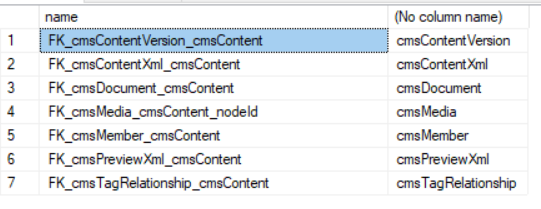
If you manually drop each of these foreign keys, and the drop the ix_cmsContent index, you can continue with the upgrade, but you'll run into the same issues on other tables, eg cmsContentType is next!
Affected foreign keys:
ALTER TABLE [dbo].[cmsContentXml] DROP CONSTRAINT "FK_cmsContentXml_cmsContent";
ALTER TABLE [dbo].[cmsContentVersion] DROP CONSTRAINT "FK_cmsContentVersion_cmsContent";
ALTER TABLE [dbo].[cmsDocument] DROP CONSTRAINT "FK_cmsDocument_cmsContent";
ALTER TABLE [dbo].[cmsMedia] DROP CONSTRAINT "FK_cmsMedia_cmsContent";
ALTER TABLE [dbo].[cmsMember] DROP CONSTRAINT "FK_cmsMember_cmsContent";
ALTER TABLE [dbo].[cmsPreviewXml] DROP CONSTRAINT "FK_cmsPreviewXml_cmsContent";
ALTER TABLE [dbo].[cmsTagRelationship] DROP CONSTRAINT "FK_cmsTagRelationship";
Not sure if updating the script to just remove 'all the FKs' associated with an index, whatever they are named is the way to go - eg if a third party package has also added an FK, you wouldn't know it had been removed.. so possibly better to fail in those circumstances...
...what would be handy would be to log the output of the select statement (if permissions allow) when the script fails, to point people in the right direction of what is wrong... or at least add it a bit on troubleshooting to the docs for the migration for this release.
 marcemarc
on 8 Jul 2019
marcemarc
on 8 Jul 2019
Yeah these old names, they are still an issue in some v7 upgrades too. We have a migration check to get a list of FK/index names already so should be able to sort something out.
Any chance we could borrow a copy of your DB, or 'Extract a data tier application' to output a DACPAC file which is just the schema of your DB.
 Shazwazza
on 9 Jul 2019
Shazwazza
on 9 Jul 2019
@Shazwazza hopefully attached as a zip, need to rename as .dacpac to import
example-for-v8.1-upgrade-issue.zip
marcemarc
on 9 Jul 2019
yep, looks like the same issue... @Shazwazza need a dacpac of mine too?
 robertjf
on 13 Jul 2019
robertjf
on 13 Jul 2019
Any update on this? We are affected by it. Our site was also upgraded from v4 to v6 to v7.
After manually dropping the constraints and removing a few of the named indexes, the upgrade continues, but fails again eventually with another error "An item with the same key has already been added". I'm not sure if this is related or not. Note, I've confirmed we don't have any duplicate propertyAliases on/inherited from any doctypes or compositions.
 wakeup2k5
on 31 Jul 2019
wakeup2k5
on 31 Jul 2019
I spent an afternoon on this.
It was for a db migration 4.11.10 -> 7.7.13 -> 7.15.1 -> 8.1.1
It fails on last step to 8.1.1
What I tried as temporary fix to complete the upgrade was to drop the problematic indexes and keys that trigger the error.
Even after I went through all the index related issues I hit a wall once I get to this error:
The database failed to upgrade. ERROR: The database configuration failed with the following message: Cannot insert the value NULL into column 'versionId', table 'brandtoolboxUmb7.14.dbo.cmsPropertyData'; column does not allow nulls. UPDATE fails. The statement has been terminated. Please check log file for additional information (can be found in '/AppData/Logs/')
@Shazwazza here is the dacpac but happy to provide a full backup if it helps (please remove .zip from the name to use it).
Thank you
 rgdagostino
on 5 Aug 2019
rgdagostino
on 5 Aug 2019
I’m having the same issue with my migrations from v4.11.10 > v7+ > v8.1.1
I understand the issue is under review, however, I’m just wondering if this issue is currently being addressed as a priority?
I’m in the process of migrating about 14 sites (v4.11.10) to v8 but stuck with this migration issue. If we don't have a fix soon, I’ll be forced to migrate to v7... which I'm loathe to do.
If the Umbraco powers that be can let us know whether this is likely to be fixed within weeks/months, then I can make a business decision whether to hold off for several weeks (and migrate to v8 then), or just migrate to v7 knowing that this migration issue will take months to fix?
Thanking you in advance.
BTW, I love the v8 experience so really hoping I don't need to migrate my sites to v7.
 robgoddes
on 7 Aug 2019
robgoddes
on 7 Aug 2019
I wonder if these edge cases of database cleanup would be better handled by a separate "Prepare your database for V8" tool? Possibly a package of health checks which you can install on your V7 site before starting the migration would work.
A health check for unexpected keys and indexes would have better options available to it than a migration has. It could list the problem keys and offer a Fix action to remove them, or let you manually deal with them and re-run the health checks. One failing check doesn't have to stop others from running, so you'd also see everything that needs addressing upfront, rather than fixing one thing and re-running the whole upgrade to see what else might be wrong.
The same is true for problems like duplicate data type configuration and orphaned rows violating foreign keys that we want to create, which we've seen in other issues. You probably do just want to be warned that they exist and let a tool clean up for you, but having a migration do it quietly without asking for confirmation feels more dangerous.
 stevemegson
on 7 Aug 2019
stevemegson
on 7 Aug 2019
We're going to keep fixing these issues in the upgrader when they pop up, our last few weeks have been pretty full with other priorities but we hope to get to them pretty soon. I can't give an exact time frame at the moment unfortunately.
The problem with a health check is we don't know up front what issues people will run into nor how to fix them, in advance. So we'll get there with issues like this.
@robgoddes have you tried the manual fixes that Marc listed above to see if you get some progress?
nul800sebastiaan
on 7 Aug 2019
@marcemarc I tried your dacpac file but i get this error when restoring it:
The calculated checksum for model.xml in the package C:\Users\Shannon\Downloads\example-for-v8.1-upgrade-issue.dacpac is different from the saved checksum. (Microsoft.Data.Tools.Schema.Sql)
Have you tried restoring this locally on your machine?
Shazwazza
on 13 Aug 2019
the v7 -> v8 migration does try to drop all keys/indexes but this migration specifically queries the existing database for it's aliases, we are not using hard coded named values to do this.
For me to proceed further I need:
A full error message and stack trace relating to dropping these indexes (since none is listed on this issue)- A dacpac file, that is tested for restoring that exhibits this same issue
Some people have logged other issues on this thread - I need to specifically deal with one issue at a time and this issue is specifically about dropping indexes during the v7 -> v8 migration.
_Update: I found a stack trace, thanks @robertjf for posting this on the other issue https://github.com/umbraco/Umbraco-CMS/issues/5877, will repost here..._
The database failed to upgrade. ERROR: The database configuration failed with the following message: An explicit DROP INDEX is not allowed on index 'cmsContent.IX_cmsContent'. It is being used for UNIQUE KEY constraint enforcement. Please check log file for additional information (can be found in '/App_Data/Logs/')
The corresponding log entry is as follows:
{"@t":"2019-07-12T21:56:10.7405800Z","@mt":"An error occurred during installation step {Step}","@l":"Error","@x":"System.Reflection.TargetInvocationException: Exception has been thrown by the target of an invocation. ---> Umbraco.Web.Install.InstallException: The database failed to upgrade. ERROR: The database configuration failed with the following message: An explicit DROP INDEX is not allowed on index 'cmsContent.IX_cmsContent'. It is being used for UNIQUE KEY constraint enforcement.\n Please check log file for additional information (can be found in '/App_Data/Logs/')\r\n at Umbraco.Web.Install.InstallSteps.DatabaseUpgradeStep.ExecuteAsync(Object model) in d:\\a\\1\\s\\src\\Umbraco.Web\\Install\\InstallSteps\\DatabaseUpgradeStep.cs:line 47\r\n --- End of inner exception stack trace ---\r\n at System.RuntimeMethodHandle.InvokeMethod(Object target, Object[] arguments, Signature sig, Boolean constructor)\r\n at System.Reflection.RuntimeMethodInfo.UnsafeInvokeInternal(Object obj, Object[] parameters, Object[] arguments)\r\n at System.Reflection.RuntimeMethodInfo.Invoke(Object obj, BindingFlags invokeAttr, Binder binder, Object[] parameters, CultureInfo culture)\r\n at Umbraco.Web.Install.Controllers.InstallApiController.<ExecuteStepAsync>d__14.MoveNext() in d:\\a\\1\\s\\src\\Umbraco.Web\\Install\\Controllers\\InstallApiController.cs:line 236\r\n--- End of stack trace from previous location where exception was thrown ---\r\n at System.Runtime.CompilerServices.TaskAwaiter.ThrowForNonSuccess(Task task)\r\n at System.Runtime.CompilerServices.TaskAwaiter.HandleNonSuccessAndDebuggerNotification(Task task)\r\n at System.Runtime.CompilerServices.TaskAwaiter.ValidateEnd(Task task)\r\n at Umbraco.Web.Install.Controllers.InstallApiController.<PostPerformInstall>d__11.MoveNext() in d:\\a\\1\\s\\src\\Umbraco.Web\\Install\\Controllers\\InstallApiController.cs:line 104","Step":"DatabaseUpgrade","SourceContext":"Umbraco.Web.Install.Controllers.InstallApiController","ProcessId":19412,"ProcessName":"iisexpress","ThreadId":15,"AppDomainId":3,"AppDomainAppId":"LMW3SVC3ROOT","MachineName":"GANDALFS-MAGIC-","Log4NetLevel":"ERROR","HttpRequestNumber":2,"HttpRequestId":"11e8cdac-9990-4160-aecb-08379f1d2748"}
So the problem i think is related to an incorrect sequence of dropping keys. I'll keep trying to investigate but any dacpac file will certainly help, @robertjf do you have one?
Shazwazza
on 14 Aug 2019
@shazwazza the dacpac posted by @rgdagostino is from the same database I was trying to update - he should be able to provide a clean one if necessary
robertjf
on 14 Aug 2019
@robertjf ah thanks, that one did restore, so will test with this.
Shazwazza
on 14 Aug 2019
The PR is here https://github.com/umbraco/Umbraco-CMS/pull/6121
It's slightly hard to to test this because if you are using a dacpac you have to manually populate all of the basic data required to run which is a fair few tables. I'll see if i can post a nightly build to here to see if @robertjf , @rgdagostino or anyone else can test, stay tuned.
Shazwazza
on 14 Aug 2019
@Shazwazza I'm sure we can supply you with a bacpac of the file if necessary (or at least a .bak) :)
robertjf
on 14 Aug 2019
@robertjf I've attached the zip of binaries for a nightly release called 8.1.2-alpha, you should just drop these all into your bin and then see if it works. Please let me know the outcome ... also for anyone else that wants to test so we can get this closed asap. Thanks!
Shazwazza
on 14 Aug 2019
Thank you for the effort @Shazwazza .
I tried to use the whole bin folder but was not running because we might have different versions of some nuget packages. I tried with just all the "umbraco.*" files and goes one step ahead, but I get this error eventually:
 .
.
Exception
System.Data.SqlClient.SqlException (0x80131904): Cannot insert the value NULL into column 'versionId', table 'brandtoolbox_Umb8.1.dbo.cmsPropertyData'; column does not allow nulls. UPDATE fails.
The statement has been terminated.
at System.Data.SqlClient.SqlConnection.OnError(SqlException exception, Boolean breakConnection, Action1 wrapCloseInAction)
at System.Data.SqlClient.SqlInternalConnection.OnError(SqlException exception, Boolean breakConnection, Action1 wrapCloseInAction)
at System.Data.SqlClient.TdsParser.ThrowExceptionAndWarning(TdsParserStateObject stateObj, Boolean callerHasConnectionLock, Boolean asyncClose)
at System.Data.SqlClient.TdsParser.TryRun(RunBehavior runBehavior, SqlCommand cmdHandler, SqlDataReader dataStream, BulkCopySimpleResultSet bulkCopyHandler, TdsParserStateObject stateObj, Boolean& dataReady)
at System.Data.SqlClient.SqlCommand.RunExecuteNonQueryTds(String methodName, Boolean async, Int32 timeout, Boolean asyncWrite)
at System.Data.SqlClient.SqlCommand.InternalExecuteNonQuery(TaskCompletionSource1 completion, String methodName, Boolean sendToPipe, Int32 timeout, Boolean& usedCache, Boolean asyncWrite, Boolean inRetry)
at System.Data.SqlClient.SqlCommand.ExecuteNonQuery()
at StackExchange.Profiling.Data.ProfiledDbCommand.ExecuteNonQuery() in C:\projects\dotnet\src\MiniProfiler.Shared\Data\ProfiledDbCommand.cs:line 278
at Umbraco.Core.Persistence.FaultHandling.FaultHandlingDbCommand.<ExecuteNonQuery>b__31_0() in d:\a\1\s\src\Umbraco.Core\Persistence\FaultHandling\RetryDbConnection.cs:line 209
at Umbraco.Core.Persistence.FaultHandling.FaultHandlingDbCommand.<>c__DisplayClass33_01.
at Umbraco.Core.Persistence.FaultHandling.RetryPolicy.ExecuteActionTResult in d:\a\1\s\src\Umbraco.Core\Persistence\FaultHandling\RetryDbConnection.cs:line 219
at Umbraco.Core.Persistence.FaultHandling.FaultHandlingDbCommand.ExecuteNonQuery() in d:\a\1\s\src\Umbraco.Core\Persistence\FaultHandling\RetryDbConnection.cs:line 209
at NPoco.Database.ExecuteNonQueryHelper(DbCommand cmd)
at NPoco.Database.NPoco.IDatabaseHelpers.ExecuteNonQueryHelper(DbCommand cmd)
at NPoco.Database.Execute(String sql, CommandType commandType, Object[] args)
at NPoco.Database.Execute(Sql Sql)
at NPoco.Database.Execute(String sql, Object[] args)
at Umbraco.Core.Migrations.MigrationExpressionBase.ExecuteStatement(StringBuilder stmtBuilder) in d:\a\1\s\src\Umbraco.Core\Migrations\MigrationExpressionBase.cs:line 118
at Umbraco.Core.Migrations.MigrationExpressionBase.Execute() in d:\a\1\s\src\Umbraco.Core\Migrations\MigrationExpressionBase.cs:line 77
at Umbraco.Core.Migrations.Expressions.Execute.ExecuteBuilder.Do() in d:\a\1\s\src\Umbraco.Core\Migrations\Expressions\Execute\ExecuteBuilder.cs:line 21
at Umbraco.Core.Migrations.MigrationBase.ReplaceColumnT in d:\a\1\s\src\Umbraco.Core\Migrations\MigrationBase_Extra.cs:line 89
at Umbraco.Core.Migrations.Upgrade.V_8_0_0.VariantsMigration.MigratePropertyData() in d:\a\1\s\src\Umbraco.Core\Migrations\Upgrade\V_8_0_0\VariantsMigration.cs:line 82
at Umbraco.Core.Migrations.Upgrade.V_8_0_0.VariantsMigration.Migrate() in d:\a\1\s\src\Umbraco.Core\Migrations\Upgrade\V_8_0_0\VariantsMigration.cs:line 21
at Umbraco.Core.Migrations.MigrationBase.Umbraco.Core.Migrations.IMigration.Migrate() in d:\a\1\s\src\Umbraco.Core\Migrations\MigrationBase.cs:line 73
at Umbraco.Core.Migrations.MigrationPlan.Execute(IScope scope, String fromState, IMigrationBuilder migrationBuilder, ILogger logger) in d:\a\1\s\src\Umbraco.Core\Migrations\MigrationPlan.cs:line 309
at Umbraco.Core.Migrations.Upgrade.Upgrader.Execute(IScopeProvider scopeProvider, IMigrationBuilder migrationBuilder, IKeyValueService keyValueService, ILogger logger) in d:\a\1\s\src\Umbraco.Core\Migrations\Upgrade\Upgrader.cs:line 67
at Umbraco.Core.Migrations.Install.DatabaseBuilder.UpgradeSchemaAndData(MigrationPlan plan) in d:\a\1\s\src\Umbraco.Core\Migrations\Install\DatabaseBuilder.cs:line 498
ClientConnectionId:3a530385-5175-41c1-89e4-be634d39c0b1
Error Number:515,State:2,Class:16
rgdagostino
on 14 Aug 2019
@rgdagostino That looks like the fix has worked and you're now running into a different issue at a later step of the upgrade. Specifically, you've probably got rows in cmsPropertyData with versionId values that don't exist in cmsContentVersion.
stevemegson
on 14 Aug 2019
Confirming that the main issue seems resolved. Thank you for putting me in the right direction @stevemegson , i ran the script below and I managed to go one more step forward
DELETE FROM [cmsPropertyData] WHERE versionId not in (SELECT VersionId FROM [cmsContentVersion])
(14 rows affected)
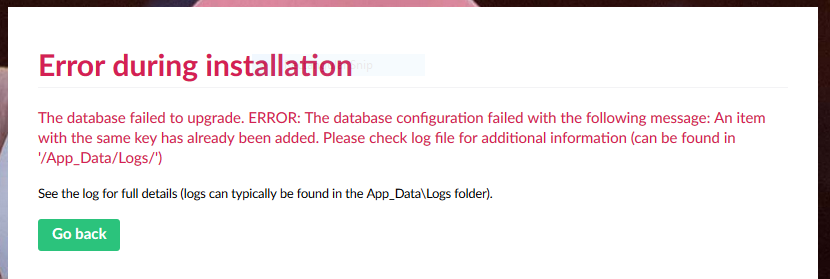
Unfortunately it did not finish the update because of the following:
Exception
System.Reflection.TargetInvocationException: Exception has been thrown by the target of an invocation. ---> Umbraco.Web.Install.InstallException: The database failed to upgrade. ERROR: The database configuration failed with the following message: An item with the same key has already been added.
Please check log file for additional information (can be found in '/App_Data/Logs/')
at Umbraco.Web.Install.InstallSteps.DatabaseUpgradeStep.ExecuteAsync(Object model) in d:\a\1\s\src\Umbraco.Web\Install\InstallSteps\DatabaseUpgradeStep.cs:line 47
--- End of inner exception stack trace ---
at System.RuntimeMethodHandle.InvokeMethod(Object target, Object[] arguments, Signature sig, Boolean constructor)
at System.Reflection.RuntimeMethodInfo.UnsafeInvokeInternal(Object obj, Object[] parameters, Object[] arguments)
at System.Reflection.RuntimeMethodInfo.Invoke(Object obj, BindingFlags invokeAttr, Binder binder, Object[] parameters, CultureInfo culture)
at Umbraco.Web.Install.Controllers.InstallApiController.
--- End of stack trace from previous location where exception was thrown ---
at System.Runtime.CompilerServices.TaskAwaiter.ThrowForNonSuccess(Task task)
at System.Runtime.CompilerServices.TaskAwaiter.HandleNonSuccessAndDebuggerNotification(Task task)
at System.Runtime.CompilerServices.TaskAwaiter.ValidateEnd(Task task)
at Umbraco.Web.Install.Controllers.InstallApiController.
rgdagostino
on 14 Aug 2019
@rgdagostino Glad to see some progress! You might have a lot of data to migrate, I ran into a similar issue with a large database, try to fiddle with the timeouts in web.config: https://github.com/umbraco/Umbraco-CMS/issues/5803
nul800sebastiaan
on 14 Aug 2019
I pasted the wrong image (just edited the post) @nul800sebastiaan . The timeout error was an easy fix :)
rgdagostino
on 14 Aug 2019
I've got a full backup of a test version if anyone had time to have a look
https://drive.google.com/open?id=1J8ELoDcU19UTacc9Z4TMHJUwRtQZQseT
rgdagostino
on 14 Aug 2019
Ok so what I recommend we do here is open up a new issue specifically for this new error(s) so we can close this one since it will probably fix the issue for other installs.
Sound good? @rgdagostino I've downloaded your file and will see what we can do but can you open up a new issue for it with the new details?
Shazwazza
on 16 Aug 2019
@rgdagostino it may not be the same issue, but I'd have a look at cmsDataTypePreValues and #6062
stevemegson
on 16 Aug 2019
Related issues
 nathanwoulfe
·
34Comments
nathanwoulfe
·
34Comments
 DotpeopleApS
·
31Comments
DotpeopleApS
·
31Comments
 roeermose
·
27Comments
roeermose
·
27Comments
 FransdeJong
·
33Comments
FransdeJong
·
33Comments
 lcichanowicz
·
28Comments
lcichanowicz
·
28Comments
Most helpful comment
The PR is here https://github.com/umbraco/Umbraco-CMS/pull/6121
It's slightly hard to to test this because if you are using a dacpac you have to manually populate all of the basic data required to run which is a fair few tables. I'll see if i can post a nightly build to here to see if @robertjf , @rgdagostino or anyone else can test, stay tuned.