Umbraco-cms: V8: Hide "Content" app if no properties
In V7 when I create a doctype with no properties I would see the "Info" tab by default.
Now in V8 that the editor has been moved to a content app, the "Content" tab still shows regardless of if there are any properties defined or not. This seems a little pointless and could be pretty confusing for users. I think the "Info" tab is all that's necessary here.
This is particularly prevalent when using a node with List View - you have a "Child Items" app, the empty / redundant "Content" app, and the "Info" app. In this scenario I would expect just the "Child Items" and "Info" apps to be shown.
 callumbwhyte
All 19 comments
After a bit of investigation I've found the list of "apps" when editing a content item come from a web API call, so we can filter the "content" app out in there if there are no properties.
This change might have some implications on the "Infinite Editing" features in future though. Adding a property to a doctype via the infinite editing workflow should make the "Content" app re-appear, but there would not be a way to toggle the visibility of content apps dynamically in Angular JS.
callumbwhyte
on 28 Feb 2019
I have just implemented something like this for media. It should be easily redone for content. Maybe HQ should have a say first though?
 kjac
on 28 Feb 2019
kjac
on 28 Feb 2019
@callumbwhyte OK so a bit more investigation and PoC's later... removing the content app has too many implications:
- Split view expects the content app as split view will always display the content app and only the content app.
- Content templates also expects the content app when editing.
Your infinite editing worries however can easily be handled (they're pretty much handled out of the box). But I don't think we'll get anything good from removing the content app with the above mentioned constraints.
kjac
on 2 Mar 2019
@kjac Great job with the investigation! 👍
I may be overlooking something, and I don't know the full technical restrictions, but your points have got me thinking...
I don't think this "UX issue" applies much to the split view as the available "content apps" aren't visible. Here it still makes sense to load the "content" app even when there are no properties as the "no content" message will show. I don't know why you would use split view when there's no properties, but I guess there is a use case for editing only the node name...
Why would you create a content template for a doctype without any content? Is there something we can do to handle this more gracefully, such as a message when no content apps can be loaded? This might be applicable elsewhere in the CMS in future (e.g. when the user doesn't have permissions to see any of the available apps)
I guess this needs someone from HQ to give their view... 😊
callumbwhyte
on 3 Mar 2019
@callumbwhyte thing is... the way to remove the "content" app is to remove it from the server response. So in other words it wouldn't be available at all for the split view, nor the content templates. And that'd cause them to explode.
I do agree that it makes no sense to open split view or create content templates for content types with no properties, but we can't prevent people from doing it as is - so we best keep the empty "content" app to keep things from exploding 💥
The good news is it still shows a nice message if you have no properties available.
kjac
on 3 Mar 2019
Hm, yes... Perhaps there's a better way than filtering server-side...
One way could be simply removing the "content" app from the array client side? I believe there's an event that fires when the editor loads and calls the server to get the content / settings...
Or against each app have a visibility flag? This way an app could be loaded but simply hidden, then toggled if it's needed (such as when someone adds the first property via an infinite editor)...
With both these approaches at least it could be implemented in some places (e.g. content) but not others that need it (e.g. content templates)
I know I'm being persistent, but this bugs me a lot! 😂
callumbwhyte
on 3 Mar 2019
@callumbwhyte for content you'll get the same end result whether you remove it on the serverside or in the client. If it's missing, split view will explode because it expects the app to be present in the array.
Hmmmm.... but thinking about it, perhaps split view should simply be disabled if the content app is not present. Let me dig into this a bit more.
kjac
on 4 Mar 2019
👍 Or have a check to see if it's currently loading in split view on the client side and don't remove the "content" app in that scenario?
callumbwhyte
on 4 Mar 2019
@callumbwhyte ok... your persistence pays off 😆
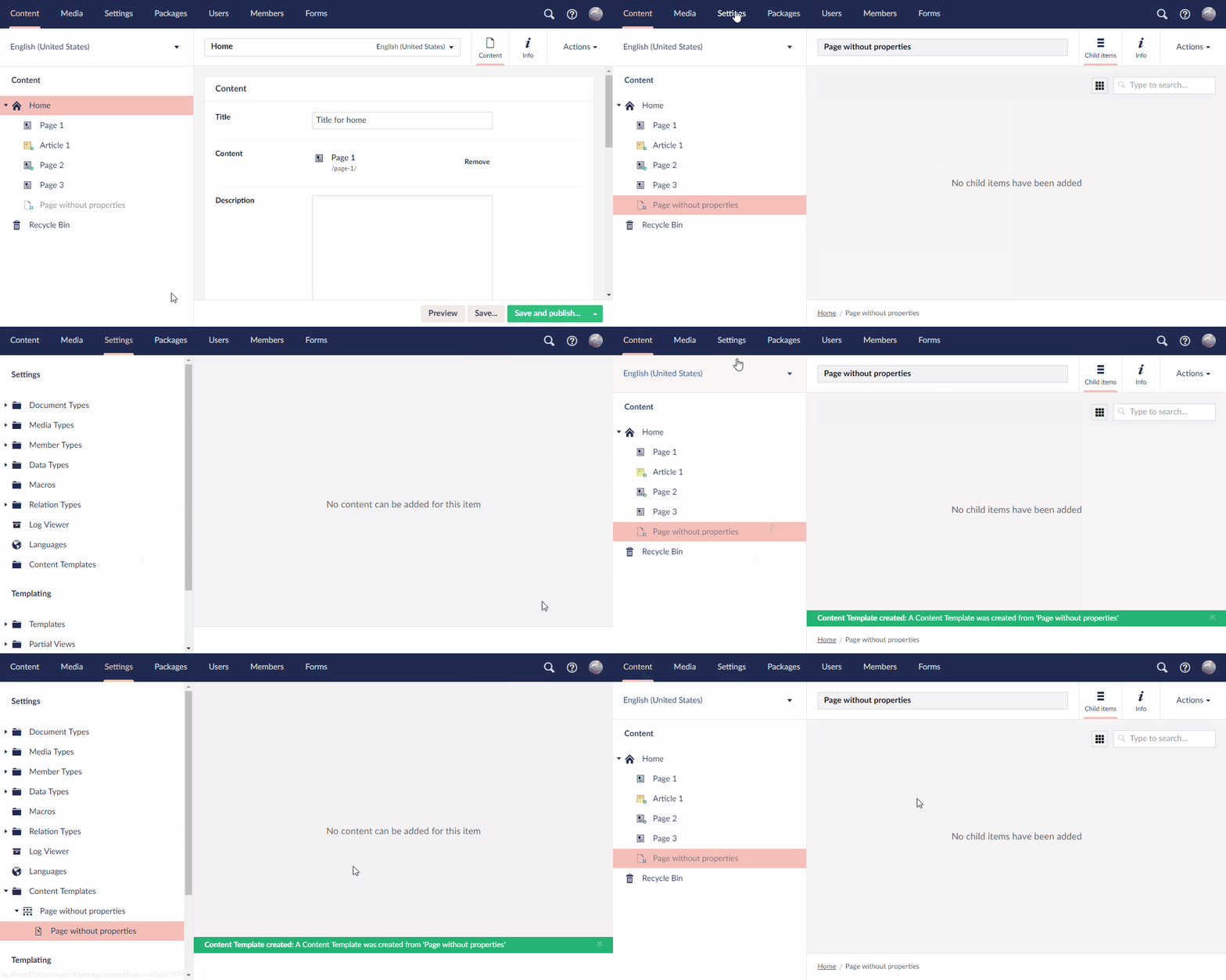
How does this look?
kjac
on 4 Mar 2019
@kjac 😲🤯 Amazing! That is perfect!
How did you achieve this?
Did you look into the split view? I guess this still works as before?
The GIF doesn't show it, but I guess nodes without properties or list view simply shows the "Info" app?
I also assume a "save" button appears on content templates with properties still?
Beers on me at Codegarden, great work mate! 🍻#h5yr
callumbwhyte
on 4 Mar 2019
@callumbwhyte you assume correct :) or, as it happens... without listview there's only one "app" remaining, in which case no apps are shown:
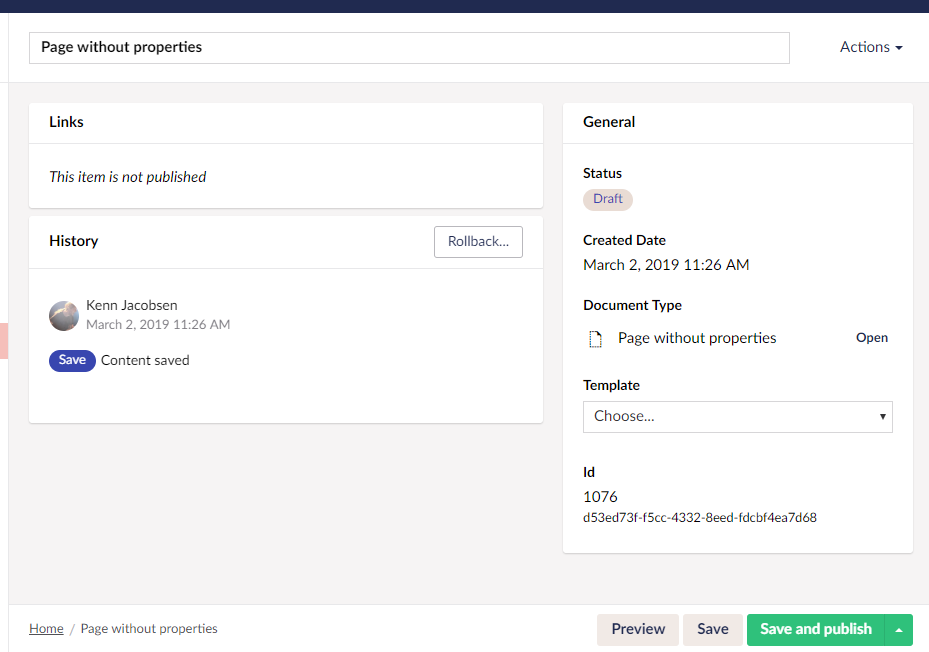
And as for content templates with properties:
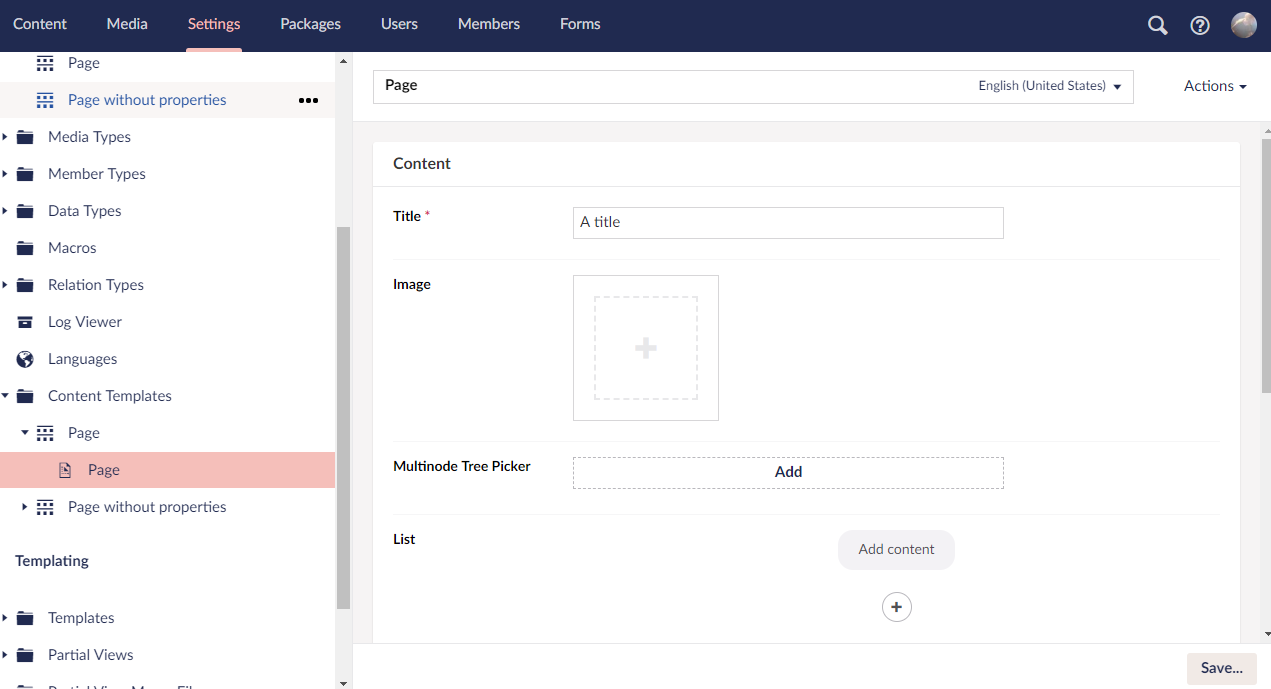
kjac
on 4 Mar 2019
This is beautiful!
callumbwhyte
on 4 Mar 2019
Awesome. PR in #4840
kjac
on 4 Mar 2019
We had some fun looking at this one at HQ recently, well done on both the discussion and the implementation! Looks super impressive, we love it!
We need to review the code etc, but the functionality looks spot on! 🎉
 nul800sebastiaan
on 22 Mar 2019
nul800sebastiaan
on 22 Mar 2019
I was about to post an issue about this, but dunno where this is in the release pipe.
We have an 8.9.1 site with uMarketingSuite installed.
There's a propertyless "folder type" document type with tree children.
When created, they show the UMS dashboard, and the name field is dimmed out.
It would be way better if we landed on the info "tab" to be able to enter the name of the new content.
Now we have to switch to info to create the item.
Let me know if I should make another issue, @nul800sebastiaan ;)
 lars-erik
on 10 Dec 2020
lars-erik
on 10 Dec 2020
@lars-erik I've read this a few times now, but I really have no idea what you mean 😅 🙈
Could you make a video to demonstrate maybe?
nul800sebastiaan
on 14 Dec 2020
@nul800sebastiaan
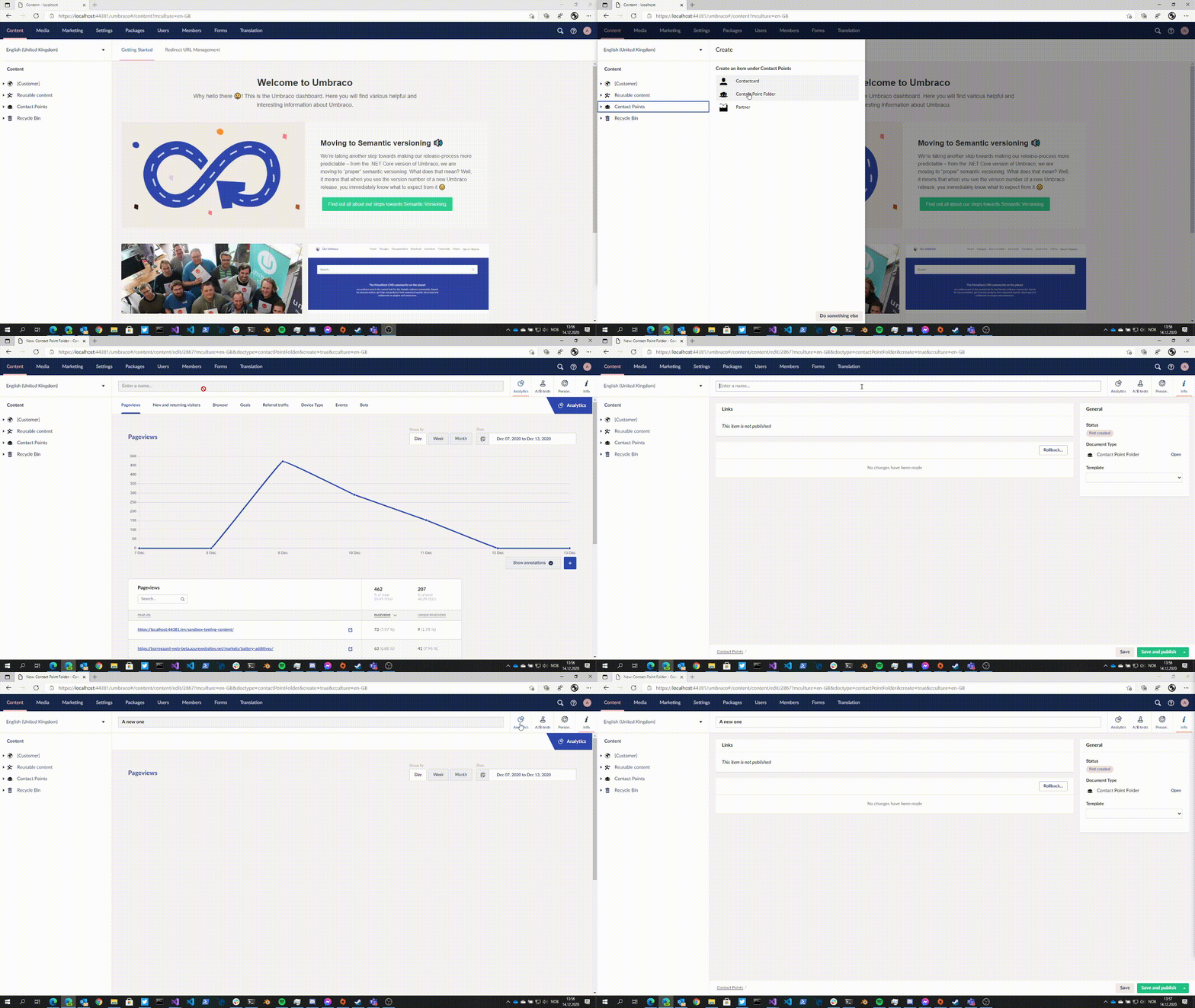
As you can see, I can't name nor publish unless I change to the "info-app".
It's a bit confusing the first few times.
lars-erik
on 14 Dec 2020
So technically this is a breaking change. This is why we can't have nice things.. 😅
Just so I understand, is the info on the marketing apps relevant for this type of content? I wonder if this would be something that content apps should be aware of then: "don't focus on me if there's no properties on this content type"..
For now, could you work around it and add a label property with some text?
nul800sebastiaan
on 14 Dec 2020
It's no pet peeve of mine, just saying the UX could be better.
I'm just of the opinion the info tab should get focus by Umbraco if there are no properties. Content app could be useful or not, there's no definitive answer. Too many use-cases for propertyless nodes.
lars-erik
on 14 Dec 2020
Related issues
nul800sebastiaan
·
24Comments
 PeteDuncanson
·
31Comments
PeteDuncanson
·
31Comments
 philipdanielhayton
·
29Comments
philipdanielhayton
·
29Comments
 roeermose
·
27Comments
roeermose
·
27Comments
 lcichanowicz
·
28Comments
lcichanowicz
·
28Comments
Most helpful comment
We had some fun looking at this one at HQ recently, well done on both the discussion and the implementation! Looks super impressive, we love it!
We need to review the code etc, but the functionality looks spot on! 🎉