Umbraco-cms: Umbraco user password regex validation validates the old password instead of the new one.
A brief description of the issue goes here.
I'm trying to change min chars and enforce a stronger policy for the Umbraco users.
https://our.umbraco.com/Documentation/Reference/Security/Security-settings/ seems to suggests that there are 2 providers: one for the website users and one for umbraco users.
In my web.config I have UmbracoMembershipProvider and UsersMembershipProvider, however changing the minRequiredPasswordLength and adding a passwordStrengthRegularExpression to the first one have no effect when I change password in the CMS.
Only when I change the users provider settings I get the desired effect:

Reproduction
Bug summary
Umbraco password policy id dictate by the user membership provider, not the umbraco one.
Specifics
Steps to reproduce
Change minRequiredPasswordLength and passwordStrengthRegularExpression attributes in the webconfig UmbracoMembershipProvider membership provider.
Expected result
The new minimum password length and regex should prevent my from changing my password to anything shorter than that or that doesn't pass the regex.
Actual result
Nothing changes, however I can get the desired effect by making the same change in the UmbracoMembershipProvider.
 StefanoChiodino
All 12 comments
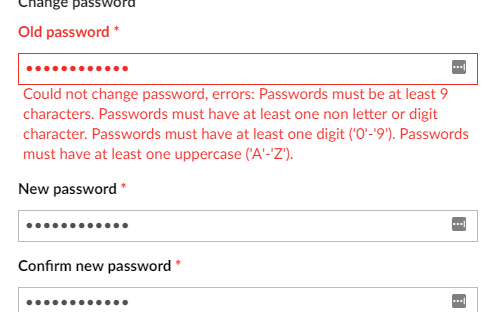
The actual bug is: one the regex doesn't match for the new password, it gives a validation error for the old password and then you can not continue and save the new password.
The backoffice exclusively uses UsersMembershipProvider and not UmbracoMembershipProvider (which is used for members in the Members section).
I tested with: minRequiredPasswordLength="12" passwordStrengthRegularExpression="^.*(?=.{6,})(?=.*\d).*$" (regex borrowed from https://stackoverflow.com/a/447677/5018).
 nul800sebastiaan
on 19 Dec 2018
nul800sebastiaan
on 19 Dec 2018
I've marked this as "Up for grabs" so that you or someone else coming along could create a pull request for it.
nul800sebastiaan
on 19 Dec 2018
Uhm, that's not what I reported but yeah, there was also that :D
My confusion was on which provider works for the CMS users. I just supposed that the UmbracoXxxxYyyy was the one to do with the CMS login, I guess it's just down to documenting it!
StefanoChiodino
on 19 Dec 2018
I added some comments to the XML, hope that makes it clear.
https://our.umbraco.com/Documentation/Reference/Security/Security-settings/
nul800sebastiaan
on 19 Dec 2018
Would a quick "how to regex" for simple case be useful? I'm working on that now so it would be easy to write a couple of lines about it now.
P.S.: is there any way where I can explain what the requirements are to the users?
StefanoChiodino
on 19 Dec 2018
@StefanoChiodino I would refer to the microsoft documentation.
Note: we're moving away from membership providers in v8 and there will need to be alternatives for password complexity rules.
Currently it should be possible to use Identity instead and I believe that supports sending back a custom complexity message. It would require some C# code, but I wouldn't be able to tell you how to do it. :)
nul800sebastiaan
on 19 Dec 2018
It looks like the passwords are actually being handled correctly - but the error messages are badly placed. I'll dig some more into this one of the next days.
 kjac
on 20 Dec 2018
kjac
on 20 Dec 2018
@kjac I don't think that is the case. If you get an error for the password strenght it does indeed show under the old password, which is not very good position (probably it's a summary compared to a field error), but also if you then input a password strong enough it doesn't proceed.
StefanoChiodino
on 20 Dec 2018
Nope, it's probably not a summary because the old password label becomes red
StefanoChiodino
on 20 Dec 2018
@StefanoChiodino it's how the validation works; the label, field and error message(s) are highlighted as one.
In this case an error is returned for the oldPassword field no matter which validation fails (wrong old password or bad new password).
I've got a fix for it and will push a PR shortly.
kjac
on 20 Dec 2018
PR in #3918
kjac
on 20 Dec 2018
great PR, have added a comment on it
As for the other questions, here's some info ...
We are unfortunately stuck with old legacy membership providers and also using ASP.Net identity while trying to phase out membership providers entirely while also maintaining compatibility ... it's fun ;)
The password validation is done by MembershipProviderPasswordValidator which is an ASP.Net Identity implementation of PasswordValidator (see https://docs.microsoft.com/en-us/previous-versions/aspnet/dn613295(v%3Dvs.108)) which wraps the legacy membership provider, this is how the membership provider complexity rules get bubbled up to work with ASP.Net Identity.
It is possible now to create your own version of PasswordValidator and assign that to the BackOfficeUserManager during OWIN startup and then you can assign whatever custom rules you want and return any custom validation messages that you want.
Some day in the future, membership providers will be removed (might not even be for v8 due to the time involved) and when that happens if you want to change password complexity you will have to assign your custom PasswordValidator on startup - or we will probably ship with some custom appSettings to be able to modify the standard complexity rules via config - it's important to know though that Regex validation rules no longer exist in ASP.Net Identity and for good reason - because it's pretty much impossible to generate a random password that complies with any given regex rule. The important password complexity rule is password length and second is guessability/common words.
 Shazwazza
on 20 Dec 2018
Shazwazza
on 20 Dec 2018
Related issues
 Matthew-Wise
·
4Comments
Matthew-Wise
·
4Comments
 vonbv
·
4Comments
vonbv
·
4Comments
 Luksor
·
3Comments
Luksor
·
3Comments
 HannesWinston
·
3Comments
HannesWinston
·
3Comments
 nielslyngsoe
·
3Comments
nielslyngsoe
·
3Comments