Umbraco-cms: Custom UrlProvider blanks links shown in CMS for multi-domain site
When registering a custom UrlProvider on a site that uses multiple domains (assigned using the Culture and Hostnames dialog) the Links section shown in the Info tab of a page shows up blank (no page URLs shown). This happens even for a custom UrlProvider that just inherits from the DefaultUrlProvider without any code changes.
Reproduction
Specifics
- Umbraco v7.12.4
- Default starter kit installed
Steps to reproduce
- Create a new blank website using Umbraco v7.12.4 and make sure you install the default starter kit.
- Once installed, open the CMS.
- Add a few example host names to the Home node, i.e.
test.comandtest.org. - Verify that the right URLs are shown in the Info tab:
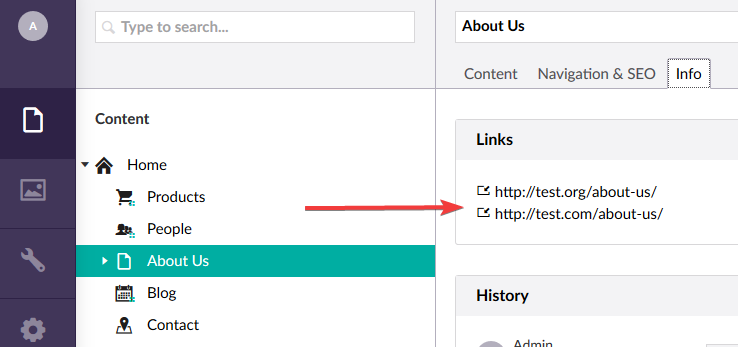
- In your project, add a custom
UrlProviderclass that inherits from theDefaultUrlProvider(theGetUrlandGetOtherUrlsmethods will not be overridden, so it's just a 'copy' of the DefaultUrlProvider):
public class SiteUrlProvider : DefaultUrlProvider
{
    public SiteUrlProvider() : base(UmbracoConfig.For.UmbracoSettings().RequestHandler)
    {
    }

    public SiteUrlProvider(IRequestHandlerSection requestSettings) : base(requestSettings)
    {
    }
}
- Register the custom
UrlProviderin anApplicationEventHandlerthat you also include in your project:
public class ApplicationEvents : ApplicationEventHandler
{
    protected override void ApplicationStarting(UmbracoApplicationBase umbracoApplication, ApplicationContext applicationContext)
    {
        UrlProviderResolver.Current.InsertTypeBefore<DefaultUrlProvider, SiteUrlProvider>();
    }
}
- Rebuild your project and restart the site.
- Go back to the CMS and find the same Info tab. Now you will see that no links are shown:
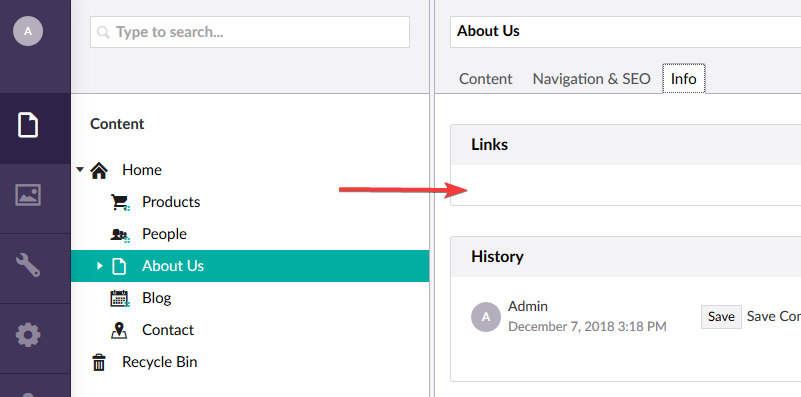
Expected result
The list of URLs available for that node.
Actual result
No URLs are shown.
The page URLs on the frontend work fine, so the UrlProvider is still doing some of it's job.
 tomvanenckevort
All 8 comments
Hi @tomvanenckevort
Thanks for reporting this and leaving such detailed notes on it too.
I've replicated this error so I'm tagging it as up-for-grabs
Emma, Pull Request team
 emmaburstow
on 8 Dec 2018
emmaburstow
on 8 Dec 2018
Hi @tomvanenckevort
Is this also the case with UrlProvider that actually creates a custom url ?
Because the example her is really a edge case. I think in cases you would inherit from the default url provider you would actually replace the default one instead of adding it
Dave
 dawoe
on 9 Dec 2018
dawoe
on 9 Dec 2018
Hi @dawoe,
Yes, it does also happen when there is code to actually create custom URLs. That's what I initially did on the project where I first encountered this bug.
The reason why I used a simplified example here with no custom URLs is to rule out that my code was causing the issue.
tomvanenckevort
on 9 Dec 2018
Hi @tomvanenckevort
I can't reproduce on the latest code base using the url provider in this PR #3837 (needs starter kit)
Dave
dawoe
on 10 Dec 2018
So I did a bit further digging into this issue by stepping through the Umbraco code.
I noticed that the request that returns the node JSON for the CMS had three URLs in its response:
Since there is a duplicate URL in there, the AngularJS ng-repeat that displays the links in the Info tab fails (since it can't deal with duplicate values in the list).
So the next step was to find out why there was a duplicate URL in there.
I started in the Umbraco.Web.Editors.ContentController class and the GetById method and traced back the Url mapping to the ContentModelMapper class, which in turn calls the GetContentUrls method where the UrlProviders come into play.
It calls the GetOtherUrls method and on this line it will invoke all registered UrlProviders and add all the URLs it returns into the list.
And there it dawned on me the mistake I made. Since I have registered two UrlProviders (the DefaultUrlProvider and my custom SiteUrlProvider) they both get called there and that's why the duplicate URLs end up in the list returned in the API controller.
So in this case I had to change my ApplicationEventHandler and make sure to remove the DefaultUrlProvider after registering my custom SiteUrlProvider:
public class ApplicationEvents : ApplicationEventHandler
{
    protected override void ApplicationStarting(UmbracoApplicationBase umbracoApplication, ApplicationContext applicationContext)
    {
        UrlProviderResolver.Current.InsertTypeBefore<DefaultUrlProvider, SiteUrlProvider>();
        UrlProviderResolver.Current.RemoveType<DefaultUrlProvider>();
    }
}
And after that change my URLs show up correctly in the CMS again 😄
So I'm going to close this issue now, since I don't think there is a code issue at all (but just an implementation issue on my side 😉).
tomvanenckevort
on 13 Dec 2018
Thanks for the explanation @tomvanenckevort - glad it's resolved for you!
 nul800sebastiaan
on 13 Dec 2018
nul800sebastiaan
on 21 Mar 2019
nul800sebastiaan
on 13 Dec 2018
nul800sebastiaan
on 21 Mar 2019
@tomvanenckevort thanks for providing the details on how you resolved this. We have an older site which was doing the same thing and your solution worked for us.
 prjseal
on 11 Dec 2020
prjseal
on 11 Dec 2020
Related issues
 sofietoft
·
3Comments
sofietoft
·
3Comments
 robertjf
·
3Comments
robertjf
·
3Comments
 Matthew-Wise
·
4Comments
Matthew-Wise
·
4Comments
 sniffdk
·
3Comments
sniffdk
·
3Comments
 HannesWinston
·
3Comments
HannesWinston
·
3Comments