Umbraco-cms: Add support for EXIF rotation for images in media
When uploading images taken by mobile or other devices, the Image cropper in Media should use EXIF-metadata to rotate the image in the right orientation. We have got many complains about portrait images rotates to horizontal orientation. I tell them to edit the image in Paint or Photoshop, but that should be unnecessary. I tought "preserveExifMetaData" and "AutoRotate" in config > imageprocessor > processing.config should take care of this, but it dont seems to work properly.
 thomassen88
All 11 comments
FYI: before we look into this, note that there's at least already available that can help alleviate the pain of having to do this in paint or photoshop: https://our.umbraco.com/packages/backoffice-extensions/tooorangeyuspinmerightround/
 nul800sebastiaan
on 12 Sep 2018
nul800sebastiaan
on 12 Sep 2018
Hi Sebastiaan, we already use this package on our bigger customers and i personally love it, but our smaller customers with lower skills (generally :p) think its difficult to use. It should be possible to rotate images directly from the mediapicker. That whould be much easier to use and not that hard to find.
thomassen88
on 12 Sep 2018
@tcmorris
I tought "preserveExifMetaData" and "AutoRotate" in config > imageprocessor > processing.config should take care of this, but it dont seems to work properly.
It works perfectly; you are expecting the wrong result. Enabling a processor in the config doesn't add the command to urls. Imagine if changing DetectEdges enabled attribute to true and all of a sudden all your images are passed through edge detection algorithms?
In any case AutoRotate does not, as you can see in the documentation, make a difference if EXIF metadata exists, the browser should automatically display the image based on that metadata.
If EXIF preservation is set to preserve metadata during processing this method will not alter the images rotation.
If you are not preserving metadata. Use the ImageProcessingModule.ValidatingRequest to automatically add the command to crop urls if you need to.
 JimBobSquarePants
on 14 Sep 2018
JimBobSquarePants
on 14 Sep 2018
Just tagging @thomassen88 instead for the above comment.
 tcmorris
on 17 Sep 2018
tcmorris
on 17 Sep 2018
Thanks for the clarification, Jim. i guess i was expecting the wrong result. i will try to use the module you mention :)
thomassen88
on 17 Sep 2018
Whoops! sorry about the incorrect tagging!
JimBobSquarePants
on 17 Sep 2018
As almost all image viewers support the orientation EXIF value nowadays (even recent browsers use this when only displaying the image), you would expect Umbraco to do also. There are some major drawbacks however and the biggest is that rotating will alter the original uploaded image, which for lossy images can result in lowering the quality with each operation.
I agree that having a rotate button within the image cropper would be a great feature, especially if it would only rotate the image on save and make sure to remove any existing orientation EXIF value.
For Umbraco 8, the ImageFilter package can add support for rotating images. It's also possible to add basic support in 2 ways:
- Auto rotate and remove orientation EXIF value on upload (using ImageProcessor's C# API): this however alters the original image. You need to handle both
ContentService.SavedandMediaService.Savedevents (as both can contain image files) and process all file upload/image cropper properties. This obviously only applies to newly uploaded images, so existing images will be unaltered (which is actually be a good thing). - Add
autorotate=trueto all image URLs using theImageProcessingModule.ValidatingRequestevent and configure ImageProcessor to remove the orientation EXIF metadata using thepreserveExifMetaDatasetting or also addingmetadata=false. This will always process all images (and keep copies in the cache, even for very large images), so even when you try to download the original, you're retrieving the processed one. This might be the easiest, but make sure all existing images still have the correct orientation and you're aware of the consequences of processing every image.
 ronaldbarendse
on 25 Jan 2020
ronaldbarendse
on 25 Jan 2020
@nul800sebastiaan This issue can probably be closed now, as there are currently enough options and a new issue can be created to add the rotate feature to the image cropper...
ronaldbarendse
on 25 Jan 2020
This isn't a feature request, it's a bug. EXIF is part of the JPEG specification, If the media section shows a portrait image as landscape (due to EXIF or not) then it's not handling that image correctly.
I appreciate that there are workarounds (I just made a package which does what @JimBobSquarePants suggests), but this should really be something that "just works" OOTB - at least in the backoffice.
Here's the current experience, which looks really buggy to editors.
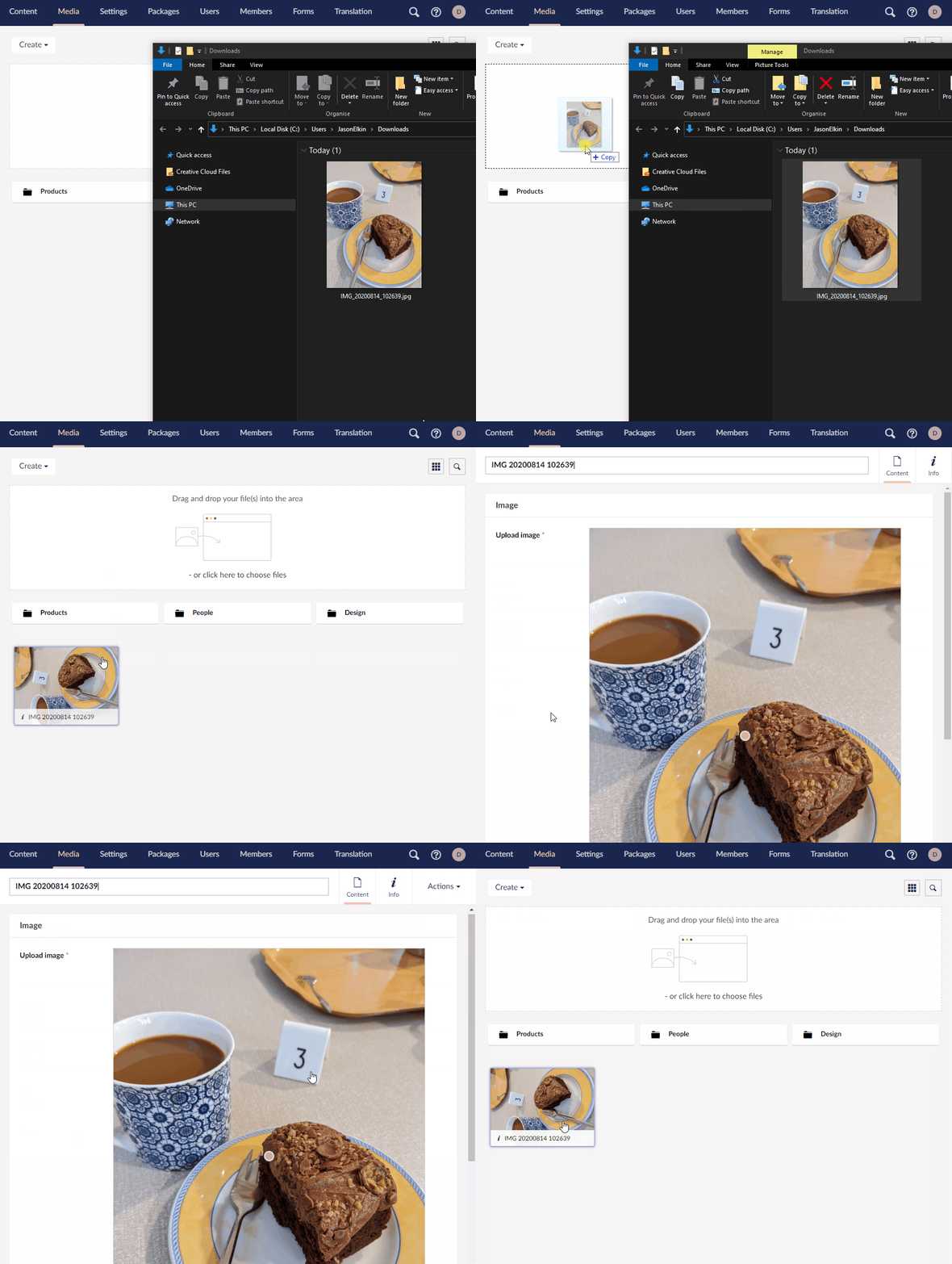
IMO the backoffice should add autorotate=true when fetching thumbnails.
In an ideal world the URL helper would too when using GetCropUrl etc. but I get that would be an annoying breaking change.
 JasonElkin
on 24 Aug 2020
JasonElkin
on 24 Aug 2020
@JasonElkin Just adding autorotate=true to all images isn't the solution, because the EXIF rotation tag is not removed and it might incorrectly rotate existing images (that have an incorrect EXIF rotation tag), see my second point in https://github.com/umbraco/Umbraco-CMS/issues/2974#issuecomment-578396236.
Also note that Umbraco sets the wrong values in the umbracoWidth/umbracoHeight, as that's retrieved server-side and uses the image data dimensions. Browsers also don't take the EXIF rotation into consideration when the image is embedded into a page (and the experimental image-orientation CSS property will be dropped: https://developer.mozilla.org/en-US/docs/Web/CSS/image-orientation).
Because of the above issues (and those raised in my previous comment), this can't be fixed. Umbraco can add features to make rotating images easier though, like adding a rotate function to the image cropper.
ronaldbarendse
on 26 Aug 2020
As an editor I just want to drag and drop a portrait Image (which my phone, all apps on it, my desktop and even browser all understand to be portrait) into the media section.
It may well be more difficult than I understand, and I totally get that there are packages as a workaround, but as things stand Umbraco doesn't support a pretty important part of the JPEG specification OOTB.
On a few points from @ronaldbarendse...
Just adding
autorotate=trueto all images isn't the solution
That's not what I'm suggesting. I'm suggesting adding &autorotate=true only when we ask ImageProcessor to process an image, as that's when the orientation will actually become "incorrect".
because the EXIF rotation tag is not removed
It is, at least in a default install. The config for ImageProcessor that installs with Umbraco removes the EXIF data.
Umbraco sets the wrong values in the umbracoWidth/umbracoHeight
I'll take another look at the incorrect umbracoWidth/umbracoHeight, as I'm not sure what the impact actually is, but the EXIF data can be fetched server side too so I don't see why this couldn't be changed?
Browsers also don't take the EXIF rotation into consideration when the image is embedded into a page
Yes they do.
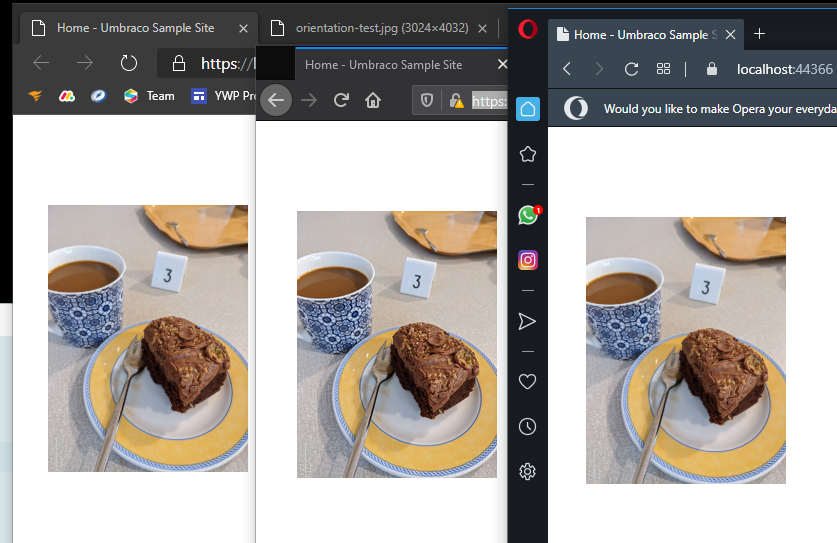
Either way I'm not suggesting we do anything to calls for the "original" image. Processed images should be rotated correctly, original images can be left to the browser to handle.
JasonElkin
on 26 Aug 2020
Related issues
 NikRimington
·
61Comments
ronaldbarendse
·
26Comments
JimBobSquarePants
·
232Comments
nul800sebastiaan
·
24Comments
NikRimington
·
61Comments
ronaldbarendse
·
26Comments
JimBobSquarePants
·
232Comments
nul800sebastiaan
·
24Comments
 philipdanielhayton
·
29Comments
philipdanielhayton
·
29Comments