Ulauncher: Unexpected API error. BadZipfile: File is not a zip file
Steps to reproduce:
happenig when adding cheatsheats extension see here
Ulauncher version:
latest
Linux distro:
mint 19
Desktop environment:
cinnamon
Logs:
2019-01-06 19:51:25,463 | ERROR | ulauncher.ui.windows.PreferencesUlauncherDialog: on_scheme_callback() | Unexpected API error. BadZipfile: File is not a zip file
Traceback (most recent call last):
  File "/usr/lib/python2.7/dist-packages/ulauncher/ui/windows/PreferencesUlauncherDialog.py", line 160, in on_scheme_callback
    resp = rt.dispatch(self, scheme_request.get_uri())
  File "/usr/lib/python2.7/dist-packages/ulauncher/util/Router.py", line 49, in dispatch
    return callback(context, url_params)
  File "/usr/lib/python2.7/dist-packages/ulauncher/ui/windows/PreferencesUlauncherDialog.py", line 355, in prefs_extension_add
    ext_id = downloader.download(url)
  File "/usr/lib/python2.7/dist-packages/ulauncher/api/server/ExtensionDownloader.py", line 63, in download
    unzip(filename, ext_path)
  File "/usr/lib/python2.7/dist-packages/ulauncher/api/server/ExtensionDownloader.py", line 171, in unzip
    with ZipFile(filename) as zipfile:
  File "/usr/lib/python2.7/zipfile.py", line 770, in __init__
    self._RealGetContents()
  File "/usr/lib/python2.7/zipfile.py", line 811, in _RealGetContents
    raise BadZipfile, "File is not a zip file"
BadZipfile: File is not a zip file
_To get the logs please do the following:_
_* Close the app_
_* Run "ulauncher -v" from the console_
_* Copy output to https://gist.github.com/_
_* Link to the gist here_
 labazza
All 14 comments
@labazza Can you install any other extensions besides this one?
 brpaz
on 13 Jan 2019
brpaz
on 13 Jan 2019
apparently not anymore, i tried running it in ubuntu 18.10
labazza
on 13 Jan 2019
i tried line 171 manually in python 2.7 using a manually downloaded zip file and did not have any issue:
>>> from zipfile import ZipFile
>>> with ZipFile('ulauncher-spotify-master.zip') as zipfile:
...     zipfile.extractall('/tmp')
I guess somehow you might have some kind of issue connecting to GitHub from Ulauncher to download the extension.
May be experimenting in another network?
Or downloading it using curl?
curl -L -v https://github.com/pywkm/ulauncher-spotify/archive/master.zip -o /tmp/extension.zip
brpaz
on 16 Jan 2019
I think the issues started when i enabled proxy settings. I removed from env variables and the extension is installing. Maybe u-launcher is not detecting env variables?
Now with the extension installed, it does not allow to save any setttings, even if you don't change anything, same happens with notes extension:
2019-01-19 18:27:28,695 | INFO | ulauncher.ui.windows.PreferencesUlauncherDialog: prefs_extension_update_prefs() | Update extension preferences: {'pref.cheats_dir': '', 'pref.demo_kw': 'cheats', 'pref.use_hawkeye_as_default_action': 'false', 'pref.urls_file': 'urls', 'pref.hawkeye_bin': '/usr/local/bin/hawkeye', 'callback': '__jp9', 'id': 'com.github.brpaz.ulauncher-cheats'}
2019-01-19 18:27:28,697 | ERROR | ulauncher.ui.windows.PreferencesUlauncherDialog: on_scheme_callback() | Unexpected API error. KeyError: com.github.brpaz.ulauncher-cheats
Traceback (most recent call last):
  File "/usr/lib/python2.7/dist-packages/ulauncher/ui/windows/PreferencesUlauncherDialog.py", line 160, in on_scheme_callback
    resp = rt.dispatch(self, scheme_request.get_uri())
  File "/usr/lib/python2.7/dist-packages/ulauncher/util/Router.py", line 49, in dispatch
    return callback(context, url_params)
  File "/usr/lib/python2.7/dist-packages/ulauncher/ui/windows/PreferencesUlauncherDialog.py", line 368, in prefs_extension_update_prefs
    controller = ExtensionServer.get_instance().get_controller(ext_id)
  File "/usr/lib/python2.7/dist-packages/ulauncher/api/server/ExtensionServer.py", line 76, in get_controller
    return self.controllers[extension_id]
KeyError: 'com.github.brpaz.ulauncher-cheats'
@labazza seems like the extension crashed. Could you attach the full log please?
Maybe u-launcher is not detecting env variables?
It's not. What env vars are you using?
 gornostal
on 22 Jan 2019
gornostal
on 22 Jan 2019
 friday
on 22 Jan 2019
friday
on 22 Jan 2019
hmm here it says that urllib works transparently with proxies https://docs.python.org/2/library/urllib.html
I've never tested that though
gornostal
on 22 Jan 2019
Me neither. Should wait for confirmation first, but one possible reason might be that it's not running in the user shell.
For example:
export asdf=123
python -c "import os; print(os.environ['asdf'])" # prints "123"
python -c "import subprocess; print(subprocess.call(['echo', '$asdf']))" # also prints "123"
python -c "import subprocess; print(subprocess.call(['sh', '-c', 'echo', '$asdf']))" # Doesn't print anything
Hi @labazza
Have you been able to resolve the issue?
Please reopen if it still exists.
Thanks
gornostal
on 5 May 2019
hi,
no i moved to different desktop env and don't use ulauncher anymore.
thanks
labazza
on 6 May 2019
This is still happened, just downloaded Ulauncher adding proxy env variables:
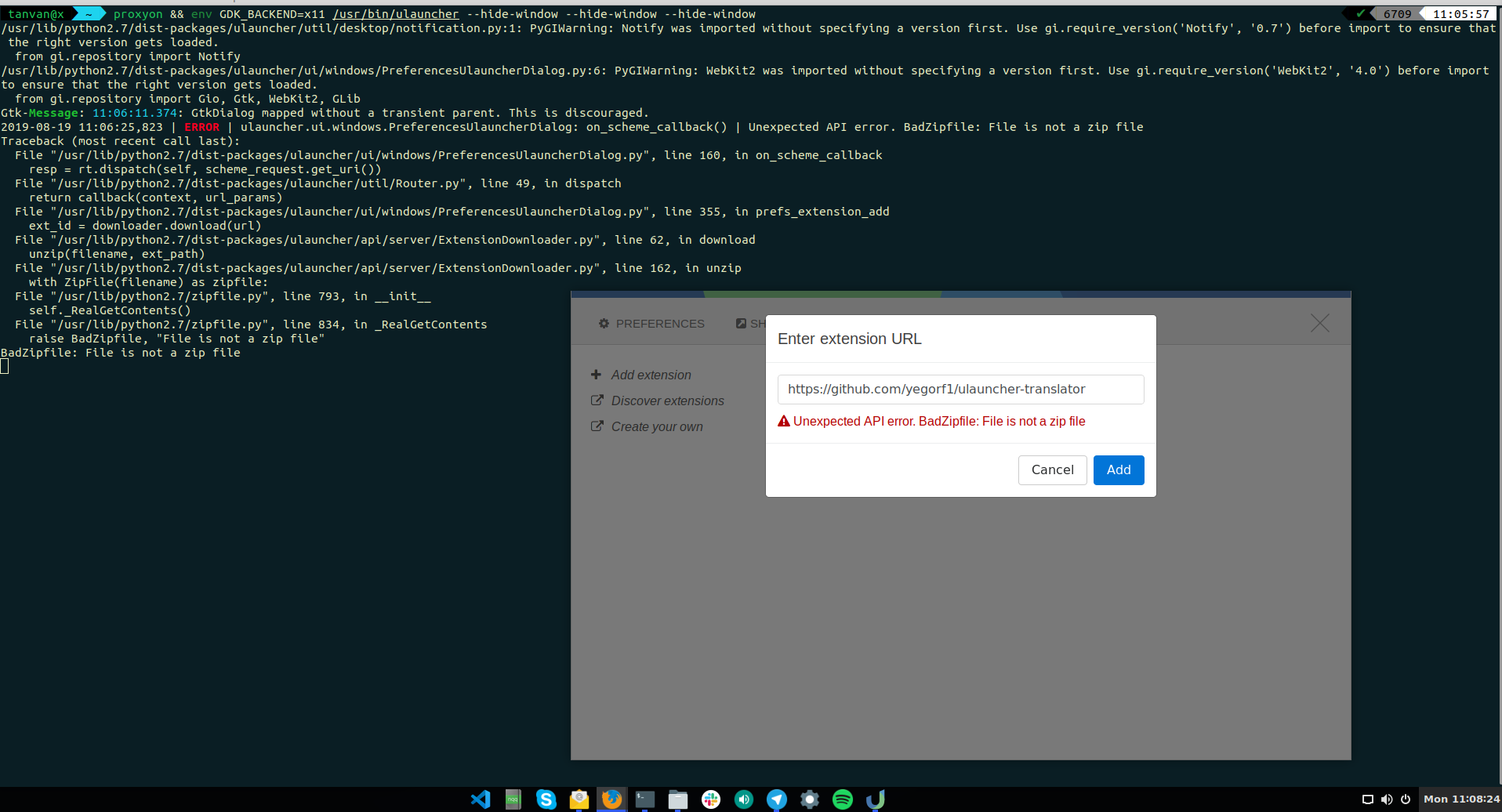
 nivhty
on 19 Aug 2019
nivhty
on 19 Aug 2019
@nivhty Sorry for the delayed response. I've tried the same url and it worked for me in Ulauncher v4.
BTW, it looks like the author has changed its Github name. Now the extension is here https://github.com/YogurtTheHorse/ulauncher-translator
If it doesn't work, please create a new issue.
gornostal
on 18 Sep 2019
Thanks for your reply.
Alright, since it's happening for every extensions url, I think that it's not a problem. I used Ulauncher behind the corporate proxy, then I added my own squid proxy in Ulauncher and the error appeared. I will try again tomorrow and let you if it work.
nivhty
on 18 Sep 2019
Related issues
 arthurlogilab
·
3Comments
arthurlogilab
·
3Comments
 cirala
·
3Comments
cirala
·
3Comments
 BartWillems
·
6Comments
BartWillems
·
6Comments
 altla
·
5Comments
altla
·
5Comments
 jonhoo
·
3Comments
jonhoo
·
3Comments
Most helpful comment
I guess somehow you might have some kind of issue connecting to GitHub from Ulauncher to download the extension.
May be experimenting in another network?
Or downloading it using curl?
curl -L -v https://github.com/pywkm/ulauncher-spotify/archive/master.zip -o /tmp/extension.zip