UIkit version
3.0.0-beta.25
Browser
Safari 10.1 Responsive Design Mode for iPhone 6S
Reproduction Link
https://getuikit.com/assets/uikit/tests/navbar.html
Steps to reproduce
Entered Responsive Design Mode for iPhone 6S
What is Expected?
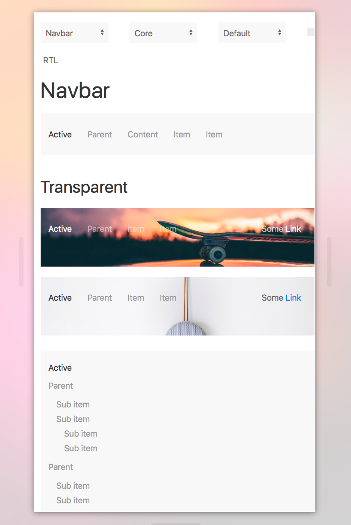
I would expect the navbar to be responsive, and change for these smaller screens
What is actually happening?
The buttons are just getting closer together
 albeaver
All 3 comments
Hi, what do you mean by responsive navbar? The navbar adapts to the window width, all depends on how many items you have in the nav. You can hide items on certain size, you can hide entire nav ( right for example ) in some size, you can show the hamburguer menu to toggle the offcanvas menu or make your nav in a full modal. Uikit gives you this flexibility.
If you want something like bootstrap that collapse the entire the navbar in a drop menu, sorry but i prefer flexibility over time saving.
 zzseba78
on 17 Jul 2017
zzseba78
on 17 Jul 2017
I personally prefer something more along the lines of Bootstrap. I will look into the off canvas menu and modal. Thank you for your advice.
On Jul 17, 2017, at 6:41 PM, Sebastian notifications@github.com wrote:
Hi, what do you mean by responsive navbar? The navbar adapts to the window width, all depends on how many items you have in the nav. You can hide items on certain size, you can hide entire nav ( right for example ) in some size, you can show the hamburguer menu to toggle the offcanvas menu or make your nav in a full modal. Uikit gives you this flexibility.
If you want something like bootstrap that collapse the entire the navbar in a drop menu, sorry but i prefer flexibility over time saving.—
You are receiving this because you authored the thread.
Reply to this email directly, view it on GitHub https://github.com/uikit/uikit/issues/2779#issuecomment-315781002, or mute the thread https://github.com/notifications/unsubscribe-auth/APkxXR0kTrHvJcH1FlBqgS4gnMOSi8miks5sO3nQgaJpZM4OZY02.
albeaver
on 17 Jul 2017
Agree with @zzseba78 here. The navigation paradigm that UIkit promotes is to use a Navbar on large viewports and hide it on smaller ones (exactly like you see on https://getuikit.com). For mobile navigations, you can then use offcanvas or display it in a full modal.
For ideas what to do you can also see the different options that we use in the Pro themes: https://demo.yootheme.com/joomla (go through the recent themes and try out, it's all built with UIkit and some theme specific styles on top).
If you want a different navigation behaviour, you are of course free to add your own styles, but I think the navbar will stay the way it is for now.
 florianletsch
on 18 Jul 2017
florianletsch
on 18 Jul 2017
Related issues
 danishiqbal4
·
3Comments
danishiqbal4
·
3Comments
 DamirPecnik
·
3Comments
DamirPecnik
·
3Comments
 s1973
·
3Comments
zzseba78
·
3Comments
s1973
·
3Comments
zzseba78
·
3Comments
 doublex
·
3Comments
doublex
·
3Comments
Most helpful comment
I personally prefer something more along the lines of Bootstrap. I will look into the off canvas menu and modal. Thank you for your advice.