Ueli: Rescan Applications causing windows taskbar to flash
Hi,
I just found your app and really like it but there seems to be something wrong with it causing all icons on the taskbar to flash every 60 seconds.
I suspect it has something to do with the rescan value because timing the flashing on the default settings causes it to flash every 60 seconds, setting the rescan value to 65 causes it to flash every 65 seconds (timed it manually with my phone).
My System information:
OS Name Microsoft Windows 10 Home
Version 10.0.17763 Build 17763
Processor Intel(R) Core(TM) i7-8700K CPU @ 3.70GHz, 3696 Mhz, 6 Core(s), 12 Logical Processor(s)
Installed Physical Memory (RAM) 32,0 GB
Name NVIDIA GeForce GTX 1080 Ti
Nvidia Driver Version: 417.35
App Info:
ueli: 7.2.0
Electron: 2.0.8
Chrome: 61.0.3163.100
Node: 8.9.3
V8: 6.1.534.41
Index size: 279
What does the rescan actually do? Does it have to be every 60 seconds or is it reasonable to set it to 86400 (24 hours) because I can live with the flashing every day (begrudgingly) but not every minute. Or is this something that you can fix?
Thanks.
 WonaBee
All 42 comments
Hmm this is weird. Never seen this before.
Do you mean the icons in the task bar?
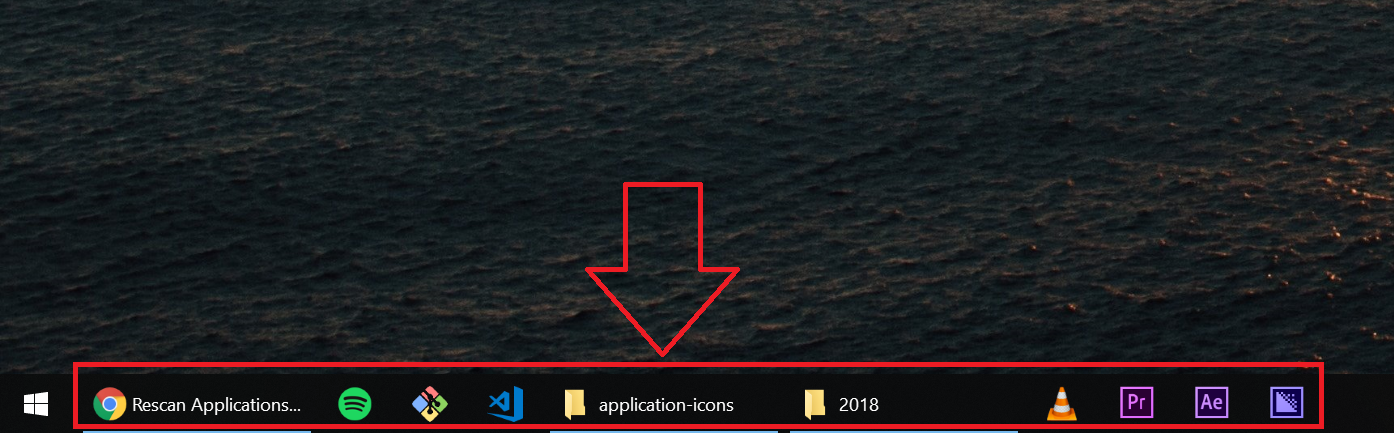
..or the icons in the system tray?
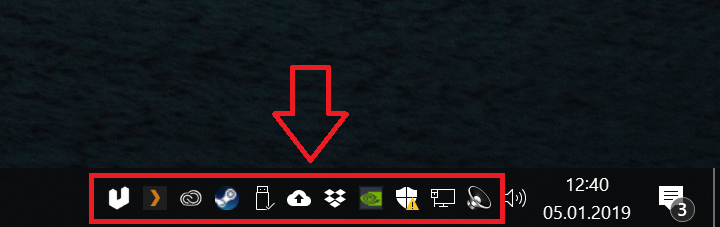
Basically, you can set the rescan interval as high as you want. When you set the rescan interval to 60 then ueli rescans your applications/files/folders for any changes (for example when you install a new program then it will be detected after 60s). If you set the rescan interval to 86400 then new programs/files/folders only get detected after 86400 seconds or if you restart the app.
But just out of curiosity: what happens if you disable the option Show tray icon ?
 oliverschwendener
on 5 Jan 2019
oliverschwendener
on 5 Jan 2019
I mean the icons in the task bar, I made a quick screen recording gif of the issue I'm having:

GIF
In order to visualize the problem better I reduced the rescan value to 5 seconds.
The problem exists whether "Show tray icon" is on or not.
One more info: I have 2 monitors and the taskbar on the left side (not at the bottom) on both monitors.
WonaBee
on 5 Jan 2019
+1
Have the same issue. I have two monitors, and the taskbar is docked to the left side.
 nevara
on 7 Jan 2019
nevara
on 7 Jan 2019
Do you experience the same issue when the taskbar is at the bottom?
oliverschwendener
on 7 Jan 2019
Just quickly tested it:
- Changed the taskbar from left to bottom
- Started ueli
- Same problem
- Switched it back to left (while ueli is running)
- Same problem
So yes the problem persists when the taskbar is at the bottom.
WonaBee
on 7 Jan 2019
Same problem: Lapetop 3 screens taskbar at bottom.
No Problem: Stationary 2 screens taskbar at bottom.
I _Think_ it started at 7.0.1
 kajih
on 8 Jan 2019
kajih
on 8 Jan 2019
Would it be possibble for anyone of you to test this with v6.1.4 ? Make sure you backup your config and count file located in ~/.ueli.
Here you can download v6.1.4: https://github.com/oliverschwendener/ueli/releases/tag/v6.1.4
oliverschwendener
on 8 Jan 2019
v6.1.4 does not flash/pulse but v7.0.0 do
kajih
on 8 Jan 2019
I just:
- Copied the
~/.uelifolder - Uninstalled ueli 7.2.0
- Installed ueli 6.1.4
- Replaced the new config file with the backup
- Set the rescan value to 5
- No more flashing
So I can confirm kajih's message that the flashing does not occur on version 6.1.4, even with taskbar on multiple monitors and docked on the left side.
WonaBee
on 8 Jan 2019
Allright, this is something to start. Thanks for your support! I will look into this.
oliverschwendener
on 8 Jan 2019
@WonaBee @nevara @kajih What happens if you disable "Use native icons" in the settings?
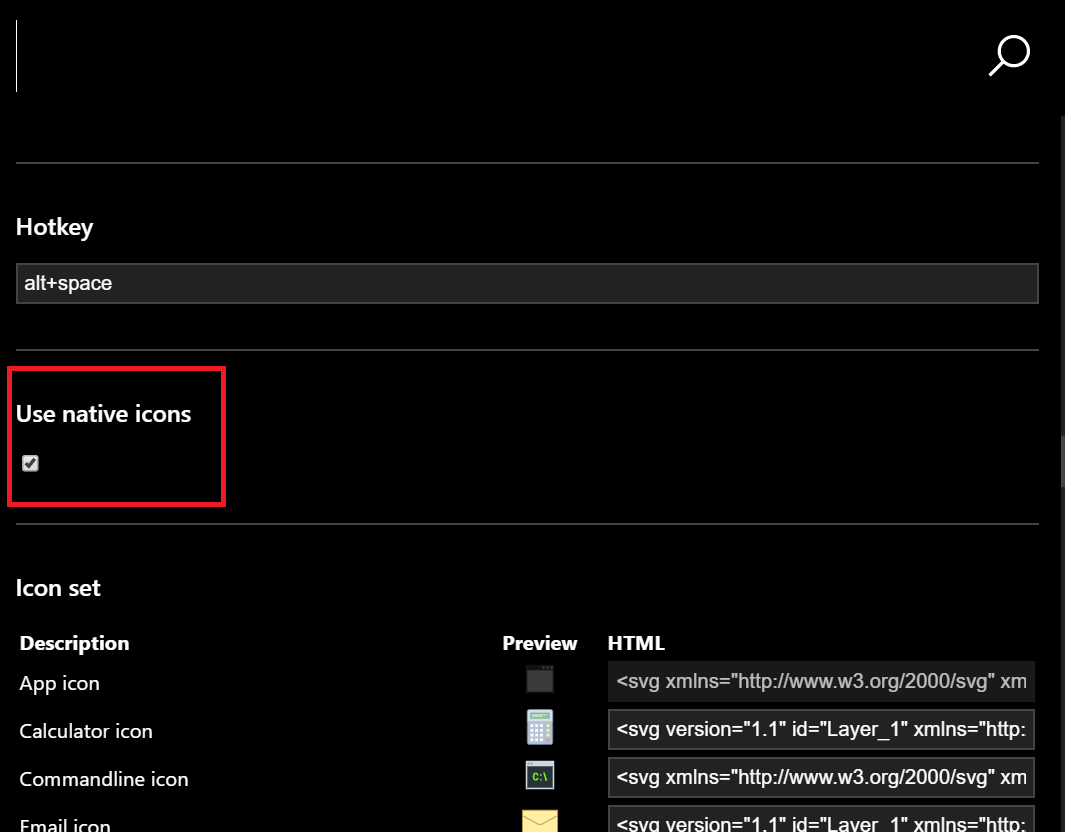
oliverschwendener
on 18 Feb 2019
@oliverschwendener I'm affected as well (and it's sufficiently annoying to keep me from properly evaluating ueli).
Disabling "Use native icons" has no effect - the blinking continues.
(To give more data, as per above: 2x 1440p monitors, taskbar at the bottom, latest Windows 10, flashing observed in both taskbars, ueli 7.2.5 (from scoop))
 CosmicToast
on 19 Feb 2019
CosmicToast
on 19 Feb 2019
I have a same trouble with blinkin' taskbar and desktop icons. Unchecking "use native icons" does't get any result.
 php-aleskeroff
on 26 Mar 2019
php-aleskeroff
on 26 Mar 2019
@php-aleskeroff Do you have more than one monitor?
oliverschwendener
on 27 Mar 2019
@oliverschwendener I am affected by this as well. I only have one monitor and my taskbar is at the bottom of my screen. Not only did the icons in my taskbar icons flash, but the icons on my desktop flashed as well. This happened with version 7.2.5. I installed version 6.1.4 and the flashing has stopped completely.
 legoniko
on 28 Mar 2019
legoniko
on 28 Mar 2019
@php-aleskeroff Do you have more than one monitor?
No, single monitor
php-aleskeroff
on 29 Mar 2019
I can confirm this is affecting both my machines(desktop and laptop) that use it. One machine just had a clean windows 10 install 1809 and the other was upgraded to 1809. All the icons flash at the update interval. Using "everything" search program I can see all the jpgs being created when it happens by filtering the c:\ and sorting by date modified. Also might be worth noting I can see a spike in CPU from PowerShell when it occurs, the PowerShell app is only visible for a few seconds in the task manager.
 freestyledork
on 2 Apr 2019
freestyledork
on 2 Apr 2019
@freestyledork Thank you for your insights! PowerShell is used to generate the app icons. But I think the issue is not caused by PowerShell because if you disable the option "Native icons" PowerShell is not used but the flashing is still there according to other users. I am working on a bigger update and I hope that this issue just disappears magically 😆
oliverschwendener
on 2 Apr 2019
@oliverschwendener
Might be worth adding, I came across a windows system bug that has a similar effect. The instructions to reproduce the flash are in this video. https://www.youtube.com/watch?v=WT9LHvtGOlU
Seems the original thread is still unanswered:
https://www.windows10forums.com/threads/taskbar-icons-blinking-often.14246/
I have confirmed the icon redraw on my desktop and laptop when changing the icon state of the recyclebin.
Not sure any of that matters, but maybe??
freestyledork
on 2 Apr 2019
@freestyledork Can you empty your recycle bin and then start ueli and wait until the flashing occurs. Then check if there are any files in the recycle bin. If so, can you make a screenshot of the files that are in the recycle bin?
oliverschwendener
on 2 Apr 2019
@oliverschwendener I checked on my laptop, set the update to 5 seconds, icons flash as expected... No files were reported in the recycle bin. FWIW I am not sure the recycle bin issue is related, just adding more info on a possibility they were related.
freestyledork
on 2 Apr 2019
@freestyledork But do you experience the same issue when deleting files normally in windows file explorer (like in the youtube video)?
oliverschwendener
on 3 Apr 2019
just thought i'd chime in. I'm experiencing the same issue. running a matebook x pro. I havn't timed it, but flashing happens every 5 - 10 min. makes the whole screen, icons and apps flash
 guitarchaos64
on 3 Apr 2019
guitarchaos64
on 3 Apr 2019
@oliverschwendener The flash only occurs if the recycle bin changes icon state. If the recycle bin is empty and I delete a file/folder from anywhere(desktop or file explorer) and it goes to the recycle bin the icons on the taskbar flash. The same happens when I empty the recycle bin if it has one or more items in it. This happens with Ueli installed or if it is not installed (it's not related to Ueli in any way).
When I notice the icon images being populated from Ueli it refreshes the taskbar in a similar fashion. I was unable to witness the files being deleted to the recycle bin from Ueli itself. As far as I can tell the files are deleted without the recycle bin.
If you can tell me the method you used to delete the files, I can try to delete a file using PowerShell to see if the icons flash.
freestyledork
on 3 Apr 2019
Hi
Just to let you know, that I'm also facing the issue.
Any fix for this issue ?
Reg//Akash
 akash-bhattacharya
on 30 Apr 2019
akash-bhattacharya
on 30 Apr 2019
I am working on the next bigger version release 8.0.0. You can download a beta version here: #142. Can someone tell me if the issue still occurs in the new beta?
oliverschwendener
on 6 May 2019
@oliverschwendener I still experience the bug in the new beta.
Reproducing goes as usual: removing old settings (%APPDATA%\ueli) (for reproducibility), launching the beta, setting refresh interval to 5 seconds and observing the effect.
Couldn't find any settings regarding "native icons", so did not check toggling that.
The flashing occurs shortly after the settings menu shows "Successfully refreshed indexes".
CosmicToast
on 6 May 2019
Is there any work around for this ?
Sometimes my icons goes totally stuck and laptop hangs as well
/ Akash
On Mon, May 6, 2019, 3:41 PM Chloe Kudryavtsev notifications@github.com
wrote:
@oliverschwendener https://github.com/oliverschwendener I still
experience the bug in the new beta.
Reproducing goes as usual: removing old settings (%APPDATA%\ueli) (for
reproducibility), launching the beta, setting refresh interval to 5 seconds
and observing the effect.
Couldn't find any settings regarding "native icons", so did not check
toggling that.
The flashing occurs shortly after the settings menu shows "Successfully
refreshed indexes".—
You are receiving this because you commented.
Reply to this email directly, view it on GitHub
https://github.com/oliverschwendener/ueli/issues/83#issuecomment-489645886,
or mute the thread
https://github.com/notifications/unsubscribe-auth/AL6SS25JM3JXH4QYMHD2HB3PUA7QTANCNFSM4GOBUCSQ
.
akash-bhattacharya
on 6 May 2019
@oliverschwendener For me in the Version 8 this bug doesn't occur anymore, even if setting the rescan value to 5 like @5paceToast said.
WonaBee
on 6 May 2019
@oliverschwendener I still experience the bug in the new beta.
Reproducing goes as usual: removing old settings (%APPDATA%\ueli) (for reproducibility), launching the beta, setting refresh interval to 5 seconds and observing the effect.
Couldn't find any settings regarding "native icons", so did not check toggling that.
The flashing occurs shortly _after_ the settings menu shows "Successfully refreshed indexes".
@5paceToast What happens if you disable all plugins in the settings? You can disable the plugins by pressing the green button on the top right. Does the flashing still occur when all plugins are disabled? If not try to enable one plugin after the other and try to find out which plugin causes the flashing.
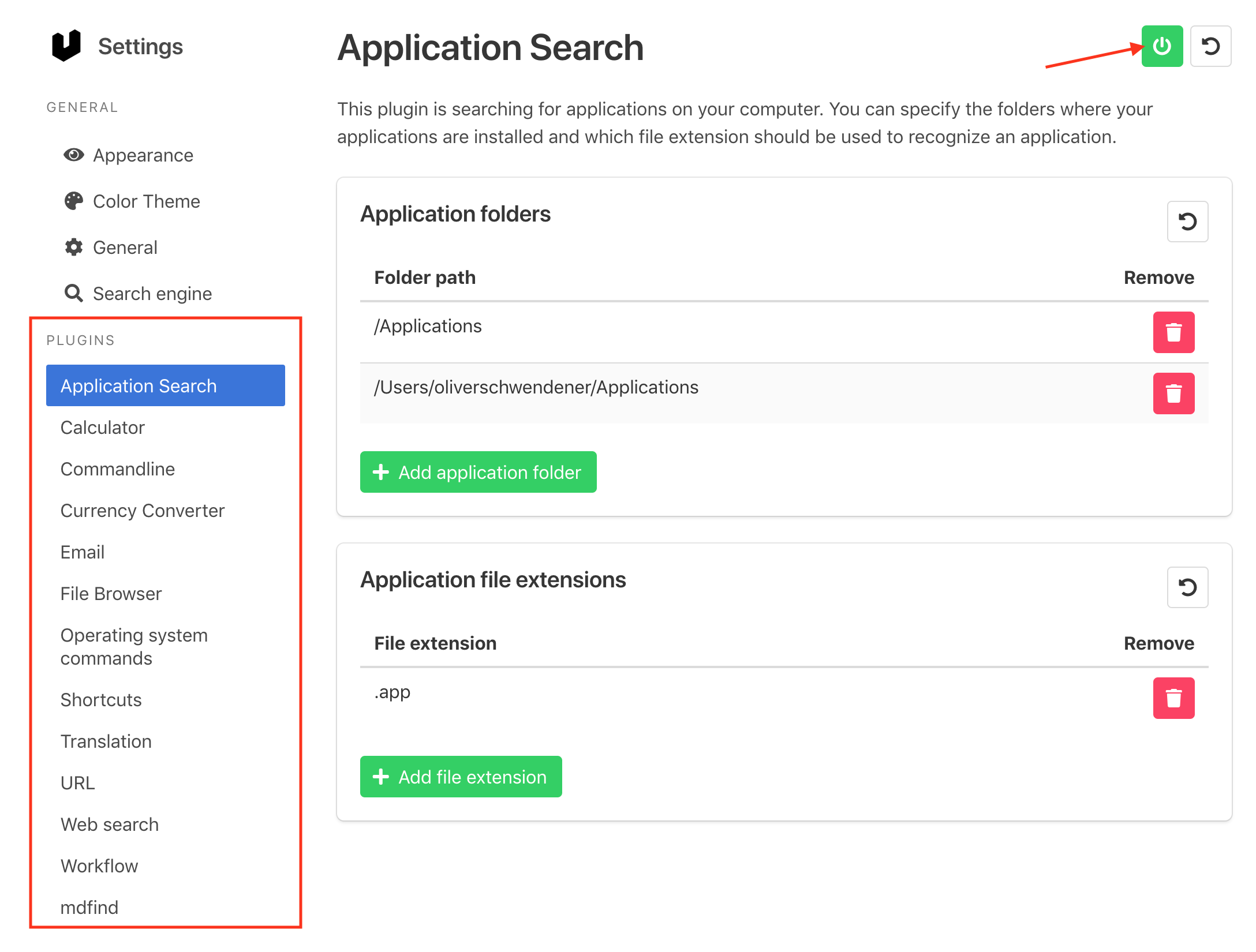
oliverschwendener
on 6 May 2019
@oliverschwendener After going every plugin one by one as asked, only the Application Search plugin causes the observed behavior.
CosmicToast
on 6 May 2019
Can anyone here tell me if one of these steps helps? https://windowsreport.com/desktop-icons-flashing/
oliverschwendener
on 20 May 2019
This link does not describe the issue.
Consider, for instance, this quote:
User reports state that they are unable to do a thing on their PC as soon as desktop icons start flashing in Windows 10.
No such thing is reported here.
The steps detailed verify against system corruption, blame the gpu (which is, somehow, doing its job just fine in other circumstances), blame the wallpaper (as you might imagine, changing it does not actually fix the issue), and finish by suggesting an entirely unrelated registry change.
I realize it is tempting and easy to say "this is caused by a broken base system", but I would request that such impulses be avoided in the future.
In the meantime, I have noticed that, actually more than the taskbar is affected.
As of my update to Windows 1903, the taskbar still blinks on launch, but no further.
However, now icons on the desktop are exhibiting the exact same behavior.
Find attached some short footage (more is available upon request, but hopefully this clears up the distracting nature of what's going on).
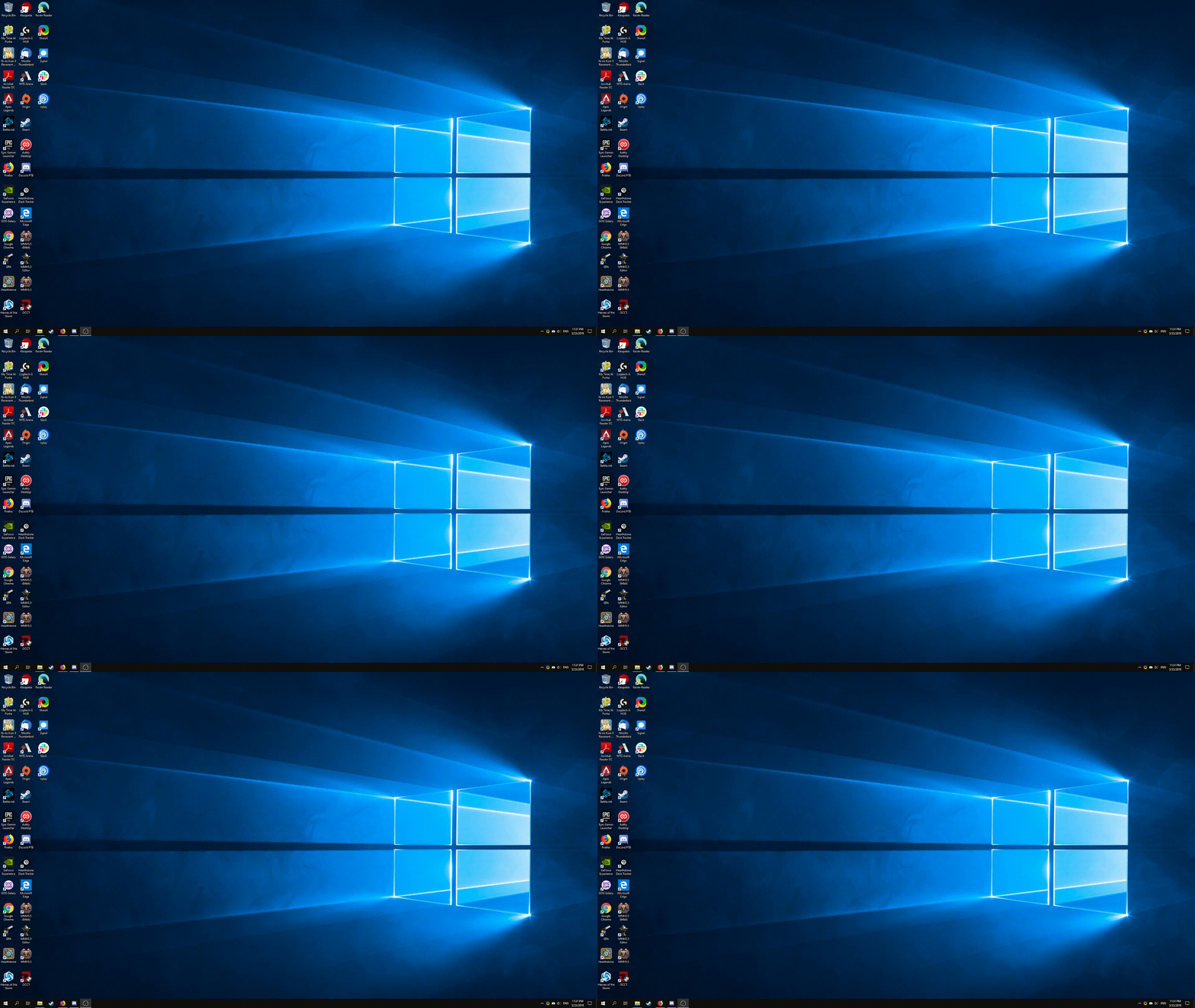
Unfortunately, I cannot say whether or not this was the case previously, as I normally have a maximized window on the monitor that would have these icons at all (I do not normally use them, generally using the search function instead).
CosmicToast
on 24 May 2019
Same problem here. I can confirm the Application Search plugin causes the observed flashing.
Happens also with version 8.0 Beta. I'm on Windows 10 1903. Is there anything I can help with to fix this?
 Tobirexy
on 15 Jul 2019
Tobirexy
on 15 Jul 2019
Hello, the same problem in my laptop.
https://youtu.be/WVtZtzyoZr0?t=8
https://youtu.be/WVtZtzyoZr0?t=68
https://youtu.be/WVtZtzyoZr0?t=128
 kovalroma
on 31 Jul 2019
kovalroma
on 31 Jul 2019
@oliverschwendener This issue also affects the general system performance. My entire machine (MBP 2015) hangs for a few seconds every few minutes, and I only now found out that ueli causes this issue. Even the mouse cursor feels like glued to the screen, thus it's really annoying.
Some console-logging turned out that ApplicationSearchPlugin's refeshIndex() leads—at least on my system—to at least 3083 (!) directory scans what results in 5728 files. The I/O is likely to be the main issue. Other potential problems could be the vast number of Promises generated and also that lists are iterated via forEach (a simple for (let i = 0; i < elements.length; i++) {..} is often noticeably faster for larger data sets).
A mitigation could be to only go down a few layers - e.g. until a first matching file (.exe or an executable binary) is found within a program directory.
Another approach could be to delegate this task to a well-written find invocation (if there's something similar on Windows).
Or there is probably even a system call on macOS and Windows to list installed applications - what would likely be the best solution.
Any thoughts?
Edit: I now set the update interval to 30000 seconds what works around the problem. Thinking of this, one could argue to only refresh the application plugin index on app startup or when asked for explicitly, but not during the regular refresh interval.
A toggle "Only refresh index after app startup" in the application plugin settings with the hint "Disabling this option may cause performance issues. To refresh all indexes manually, choose 'Refresh indexes.'" or something similar.
To handle the case when a new program is installed, the directory structure of the apps (e.g. /Applications and /Users/<name>/Applications) could be scanned and only when a top-level directory is added or removed, a full scan is done.
Although, the last point could also be a standalone solution: List the top-level directories and only deep-scan when something changes there - or when 'Refresh indexes' is invoked.
 sgruetter
on 28 Aug 2019
sgruetter
on 28 Aug 2019
@sgruetter I replaced all forEach's with conventional for loops and performance wasn't noticeably better.
Maybe the solution here would be to use powershell on Windows and mdfind on macOS to get a list of all installed programs. I'm looking into this!
oliverschwendener
on 13 Sep 2019
Can someone check if this issue still occurs with the newest release? Ueli now uses the os's build in tools to search for installed applications.
oliverschwendener
on 16 Sep 2019
@olivereisenhut This is solved for me.
I noticed another change - at the time when icons would normally blink, instead the application gets a kind of "loading" animation (and the search bar proper has "Refreshing indexes..." written on it.
This "loading" takes a bit longer than the old blinking, but is far preferable!
Thanks (at least it's solved for me :) )!
CosmicToast
on 17 Sep 2019
@WonaBee or @Tobirexy Can you also check if this issue is resolved for you?
oliverschwendener
on 17 Sep 2019
@oliverschwendener Yep. It's fixed now.
Tobirexy
on 17 Sep 2019
Closing this now because it seems to be fixed. Thanks guys for your support!
oliverschwendener
on 19 Sep 2019
Related issues
 thatKaran
·
5Comments
thatKaran
·
5Comments
 cosimochellini
·
5Comments
cosimochellini
·
5Comments
 JMountainMan
·
6Comments
JMountainMan
·
6Comments
 moses-bowman
·
3Comments
moses-bowman
·
3Comments
 GovindKrishnan
·
3Comments
GovindKrishnan
·
3Comments