From today, I stop downloading the courses.
I have tried many times without success ...

 pigullino1975
All 67 comments
Same here, I get this and also in the next try the error 429 (Too many requests).
 smart-lemon
on 14 Mar 2019
smart-lemon
on 14 Mar 2019
you can use cookies based authentication until i fix the issue.
 r0oth3x49
on 14 Mar 2019
r0oth3x49
on 14 Mar 2019
you can use cookies based authentication until i fix the issue.
This works. I am downloading one of my courses. I understand they might be worried about piracy, and so they're blocking automatic downloads, but if you own a course you must have the right to download it
 vherasme
on 14 Mar 2019
vherasme
on 14 Mar 2019
how can I get my cookies?
it's actually on the readme. Sorry.
The command becomes
python udemy-dl.py [courselink] -k [yourcookiesfile.txt]
 kamalhm
on 14 Mar 2019
kamalhm
on 14 Mar 2019
cookie is also not working for me
 imVinayPandya
on 15 Mar 2019
imVinayPandya
on 15 Mar 2019
Same here, even with cookie not working.
 jmishal
on 15 Mar 2019
jmishal
on 15 Mar 2019
Cookies work fine for me 🍪
smart-lemon
on 15 Mar 2019
Cookies Workaround
Cookies do work, but the cookie parser is very fragile with no documentation and no debug output.
So I stepped through the source code and studied the logic.
Make a text file (cookie.txt) with this exact format:
Cookie: access_token=youraccesstokenvalue client_id=yourclientid
You need the "Cookie:" tag, space separators, '=' delimiter, and absolutely no line breaks.
Use the cookie switch: --cookie=cookie.txt
To get the actual values, you can use a cookie chrome extension.
 chrisjunlee
on 15 Mar 2019
chrisjunlee
on 15 Mar 2019
Cookies Workaround
Cookies do work, but the cookie parser is very fragile with no documentation and no debug output.
So I stepped through the source code and studied the logic.
Make a text file (cookie.txt) with this exact format:
Cookie: access_token=youraccesstokenvalue client_id=yourclientidYou need the "Cookie:" tag, space separators, '=' delimiter, and absolutely no line breaks.
Use the cookie switch: --cookie=cookie.txt
To get the actual values, you can use a cookie chrome extension.
yes ,, this working with me :-)
thanks
jmishal
on 15 Mar 2019
Cookies Workaround
Cookies do work, but the cookie parser is very fragile with no documentation and no debug output.
So I stepped through the source code and studied the logic.
Make a text file (cookie.txt) with this exact format:
Cookie: access_token=youraccesstokenvalue client_id=yourclientidYou need the "Cookie:" tag, space separators, '=' delimiter, and absolutely no line breaks.
Use the cookie switch: --cookie=cookie.txt
To get the actual values, you can use a cookie chrome extension.
Traceback (most recent call last):
File "C:\udemy-dl-master\udemy-dl.py", line 1443, in
main()
File "C:\udemy-dl-master\udemy-dl.py", line 952, in main
f_in = open(options.cookies)
FileNotFoundError: [Errno 2] No such file or directory: 'cookie.txt'
I still get this problem,
please how can I fix it
and is there any short video tutorial about cookies based authentication ?
 RamAhm
on 17 Mar 2019
RamAhm
on 17 Mar 2019
Cookies Workaround
Cookies do work, but the cookie parser is very fragile with no documentation and no debug output.
So I stepped through the source code and studied the logic.
Make a text file (cookie.txt) with this exact format:Cookie: access_token=youraccesstokenvalue client_id=yourclientidYou need the "Cookie:" tag, space separators, '=' delimiter, and absolutely no line breaks.
Use the cookie switch: --cookie=cookie.txt
To get the actual values, you can use a cookie chrome extension.Traceback (most recent call last):
File "C:\udemy-dl-master\udemy-dl.py", line 1443, in
main()
File "C:\udemy-dl-master\udemy-dl.py", line 952, in main
f_in = open(options.cookies)
FileNotFoundError: [Errno 2] No such file or directory: 'cookie.txt'I still get this problem,
please how can I fix it
and is there any short video tutorial about cookies based authentication ?
Same issue with me
 prateekdaniels
on 17 Mar 2019
prateekdaniels
on 17 Mar 2019
I think you should give exact location of cookie.txt
Example:
--cookie=/home/user/cookie.txt
 queeup
on 17 Mar 2019
queeup
on 17 Mar 2019
I think you should give exact location of cookie.txt
Example:
--cookie=/home/user/cookie.txt
Have done that too, but doesnt work
prateekdaniels
on 19 Mar 2019
I think you should give exact location of cookie.txt
Example:--cookie=/home/user/cookie.txtHave done that too, but doesnt work
i have already mention the guide to extract cookies via firefox & chrome in readme file. the error you are facing is user error and not related to the tool you can follow the guide on readme how to use the tool.
r0oth3x49
on 19 Mar 2019
Hello @all i am firefox user and this is working for me
https://github.com/r0oth3x49/udemy-dl/issues/303#issuecomment-441345792
imVinayPandya
on 19 Mar 2019
since you used windows I guess need to used back slash for the paths instead of slash.
jmishal
on 19 Mar 2019
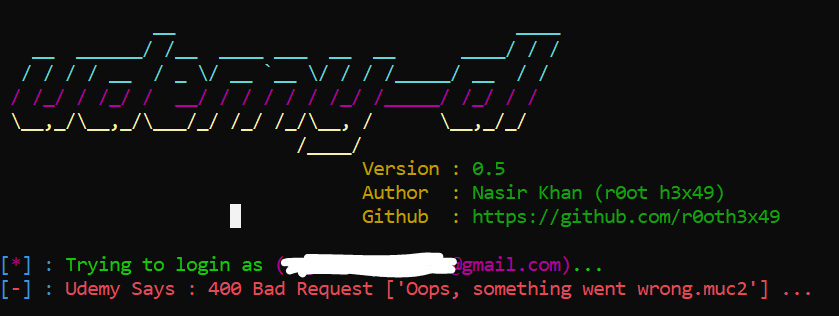
Hello, @r0oth3x49 I hope this can be fixed soon. thanks and more power!
 anagnam
on 20 Mar 2019
anagnam
on 20 Mar 2019
@anagnam This is solved by cookies. Please check the closed issues on how to do that. It's also present in the README.
 varunchandak
on 20 Mar 2019
varunchandak
on 20 Mar 2019
@varunchandak I don't think so. I've tried using cookies and it worked on the first 3 chapters. Then after that, a series of error occurs so the total 14 chapter course was not downloaded in full. only the first 3 chapters were downloaded and were not actually finished.
anagnam
on 21 Mar 2019
I had same 400 issue, then used cookies and it works! had to fix #347 before.
 jck4422
on 22 Mar 2019
jck4422
on 22 Mar 2019
Worked also for me. Thanks!
 Eugenio-Liso
on 22 Mar 2019
Eugenio-Liso
on 22 Mar 2019
Cookies Workaround
Cookies do work, but the cookie parser is very fragile with no documentation and no debug output.
So I stepped through the source code and studied the logic.
Make a text file (cookie.txt) with this exact format:Cookie: access_token=youraccesstokenvalue client_id=yourclientidYou need the "Cookie:" tag, space separators, '=' delimiter, and absolutely no line breaks.
Use the cookie switch: --cookie=cookie.txt
To get the actual values, you can use a cookie chrome extension.yes ,, this working with me :-)
thanks
the file must name cookies not cookie
 Nashaatfarrag
on 22 Mar 2019
Nashaatfarrag
on 22 Mar 2019
Thank @r0oth3x49! You're the champ !
prateekdaniels
on 22 Mar 2019
Hello all.
I was able to create cookies, but latter it process failed.
[] : Trying to login using cookies ...
[+] : Logged in successfully.
[] : Downloading course information .. -Traceback (most recent call last):
File "udemy-dl.py", line 1432, in
main()
File "udemy-dl.py", line 1091, in main
udemy.course_download(path=options.output, quality=options.quality, unsafe=options.unsafe)
File "udemy-dl.py", line 425, in course_download
course = udemy.course(url=self.url, username=self.username, password=self.password, cookies=self.cookies)
File "C:\Program Files (x86)\Python37-32\udemy-dl-master\udemy_udemy.py", line 38, in course
return Udemy(url, username, password, cookies, basic, callback)
File "C:\Program Files (x86)\Python37-32\udemy-dl-master\udemy_internal.py", line 44, in __init__
super(InternUdemyCourse, self).__init__(args, *kwargs)
File "C:\Program Files (x86)\Python37-32\udemy-dl-master\udemy_shared.py", line 63, in __init__
self._fetch_course()
File "C:\Program Files (x86)\Python37-32\udemy-dl-master\udemy_internal.py", line 56, in _fetch_course
self._info = self._real_extract(self._url)
File "C:\Program Files (x86)\Python37-32\udemy-dl-master\udemy_extract.py", line 584, in _real_extract
'subtitles' : self._extract_subtitles(tracks),
File "C:\Program Files (x86)\Python37-32\udemy-dl-master\udemy_extract.py", line 382, in _extract_subtitles
lang = track.get('language') or track.get('srclang') or track.get('label') or track['locale'].get('locale').split('_')[0]
KeyError: 'locale'
Please let me know if I am doing something wrong.
 farukh2352
on 23 Mar 2019
farukh2352
on 23 Mar 2019
Hello all.
I was able to create cookies, but latter it process failed.
[_] : Trying to login using cookies ... [+] : Logged in successfully. [_] : Downloading course information .. -Traceback (most recent call last):
File "udemy-dl.py", line 1432, in
main()
File "udemy-dl.py", line 1091, in main
udemy.course_download(path=options.output, quality=options.quality, unsafe=options.unsafe)
File "udemy-dl.py", line 425, in course_download
course = udemy.course(url=self.url, username=self.username, password=self.password, cookies=self.cookies)
File "C:\Program Files (x86)\Python37-32\udemy-dl-master\udemy_udemy.py", line 38, in course
return Udemy(url, username, password, cookies, basic, callback)
File "C:\Program Files (x86)\Python37-32\udemy-dl-master\udemy_internal.py", line 44, in init
super(InternUdemyCourse, self).init(args, kwargs)
File "C:\Program Files (x86)\Python37-32\udemy-dl-master\udemy_shared.py", line 63, in *init
self._fetch_course()
File "C:\Program Files (x86)\Python37-32\udemy-dl-master\udemy_internal.py", line 56, in _fetch_course
self._info = self._real_extract(self._url)
File "C:\Program Files (x86)\Python37-32\udemy-dl-master\udemy_extract.py", line 584, in _real_extract
'subtitles' : self._extract_subtitles(tracks),
File "C:\Program Files (x86)\Python37-32\udemy-dl-master\udemy_extract.py", line 382, in _extract_subtitles lang = track.get('language') or track.get('srclang') or track.get('label') or track['locale'].get('locale').split('_')[0]
KeyError: 'locale'Please let me know if I am doing something wrong.
pull the repository. i have recently merged a patch request for this error.
r0oth3x49
on 23 Mar 2019
Hi! I have the same error... and I try to fix it but I don't know how to do it.
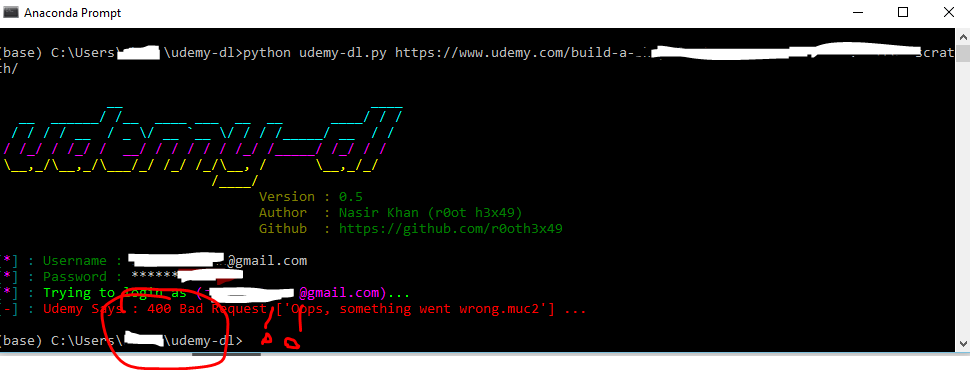 Can you help me?
 agisan
on 23 Mar 2019
agisan
on 23 Mar 2019
Hello all.
I was able to create cookies, but latter it process failed.
[_] : Trying to login using cookies ... [+] : Logged in successfully. [_] : Downloading course information .. -Traceback (most recent call last):
File "udemy-dl.py", line 1432, in
main()
File "udemy-dl.py", line 1091, in main
udemy.course_download(path=options.output, quality=options.quality, unsafe=options.unsafe)
File "udemy-dl.py", line 425, in course_download
course = udemy.course(url=self.url, username=self.username, password=self.password, cookies=self.cookies)
File "C:\Program Files (x86)\Python37-32\udemy-dl-master\udemy_udemy.py", line 38, in course
return Udemy(url, username, password, cookies, basic, callback)
File "C:\Program Files (x86)\Python37-32\udemy-dl-master\udemy_internal.py", line 44, in init
super(InternUdemyCourse, self).init(args, kwargs)
File "C:\Program Files (x86)\Python37-32\udemy-dl-master\udemy_shared.py", line 63, in *init
self._fetch_course()
File "C:\Program Files (x86)\Python37-32\udemy-dl-master\udemy_internal.py", line 56, in _fetch_course
self._info = self._real_extract(self._url)
File "C:\Program Files (x86)\Python37-32\udemy-dl-master\udemy_extract.py", line 584, in _real_extract
'subtitles' : self._extract_subtitles(tracks),
File "C:\Program Files (x86)\Python37-32\udemy-dl-master\udemy_extract.py", line 382, in _extract_subtitles lang = track.get('language') or track.get('srclang') or track.get('label') or track['locale'].get('locale').split('_')[0]
KeyError: 'locale'Please let me know if I am doing something wrong.
Hello all.
I was able to create cookies, but latter it process failed.
[_] : Trying to login using cookies ... [+] : Logged in successfully. [_] : Downloading course information .. -Traceback (most recent call last):
File "udemy-dl.py", line 1432, in
main()
File "udemy-dl.py", line 1091, in main
udemy.course_download(path=options.output, quality=options.quality, unsafe=options.unsafe)
File "udemy-dl.py", line 425, in course_download
course = udemy.course(url=self.url, username=self.username, password=self.password, cookies=self.cookies)
File "C:\Program Files (x86)\Python37-32\udemy-dl-master\udemy_udemy.py", line 38, in course
return Udemy(url, username, password, cookies, basic, callback)
File "C:\Program Files (x86)\Python37-32\udemy-dl-master\udemy_internal.py", line 44, in init
super(InternUdemyCourse, self).init(args, kwargs)
File "C:\Program Files (x86)\Python37-32\udemy-dl-master\udemy_shared.py", line 63, in *init
self._fetch_course()
File "C:\Program Files (x86)\Python37-32\udemy-dl-master\udemy_internal.py", line 56, in _fetch_course
self._info = self._real_extract(self._url)
File "C:\Program Files (x86)\Python37-32\udemy-dl-master\udemy_extract.py", line 584, in _real_extract
'subtitles' : self._extract_subtitles(tracks),
File "C:\Program Files (x86)\Python37-32\udemy-dl-master\udemy_extract.py", line 382, in _extract_subtitles lang = track.get('language') or track.get('srclang') or track.get('label') or track['locale'].get('locale').split('_')[0]
KeyError: 'locale'
Please let me know if I am doing something wrong.pull the repository. i have recently merged a patch request for this error.
Thank you its working now :)
farukh2352
on 23 Mar 2019
I used the cookies , but still getting the same error
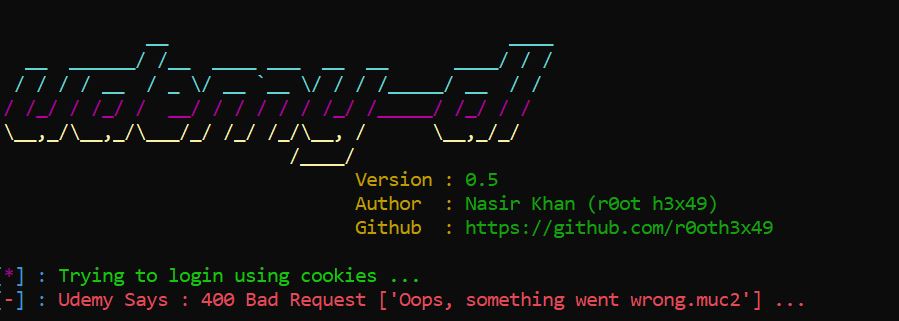
 jokumar
on 26 Mar 2019
jokumar
on 26 Mar 2019
It seems that you are not using correct format of cookies
On Tue, Mar 26, 2019, 7:40 PM Joydip Kumar notifications@github.com wrote:
I used the cookies , but still getting the same error
[image: Capture]
https://user-images.githubusercontent.com/7227769/55003737-d9f4c600-4fd0-11e9-8afa-e5a0ed2901a4.JPG—
You are receiving this because you were mentioned.
Reply to this email directly, view it on GitHub
https://github.com/r0oth3x49/udemy-dl/issues/341#issuecomment-476661159,
or mute the thread
https://github.com/notifications/unsubscribe-auth/AulraWm-LNShTUBkx4fMcrfjcxDx12nKks5vaipHgaJpZM4bwK_E
.
farukh2352
on 26 Mar 2019
Hi
I am using the below in cookie.txt
Cookie: access_token=xxxxxxxxxxxxxxxxx client_id=xxxxxxxxxxxxxxxxxx
command :
python udemy-dl.py http://..... --cookie=cookies.txt
I was able to download couple of days back . but its not working from today . Not sure what could be the issue .
jokumar
on 26 Mar 2019
Try using instructions for cookies from author's documentation.
On Tue, Mar 26, 2019, 8:38 PM Joydip Kumar notifications@github.com wrote:
Hi
I am using the below in cookie.txt
Cookie: access_token=xxxxxxxxxxxxxxxxx client_id=xxxxxxxxxxxxxxxxxxcommand :
python udemy-dl.py http://..... --cookie=cookies.txt—
You are receiving this because you were mentioned.
Reply to this email directly, view it on GitHub
https://github.com/r0oth3x49/udemy-dl/issues/341#issuecomment-476692835,
or mute the thread
https://github.com/notifications/unsubscribe-auth/AulraeIttOcEjjJqbqK4yKdlAxd5ruUmks5vajfngaJpZM4bwK_E
.
farukh2352
on 26 Mar 2019
Cookies Workaround
Cookies do work, but the cookie parser is very fragile with no documentation and no debug output.
So I stepped through the source code and studied the logic.
Make a text file (cookie.txt) with this exact format:
Cookie: access_token=youraccesstokenvalue client_id=yourclientidYou need the "Cookie:" tag, space separators, '=' delimiter, and absolutely no line breaks.
Use the cookie switch: --cookie=cookie.txt
To get the actual values, you can use a cookie chrome extension.
holy shoot, this is works for me, thanks, i love you
 devprojectid
on 26 Mar 2019
devprojectid
on 26 Mar 2019
It seems that you are not using correct format of cookies
…
On Tue, Mar 26, 2019, 7:40 PM Joydip Kumar @.*> wrote: I used the cookies , but still getting the same error [image: Capture] https://user-images.githubusercontent.com/7227769/55003737-d9f4c600-4fd0-11e9-8afa-e5a0ed2901a4.JPG — You are receiving this because you were mentioned. Reply to this email directly, view it on GitHub <#341 (comment)>, or mute the thread https://github.com/notifications/unsubscribe-auth/AulraWm-LNShTUBkx4fMcrfjcxDx12nKks5vaipHgaJpZM4bwK_E .
Yes it works for me now . Thanks a lot . I was using a wrong cookie .
jokumar
on 27 Mar 2019
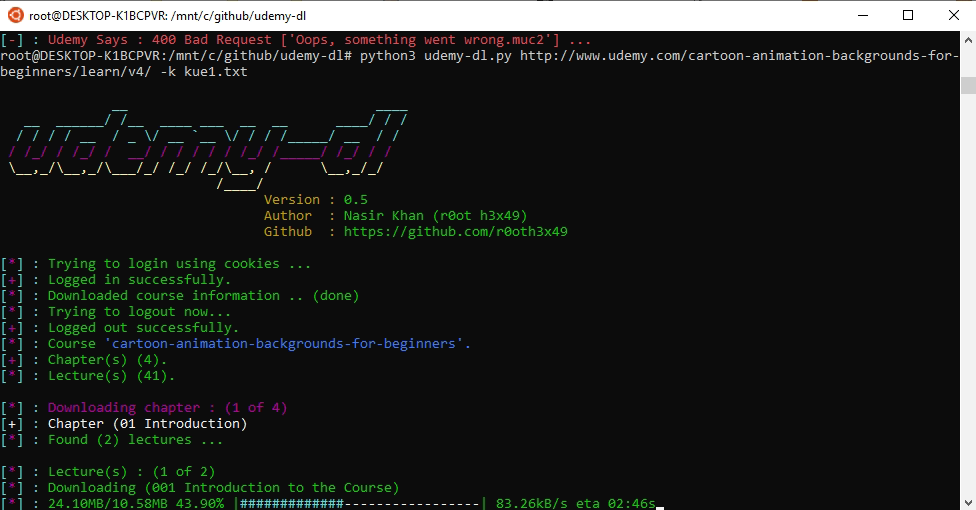
I make the file cook2.txt and just saved the file with following.
Cookie: access_token=mytoken client_id=myclientid
then issue the command
python udemy-dl.py cours_url -k cook2.txt -u xxxx -p xxxxx -q 720
copy cookies in file by using cookies google extension
Thanks it is working fine for me
 mag2000
on 28 Mar 2019
mag2000
on 28 Mar 2019
@mag2000 you don't need -u -p if you're using -k 😅
 ghost
on 29 Mar 2019
ghost
on 29 Mar 2019
I can successfully login using the cookie method but now I get this weird error:
TypeError: 'NoneType' object is not subscriptable
I can also see that udemy recently changed their interface and also their links and thus the "/v4/content" style linking doesn's exist and redirects straight to "/lecture/NUMBER#overview". So is this related?
EDIT: I'm just stupid. It works now. Totally my bad.
 dealvidit
on 29 Mar 2019
dealvidit
on 29 Mar 2019
cookies worked for me, thanks
 xcesaralejandro
on 30 Mar 2019
xcesaralejandro
on 30 Mar 2019
Cookies Workaround
Cookies do work, but the cookie parser is very fragile with no documentation and no debug output.
So I stepped through the source code and studied the logic.
Make a text file (cookie.txt) with this exact format:
Cookie: access_token=youraccesstokenvalue client_id=yourclientidYou need the "Cookie:" tag, space separators, '=' delimiter, and absolutely no line breaks.
Use the cookie switch: --cookie=cookie.txt
To get the actual values, you can use a cookie chrome extension.
It works for me! Many thanks!!!!!!! i love you too!
 Fidozx
on 1 Apr 2019
Fidozx
on 1 Apr 2019
Cookies Workaround
Cookies do work, but the cookie parser is very fragile with no documentation and no debug output.
So I stepped through the source code and studied the logic.
Make a text file (cookie.txt) with this exact format:
Cookie: access_token=youraccesstokenvalue client_id=yourclientidYou need the "Cookie:" tag, space separators, '=' delimiter, and absolutely no line breaks.
Use the cookie switch: --cookie=cookie.txt
To get the actual values, you can use a cookie chrome extension.
Worked for me as described as of 2019/04/01 (no joke !)
 markusmaresch
on 1 Apr 2019
markusmaresch
on 1 Apr 2019
@markusmaresch So what is the command format to download the course in windows? udemy-dl.py -u username -p password courseurl -k fullpathof cookie.txt?
 ronkiwest
on 3 Apr 2019
ronkiwest
on 3 Apr 2019
@chrisjunlee I tried your method , and i get
[] : Trying to login using cookies ...
[+] : Logged in successfully.
[] : Downloading course information .. -Traceback (most recent call last):
File "C:\Users\Lenovo\udemy-dl-master\udemy-dl.py", line 1441, in
main()
File "C:\Users\Lenovo\udemy-dl-master\udemy-dl.py", line 1095, in main
udemy.course_download(skip_captions=options.skip_captions, path=options.output, quality=options.quality, unsafe=options.unsafe)
File "C:\Users\Lenovo\udemy-dl-master\udemy-dl.py", line 436, in course_download
course = udemy.course(url=self.url, username=self.username, password=self.password, cookies=self.cookies)
File "C:\Users\Lenovo\udemy-dl-master\udemy_udemy.py", line 38, in course
return Udemy(url, username, password, cookies, basic, callback)
File "C:\Users\Lenovo\udemy-dl-master\udemy_internal.py", line 44, in __init__
super(InternUdemyCourse, self).__init__(args, *kwargs)
File "C:\Users\Lenovo\udemy-dl-master\udemy_shared.py", line 62, in __init__
self._fetch_course()
File "C:\Users\Lenovo\udemy-dl-master\udemy_internal.py", line 56, in _fetch_course
self._info = self._real_extract(self._url)
File "C:\Users\Lenovo\udemy-dl-master\udemy_extract.py", line 547, in _real_extract
'subtitles' : self._extract_subtitles(tracks),
File "C:\Users\Lenovo\udemy-dl-master\udemy_extract.py", line 345, in _extract_subtitles
lang = track.get('language') or track.get('srclang') or track.get('label') or track['locale'].get('locale').split('_')[0]
KeyError: 'locale'
C:\Users\Lenovo>
ronkiwest
on 3 Apr 2019
@ronkiwest your udemy-dl is old, clone again. if you login with cookie, you only need -k command and cookie.txt file
ghost
on 3 Apr 2019
@ronkiwest your udemy-dl is old, clone again. if you login with cookie, you only need -k command and cookie.txt file
Thanks @brundidge , updated udemy-dl , it worked.
ronkiwest
on 3 Apr 2019
how to get youraccesstokenvalue and yourclientid
for
Cookie: access_token=youraccesstokenvalue client_id=yourclientid
 ipsgit2018
on 4 Apr 2019
ipsgit2018
on 4 Apr 2019
@ipsgit2018 Guide Extracting Cookies in README.md works fine, you can follow that.
ghost
on 4 Apr 2019
Awesome. Glad I could help. Happy learning everyone :)
chrisjunlee
on 5 Apr 2019
Cookies Workaround
Cookies do work, but the cookie parser is very fragile with no documentation and no debug output.
So I stepped through the source code and studied the logic.
Make a text file (cookie.txt) with this exact format:
Cookie: access_token=youraccesstokenvalue client_id=yourclientidYou need the "Cookie:" tag, space separators, '=' delimiter, and absolutely no line breaks.
Use the cookie switch: --cookie=cookie.txt
To get the actual values, you can use a cookie chrome extension.
Awesome. Glad I could help. Happy learning everyone :)
Really nice workaround. Working as of today :)
 huydhoang
on 5 Apr 2019
huydhoang
on 5 Apr 2019
kindly tell me what is clientID and i have given this way in cookies.txt

 ahmedbokhari7
on 10 Apr 2019
ahmedbokhari7
on 10 Apr 2019
how should i execute the command with cookies
i do this

ahmedbokhari7
on 10 Apr 2019
kindly tell me what is clientID
First you need to extract the cookie and save it in a txt file. Then search client_id in this file, you will find something like client_id=joiz7896dfaioejnfoizuc8g879za8691rif9.
Fidozx
on 10 Apr 2019
client_id
@Fidozx
how can i extract cookies ?
and what is access_token ?
ahmedbokhari7
on 10 Apr 2019
@ahmedbokhari7 follow guide in readme : https://github.com/r0oth3x49/udemy-dl#extracting-cookies--request-headers
ghost
on 10 Apr 2019
thanks :) its done
ahmedbokhari7
on 10 Apr 2019
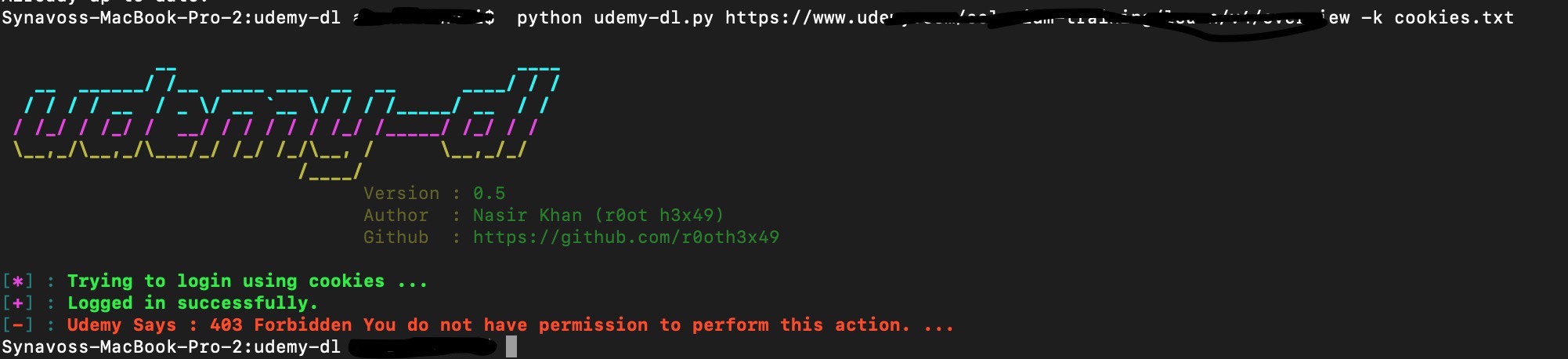
now i get this issue if i download with cookies
ahmedbokhari7
on 11 Apr 2019
@ahmedbokhari7 Check your access_token, i think it's broken, maybe you added or deleted some characters by mistake, should be 40 chars. Make a new cookie file again is the best option.
ghost
on 11 Apr 2019
Cookies Workaround
Cookies do work, but the cookie parser is very fragile with no documentation and no debug output.
So I stepped through the source code and studied the logic.
Make a text file (cookie.txt) with this exact format:
Cookie: access_token=youraccesstokenvalue client_id=yourclientidYou need the "Cookie:" tag, space separators, '=' delimiter, and absolutely no line breaks.
Use the cookie switch: --cookie=cookie.txt
To get the actual values, you can use a cookie chrome extension.
Great! this work fine
thanks!
 fdbiondi
on 24 Apr 2019
fdbiondi
on 24 Apr 2019
USING FIREFOX:
- open udemy and go to your courses page.
- right click and select "Inspect Element"
- choose "Network" tab
- right click on any get request and select "Copy > Copy as cURL"
- save it in a text file e.g "cookie.txt"
- put that text file with the main directory of "udemy-dl-master" folder
- open CMD and run the following command:
python udemy-dl.py COURSE_URL -k cookie.txt
OR
py udemy-dl.py COURSE_URL -k cookie.txt
 wldsaad
on 25 Apr 2019
wldsaad
on 25 Apr 2019
now i get this issue if i download with cookies
Note that udemy changes access token after we select any course to view. When we login to udemy and select any course to view its videos, access token gets changed and thus becomes different from the one which is set when we have not selected any course. Thus you have to use the access token which is set after you have selected the course (same course which you have to download via command line)
 shubhamjain-tolexo
on 28 Apr 2019
shubhamjain-tolexo
on 28 Apr 2019
@shubhamjain-tolexo no, it doesn't change at all, stay the same because it's just a random string to identify you between requests after login. Unless you change your password or expired after 1 month or you logged out
ghost
on 28 Apr 2019
@shubhamjain-tolexo no, it doesn't change at all, stay the same because it's just a random string to identify you between requests after login. Unless you change your password or expired after 1 month or you logged out
But when i logged in, i took the access token value from the browser, then used it to download the course via command line, but i got error: Udemy Says : 403 Forbidden You do not have permission to perform this action. .... But when i select the course, the access token changed and when i used this new access token to download the course via command line, it worked.
shubhamjain-tolexo
on 28 Apr 2019
@shubhamjain-tolexo I tried what you said but it doesn't change at all, i moved from course to course and it still the same. Maybe your cookie method has some bug in it.
ghost
on 28 Apr 2019
Maybe, it has some bug. I am using chrome "edit this cookie" extension.
shubhamjain-tolexo
on 28 Apr 2019
@shubhamjain-tolexo Here is my method: https://github.com/r0oth3x49/udemy-dl/issues/351#issuecomment-476936783
ghost
on 28 Apr 2019
Wow! what a wonderful and step-by-step guide you have made. Well i checked again, but now i am also getting the same value for the access_token. Don't know how i get different values before? Maybe i have made some mistake before. Maybe i have copied value of some other key before. Not sure.
shubhamjain-tolexo
on 28 Apr 2019
Cookies Workaround
Cookies do work, but the cookie parser is very fragile with no documentation and no debug output.
So I stepped through the source code and studied the logic.
Make a text file (cookie.txt) with this exact format:
Cookie: access_token=youraccesstokenvalue client_id=yourclientidYou need the "Cookie:" tag, space separators, '=' delimiter, and absolutely no line breaks.
Use the cookie switch: --cookie=cookie.txt
To get the actual values, you can use a cookie chrome extension.
THX it's help me to ))
 MRDO5
on 11 May 2020
MRDO5
on 11 May 2020
Cookies Workaround
Cookies do work, but the cookie parser is very fragile with no documentation and no debug output.
So I stepped through the source code and studied the logic.
Make a text file (cookie.txt) with this exact format:Cookie: access_token=youraccesstokenvalue client_id=yourclientidYou need the "Cookie:" tag, space separators, '=' delimiter, and absolutely no line breaks.
Use the cookie switch: --cookie=cookie.txt
To get the actual values, you can use a cookie chrome extension.Traceback (most recent call last):
File "C:\udemy-dl-master\udemy-dl.py", line 1443, in
main()
File "C:\udemy-dl-master\udemy-dl.py", line 952, in main
f_in = open(options.cookies)
FileNotFoundError: [Errno 2] No such file or directory: 'cookie.txt'I still get this problem,
please how can I fix it
and is there any short video tutorial about cookies based authentication ?
the problem You guys are facing is you might are saving the name wrong like cookies.txt
save the file like cookies txt is the extension don't explicitly add (.txt) in the name
I was also stuck at this problem and now its solved.
 vnay07
on 14 May 2020
vnay07
on 14 May 2020
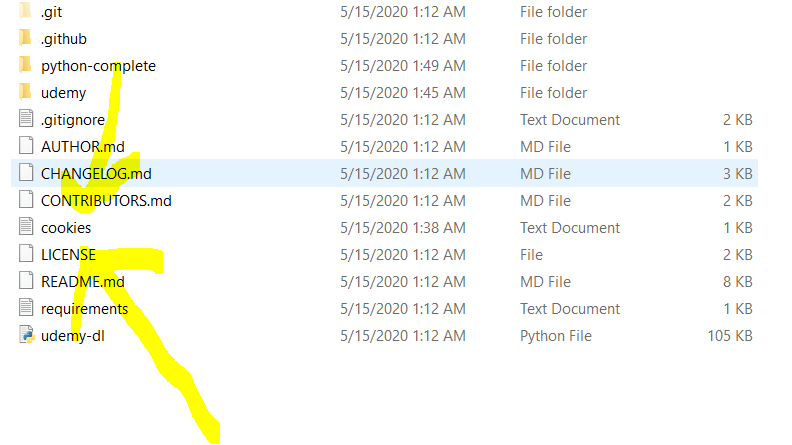
Look at this image. This is what i mean
vnay07
on 14 May 2020
Related issues
 mumi
·
10Comments
mumi
·
10Comments
 vipksmosar
·
6Comments
vipksmosar
·
6Comments
 badjano
·
6Comments
badjano
·
6Comments
 dpsproservices
·
9Comments
dpsproservices
·
9Comments
 mynameismaxz
·
6Comments
mynameismaxz
·
6Comments
Most helpful comment
Cookies Workaround
Cookies do work, but the cookie parser is very fragile with no documentation and no debug output.
So I stepped through the source code and studied the logic.
Make a text file (cookie.txt) with this exact format:
You need the "Cookie:" tag, space separators, '=' delimiter, and absolutely no line breaks.
Use the cookie switch: --cookie=cookie.txt
To get the actual values, you can use a cookie chrome extension.