Ublock: ublock is not working in firefox private browsing
As the title says, uBlock origin is not working in Firefox private window
windows 7 sp1 x64
Firefox version 55.0.3 64 bit
 sasatefa2009
All 10 comments
W10 64 with Firefox version 55.0.3 64 bit and latest off the firefox add-ons does work.......................... but only if you install it every time. Soon as you close Firefox uBlock is listed as installed in the Firefox Add-ons but its inactive and the little icon showing its presence is missing.................... thus tons of garbage is again thrown at me. Please have a look again gorhill?
 LawrencevR
on 30 Aug 2017
LawrencevR
on 30 Aug 2017
@gorhill please have a look instead of throwing it at garbage
sasatefa2009
on 30 Aug 2017
I'm experiencing this issue as well. Issue may be permissions which seems new to add-ons. I too have windows 10, running in firefox(normal mode).
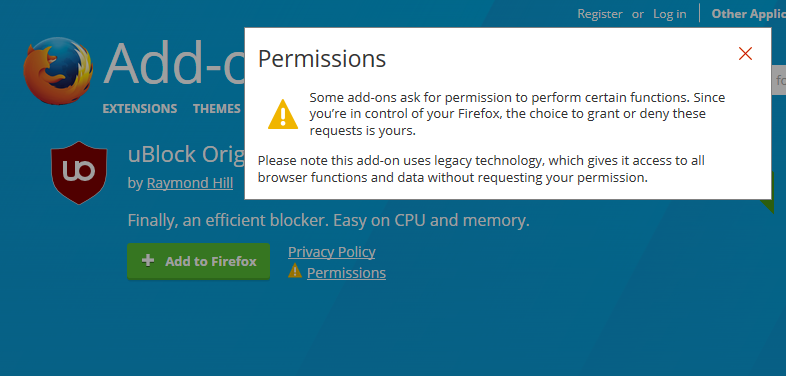
 durffy
on 30 Aug 2017
durffy
on 30 Aug 2017
@durffy @LawrencevR okay guys i think i've found the solution. you need to navigate to the ublock origin extension webpage on firefox while on private browsing and install it again.
sasatefa2009
on 30 Aug 2017
Glad it worked for you - didn’t for me. Soon as I close Firefox its awol again
LawrencevR
on 30 Aug 2017
sasatefa2009, gorhill has to reproduce the bug so the more information you can provide, the better.
 ghost
on 30 Aug 2017
ghost
on 30 Aug 2017
I too have this problem. µBlock Origin/webext hybrid 1.13.10, Firefox 55.0.3 (x64), Windows 10 Pro (1703) x64. I did not change anything in the configuration before the problem occured. It does happen both in private mode and regular instances of Firefox.
Disabling and re-enabling µBlock does not make a difference, but if I uninstall and re-install it, the µBlock-logo (and its function) is restored.
 flolilo
on 30 Aug 2017
flolilo
on 30 Aug 2017
same issue here. I have Firefox 55.03 and Windows 7. Ublock is not working. Even the button disappeared. I installed it new and it worked. Closed Firefox. Start Firefox. And it stopped working. Button disappeared.
 Schokolader
on 30 Aug 2017
Schokolader
on 30 Aug 2017
On a sidenote: Isn't this a duplicate of #2909 ?
flolilo
on 30 Aug 2017
Report to https://bugzilla.mozilla.org/.
 gorhill
on 30 Aug 2017
gorhill
on 30 Aug 2017
Related issues
 rvandermeulen
·
4Comments
rvandermeulen
·
4Comments
 Gitoffthelawn
·
3Comments
Gitoffthelawn
·
3Comments
 KonoromiHimaries
·
3Comments
KonoromiHimaries
·
3Comments
 FuglyLookingGuy
·
3Comments
gorhill
·
3Comments
FuglyLookingGuy
·
3Comments
gorhill
·
3Comments
Most helpful comment
same issue here. I have Firefox 55.03 and Windows 7. Ublock is not working. Even the button disappeared. I installed it new and it worked. Closed Firefox. Start Firefox. And it stopped working. Button disappeared.