Ublock: Toggle option changes are always permanent
Describe the issue
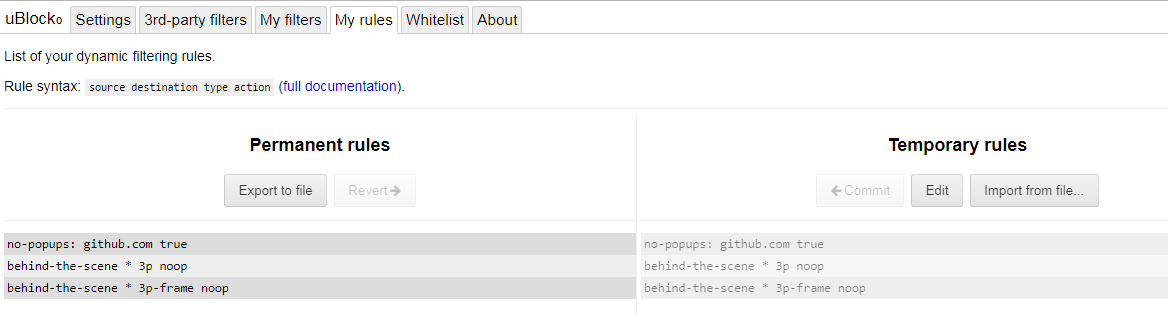
Toggle options are always permanent (also in advanced mode). In advanced mode all (other) rules need to be made permanent with the lock icon. Would be more logical when toggle rules would be permanent in simple mode and would be temporary in advanced mode.
One or more specific URLs where the issue occurs
All
Screenshot in which the issue can be seen
Steps for anyone to reproduce the issue
- Click on "Toggle the blocking of all pop-ups for this site"
- Click on wheels icon to open the dashboard
- Click on My Rules tab
- The pop-up block rule is added (correct) but also made permanent, example:
no-popups: github.com true
Your settings
enabled advanced user, kept all other settings default
- OS/version: Windows 7 Ho,e
- Browser/version: Chromium 60
- uBlock Origin version: 1.13.8
Your filter lists
uBlock experimental
BlockZilla
Disconnect simple ad-filter
Your custom filters (if any)
 Kees1958
All 9 comments
In advanced mode, other rules are temporarily until you click the lock icon, while toggle rules popup, media elements, etc are permanent. When that does not strike you as an irregularity, fine no need to give such an unfriendly answer.
{edit: the post I was referring to was removed]
Kees1958
on 13 Aug 2017
Will like this too. For example i often disable blocking large media for one time use (clicking in "red frame" not always work). When not permanent, will work similarly to "zapper" tool.
 gwarser
on 13 Aug 2017
gwarser
on 13 Aug 2017
Okay let's see whether the developer thinks of this feature request.
Please add an option (for advanced users) to switch the toggle options from permanent (current behavior) to temporary like other rules. When current behavior remains the default, current users would not be impacted by this additional option.
Kees1958
on 13 Aug 2017
For example i often disable blocking large media for one time use
You can do this using the context menu and click the entry "Temporarily allow large media elements". This leaves the switch unchanged.
 gorhill
on 13 Aug 2017
gorhill
on 13 Aug 2017
Okay let's see whether the developer thinks of this feature request.
This also annoys me that the toggle of switches are not temporary. I have experimented with a UI in the past, and I didn't like the result, over-complicating things for mainstream users goes opposite of what I want. See https://github.com/gorhill/uBlock/issues/1117#issuecomment-167381796.
gorhill
on 13 Aug 2017
When you add an option at default behavior section in the settings tab to enable creating per site override rules as temporary the user interface could remain the same, see pictures
UI change to add the option
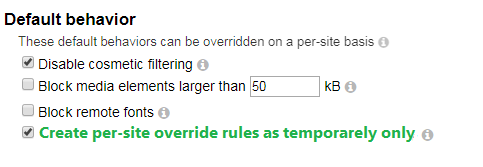
My Rules tab would only show these per site rules as temporary (lock icon makes them permanent identical to how other rules are handled), when this option is selected (so default behavior does not change)

When option is not enabled (default) the per site override behavior creates them as permanent rules, UI and UX would remain the same for simple and advanced mode. So it would be a clean "extra"feature not impacting the standard user (nor the advanced mode user not enabling this option) in any way.
Kees1958
on 13 Aug 2017
I consider the lack of temporary toggle even more of an irritant now that there is a JavaScript master switch.
One idea I am considering is to have the toggle set as temporary when the overview panel is opened (thus allowing the user to persist using the now-visible padlock), and keep it sticky (as it is currently) when the overview panel is not visible.
gorhill
on 2 Sep 2018
That would work for me.
Kees1958
on 2 Sep 2018
Can't remember why I re-opened, so closing again.
gorhill
on 19 May 2019
Related issues
 KonoromiHimaries
·
3Comments
KonoromiHimaries
·
3Comments
 GSNord
·
3Comments
GSNord
·
3Comments
 pfofi
·
4Comments
pfofi
·
4Comments
 butonic
·
3Comments
butonic
·
3Comments
 ghost
·
3Comments
ghost
·
3Comments