Ublock: uBO webext doesn't fill entire panel space
Describe the issue
While the old, even the hybrid filled the entire panel, the webext leaves an empty space.
Screenshot in which the issue can be seen

Steps for anyone to reproduce the issue
- Place the uBO icon in the add-ons overflow
- Open the overflow
- Click the uBO icon
- See empty space to the right of the uBO panel
Your settings
Hide placeholders of blocked elements
Show the number of blocked requests on the icon
Make use of context menu where appropriate
Enable cloud storage support
Disable pre-fetching (to prevent any connection for blocked network requests)
Disable hyperlink auditing
[If you fail to provide this info, I will mark the issue as invalid. Lists all settings which differs from default settings]
- OS/version: Ubuntu 17.04
- Browser/version: Firefox Nightly
- uBlock Origin version: 1.13.9b0
 pwd-github
All 9 comments
Reproducible on Firefox Nightly in Win7 x64
 Betsy25
on 21 Jul 2017
Betsy25
on 21 Jul 2017
Unlike the legacy version, uBO/webext can't control the size of the popup placeholder. This needs to be reported to Firefox, see: https://bugzilla.mozilla.org/show_bug.cgi?id=1369564. I doubt Firefox will consider this an issue on their side, this is probably a by-design overflow menu behavior.
I have the latest Nightly (56.0a1 (2017-07-21) (64-bit)) and I can't reproduce on my side.
 gorhill
on 21 Jul 2017
gorhill
on 21 Jul 2017
Ok I see, uBO is inside the overflow menu, so I can reproduce.
There is also an issue in advanced panel mode, it's being truncated. This is not trivial, so far all popup code never had to assume the popup panel was set in a fixed-width parent frame.
gorhill
on 21 Jul 2017
I believe this is related: https://bugzilla.mozilla.org/show_bug.cgi?id=1373490.
With the legacy version, uBO was able to adjust its size because if was able to gather knowledge about the current context, that its panel was being rendered inside the menu. It's not possible to get context knowledge with webext. What could help is if the Firefox framework set a specific predefined class name on the panel's html element to provide that knowledge, so that an extension could use this class to craft special CSS rules for that case (this is what uBO legacy was doing with its portrait class name).
gorhill
on 21 Jul 2017
Adding a screenshot to add that,
- In Standard mode, as reported by OP, this bug just makes the panel feel weird due to ugly whitespace around it...
- ... but using Advanced mode, it means the entire right part of the panel is truncated and unusable:
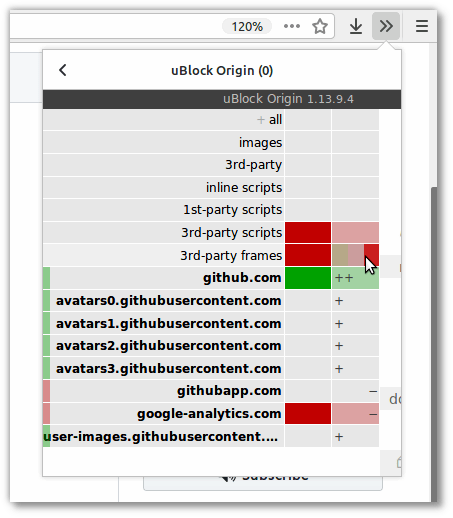
Using Nightly 57.0a1 (2017-08-03) on Linux.
EDIT gah, just saw @gorhill had already noticed this in above comment https://github.com/gorhill/uBlock/issues/2809#issuecomment-316983507 . Sorry for the noise.
There is also an issue in advanced panel mode, it's being truncated. This is not trivial, so far all popup code never had to assume the popup panel was set in a fixed-width parent frame.
 ronjouch
on 3 Aug 2017
ronjouch
on 3 Aug 2017
@gorhill Would it be possible to include a small script to get the visible width of the menu each time it's opened? If it detects that not all of the menu is visible horizontally, it can then apply a different set of style rules.
Alternatively, rewriting the UI with responsive design in mind should alleviate the issue as well.
 wincohi
on 4 Aug 2017
wincohi
on 4 Aug 2017
As this issue remains unfixed in uBO, https://github.com/gorhill/uBlock/issues/2809#issuecomment-320010715 (advanced mode unusable) can be worked around in userChrome.css:
- Option 1: only widen uBO panel - unfortunately the overflow menu subsequently appears in the wrong place (not under the button) if the uBO panel was the last one shown:
#widget-overflow .PanelUI-subView[title^="uBlock Origin"] {
    min-width: 492px !important;
}
- Option 2: widen the overflow menu and all extension panels (not as pretty but popover always appears in the right place):
#widget-overflow, #widget-overflow .PanelUI-subView {
    min-width: 492px !important;
}
Improved CSS welcome ;) Docs for Firefox chrome CSS inspection here: https://developer.mozilla.org/en-US/docs/Tools/Browser_Toolbox
 smithfred
on 26 Dec 2017
smithfred
on 26 Dec 2017
A better version of option 2:
#widget-overflow .PanelUI-subView {
    min-width: 492px !important;
}
#widget-overflow-mainView {
    max-width: none !important;
    width: 492px !important;
}
#widget-overflow-fixed-list > .toolbarbutton-1 {
    max-width: none !important;
}
The latest commit does not fix the unfilled space, but it does solve the popup panel being unusable when the overview pane is enabled.
gorhill
on 2 May 2018
Related issues
 KonoromiHimaries
·
3Comments
KonoromiHimaries
·
3Comments
 pfofi
·
4Comments
gorhill
·
4Comments
pfofi
·
4Comments
gorhill
·
4Comments
 thebigsmileXD
·
3Comments
thebigsmileXD
·
3Comments
 Travisi
·
3Comments
Travisi
·
3Comments
Most helpful comment
Reproducible on Firefox Nightly in Win7 x64