Ublock: Blocked CSP With No Discernible Reason?
Issue
On Twitter (at least that's where I noticed it) when you attempt to play a video uB0 is blocking csp_report which causes the playback to fail.
Looking at the logger, you will see a blocking entry: (I broke the automatic URL parsing intentionally for posting here)
no-spurious-csp-report -- csp_report https
://twitter.com/i/csp_report?a=NVQWGYLXFVYGYYLZMFRGYZJNNVSWI2LB&ro=false
There is no filter shown to be responsible for this block, I have explicitly allowed it using a static filter @@twitter.com/i/csp_report$csp_report,first-party but alas, no difference, it is still blocked and there is nothing anywhere that I can find to explain it. Even the logger doesn't give you a reference of "what" blocked it.
So I am reaching out to find out if this is a bug or something built-in or whatnot and any help to narrow down the reason, or if it is a bug, would be appreciated.
Location
Any Twitter video, this fails on all of them that I have tried. But for the sake of expediency, here is a little one from my own : Navagio Beach
Screenshot
Not really a visual issue and it shouldn't really help, but here is the result and I overlayed the "blocking" information on there too.

Steps to Reproduce
For me, it has been as simple as:
- Any Twitter post with a video
- Click to play it
- Watch it spin it's wheel and spit blocks to the logger
- It fails and shows you the visual above and log item appears
- Filter never kicks in to "stop the blocking"
Settings
- OS/version: Windows 10 Pro x64 (1703)
- Browser/version: Firefox 53.0.2 (64-bit)
- uBlock Origin version: v1.12.1
3P Filters
I created a clean profile just to test this and rule out any conflicts. 3p Filters selected were to most closely match the environment we are trying to "unbreak" and are as follows:

My Filters
There is no custom filter before the fail, but after I added one as stated above.
@@twitter.com/i/csp_report$csp_report,first-party
Thank you in advance and if I missed something, let me know and I will provide it but I think I covered everything relevant. It should be noted if not obvious already, works fine without uB0 or with it disabled in my case; despite the commonly encountered issue of video playback on Twitter using Firefox. Up until now I blamed it on that too until I actually sat down and did a clean profile, ran it, worked and then failed with uB0 active, and the only critical thing I can see would be this log item. So that's what led me to reach out, seemed more than just user error or browser issue.
Hope that helps and thanks in advance.
 GuardianMajor
All 15 comments
It's blocked internally when uBO redirects some resources to local neutered ones, which may cause spurious CSP reports to a remote server. You cannot override this with usual rules -- there is no good reason you would want uBO to cause spurious CSP violation reports to a remote server.
 gorhill
on 8 May 2017
gorhill
on 8 May 2017
Blocked csp_reports don't block twitter videos playback, I can play them just fine, something else on your side is blocking it.
 uBlock-user
on 8 May 2017
uBlock-user
on 8 May 2017
uBlock-user
on 8 May 2017
uBlock-user
on 8 May 2017
Blocked csp_reports don't block twitter videos playback
Right. They are like beacons, its the browser firing them, not the web page, and there is no response to be returned.
gorhill
on 8 May 2017
Yes, those are little nuggets of information sent to the server by the client which is blocked by uBO by default.
uBlock-user
on 8 May 2017
@gorhill
It's blocked internally when uBO redirects some resources to local neutered ones, which may cause spurious CSP reports to a remote server. You cannot override this with usual rules -- there is no good reason you would want uBO to cause spurious CSP violation reports to a remote server.
Ok, fine - accepted; but question is why provide a filter interface for it then? If it can't be done why are you providing an interface to create a filter for it? Also, why not provide feedback when you click on it, like when it shows you which filter blocked something saying, I blocked this? I don't want anything sent to anything that is not necessary but when it is the ONLY thing I can see blocked and the video won't play, disabling makes it work, what assumption would you make?
@uBlock-user I am happy it works for you but your input provides no solution. Echo chamber to repeat what the author says adds no value. Please make your contributions by providing solutions, not repeating what everyone else has already said. Thanks.
So what is blocking it then? You have the exact setup provided above, with that exact setup you are able to make it work? right? Because it is impossible that you setup exactly as I have it listed above and tell me that it works fine when the only way to fix it to disable uB0 or whitelist the whole site. SO, SOMETHING is killing it that is not outside the uB0 ecosystem, so what is it?
Now could uB0 be triggering some other regression external to itself, sure I suppose but when enabled=broken, disabled=works, then you have to admit the cause-effect relationship is pretty obvious, even if by some miracle triggering something external. What I need to understand is why the presence of uB0 is causing this issue. Now if this is not being consistently triggered in all setups, then it makes it even worse, edge cases are often overlooked and ignored because not enough people bring them up but that doesn't mean something is broken. SO about we actually try to figure it out instead of brushing it off. TIA.
GuardianMajor
on 8 May 2017
when it is the ONLY thing I can see blocked and the video won't play, disabling makes it work
What?
If I disable all blocking for Twitter, there is no csp_report being filtered, because none is sent by the browser as there is no resulting CSP violation. The csp_report on Twitter occurs only if uBO redirects to one of its neutered scripts, and this does not happen if nothing is blocked.
The video plays fine here, neutered script injected or not, i.e. csp_report blocked or not.
gorhill
on 8 May 2017
TL;DR
but your input provides no solution.
My input illustrates that csp_reports being blocked is not causing the issue, as you're trying to create one here. The issue seems to be stemming on your end which has nothing to do with csp_reports, period. You're not contributing anything but rather blaming something which has nothing to do with videos not playing on Twitter.
So I will repeat once more, the issue is on YOUR end, and it appears to be more of a filter list issue. Investigate and do whatever you need to instead of whining here and telling me to make some contributions, while I already proved you that isn't the case.
To make it simpler for you to comprehend the situation, switch your uBlock settings to default and check if it still happens.
about we actually try to figure it out instead of brushing it off
Nobody's "brushing" anything off. Secondly, gorhill and I cannot reproduce, so no further help can be offered, which is bad luck for you. Lastly, keep an open mind.
uBlock-user
on 8 May 2017
This issue illustrates how some bad code (iframes, js) is modified once in a while to push the users to switch off whatever blocks the calls needed to view the content.
Provided video comes into a frame on twitter. The info _media couldn't be played_ comes from:
https://abs.twimg.com/web-video-player/89abee84bd43a19f0ceaa2e33986cf730fe014dc/js/build.min.js
 Atavic
on 8 May 2017
Atavic
on 8 May 2017
@gorhill sorry for the delay getting back, had some health issues to deal with,
What?
If I disable all blocking for Twitter, there is no csp_report being filtered, because none is sent by the browser as there is no resulting CSP violation. The csp_report on Twitter occurs only if uBO redirects to one of its neutered scripts, and this does not happen if nothing is blocked.
The video plays fine here, neutered script injected or not, i.e. csp_report blocked or not.
What I means is that, since the videos are dying only after uB0 being active, and disabling it makes it work, and the only thing I could see being blocked (non-ads that are blocked by the filters above) was this, so that's what I was saying and yes that would imply fault. Now as I also said, not saying it is directly caused by uB0 but it MUST be triggering something since it works before, but not after, see "what" now?
@uBlock-user I have no interest in getting into a pissing contest that doesn't resolve the issue at hand, but
My input illustrates that csp_reports being blocked is not causing the issue, as you're trying to create one here. The issue seems to be stemming on your end which has nothing to do with csp_reports, period. You're not contributing anything but rather blaming something which has nothing to do with videos not playing on Twitter.
Again, you are parroting Raymond, so how is that helpful? He had already said that and why he did it, so why do we need to have you repeat it? the value you see here?
So I will repeat once more, the issue is on YOUR end, and it appears to be more of a filter list issue. Investigate and do whatever you need to instead of whining here and telling me to make some contributions, while I already proved you that isn't the case.
You are entitled to your opinion but it has no bearing on anything here as this is not YOUR project, YOU were not asked and you can just go do something else, no one asked you for anything, so what is a whine to you, I consider you being a troll.
You say that no one can recreate the issue that is insincere, given that this is a CLEAN profile, NOTHING ELSE installed. The filters selected are exactly as shown above and nothing else. So if you indeed HAD done the above setup, you'd reproduce it, if not then you didn't, so again brushing it off, so see how not helpful?
I mean if the final result of this discussion is we don't give a shit, have no interest in figuring it out, then that's one thing, I can move on and deal with it on my own but don't act like I am in the wrong for bringing it up and asking for other eyes on it. Because so far that is the only legitimate, professional and genuine thing anyone has done and Raymond explaining the design choice, nothing else has been anything but noise, not to mention noise that was not asked for and was unsolicited.
@Atavic thank you, I will look into that. So far that seems to be the most thoughtful and potentially helpful reply to the issue I have seen. I will give it a look to see if maybe a surrogate script situation might fix it, thanks again. I had noticed that it will load into frames, and had dismantled in the past for other reasons (as part of the "flashget" parsing algorithm) but hadn't checked recently to see if they were also using it as some kind of a callback to interfere with those blocking things. I know that noscript for example resolves that issue by using a surrogate to make the system think it got what it needed and move on but not give them anything. You just gave me my project for the weekend, thank you 👍
GuardianMajor
on 10 May 2017
I'm 100% with you, as I always had this same problem. I gave up any efforts for trying to solve this, as I should reconsider so many hardening options on my system and on the router.
Most direct link to the video is:
https://twitter.com/i/videos/tweet/860611087284133889
Atavic
on 11 May 2017
@Atavic Thank you.
GuardianMajor
on 11 May 2017
I won't be answering to you anymore as egoistic trolls like you are the reason I decided not to contribute to any projects where narcissistic idiots like you and others who can't keep an open mind always ruin the conversation.
With someone showing me that attitude, helping you further would be me hitting my head against the wall and with you it's always has been in all your issues you opened here. It's like you want people to choose yourway or the highway, pretty pathetic on your part. I'm done here, so adios!
uBlock-user
on 13 May 2017
Came across this issue today:
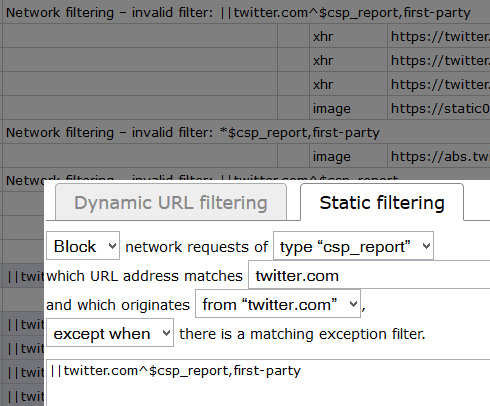
Since EasyPrivacy blocks Twitter's CSP report with ||twitter.com/i/csp_report? I was thinking it'd be good to block _all_ CSP reports.
(Note that I don't have any problems with Twitter when they're blocked.)
2 questions:
- Is it desirable privacy-wise to block all of them?
- If yes, is there a way to block all of them? As shown in the picture, the rule wizard isn't capable of creating an equivalent rule as the one in EasyPrivacy. I also tried
*$csp_reportbut that has the same invalid filter error.
 joey04
on 31 Aug 2017
joey04
on 31 Aug 2017
*$csp_reportbut that has the same invalid filter error.
csp_report is not a valid type, this needs fixing in the logger. CSP report requests are normalized to type other.
gorhill
on 31 Aug 2017
Related issues
 Darkspirit
·
4Comments
gorhill
·
4Comments
gorhill
·
3Comments
Darkspirit
·
4Comments
gorhill
·
4Comments
gorhill
·
3Comments
 UnicornVariant
·
3Comments
gorhill
·
3Comments
UnicornVariant
·
3Comments
gorhill
·
3Comments
Most helpful comment
It's blocked internally when uBO redirects some resources to local neutered ones, which may cause spurious CSP reports to a remote server. You cannot override this with usual rules -- there is no good reason you would want uBO to cause spurious CSP violation reports to a remote server.