Description
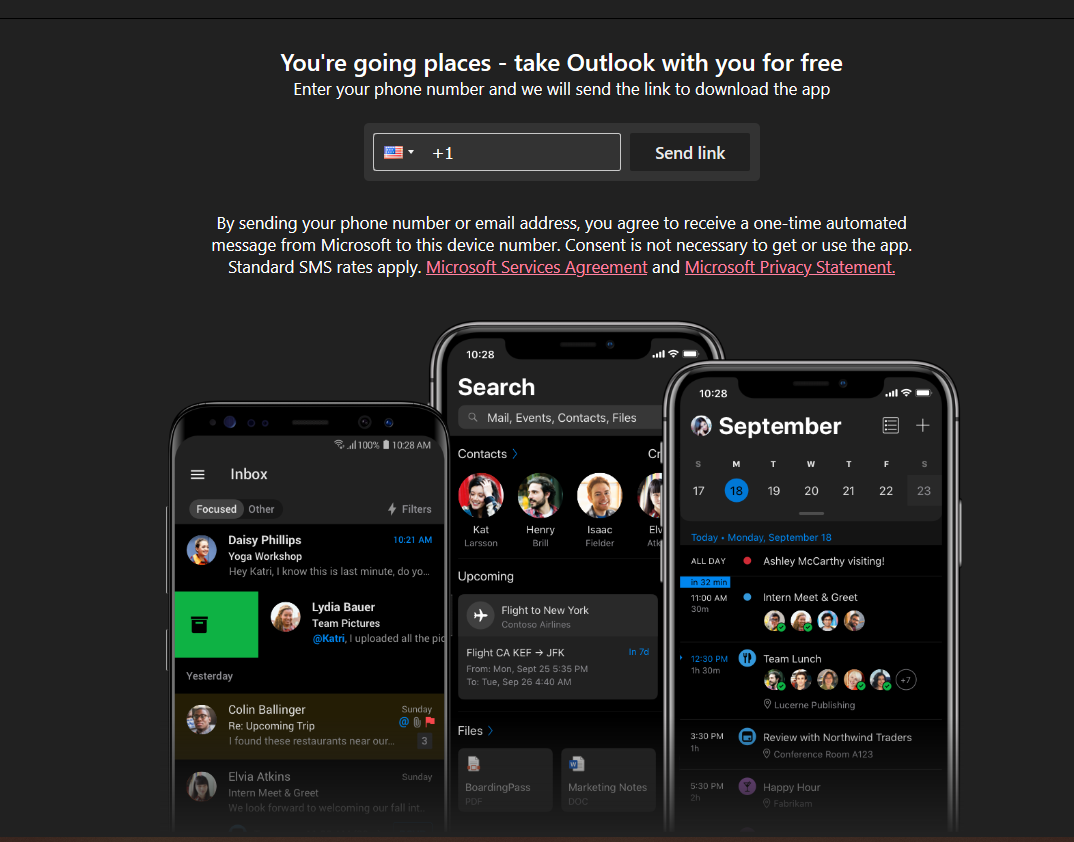
On outlook mail there is a huge area of advertising for the mobile app on the right next to mail which I can't get rid of with any ublock filters.
I was using adguard before and I didn't have this issue with that.
I have tried every single filter including all ad blocking and annoyance filters available including the adguard ones (as this doesn't happen using adguard itself) but it still appears.
All filters tried, all the latest version. Even purged cache and updated and tried again but it remains.
A specific URL where the issue occurs
https://outlook.live.com/mail/0/inbox
Steps to Reproduce
- Open outlook mail
- do nothing, on the right is your mail list on the left it should say something like "no message selected" but instead there is a huge add for the mobile app 3.
Expected behavior:
it should say something like "no message selected"
Actual behavior:
A huge mobile app ad
Your environment
- uBlock Origin version: 1.30.6
- Browser Name and version: Firefox 82.0.2 (64 bit)
- Operating System and version: Windows 10
 ukheather
All 25 comments
Looks like self-promotion, which might be taken care of with one of the _Annoyances_ lists.
 gorhill
on 7 Nov 2020
gorhill
on 7 Nov 2020
I have tried all of the ad and annoyance filters but not one blocked it sadly
ukheather
on 7 Nov 2020
So report via this:
https://agrd.io/report and mark as active AdGuard Annoyance.
 krystian3w
on 7 Nov 2020
krystian3w
on 7 Nov 2020
test this filter, see if is breaking something:
outlook.live.com##[href^="https://go.microsoft.com/fwlink/?linkid"][target="_blank"]:upward(5)
 mapx-
on 7 Nov 2020
mapx-
on 7 Nov 2020
@mapx- not a good idea, that will block all informational popups as well most likely -- too broad.
 llacb47
on 7 Nov 2020
llacb47
on 7 Nov 2020
yeah, I know, I'd not add it in any list - only a suggestion if OP wants to use it as custom filter
mapx-
on 7 Nov 2020
So report via this:
https://agrd.io/report and mark as active
AdGuard Annoyance.
why would I need to report via adguard? If I use the adguard extension it blocks it fine. It is just using the ublock extension I see the ad
ukheather
on 8 Nov 2020
? If I use the adguard extension it blocks it fine.
So check what filter hide ad when using AdGuard Adblocker, maybe needed is enable AdGuard Base instead of Adguard Annoyance.
! https://github.com/AdguardTeam/AdguardFilters/issues/2686
outlook.live.com##div[aria-label][data-max-width] > div[class^="_"] >div[class] > div.ms-FocusZone.disableTextSelection + div[class]:not([data-focuszone-id]):not([role]) > button
outlook.live.com##div[class][style] > div[data-focuszone-id*="FocusZone"] + div[class] > div[class] > button[class]
outlook.live.com##div[autoid].hiddenOverflow > div[autoid] a.o365button[href*="_Upgrade"]
krystian3w
on 8 Nov 2020
But as I said I tried all the filters on ublock and none block it.
All of them. All annoyances all ad blockers.
That includes all the adguard filters on ublock.
So I could have every single filter ticked on ublock and I still get the ad.
So no filters available on ublock block it so I can’t tick anymore as even with them all ticked it still happens.
Not sure why this got closed? It’s still happening? Or was it fixed for the next filter update?
ukheather
on 8 Nov 2020
@ukheather did you test the filter I posted above ?
mapx-
on 8 Nov 2020
@krystian3w if you don't test the filters it's bad to add just noise to the thread.
mapx-
on 8 Nov 2020
The link from 5 hours ago (self-promo.txt)? How do you add that to ublock?
I have just used the ones that show on the app by default
I tried the one you posted 20 hours ago (custom filter) but that caused many issues:
“ outlook.live.com##[href^="https://go.microsoft.com/fwlink/?linkid"][target="_blank"]:upward(5).
ukheather
on 8 Nov 2020
@krystian3w if you don't test the filters it's bad to add just noise to the thread.
I had no idea that link was a filter I could ad which is why I just asked..
I saw
“ So check what filter hide ad when using AdGuard Adblocker, maybe needed is enable AdGuard Base instead of Adguard Annoyance”
So I replied to that. I saw the link but I didn’t realise that was a filter I could add as it didn’t say that
Or use inverted whitelist:
extension://pdffkfellgipmhklpdmokmckkkfcopbh/pages/options.html#whitelist
chrome-extension://bgnkhhnnamicmpeenaelnjfhikgbkllg/pages/options.html#whitelist

I don’t want to whitelist the domain? I want to block numerous ads on outlook.com. It wasn’t blocking one which is why I posted?
ukheather
on 8 Nov 2020
When AdGuard Adblocker works on only twitch and outlook - is recommended if AdGuard replace hide SSAI ads.
krystian3w
on 8 Nov 2020
When AdGuard Adblocker works on only twitch and outlook - is recommended if AdGuard replace hide SSAI ads.
It is recommended to whitelist ads?
But that would defeat the issue I raised initially? I was hoping to block this ad that isn’t getting blocked on ublock.
Getting lost now
The manual filter from yesterday didn’t work, I asked if that link posted to “self promo” was a filter I have to manually add as that wasn’t mentioned hence my issue still is happening.
I am not going to whitelist outlook.com as that wouldn’t help block an ad at all.
ukheather
on 8 Nov 2020
you could at least block the image:
||outlook-1.cdn.office.net/owamail/*/resources/img/outlook-mobile-apps.png$image
mapx-
on 8 Nov 2020
you could at least block the image:
||outlook-1.cdn.office.net/owamail/*/resources/img/outlook-mobile-apps.png$image
I tried blocking the image but it just blocks the bottom large phone image one, not the text above which is 3 or 4 different images of the ad rather than one total ad image.
Like top like is one image, second is another etc.
Tried it again and yep it just blocks the large phone image at the bottom not the other parts of the ad so doing that only hides the phones.
I just thought it was weird that the adguard extension blocks it fine yet no ublock filter do even though some are adguard filters?
ukheather
on 8 Nov 2020
##div[aria-label="Reading Pane"] > div > div > div > div > div:has(> div input[placeholder="+1 (702) 123-4567"])
Easy
krystian3w
on 8 Nov 2020
I am not able to reproduce that big self-promotion ad on my side, I just have a small right bar with _"It looks like you're using an ad blocker. To maximize the space in your inbox, sign up for Ad-Free Outlook."_ -- I would be able to investigate if I could reproduce.
gorhill
on 8 Nov 2020
Right anti-adblock section is hidden by procedural filtering, use https://github.com/gorhill/uBlock/wiki/Resources-Library maybe better.
krystian3w
on 8 Nov 2020
I suppose possible hide self-promotion by some like nosiif / nostif - ad is loaded by javascript after few seconds.
krystian3w
on 8 Nov 2020
@krystian3w Which Adguard filter is taking care of this?
gorhill
on 8 Nov 2020
it works (but I don't know if breaks something)
outlook.live.com##+js(nostif, tryRunTask, 500)
mapx-
on 8 Nov 2020
adguard (annoyances enabled) does not hide that self promo
mapx-
on 8 Nov 2020
Now accepted hide this crap ad, for me also right column again show anti-adblock info.
krystian3w
on 11 Nov 2020
Related issues
 Htin
·
4Comments
Htin
·
4Comments
 ghost
·
3Comments
ghost
·
3Comments
 patrickdrd
·
4Comments
patrickdrd
·
4Comments
 efih
·
4Comments
efih
·
4Comments
 BurungHantu1605
·
3Comments
BurungHantu1605
·
3Comments
Most helpful comment
yeah, I know, I'd not add it in any list - only a suggestion if OP wants to use it as custom filter