Uassets: softonic.com (spanish version) is broken (several lists)
Hello everyone, very good
URL(s) where the issue occurs
[https://www.softonic.com/]
Describe the issue
After several tests I have verified that [https://www.softonic.com/] breaks with several filters.
I don't want to get rid of any of them, since they work well in most of the pages I visit. So would it be possible to fix it without modifying my uBlock settings?... I would appreciate it.
The filters that break [https://www.softonic.com] are:
Defaults
AdGuard Annoyances
Peter Lowe´s Ad and tracking server list
Customized
https://s3.amazonaws.com/lists.disconnect.me/simple_malvertising.txt
Fanboy+Easylist-Merged Complete List
I don´t care about cookies
StevenBlack/hosts
Screenshot(s)
With my uBlock settings it looks like this -->
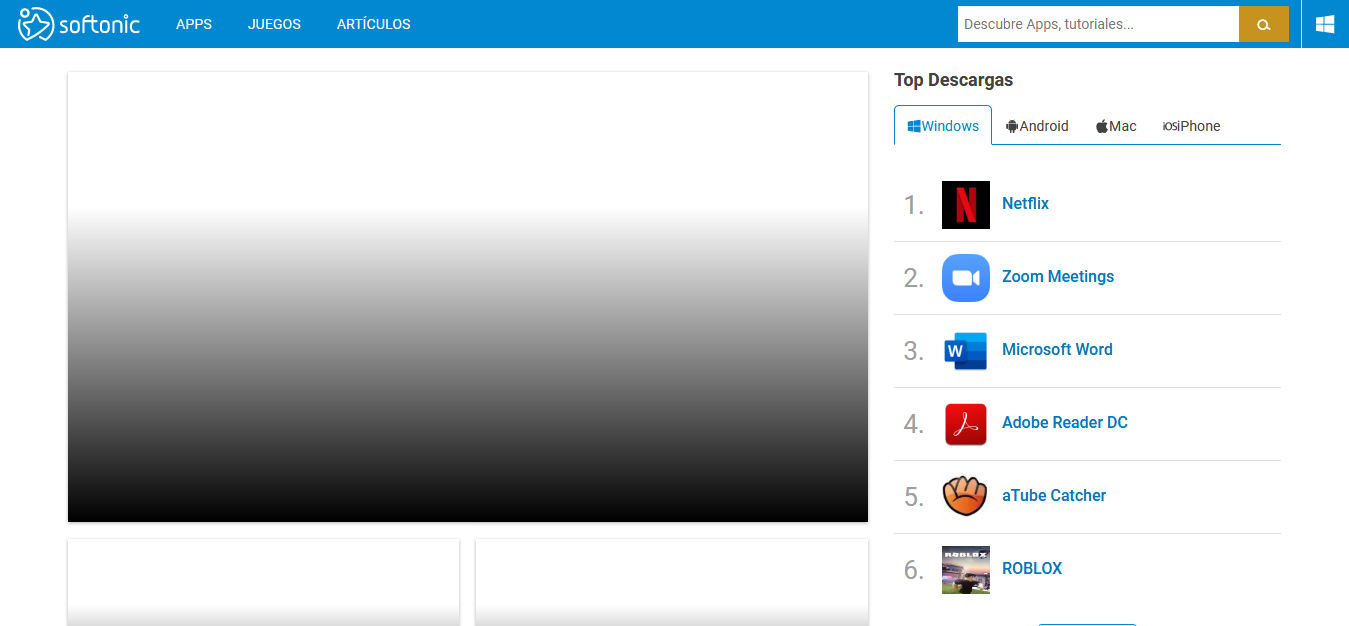
If I turn off the filters I describe, it looks like this -->

Versions
- Browser/version: [Firefox 64-bit 78.0.2]
- uBlock Origin version: [v1.28.2]
Settings
Well, basically I was deactivating the filters that I have mentioned one by one, refreshing the page and testing until I checked that those are the ones that break [https://www.softonic.com/]. I mean...
Default
AdGuard Annoyances
Peter Lowe´s Ad and tracking server list
Customized
https://s3.amazonaws.com/lists.disconnect.me/simple_malvertising.txt
Fanboy+Easylist-Merged Complete List
I don´t care about cookies
StevenBlack/hosts
Notes
Please, I'd appreciate it if it could be solved without me having to get rid of those filters.
Greetings and thanks in advance.
 Jose1971AB
All 18 comments
AdGuard Annoyances is not a default list.
 uBlock-user
on 15 Jul 2020
uBlock-user
on 15 Jul 2020
report here: https://github.com/AdguardTeam/AdguardFilters/issues
 mapx-
on 16 Jul 2020
mapx-
on 16 Jul 2020
Hello @uBlock-user good morning, thank you very much for answering my friend.
AdGuard Annoyances is not a default list.
Aren't these filters default... if so, among them is AdGuard Annoyances. Look at the capture.
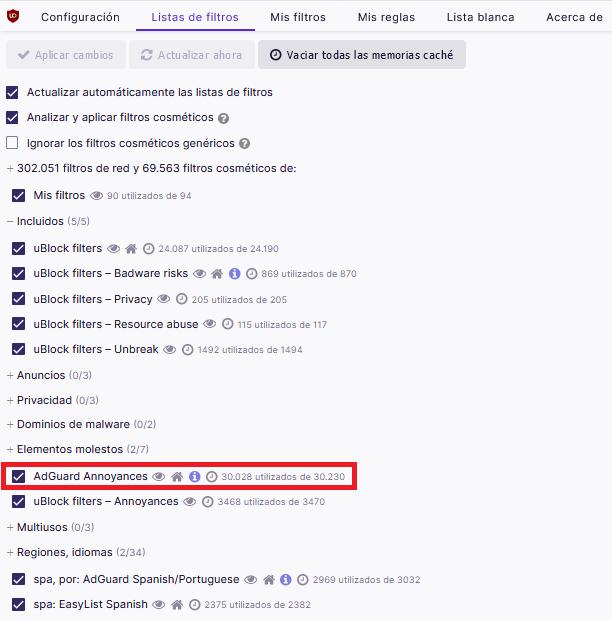
A greeting.
Jose1971AB
on 16 Jul 2020
Reset to default settings and see for yourself.
uBlock-user
on 16 Jul 2020
Hello @mapx- good morning, thank you very much for answering my friend.
report here: https://github.com/AdguardTeam/AdguardFilters/issues
All right I'll try that way.
Thanks a lot and say hello.
Jose1971AB
on 16 Jul 2020
Hello @uBlock-user
Reset to default settings and see for yourself.
Okay, so I understand that the default filters are the ones that are activated by default. Even if it appears in that list if it's not activated they are not default.
I understand, my friend, I think it was a confusion on my part, excuse my ignorance.
Greetings and thanks again
Jose1971AB
on 16 Jul 2020
Hello @mapx- @uBlock-user good morning.
Sorry to bother you again, but the address you provided (https://github.com/AdguardTeam/AdguardFilters/issues) only solved the problem for the AdGuard Annoyances filter. If I activate the other filters that I mentioned in my problem statement, the fault appears. This means, I believe, that they cause conflicts between them.
The filters that proved the failure were the following:
AdGuard Annoyances
Peter Lowe's Ad and tracking server list
https://s3.amazonaws.com/lists.disconnect.me/simple_malvertising.txt
Fanboy+Easylist-Merged Complete List
I don't care about cookies
StevenBlack/hosts
It is only fixed for the AdGuard Annoyances filter, if I activate the others the fault returns.
As I indicated at the beginning of my message, I don't want to get rid of the other filters since I do very well in most of the pages I visit (I would say all of them). It's a compendium of filters that I achieved through many tests, being that configuration the one that works better for me, and it's a pity that for a page all the configuration is spoiled, don't you think?...
So... What could be done?...
A greeting friends again.
Jose1971AB
on 19 Jul 2020
You have to test using the default uBO setup, then (if works) enable those lists above 1 by 1 (not all together) and see if works. If does not work for a certain list => open the logger, refresh the page => identify in the logger the wrong filter (from that list), eventually post it here or at the repository of that specific list
mapx-
on 19 Jul 2020
Hello @mapx-
Let me get this straight, because the translator sometimes plays tricks.
When you say open the register I don't know what you mean, anyway I've done the following...
I have left AdGuard Annoyances activated and now I have been activating the other filters one by one, refreshing the page every time I have activated the filter, and the failure keeps on happening.
So... can I open another issue in this forum that I write to you with the problem or would I have to open an issue for each filter that fails in your specific forum...
It would be 5 open fronts, one for each filter... and if I have to open 5 fronts it would be more cumbersome
Greetings friend
Jose1971AB
on 19 Jul 2020
I didn't talk about register but about uBO's logger where you can see what filters are triggered on a certain page.
https://github.com/gorhill/uBlock/wiki/The-logger
You should use only the default settings in uBO.
mapx-
on 19 Jul 2020
Issues created by non-default lists are not addressed here, so report them at their respective issue trackers.
uBlock-user
on 19 Jul 2020
Hello @mapx- @uBlock-user, good afternoon
I'm going to have to write my problem in the repository of every filter that fails me, but first I'd like to ask some questions to clear up doubts, because there are things that don't fit me, excuse me
I ask you both separately or you answer in general, as you wish...
1.- When you talk to me about "default filter lists" or "default filters" what exactly do you mean?... (It should be noted that some filters disappear and others change over time)
A) All the filters that appear in the uBlock Control Panel when it is first installed, i.e. filters on and filters off
B) Only the filters that are already activated when I install uBlock for the first time
If the answer is "B", you recently solved a problem for me about I don't care about cookies and this filter doesn't appear in uBlock, it disappeared long ago, now you have to include it in Custom.
2.- @mapx-
I didn't talk about
registerbut about uBO's logger where you can see what filters are triggered on a certain page.
https://github.com/gorhill/uBlock/wiki/The-loggerYou should use only the default settings in uBO.
I have been looking and I think I know what you mean, from the tab of https://www.softonic.com/ I have opened the uBlock logger and I have seen all the filters of https://www.softonic.com/ but solving it from there is for users much more advanced than me, I do not dare to touch anything because I can screw up completely.
You also say that I should only use uBloc's default settings. If based on the first question I ask you in this message, the default settings are only the filters that uBlock activates by default, then I would be very unprotected, it would be a very basic protection, wouldn't it?... since very few lists are used.
When I started to use uBlock I was adding filters to be more and more protected in terms of crawlers, ads, malwares (url), phishing, cookies, etc ... until after time I got the settings I have now, which is what I left because it is the one that goes better in most sites I visit.
If you could offer me a complete configuration with only the default lists I would accept it, as long as that list was more or less the same as the one I use now, that is, a list that serves for crawlers, ads, malwares (url), phishing, cookies, etc...
3.- @uBlock-user
Issues created by non-default lists are not addressed here, so report them at their respective issue trackers.
As I said, I'm going to have to write to the repository of each filter, I'm going to be entertained ha, ha... but I think it's going to be the solution.
Basic users like me waste 80% of uBlock Origins potential by not knowing how to use the advanced mode, at least I have tried and I don't know where to start. Once I tried it and I had to uninstall Firefox and install it again, it opened but a blank page appeared, ha, ha, ha...
Well friends, a greeting again ... and always very grateful.
Jose1971AB
on 19 Jul 2020
- default setup => exactly what is enabled when you first install uBO => you are very protected.
- you could add
Fanboy’s Annoyanceif you want remove the various annoyances - don't use any other blocking add-on => you'll get conflicts
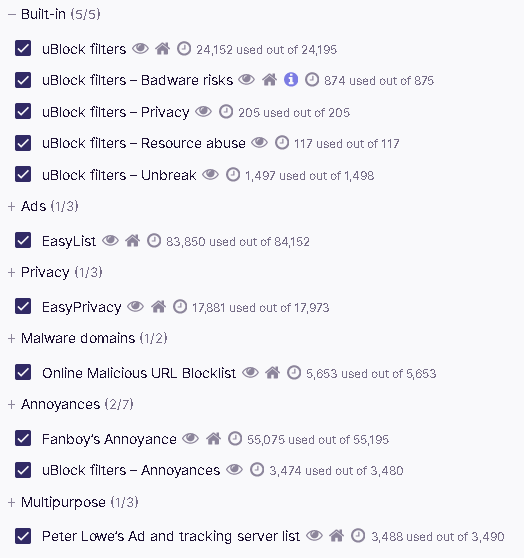
- use only the lists in this pic (and your regional spanish lists):
mapx-
on 19 Jul 2020
Hello @mapx- very good again
So the catch you send me is the default lists, okay, so... if I ask in this forum about any filter that appears in the screenshot you answer me?...that's what I deduce now after what we've been talking about.
If that is so, it turns out that one of the filters that you include as a default Peter Lowe's Ad and tracking server list which is the last one that appears in the capture, also causes the failure in [https://www.softonic.com/]. If you go to my question you will see that it is also one of the filters that causes the failure. That is, it is fixed for AdGuard Anoyannces but not for Peter Lowe's Ad and tracking server list.
Well... that's one thing.
This is an example...
I will try with the configuration that you send me, but now for example... with that configuration that you send me (capture) the filter I don't care about cookies is not included, therefore the warnings to accept cookies would appear again. This is an example of what I mean.
If not, the solution would be to write to the repository of each filter list.
As an ad blocker I only use uBlock Origins, I also use the Cookie AutoDelete extension, but I read somewhere that both add-ons are compatible. As far as privacy and security are concerned, that's what I use.
Well friends, a greeting again
Jose1971AB
on 19 Jul 2020
if you use fanboy's annoyance, the cookies are fixed and you don't need another list.
However, I was able to reproduce your issue only using a spanish ip
this filter should fix it:
@@||doubleclick.net^$script,xhr,domain=softonic.com
mapx-
on 19 Jul 2020
Hello @mapx- good afternoon
It has been solved for both filters, both for AdGuard Annoyances and Peter Lowe's Ad and tracking server list.
The script or filter that you provide me @@||doubleclick.net^$script,xhr,domain=softonic.com I have included it in the tab My filters, I suppose that if it works is because I have to include it in the tab My filters, correct me if it is not there and tell me where to include it.
Let's see... to concrete it
1.- If you assure me that I will be protected against trackers, cookies, warnings to accept cookies, malwares (url), phishing, anti-adblock, etc... well I will try with the list that you sent me yesterday in a capture.
2.- If I found any fault with one of those filters (the ones that appear in your screenshot) I could report it in this site, right?... since they are the default filters of uBlock.
I show you an example... At the beginning of using uBlock I remember that Fanboy's Annoyance filter was breaking many pages, I didn't use third party filters at first (only the ones that appear in uBlock), so I deactivated it, so if I activate it now and find a bug I will have to report it here, right?
Regards, friend.
Jose1971AB
on 20 Jul 2020
- As you can see above I added already that filter to the
unbreaklist - if you have issues with fanboy's annoyances list we can notify
fanboyfor a fix
mapx-
on 20 Jul 2020
Hello @mapx- good afternoon
Well, I think that's all that's left to do, is to try... and try the navigation and see how the pages go.
I am very grateful to you for everything, for your constancy and patience, as well as to @uBlock-user who has also contributed to my problem.
Great work you do with this forum, especially for basic users like me.
A greeting friend and thank you very much, have a nice day.
Jose1971AB
on 20 Jul 2020
Related issues
 terrorist96
·
3Comments
Jose1971AB
·
3Comments
terrorist96
·
3Comments
Jose1971AB
·
3Comments
 JulianNorton
·
3Comments
JulianNorton
·
3Comments
 Htin
·
4Comments
Htin
·
4Comments
 igitur
·
3Comments
igitur
·
3Comments
Most helpful comment
Reset to default settings and see for yourself.