Uassets: Youtube.com breaks with 2 filters from uBlock filters in Chrome/Chromium
URL(s) where the issue occurs
Describe the issue
Most of the site is blank and does not load.
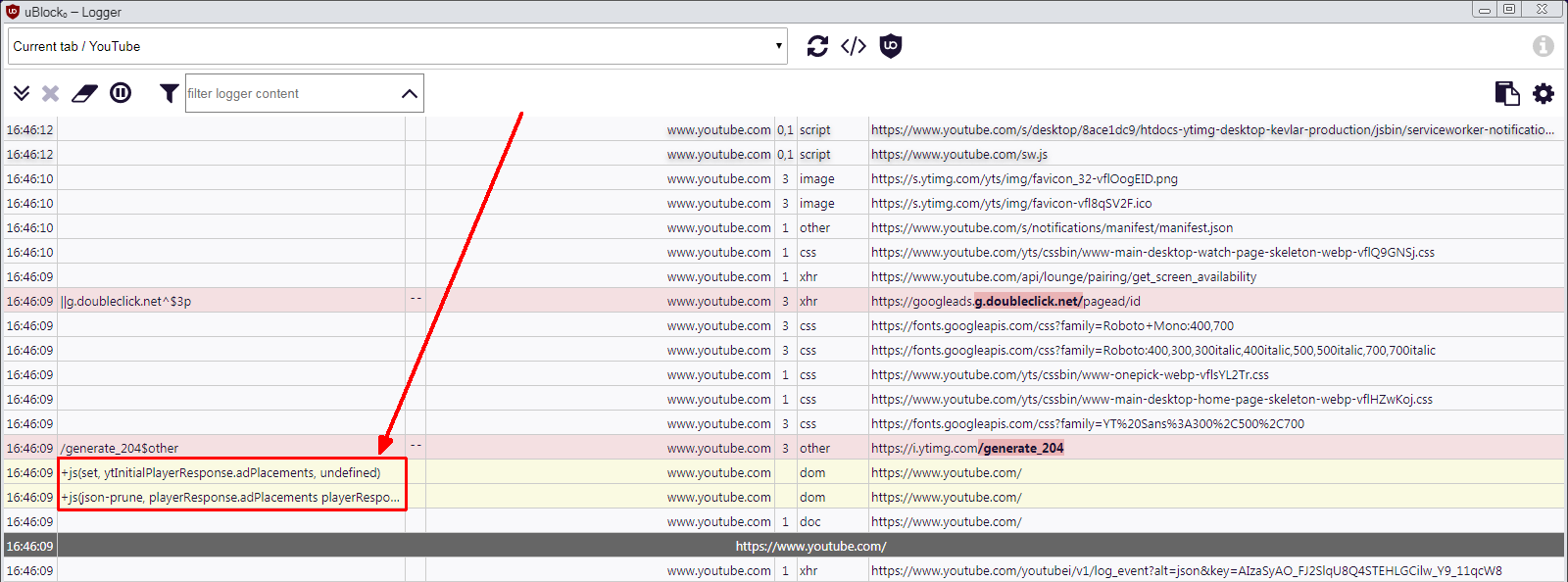
It is caused by the following 2 filters in uBlock Filters:
youtube.com##+js(json-prune, playerResponse.adPlacements playerResponse.playerAds adPlacements playerAds)
youtube.com##+js(set, ytInitialPlayerResponse.adPlacements, undefined)
If I whitelist this or uncheck uBlock filters in uBlock Origin then YouTube loads fine.
Screenshot(s)

Versions
- Browser/version: Chromium Version 79.0.3945.88 (Official Build) (64-bit)
- uBlock Origin version: 1.27.10
Notes
Disable uBLock filters, reload YouTube, issue goes away.
 BlohoJo
All 4 comments
@gwarser
 uBlock-user
on 9 Jun 2020
uBlock-user
on 9 Jun 2020
👍1
If I whitelist this
Both? Like this:
youtube.com#@#+js(json-prune, playerResponse.adPlacements playerResponse.playerAds adPlacements playerAds)
youtube.com#@#+js(set, ytInitialPlayerResponse.adPlacements, undefined)
?
Chromium Version 79.0.3945.88
Why 79?
 gwarser
on 9 Jun 2020
gwarser
on 9 Jun 2020
👍1
It's probably second filter - https://www.reddit.com/r/uBlockOrigin/comments/gzxzv4/youtube_on_firefox_broken/ftizk63/
It's removed now - update uBlock filters.
gwarser
on 10 Jun 2020
👍1
@BlohoJo works now ?
uBlock-user
on 10 Jun 2020
👍1
Was this page helpful?
0 / 5 - 0 ratings
Related issues
 JulianNorton
·
3Comments
JulianNorton
·
3Comments
 KiLL4FuNK
·
4Comments
KiLL4FuNK
·
4Comments
 patrickdrd
·
4Comments
patrickdrd
·
4Comments
 krystian3w
·
3Comments
krystian3w
·
3Comments
 sebastianbell
·
3Comments
sebastianbell
·
3Comments