URL(s) where the issue occurs
[www.tomshardware.com]
Describe the issue
The website uses 1.5 CPU Threads on firefox its fine on chrome
Screenshot(s)
Versions
Firefox 76.0.1
uBlock Origin v1.27.6
Settings
Default
Notes
I have just spent the last few hours tracking down the issue
that has annoyed me for months but have only just got around to finding the issue
any script with responsive.js in its name maxes out 1.5 threads on firefox
its fine on chrome
I have put a temp fix inplace with the following
! 22/05/2020 tomshardware.com
||*responsive.js$script,domain=www.tomshardware.com
If something like this could be added to uBlock filters – Resource abuse that would be great
 Shonk
Shonk
All 13 comments
Please read https://github.com/uBlockOrigin/uAssets/issues/7441
And test the fixes from this comment https://github.com/uBlockOrigin/uAssets/issues/7441#issuecomment-631840016 or this comment https://github.com/uBlockOrigin/uAssets/issues/7441#issuecomment-631860001
 llacb47
on 23 May 2020
llacb47
on 23 May 2020
Please read #7441
And test the fixes from this comment #7441 (comment) or this comment #7441 (comment)
Its not just files hosted on futurecdn they are also on widgets.future-fie.co.uk
my fix above blocks them
Shonk
on 23 May 2020
Its not just files hosted on futurecdn they are also on widgets.future-fie.co.uk
I can't reproduce it's the same futurecdn script on my end.
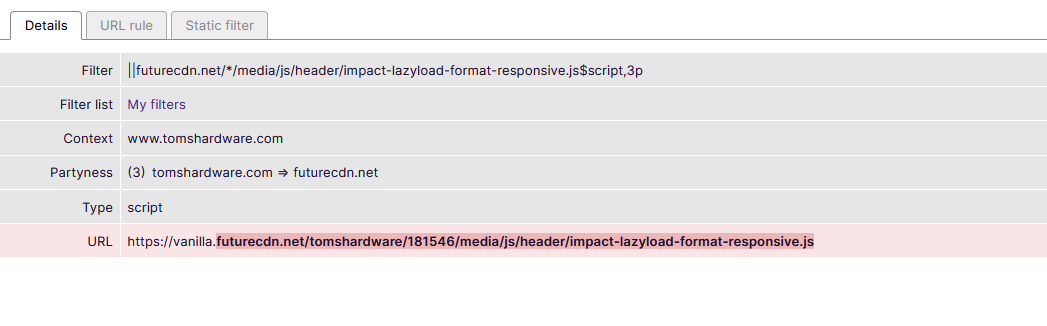
Anyway it is a site/browser issue, someone should open a bug report with mozilla.
 okiehsch
on 23 May 2020
okiehsch
on 23 May 2020
It depends where you are on the website
on the main page you have to scroll all the way down whilst monitoring for more to show up
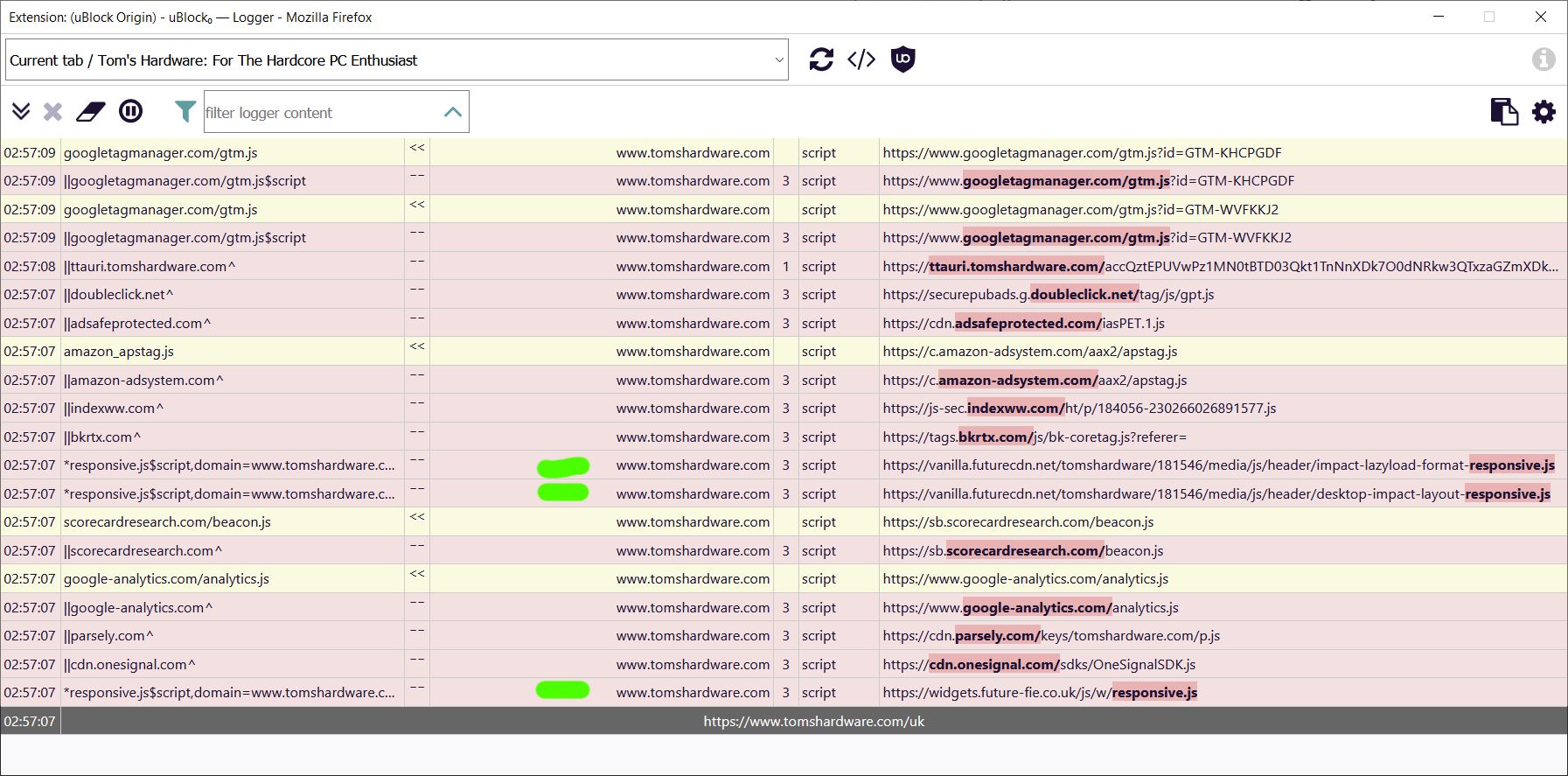
Shonk
on 23 May 2020
Are you sure that widgets.future-fie.co.uk is responsible for a high CPU?
It is not on my end. Blocking the futurecdn responsive script and allowing the future-fie responsive script reduces the CPU usage to 2-3%.
okiehsch
on 23 May 2020
on one of the review pages i had all the others blocked and still had the cpu use
blocked that one and it went to 0% beforei did the catchall
Shonk
on 23 May 2020
I can reproduce the CPU spike but
||widgets.future-fie.co.uk/js/w/responsive.js$domain=tomshardware.com
did not change it.
||vanilla.futurecdn.net/tomshardware/*/impact-lazyload-format-responsive.js$domain=tomshardware.com
did the trick.
EDIT:
||vanilla.futurecdn.net/tomshardware/*/desktop-impact-layout-responsive.js$domain=tomshardware.com
also seems to work and the effect appears to be additive.
 Yuki2718
on 23 May 2020
okiehsch
on 23 May 2020
Yuki2718
on 23 May 2020
okiehsch
on 23 May 2020
Okay, and found the same script on subpages.
So
||vanilla.futurecdn.net/*/media/js/header/impact-lazyload-format-responsive.js$3p
||vanilla.futurecdn.net/*/media/js/header/n-format-format-responsive.js$3p
will be needed. Does adding
||vanilla.futurecdn.net/*-layout-responsive.js$3p
cause some problem? It appears this further reduces CPU usage.
Yuki2718
on 23 May 2020
@Yuki2718 I don't see any noticable further reduction on my end and I don't see any noticable breakage if I add your additional filter.
Like I said in the other issue, it's a site/browser issue and should be fixed by the site or Firefox.
okiehsch
on 24 May 2020
@Yuki2718 I don't see any noticable further reduction on my end and I don't see any noticable breakage if I add your additional filter.
Like I said in the other issue, it's a site/browser issue and should be fixed by the site or Firefox.
All right, thx for testing!
Yuki2718
on 24 May 2020
I can reproduce undue CPU usage, and @Yuki2718's filter along with a CSP to forbid workers seem to work to fix this:
||tomshardware.com^$csp=worker-src 'none'
||vanilla.futurecdn.net/*-layout-responsive.js$3p
Edit: Maybe the CSP directive alone is sufficient, I disabled the other filter and CPU usage is normal.
 gorhill
on 19 Jun 2020
gorhill
on 2 Jul 2020
gorhill
on 19 Jun 2020
gorhill
on 2 Jul 2020
Related issues
 efih
·
4Comments
efih
·
4Comments
 krystian3w
·
3Comments
krystian3w
·
3Comments
 wis
·
4Comments
wis
·
4Comments
 patrickdrd
·
4Comments
patrickdrd
·
3Comments
patrickdrd
·
4Comments
patrickdrd
·
3Comments
Most helpful comment
I can reproduce undue CPU usage, and @Yuki2718's filter along with a CSP to forbid workers seem to work to fix this:
Edit: Maybe the CSP directive alone is sufficient, I disabled the other filter and CPU usage is normal.