ADS in the player.
https://rutube.ru/play/embed/12974816
_This only on Firefox, on Chrome-invalids everything is fine._
Of course fucking of course, the latest version of uBO and Firefox, only the default settings and yes, i have already reset my profile. Nothing.
 bogachenko
All 10 comments
I get this message going to https://rutube.ru/play/embed/12974816

 okiehsch
on 16 Nov 2019
okiehsch
on 16 Nov 2019
it is written here - geolock. Use RUS/UKR/BLR proxy
bogachenko
on 16 Nov 2019
Thanks for the translation, I can't use a VPN at the moment sorry.
okiehsch
on 16 Nov 2019
Is the whole site geolocked or just some videos?
 llacb47
on 16 Nov 2019
llacb47
on 16 Nov 2019
idk, i have no west IP. you tell me @llacb47
bogachenko
on 16 Nov 2019
even if video is not geolocked, midrolls only served to russian IP... I'm using proxy and got midrolls on these videos:
https://rutube.ru/video/e34b634dc2906677434c907d5b46c878/
https://rutube.ru/video/ba1c47ec41529a7fb44691106495342b/
https://rutube.ru/video/4f7545205d3b8d0b5e1853dde32c7f5c/
I have the issue in chrome too.
llacb47
on 16 Nov 2019
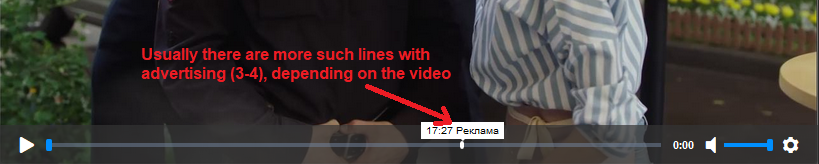
It's SSAI, meaning the ads are inside of the m3u8 stream, nothing can be done to get rid of ads.
However, add this to be able to skip through ads (the player otherwise disables your ability to skip them using controls/progress bar): rutube.ru##+js(json-prune, cuepoints)
llacb47
on 16 Nov 2019
Maybe AdGuard can override m3u8 with replace: https://kb.adguard.com/en/general/how-to-create-your-own-ad-filters#replace-modifier
 krystian3w
on 16 Nov 2019
krystian3w
on 16 Nov 2019
Maybe AdGuard can override m3u8 with replace
That may be the solution to SSAI
meaning the ads are inside of the m3u8 stream
The ads are "stitched", not inside the stream, you can't separate or un-stitch something that is stitched with the video stream.
 uBlock-user
on 17 Nov 2019
uBlock-user
on 17 Nov 2019
There are no problems so far. It works, but for a long time?
bogachenko
on 17 Nov 2019
Related issues
krystian3w
·
3Comments
 ghost
·
3Comments
ghost
·
3Comments
 pepablock
·
4Comments
pepablock
·
4Comments
 patrickdrd
·
4Comments
patrickdrd
·
4Comments
 Jose1971AB
·
3Comments
Jose1971AB
·
3Comments