Uassets: Aliexpress does not work properly with the enabled annoyances list
URL(s) where the issue occurs
https://ru.aliexpress.com/
Describe the issue
Aliexpress does not work properly with the enabled annoyances list
Versions
- Browser/version: Chromium Version 78.0.3904.70 (Official Build) Built on Ubuntu
- uBlock Origin version: development build v1.23.1b11
Settings
- annoyances list enabled
Notes
Adding a filter restores site functionality:
aliexpress.com##.ui-newuser-layer-dialog.ui-window-transition.ui-window-normal.ui-window
 ediowar
All 16 comments
5283
6184
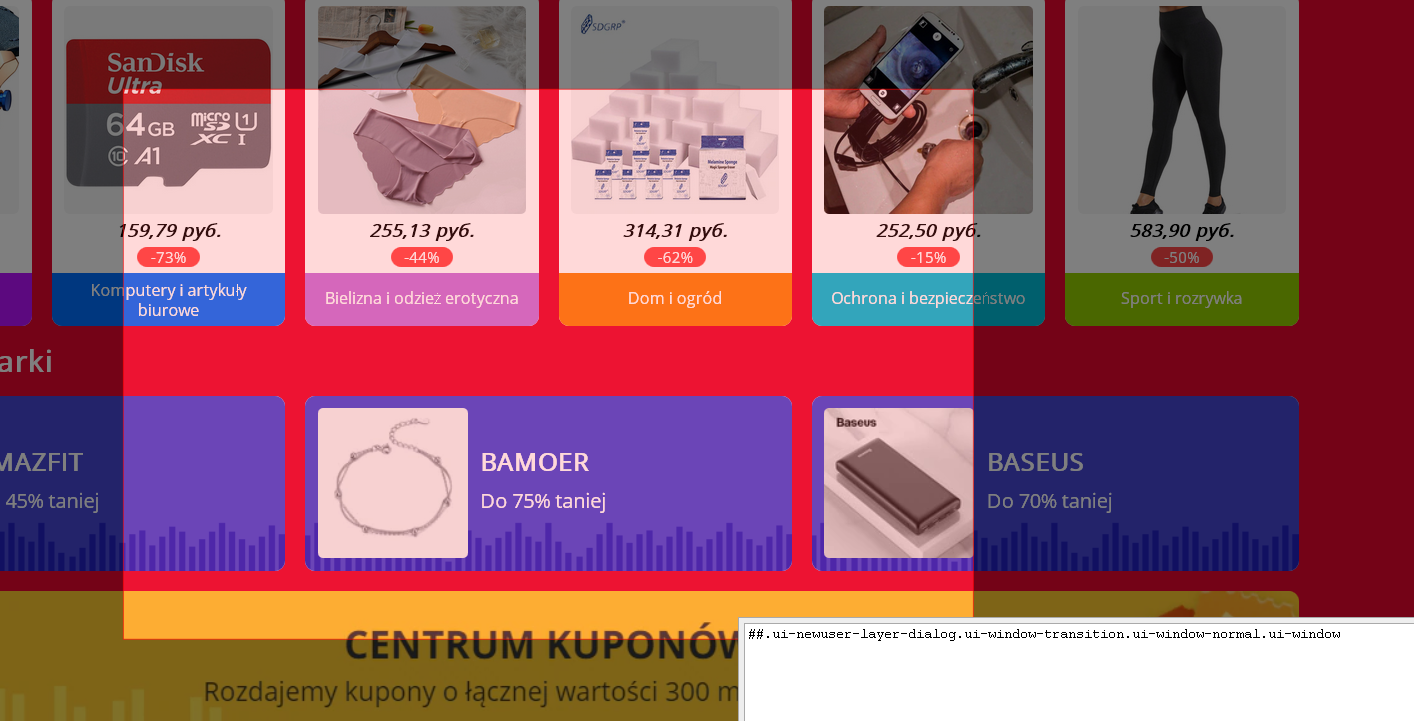
Leftover on center:
 |
|
--- |
 krystian3w
on 12 Nov 2019
krystian3w
on 12 Nov 2019
Is the annoyances list on?
ediowar
on 12 Nov 2019
Yes with uBO Annoyance, guilty is old:
https://github.com/uBlockOrigin/uAssets/blob/f0fa7d418cc11b276f5b8c609715aebb048b6cf9/filters/annoyances.txt#L2031
Disable:
aliexpress.com#@#.close-layer:xpath(..)
IMO any pop-up possible have ❌, maybe better base on class ui-newuser-layer-dialog if now is stable.
new xpath if any still try use:
##.close-layer:xpath(../../..[div][contains(concat(' ',normalize-space(@class),' '),'ui-newuser-layer-dialog')])
Try to turn off POL: Oficjalne Polskie Filtry do AdBlocka, uBlocka Origin i AdGuarda.
RU Adguard is already removed by default.
ediowar
on 12 Nov 2019
Poland no remove this pop-up - I added in other Polish project "Polskie Filtry Elementów Irytujących": https://github.com/PolishFiltersTeam/PolishAnnoyanceFilters/commit/b3cb9fa8874a59e8b69d0b945b93cb9324bdf901
krystian3w
on 12 Nov 2019
Which pop-up? Your settings?
ediowar
on 12 Nov 2019
That:
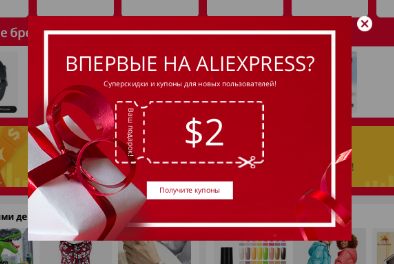
This is no cut property:
So on center on works click with mouse.
New XPath:
:xpath(../../..[div][contains(concat(' ',normalize-space(@class),' '),'ui-newuser-layer-dialog')])
I can not reproduce. Place a link to Google Drive with screenrecord. At the same time, show the settings there.
ediowar
on 12 Nov 2019
@ediowar could you provide the steps to get the issue ? I don't really understand from the video
 mapx-
on 12 Nov 2019
mapx-
on 12 Nov 2019
Links that are in the area aliexpress.com##.ui-newuser-layer-dialog.ui-window-transition.ui-window-normal.ui-window become unclickable.
ediowar
on 12 Nov 2019
meaning aliexpress.com,aliexpress.ru ?
mapx-
on 12 Apr 2020
@mapx- you added aliexpress.com again
 llacb47
on 12 Apr 2020
llacb47
on 12 Apr 2020
no better *?
Maybe other countries use "regional" TLD instead of ".com" or sudomain "XX.aliexpress.com"?
krystian3w
on 12 Apr 2020
Maybe other countries use "regional" TLD instead of "
.com" or sudomain "XX.aliexpress.com"?
Aliexpress only for Russia uses "regional" TLD. The rules for the domain also apply to the subdomain.
ediowar
on 12 Apr 2020
@krystian3w, found Aliexpress's bug.
After changing the language to Polish at the top of the page, it is impossible to change the language.
Steps to Reproduce
- Go to any Aliexpress subdomain exept pl.aliexpress.com.
- Not sign in, at the top of the page change language to Polish.
- At the top of the page change the language to any other.
Expected behavior:
The language is any other.
Actual behavior:
The language is Polish.
Chromium version 80.0.3987.163 (Official Build) Built on Ubuntu , running on Ubuntu 16.04 (64-bit)
Notes:
The subdomain pl.aliexpress.com has the http protocol, not https, as when changing the language to Polish at the bottom of the page (AliExpress Multi-Language Sites). After changing the language to Polish at the bottom of the page, you can change the language at the top of the page.
You can report a bug to https://home.aliexpress.com/survey.htm
ediowar
on 13 Apr 2020
Related issues
 ghost
·
3Comments
ghost
·
3Comments
 JulianNorton
·
3Comments
krystian3w
·
3Comments
JulianNorton
·
3Comments
krystian3w
·
3Comments
 KiLL4FuNK
·
4Comments
KiLL4FuNK
·
4Comments
 terrorist96
·
3Comments
terrorist96
·
3Comments
Most helpful comment
@mapx- you added
aliexpress.comagain