Uassets: svonm.com / golem.de - Video playback issues (uBlock filters)
Affected site:
http://www.kicker.de/
Issue:
Video playback stops after about 13 seconds.
Example:
http://www.kicker.de/news/video/2037466/video_vorsichtige-offensive---schalke-und-die-chance-bei-mancity.html
Problem filter:
- uBlock filters
Problem rule:
||svonm.com/hd-main.js$script,redirect=hd-main.js,domain=4players.de|bento.de|brigitte.de|buffed.de|desired.de|gamesaktuell.de|gamezone.de|gamona.de|giga.de|golem.de|kicker.de|kino.de|myspass.de|pcgames.de|pcgameshardware.de|spiegel.de|spiegel.tv|spielaffe.de|spieletipps.de|t-online.de|tele5.de|thrashermagazine.com|welt.de|videogameszone.de
Possible fix:
@@||svonm.com/hd-main.js$script,domain=kicker.de
Note:
The issue only seems to occur when using uBO Legacy.
Reference (with relevant information):
https://forum.palemoon.org/viewtopic.php?f=46&t=21644&p=163445#p163443
--
- OS/version: Windows 8.1 Pro (x64)
- Browser/version: Pale Moon v28.4.0 (x64)
- Adblock Extension/version: uBlock Origin v1.16.4.9 (XUL)
--
EDIT:
As it turns out, more sites are affected by similar issues.
See my post here:
https://github.com/uBlockOrigin/uAssets/issues/5120#issuecomment-472497419
 THEtomaso
All 52 comments
Adding that filter would break the video using Chromium/Chrome.
I can't test with Firefox at the moment..
||svonm.com/hd-main.js$script,redirect=hd-main.js,domain=kicker.de
kicker.de##+js(golem.de.js)
is dealing with pre-roll ads at the site.
 okiehsch
on 12 Mar 2019
okiehsch
on 12 Mar 2019
I don't see any video ads at that site, when using the exception rule that I posted.
At least, not in Pale Moon.
THEtomaso
on 12 Mar 2019
I get the pre-roll ads if I remove both entries using Chromium.
If you also add
kicker.de#@#+js(golem.de.js)
do you get them?
okiehsch
on 12 Mar 2019
Nope, still no ads.
They might be blocked by another filter which I'm using though.
--
EDIT:
I disabled all other filters..
Still no video ads!
THEtomaso
on 12 Mar 2019
The redirection is needed on my end for the video to play properly using chromium.
Does
!#if env_firefox
@@||svonm.com/hd-main.js$script,domain=kicker.de
!#endif
work with Pale Moon?
okiehsch
on 12 Mar 2019
No.
THEtomaso
on 12 Mar 2019
Well, then there is nothing we can do, I can reproduce pre-roll ads if I remove the entries for all browsers.
okiehsch
on 12 Mar 2019
After further comparing the loggers for uBO Legacy and the WebExtensions version, I now see that the following rule (found in 'uBlock filters') doesn't load in the legacy version:
kicker.de,kino.de,meinestadt.de,spieletipps.de##+js(set-constant.js, String.fromCharCode, noopFunc)
THEtomaso
on 12 Mar 2019
That filter will not load in Firefox.
It is part of a block of filters with a
!#if env_chromium
!#endif
condition, see https://github.com/gorhill/uBlock/wiki/Static-filter-syntax#if-condition
okiehsch
on 12 Mar 2019
OK.
That's the only difference I saw though.
THEtomaso
on 12 Mar 2019
I have now tested with Firefox stable and the video works fine.
We can't add your filter for the legacy versions of Firefox and Pale Moon without breaking the site for Chrome users, so I don't know what can be done other than adding your filter to ones own list.
okiehsch
on 12 Mar 2019
what if you try
!#if !env_chromium
!#if !env_firefox
!#if !env_edge
!#if !env_safari
!#if !env_mobile
@@||svonm.com/hd-main.js$script,domain=kicker.de
!#endif
!#endif
!#endif
!#endif
!#endif
 mapx-
on 13 Mar 2019
mapx-
on 13 Mar 2019
I quickly looked through the other sites (included in the uBlock filters rule), and it seems like Kino.de is affected in the same way too.
Example:
https://www.kino.de/film/captain-marvel-2019/
So, the new exception rule should be updated to include it, like this:
@@||svonm.com/hd-main.js$script,domain=kicker.de|kino.de
Under Chromium though, the videos @ kino.de won't play at all, as the video windows won't even open!
I haven't figured out which rule is causing it though.
--
For uBO Legacy, the problem also occurs at giga.de and spieletipps.de (the videos stops after 13-14 seconds).
Examples:
https://www.giga.de/downloads/windows-10/news/windows-10-darum-sollten-pc-spieler-das-neue-update-lieber-nicht-installieren-13-03-2019/
https://www.spieletipps.de/artikel/9902/1/
EDIT:
IMPORTANT INFORMATION:
giga.de and spieletipps.de uses some sloppy UA sniffing.
To properly troubleshoot the filter issues at those sites in Pale Moon, you need to run it in "Native" mode:
('Preferences' > 'Advanced' > 'General' > 'Compatibility' > 'User Agent Mode' > "Native")
--
@ tele5.de, the videos play just fine, but has ads in them.
Because of regional restrictions, this was tested by gepus:
https://forum.palemoon.org/viewtopic.php?f=46&t=21644#p163483
THEtomaso
on 13 Mar 2019
for kino test
kino.de#@#+js(addEventListener-defuser.js, /^(?:DOMContentLoaded|load)$/, =!0)
mapx-
on 13 Mar 2019
for giga in palemoon needing
@@||svonm.com/hd-main.js$script,domain=videos.giga.de
but I get in console
Cannot play media. No decoders for requested formats: application/javascript
same for spieletipps
mapx-
on 13 Mar 2019
for kino test
kino.de#@#+js(addEventListener-defuser.js, /^(?:DOMContentLoaded|load)$/, =!0)
Yes, this seems to fix the issue for Chromium. :thumbsup:
Although, for some strange reason it doesn't show up in uBO's logger.
--
I get in console
"Cannot play media. No decoders for requested formats: application/javascript"
To reproduce in Pale Moon, try to disable MSE for WebM video.
('Preferences' > 'Content' > 'Video' > 'Enable MSE for WebM video' > UNCHECK).
THEtomaso
on 13 Mar 2019
it was already unchecked, how ever giga seems running fine now after retesting it
spieletipps instead I was able to run the video after whitelisting all scripts / xhr and waiting minutes
mapx-
on 13 Mar 2019
It seems very unstable (palemoon). Trying with the same settings 3-4 times I have different results.
Maybe you should migrate to some other browser. This way you'll have a full uBo (not legacy one)
mapx-
on 13 Mar 2019
It seems very unstable (palemoon). Trying with the same settings 3-4 times I have different results.
Maybe you should migrate to some other browser. This way you'll have a full uBo (not legacy one)
Nah, IMO there are too many mystery-connections going on in the background in other browsers, and they leave you with too little control.. especially Chrome-based ones.
Besides, I don't notice any "unstable" behaviour in Pale Moon, related to these video issues.
With uBO disabled, the videos play just fine @ spieletipps.de.
I DID however notice some weird behaviour @ giga.de (like you described), but after some closer inspection, I've narrowed it down to a site issue..
More specifically, the site seems to enforce badly implemented UA sniffing!
After tweaking Pale Moon's UA a bit, the videos play just fine there as well (with uBO disabled, of course).
THEtomaso
on 13 Mar 2019
I removed the kino.de filter, was redundant anyway I just forgot about it. :(
https://github.com/uBlockOrigin/uAssets/commit/e07b8d8b7a9d0a597fa1e371d2d613b004a2fac7
okiehsch
on 13 Mar 2019
@mapx-:
Instead of tweaking Pale Moon's UA manually (like I did at first), you can simply switch to "Native" mode.
('Preferences' > 'Advanced' > 'General' > 'Compatibility' > 'User Agent Mode' > "Native")
This takes care of the sloppy UA sniffing @ giga.de, and makes the filter issue easier to troubleshoot at that particular site!
THEtomaso
on 13 Mar 2019
ok, using native mode is working all fine on my side (using the whitelisting added above)
mapx-
on 13 Mar 2019
using native mode is working all fine on my side (using the whitelisting added above)
Confirmed!
I regret not checking for UA sniffing earlier, as it would have saved us all some unnecessary troubleshooting.
Thanks to both of you, for looking into, and fixing, these filter issues! :+1:
THEtomaso
on 13 Mar 2019
You are right, the filter only works for chromium the exception
````
@@||svonm.com/hd-main.js$script,domain=kicker.de
`````
does get applied if I use Firefox and I get pre-roll ads.
okiehsch
on 14 Mar 2019
we have to wait a fix from @gorhill
mapx-
on 14 Mar 2019
!#if !env_chromium
@@||svonm.com/hd-main.js$script,domain=kicker.de|kino.de|videos.giga.de|video.spieletipps.de
!#endif
!#if !env_firefox
@@||svonm.com/hd-main.js$script,domain=kicker.de|kino.de|videos.giga.de|video.spieletipps.de
!#endif
!#if !env_edge
@@||svonm.com/hd-main.js$script,domain=kicker.de|kino.de|videos.giga.de|video.spieletipps.de
!#endif
!#if !env_safari
@@||svonm.com/hd-main.js$script,domain=kicker.de|kino.de|videos.giga.de|video.spieletipps.de
!#endif
!#if !env_mobile
@@||svonm.com/hd-main.js$script,domain=kicker.de|kino.de|videos.giga.de|video.spieletipps.de
!#endif
could this work in the meantime?
okiehsch
on 14 Mar 2019
No, it doesn't. Already the first if will permit FF whitelisting
mapx-
on 14 Mar 2019
Yes you're right that was a silly idea.
okiehsch
on 14 Mar 2019
Maybe (if parsing more code lines it's difficult) having more conditions on a line would fix the issue
mapx-
on 14 Mar 2019
We could add a Firefox specific important block for svonm.com/hd-main.js the exception should then still work with Pale Moon.
okiehsch
on 14 Mar 2019
something like this
!#if !(env_chromium & env_firefox & env_edge & env_safari & env_mobile)
@@||svonm.com/hd-main.js$script,domain=kicker.de|kino.de|videos.giga.de|video.spieletipps.de
!#endif
there are ads only in firefox ?
mapx-
on 14 Mar 2019
At the moment with chromium/chrome
!#if !env_chromium
!#if !env_firefox
!#if !env_edge
!#if !env_safari
!#if !env_mobile
the exception does not apply, so no ads.
With Firefox the exception applies and I can see pre-roll ads.
I can't test with Pale Moon.
okiehsch
on 14 Mar 2019
maybe could help (in the future) having env_other too
mapx-
on 14 Mar 2019
well, only FF "sees" that filter ? and chrome doesn't ? weird, it's some bug I guess
mapx-
on 14 Mar 2019
It's https://github.com/uBlockOrigin/uBlock-issues/issues/270 as I understand it if you add
!#if !env_chromium
!#if !env_firefox
whatever
!#endif
!#endif
"whatever" will only apply for the first, i.e. chromium and not firefox, condition,
okiehsch
on 14 Mar 2019
We could add the whitelisting filter without "if" and the same filter with badfilter for all known envs (with if)
mapx-
on 14 Mar 2019
Adding
!#if env_firefox
||svonm.com/hd-main.js$script,important,domain=kicker.de|kino.de|videos.giga.de|video.spieletipps.de
!#endif
and keeping the existing filter seems more straightforward, if it also works for Pale Moon.
The filter fixes the pre-roll ads on my end using Firefox.
okiehsch
on 14 Mar 2019
for me we should have (I don't understand the bugs in the current behaviour on multi included "if" )
@@||svonm.com/hd-main.js$script,domain=kicker.de|kino.de|videos.giga.de|video.spieletipps.de
!#if env_chromium
@@||svonm.com/hd-main.js$script,domain=kicker.de|kino.de|videos.giga.de|video.spieletipps.de,badfilter
!#endif
!#if env_firefox
@@||svonm.com/hd-main.js$script,domain=kicker.de|kino.de|videos.giga.de|video.spieletipps.de,badfilter
!#endif
!#if env_edge
@@||svonm.com/hd-main.js$script,domain=kicker.de|kino.de|videos.giga.de|video.spieletipps.de,badfilter
!#endif
!#if env_safari
@@||svonm.com/hd-main.js$script,domain=kicker.de|kino.de|videos.giga.de|video.spieletipps.de,badfilter
!#endif
!#if env_mobile
@@||svonm.com/hd-main.js$script,domain=kicker.de|kino.de|videos.giga.de|video.spieletipps.de,badfilter
!#endif
I rather not bloat uBO filters with that kind of fix. A volunteer using a legacy Firefox version of uBO is welcome to create a filter list which contains filters specific to the Firefox-legacy version of uBO.
I don't understand the bugs in the current behaviour on multi included "if"
Known issue: https://github.com/uBlockOrigin/uBlock-issues/issues/270.
 gorhill
on 14 Mar 2019
gorhill
on 14 Mar 2019
@lassekongo83:
Perhaps you'd be able to come up with a solution that works for all browsers?
If you'd be willing to take a crack at it, of course.
THEtomaso
on 14 Mar 2019
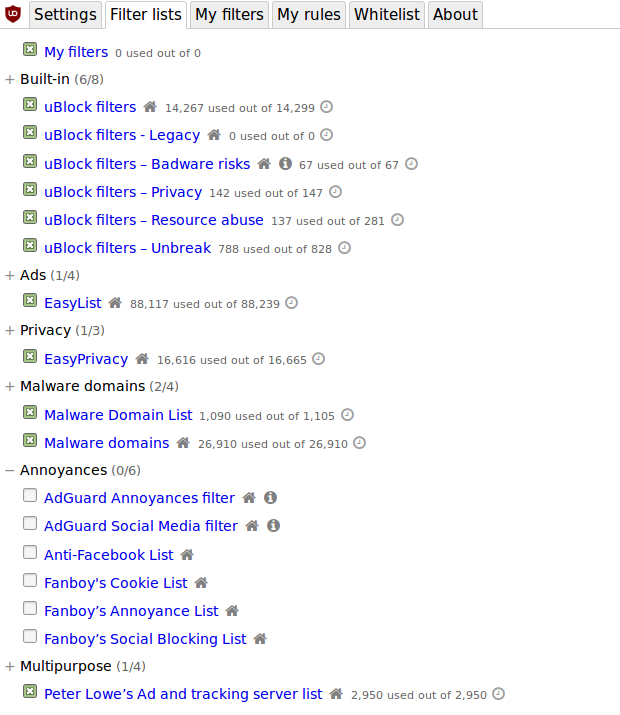
I have created a new list which purpose is to hold filters to fix issues specific to legacy versions of uBO:
https://github.com/uBlockOrigin/uAssets/blob/master/filters/legacy.txt
That list will be automatically enabled in Firefox-legacy version of uBO once it updates assets.json. But I believe this may first require a hard purge-cache (ctrl-shift-click "Purge caches") once uBO is updated to 1.16.4.10.
gorhill
on 15 Mar 2019
@gorhill:
Actually, this doesn't seem to work.
I just updated to v1.16.4.10, performed a hard purge, and updated my filter list..
However, the legacy filter didn't appear!
--
EDIT:
This worked (to enable the new "Legacy" filter):
1 - Removed uBO.
2 - Deleted ublock0.sqlite.
3 - Installed uBO.
But now, there's another issue!:
After performing the steps above, and forcing a hard purge + update, a couple of regional filters fail to update themselves, showing an "out of date" warning.
These filters are "NOR: Dandelion Sprouts norske filtre" and "FIN: Finnish Addition to Easylist", both of which have been changed recently.
("NOR: Dandelion Sprouts norske filtre" should now be "NOR, DNK, ISL: Dandelion Sprouts nordiske filtre" and "FIN: Finnish Addition to Easylist" should be "FIN: Adblock List for Finland")
Also, the recently added "AdGuard Social Media filter" fails to appear!
In previous versions of uBO legacy, a hard purge + update refreshed the filterlist and updated such filters, without any issues!
THEtomaso
on 15 Mar 2019
It's not a code path I have tried much. After looking into the code, it seems a "Reset to factory" is necessary -- probably "Restore from backup file" would work too). The missing step is that the key assetSourceRegistry must be removed from the indexedDB file.
gorhill
on 15 Mar 2019
I went back to uBO v1.16.4.9.
Now, all of the filters that I mentioned in my previous post updated themselves just fine.
..so there's definitely a regression in v1.16.4.10!
THEtomaso
on 15 Mar 2019
I forgot to bring all changes to assets.json in master into firefox-legacy branch. This is fixed now.
gorhill
on 15 Mar 2019
This is fixed now.
Confirmed! :+1:
I know it's just a very minor thing, but many of the filters in uBO Legacy still requires a filter update to show the new filter names.
And 'AdGuard Social Media filter' is still missing, until that action has been performed.
THEtomaso
on 15 Mar 2019
All is fine on my side:
gorhill
on 15 Mar 2019
What I ment is that those filters show the wrong filter names, and fails to appear in the filter list, until a filter update has been run for the first time.
That's why I called it a very minor issue (if it even qualifies as such). :)
THEtomaso
on 15 Mar 2019
until a filter update has been run for the first time
Yes, this will be fixed whenever there will be a new release for firefox-legacy, the assets.json in the package is still the one not updated.
gorhill
on 15 Mar 2019
I copied the fix to the legacy list and removed the safari and edge part, I don't think any user of those browsers would ever entertain the idea of enabling that list.
We should remove the fix from uBO-filters in a week or two to make sure that all legacy users have the chance to get the new list.
okiehsch
on 15 Mar 2019
I've announced it in the Pale Moon forum here:
https://forum.palemoon.org/viewtopic.php?f=46&t=21666/
..to raise awareness of it.
THEtomaso
on 15 Mar 2019
Related issues
 Jose1971AB
·
3Comments
Jose1971AB
·
3Comments
 terrorist96
·
3Comments
terrorist96
·
3Comments
 ip012
·
3Comments
ip012
·
3Comments
 Htin
·
4Comments
Htin
·
4Comments
 JulianNorton
·
3Comments
JulianNorton
·
3Comments
Most helpful comment
I have created a new list which purpose is to hold filters to fix issues specific to legacy versions of uBO:
https://github.com/uBlockOrigin/uAssets/blob/master/filters/legacy.txt
That list will be automatically enabled in Firefox-legacy version of uBO once it updates
assets.json. But I believe this may first require a hard purge-cache (ctrl-shift-click "Purge caches") once uBO is updated to 1.16.4.10.